Conditional Mapping using a Mapping Script
With conditional mapping, source members are mapped to script expressions rather than to hard-coded target members. Conditional mapping is valid only for rule-based mapping (Between, In, and Like). You can activate conditional mapping by placing
#SCRIPT
or
#SQL
in the Target value column. Use
#SCRIPT
for Jython Script and
#SQL
for SQL script. Conditional mapping, in conjunction with dimension processing order, enables mapping that is based on the results of dimension mappings. That is, dimension mappings that have already been processed. See
Using Mapping Scripts.
Note:
In Oracle Hyperion Financial Data Quality Management, Enterprise Edition, Jython script is not supported for conditional mapping (#SCRIPT
cannot be used in the Target value column.)
To apply conditional mapping:
- On the Workflow tab, under Data Load, select Data Load Mapping.
- In
Data Load Mapping, click
Add.
A blank row is added.
- From Dimensions, select the dimension name.
- Select either the Between, In, or Like tab.
- Enter source values in the Source Value range.
- In
Target Value, enter
#SQL.
To use Jython script, enter #SCRIPT. For more information, see Using Jython Objects with Mapping Scripts.
The pencil icon is enabled.
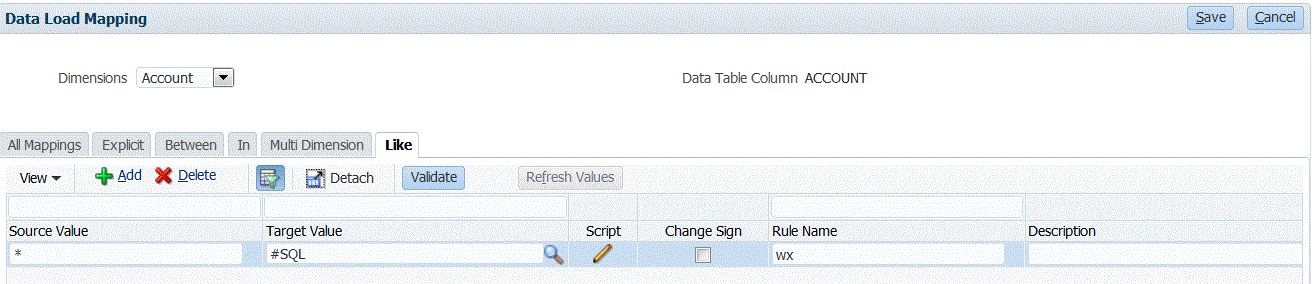
- Click the pencil icon.
- On the
Edit Script
screen, specify your SQL script.
This sample script uses the SQL Cast statement to conditionally process assigned values for the target column.
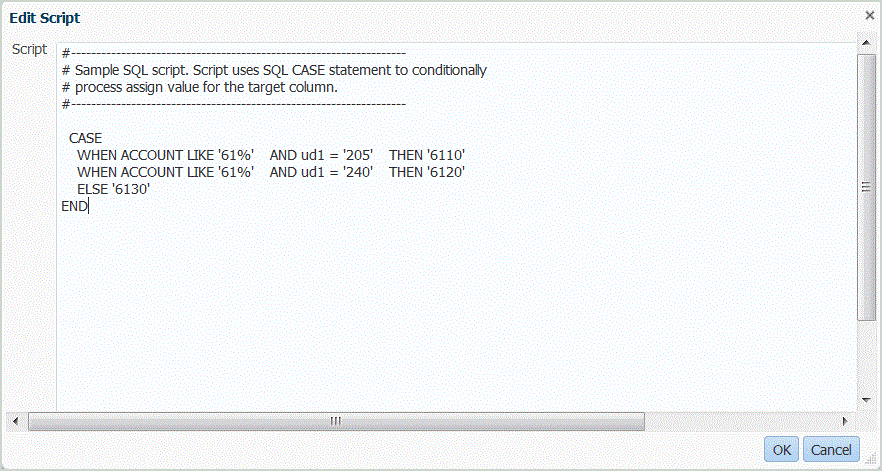
FDMEE does not perform an error check or validate the script. You need to test the script on your data files in a test environment and verify the results.
- In Rule Name, specify the data load rule to use with the mapping script.
- Click Save.