Registering Target Applications
Target applications enable Oracle Hyperion Financial Data Quality Management, Enterprise Edition to be used as a primary gateway to integrate data between different source systems and target applications. In this way, you can deploy local Oracle Enterprise Performance Management Cloud applications, service instance to service instance deployments (cloud to cloud applications), and custom applications into your existing EPM portfolio. The process to integrate source applications with target applications provides data visibility, integrity, and verification systems.
The following application types describe the types of target application that can be used:
-
local—This application type refers to a local EPM application (onpremise deployment) in the current service.
You might use the integration to import data from existing on-premise ERP applications, or synchronize data between on-premise EPM applications.
For example, Oracle Hyperion Financial Management customers can add Oracle Hyperion Planning, data or a Planning customer can add more Planning applications. In addition, this integration enables you to write back from a cloud to an on-premise application or other external reporting applications.
-
Cloud—This application type refers to a service instance that uses a remote service to integrate data. A service instance is a self-contained unit often containing the web server and the database application. In this case, connection information must be selected between the two service instances. Service instances available include:
This feature enables EPM customers to adapt cloud deployments into their existing EPM portfolio including
- Oracle Enterprise Planning and Budgeting Cloud
- Oracle Planning and Budgeting Cloud
- Oracle Financial Consolidation and Close Cloud
- Oracle Hyperion Profitability and Cost Management
- Oracle Tax Reporting Cloud
To register a target application:
-
Select the Setup tab, and then under Register, select Target Application.
-
In Target Application, in the summary grid, click Add, and then select the type of deployment.
Available options are Cloud (for a Cloud deployment) or Local (for an on-premise deployment).
For a Cloud deployment, go to step 3.
For a Local deployment, go to step 4.
-
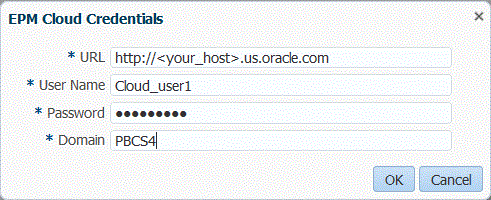
To register a Cloud deployment, select Cloud and then complete the following steps on the EPM Cloud Credentials screen:
-
In URL, specify the service URL that you use to logon to your service.
-
In User name, specify the user name for the Cloud Service application.
-
In Password, specify the password for the Cloud Service application.
-
In Domain, specify the domain name associated with the Cloud Service Application.
An identity domain controls the accounts of users who need access to service instances. It also controls the features that authorized users can access. A service instance belongs to an identity domain.
Note:
Administrators can update the domain name that is presented to the user, but FDMEE requires the original domain name that was provided when the customer signed up for the service. Alias domain names cannot be used when setting up EPM Cloud connections from FDMEE. -
Click OK.
You can add or edit EPM Cloud credentials on the Application Options tab of the target application.
-
- From Select Application, and then from the Type drop-down, select the target application name and click OK.
-
To register a target application with the same name as an existing target application, in Prefix, specify a prefix to make the name unique.
The prefix name is joined to the existing target application name. For example, if you want to name a demo target application the same name as the existing "Vision" application, you might assign the Demo prefix to designate the target application with a unique name. In this case, the FDMEE joins the names to form the name DemoVision.
It is recommended when specifying the prefix, use between three to six characters.
-
In Application Details, enter the application name.
-
Click OK.
-
If using an Essbase database, select the Essbase Database Name.
- Click Refresh Members.
-
Click Save.
-
Define the dimension details.
See Defining Application Dimension Details.
Optional: If not all dimensions are displayed, click Refresh MetadataNote:
Do not modify dimensions in the EPMA application after you have registered the target application in FDMEE. Any action such as sharing or removing the dimension, and then re-adding it, alters the dimensions ID and creates a mismatch between EPMA and FDMEE.
-
Select the application options.
For Planning applications, see Defining Application Options for Essbase and Planning.
For Oracle Hyperion Public Sector Planning and Budgeting, see Defining Application Options for Public Sector Planning and Budgeting.
For Financial Management, see defining_application_options_for_hfm.html#erpi_source_system_844.
Note:
No application options are available for the Account Reconciliation Manager.