Data Load Mapping
Data load mappings convert the chart of accounts values from the Oracle General Ledger to the dimension members of the EPM application during the transfer. This allows Oracle Hyperion Financial Data Quality Management, Enterprise Edition to categorize Oracle General Ledger balances.
In the following example, based on the chart of accounts segment, the Oracle General Ledger breaks down administrative expenses as a range of accounts from 4001-4003.
In Oracle Hyperion Planning, budgeting for administrative expenses is all done for dimension value 410, Administrative Expenses.
The data load mapping maps Oracle General Ledger accounts in the range 4001-4003 actual amounts to 410 administrative expenses in Planning.
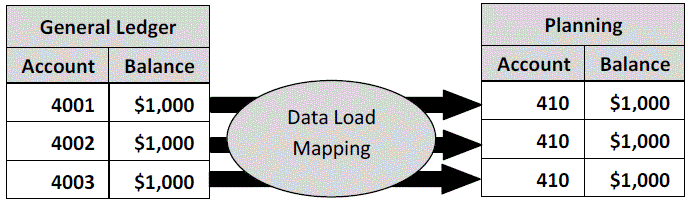
Differences in Planning dimension values and Oracle General Ledger Chart of Accounts values may occur. Additionally segments of the Chart of Accounts may not be used when budgeting.
For example, the data load mapping can be used to use zero values (such as “0000” for sub-account) for the chart of accounts segments that are not used for budgeting.
To define data load mappings:
- On the
Workflow tab, under
Data Load, select
Data Load Mapping.
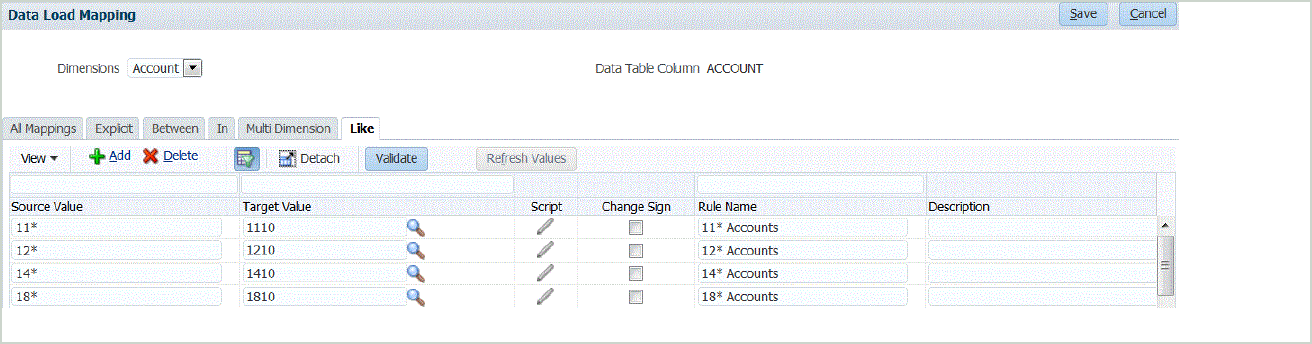
- From the
Dimensions
drop-down, select the dimension that you want to map.
The "*" represents all values. Data load mappings should be based upon your EPM application requirements.
When there is no update to the Oracle General Ledger value prior to the load, it is still necessary to create the data load mapping for the dimensions to instruct FDMEE to create the target values.
At a minimum, map values for the "Account" and "Entity" dimensions since those are transferred from Oracle General Ledger.
If you are transferring additional chart segments you must provide a mapping for each destination dimension.
- To map all General Ledger accounts to the EPM application "as is" without any modification, in Source Value, enter *, and from Target Value, enter *.
- Select the Like tab.
- In
Source Value, enter
*
to indicate that all values should use the mapping.
These are the values from the Oracle General Ledger Chart of Accounts. Enter the values directly.
- In
Target Value, enter the value for the accounting scenario to use to load the budget information.
Enter the values that should be used in the EPM application to store the Oracle General Ledger actual balances that are transferred.
- In
Rule Name, enter the name of the data load rule used to transfer budget amounts to the
Oracle General Ledger.
Note:
Rules are evaluated in rule name order, alphabetically. Explicit rules have no rule name. The hierarchy of evaluation is from Explicit to (In/Between/Multi) to Like. - In
Description, enter a description of the mapping.
For example, enter a description such as “Map to the General Ledger.”
- Optional: In Apply to Rule to apply the mapping only to the specific data rule in the location.