Importing Excel Mapping
You can import Excel mappings by selecting the Import option and selecting an Excel mapping.
Note:
The import of mapping rules using an Excel template provides a place to specify a mapping script.
To import an Excel mapping:
-
From
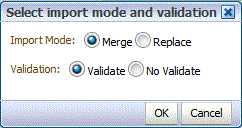
Select mode and validation, in
Import mode, select the import mode.
-
Merge—Overwrites the data in the application with the data in the Excel data load file.
-
Replace-Clears values from dimensions in the Excel data load file and replaces them with values in the existing file.
-