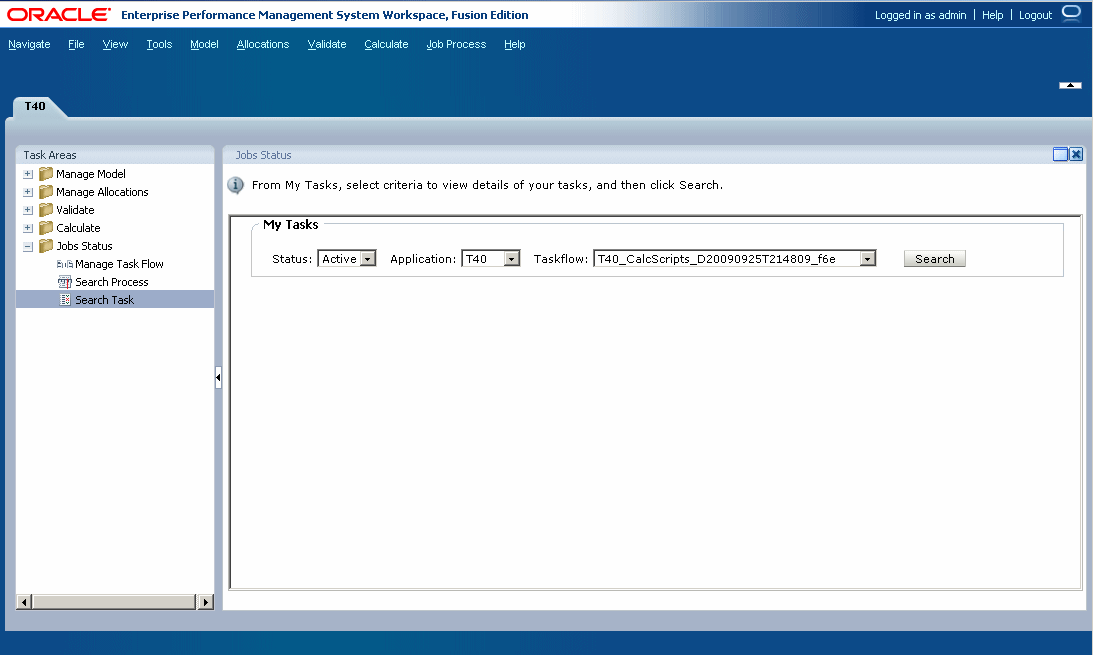
You can view the details for an existing taskflow using the Task Details option.
A new task ID is generated each time you run a task.
To view task details:
In an open model, from
Task Areas, select
Jobs Status, then
Search Task.
The My Tasks screen is displayed.
Select one or more search criteria to locate the taskflow you want to view:
Under
Status, select a status, such as
New,
Active,
Done, or
All.
Under
Application, select an Application ID.
Under
Taskflow, select the generated Taskflow ID.
Note:
Depending on the requirements, you may leave all search fields blank to display all taskflows, or make the search as specific as possible to narrow the results.
Click
Search.
The results of the search are displayed.
Optional:
Use the forward and back arrows to scroll through the results. The current page in the sequence and the total number of pages are displayed.
Optional:
Click
Refresh
to update status information.
Select a taskflow, and then click
View Status.
The Taskflow Participant Summary is displayed, showing details of the job and current status for the selected step in the taskflow.