The Dgraph stores the data it queries in databases (formerly called indexes).
- system-bddProjectInventory_indexes
- system-bddDatasetInventory_indexes
- system-bddSemanticEntity_indexes
edp_cli_edp_256b0c6b-cacf-478c-80bf-b5332f4f37ae_indexes
For example, if you created two data sets called Wine and Weather in Studio, the Dgraph databases directory would contain five databases (one for each of the two data sets you created, plus the three internal ones). There might also be other databases that were created by committing transformed data sets.
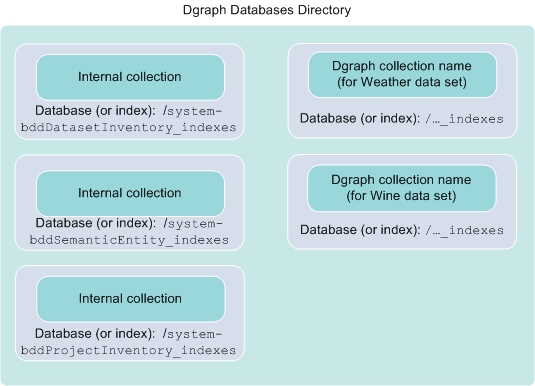
Database directory location
- HDFS (Hadoop Distributed File System), or MapR-FS (for MapR clusters). This is recommended for production environments, as it's the best high availability option. For instructions on moving your databases to HDFS post-install, see Moving the Dgraph databases to HDFS.
- NFS (network file system). This option provides some high availability, making it suitable for production environments. All Dgraph nodes must have read and write access to the NFS.
- Local storage. This option doesn't provide high availability, and is therefore only recommended for small demo or development environments.
If the Dgraph databases are on HDFS, the Dgraph can start if HDFS is down, but won't be able to accept requests. A background thread will try to connect to HDFS once per second until a connection is established.
Additionally, if you have HDFS data at rest encryption enabled, you can keep your databases in special directories called encryption zones. All files within an encryption zone are transparently encrypted and decrypted on the client side, meaning decrypted data is never stored in HDFS.
More information about database locations is available in the Installation Guide.
Database logging
DGRAPH NOTIFICATION {database} [0] Mounting database edp_cli_edp_256b0c6b-cacf-478c-80bf
Note that the entry is made by the Dgraph database log subsystem.
EDP: ProvisionDataSetFromHiveConfig{hiveDatabaseName=default, hiveTableName=warrantyclaims,
newCollectionId=MdexCollectionIdentifier{databaseName=edp_cli_edp_256b0c6b-cacf-478c-80bf-b5332f4f37ae,
collectionName=edp_cli_edp_256b0c6b-cacf-478c-80bf-b5332f4f37ae}}
You should also see database names in the logs for Studio, Dgraph HDFS Agent, Workflow Manager, and Transform Service.
