Working with the Work Breakdown Page for Head Contractors
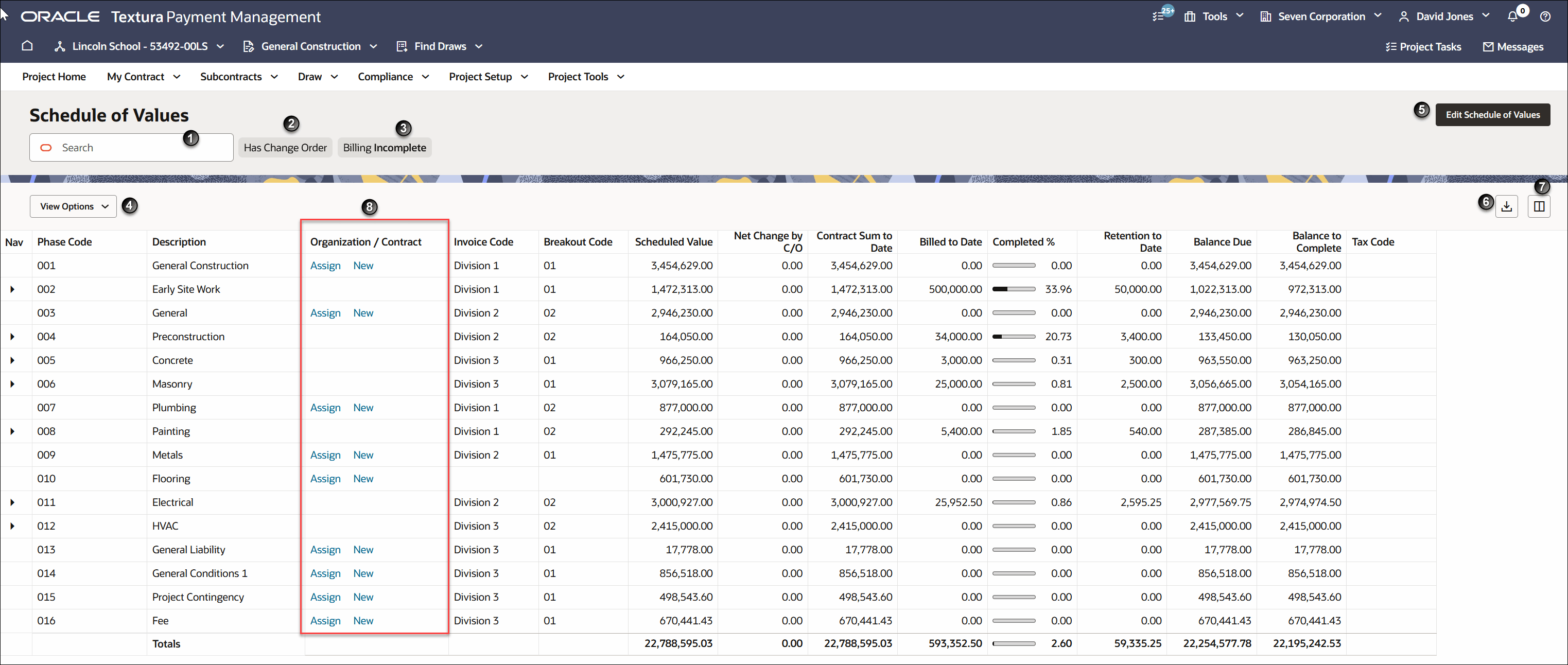
Note: The above screenshot comes from a North American instance of Textura and reflects North American English terminology.
- Search Box: Enter text to narrow the list of line items in the SWork Breakdown (WB). You can search by item code or line item description.
- Has Variation: Filter the WB table to only show line items with variations. A variation either increases or decreases the original value of the line item.
- Billing Incomplete: Filter the WB table to only show line items with a remaining balance.
- View Options: Select the drop-down and choose to expand or collapse all lines in the WB.
- Edit Work Breakdown: Navigate to the Edit Work Breakdown page. You can use the Edit Work Breakdown page to add, remove, and adjust line items.
Note: You cannot delete contracted line items or change the contract value of your contract or a subcontract from the Edit Work Breakdown page. Create a variation to make adjustments to total contracted values.
- Print and Export: Export the Work Breakdown as a CSV file.
- Columns: Opens a Columns drawer. From the drawer you can select the columns to show or hide. You can also search for a specific column or restore the default selection.
- Organisation/Contract Column: Lists the organisation contracted for the line and links to either the Create Contract or Contract Maintenance page. If the column lists New, it links to the Create Contract page so you can create a new subcontract.