Source Applicants
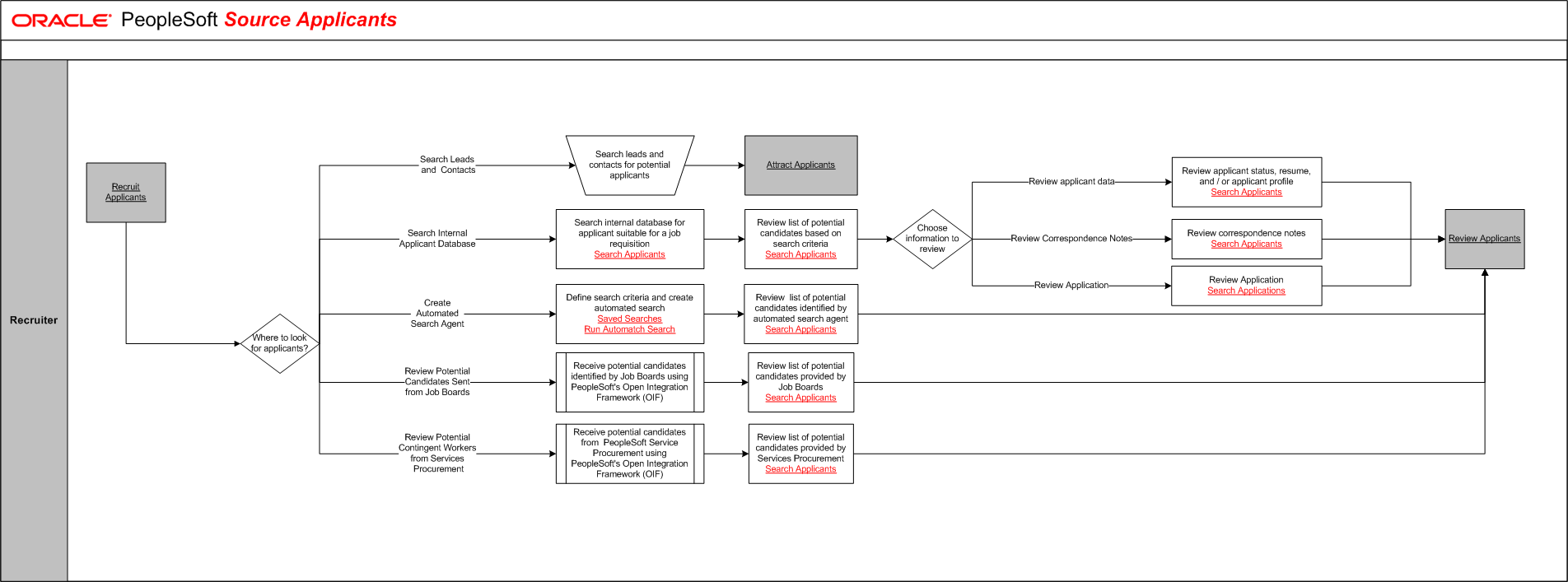
The tables on this page list the tasks for this business process, grouped by role. Some roles may be listed more than once if their tasks are performed at different points in the process. Follow the task numbers in order, unless the Task Description column provides instructions to go to a different task number. Click links in the Task Description column to view detailed diagrams for those tasks or to go to the online help for those pages.
Recruiter
Task Number | Task Description |
|---|---|
1 | Perform external activity:. Stop and complete Recruit Applicants. |
2 | Where to look for applicants?. In parallel: Go to task number 3, Go to task number 4, Go to task number 10, Go to task number 12, Go to task number 14. |
3 | Search leads and contacts for potential applicants. Stop and complete Attract Applicants. End of activity. |
4 | Search internal database for applicant suitable for a job requisition. |
5 | Review list of potential candidates based on search criteria. |
6 | Choose information to review. In parallel: Go to task number 7, Go to task number 8, Go to task number 9. |
7 |
Go to task number 16. |
8 | Review correspondence notes. Go to task number 16. |
9 | Review Application. Go to task number 16. |
10 | Define search criteria and create automated search. |
11 | Review list of potential candidates identified by automated search agent. Go to task number 16. |
12 | Receive potential candidates identified by Job Boards using PeopleSoft's Open Integration Framework (OIF). |
13 | Review list of potential candidates provided by Job Boards. Go to task number 16. |
14 | Receive potential candidates from PeopleSoft Service Procurement using PeopleSoft's Open Integration Framework (OIF). |
15 | Review list of potential candidates provided by Services Procurement. |
16 | Perform external activity:. Stop and complete Review Applicants. End of activity. |