Calculate, Confirm, and Provide Payroll Using PeopleSoft Payroll for North America
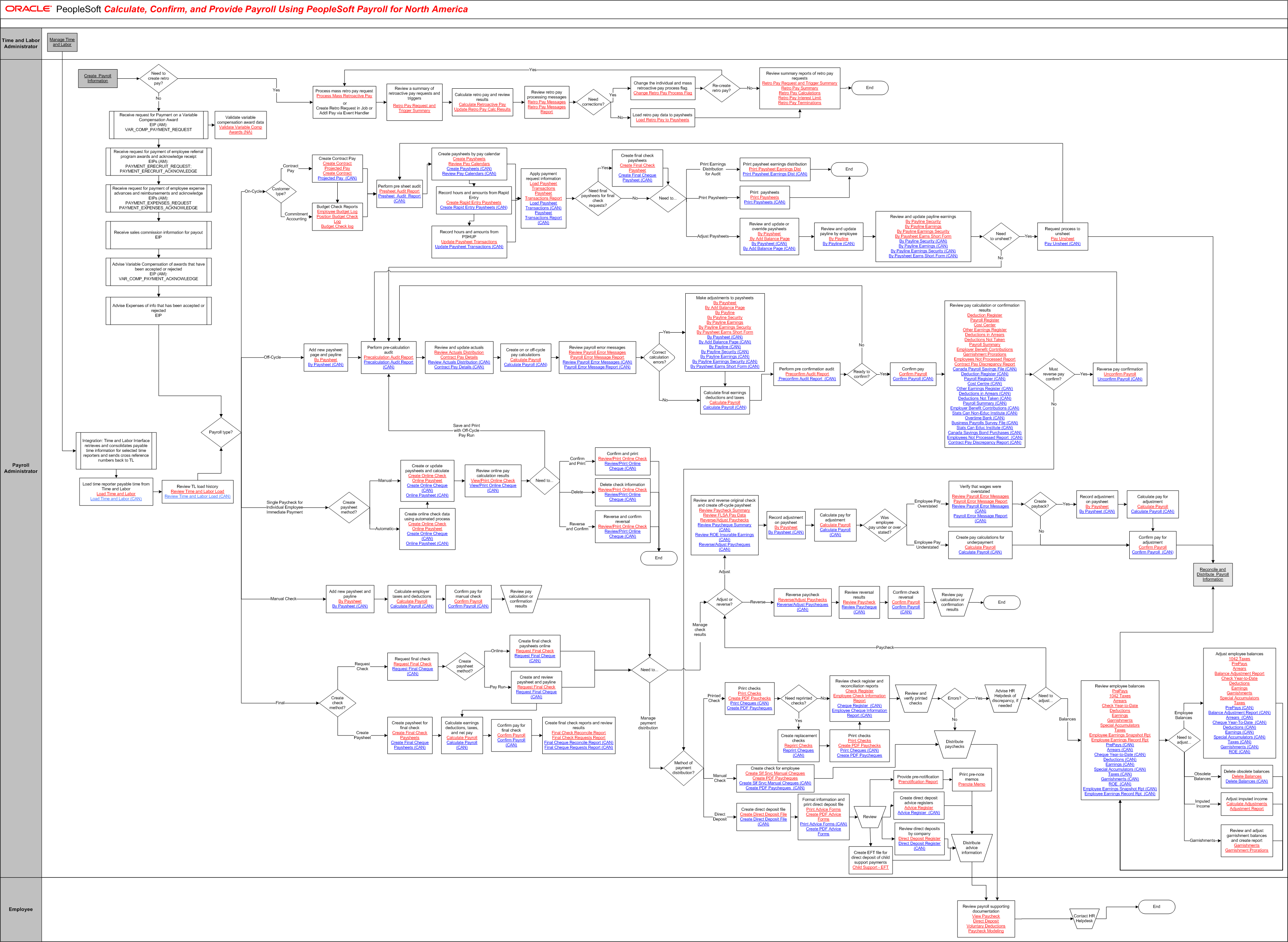
The tables on this page list the tasks for this business process, grouped by role. Some roles may be listed more than once if their tasks are performed at different points in the process. Follow the task numbers in order, unless the Task Description column provides instructions to go to a different task number. Click links in the Task Description column to view detailed diagrams for those tasks or to go to the online help for those pages.
Time and Labor Administrator
Task Number | Task Description |
|---|---|
1 | Manage Time and Labor. |
Payroll Administrator
Task Number | Task Description |
|---|---|
2 | Integration: Time and Labor Interface retrieves and consolidates payable time information for selected time reporters and sends cross reference numbers back to TL. |
3 | Load time reporter payable time from Time and Labor. |
4 | Review TL load history. Review Time and Labor Load (CAN) Go to task number 23. |
5 | Create Payroll Information. |
6 | Need to create retro pay?. In parallel: Go to task number 7, Go to task number 16. |
7 | Process mass retro pay request. |
or Create Retro Request in Job or Addl Pay via Event Handler
Task Number | Task Description |
|---|---|
8 | Review a summary of retroactive pay requests and triggers. |
9 | Calculate retro pay and review results. |
10 | Review retro pay processing messages. |
11 | Need corrections?. In parallel: Go to task number 12, Go to task number 14. |
12 | Change the individual and mass retroactive pay process flag. $Change Retro Pay Process Flag |
13 | Re-create retro pay?. In parallel: Go to task number 7, Go to task number 15. |
14 | Load retro pay data to paysheets Load Retro Pay to Paysheets. |
15 | Review summary reports of retro pay requests. Retro Pay Request and Trigger Summary End of activity. |
16 | Receive request for Payment on a Variable Compensation Award EIP (AM): VAR_COMP_PAYMENT_REQUEST. In parallel: Go to task number 17, Go to task number 18. |
17 | Validate variable compensation award data. Validate Variable Comp Awards (NA) End of activity. |
18 | Receive request for payment of employee referral program awards and acknowledge receipt EIPs (AM): PAYMENT_ERECRUIT_REQUEST; PAYMENT_ERECRUIT_ACKNOWLEDGE. |
19 | Receive request for payment of employee expense advances and reimbursements and acknowledge EIPs (AM): PAYMENT_EXPENSES_REQUEST PAYMENT_EXPENSES_ACKNOWLEDGE. |
20 | Receive sales commission information for payout EIP. |
21 | Advise Variable Compensation of awards that have been accepted or rejected EIP (AM): VAR_COMP_PAYMENT_ACKNOWLEDGE. |
22 | Advise Expenses of info that has been accepted or rejected EIP. |
23 | Payroll type?. In parallel: Go to task number 24, Go to task number 42, Go to task number 43, Go to task number 63, Go to task number 67. |
24 | Customer type?. In parallel: Go to task number 25, Go to task number 26. |
25 | Create Contract Pay. Create Contract Projected Pay (CAN) In parallel: Go to task number 27, Go to task number 26. |
26 | Budget Check Reports. |
27 | Perform pre sheet audit. |
28 | Create paysheets by pay calendar. In parallel: Go to task number 29, Go to task number 31. |
29 | Record hours and amounts from Rapid Entry. Create Rapid Entry Paysheets (CAN) In parallel: Go to task number 31, Go to task number 30. |
30 | Record hours and amounts from PSHUP. |
31 | Apply payment request information. |
32 | Need final paysheets for final check requests?. In parallel: Go to task number 33, Go to task number 34. |
33 | Create final check paysheets. |
34 | Need to. In parallel: Go to task number 35, Go to task number 36, Go to task number 37. |
35 | Print paysheet earnings distribution. Print Paysheet Earnings Dist (CAN) End of activity. |
36 | Print paysheets. End of activity. |
37 | Review and update or override paysheets. |
38 | Review and update payline by employee. |
39 | Review and update payline earnings. |
40 | Need to unsheet?. In parallel: Go to task number 41, Go to task number 47. |
41 | Request process to unsheet. In parallel: Go to task number 27, Go to task number 99. |
42 | Add new paysheet page and payline. Go to task number 47. |
43 | Create paysheet method?. In parallel: Go to task number 45, Go to task number 43, Go to task number 44. |
44 | Create online check data using automated process. |
45 | Create or update paysheets and calculate. |
46 | Review online pay calculation results. View/Print Online Cheque (CAN) If Need to... is Save and Print with Off-Cycle Pay Run, Go to task number 47. If Need to... is Confirm and Print, Go to task number 60. If Need to... is Delete, Go to task number 61. If Need to... is Reverse and Confirm, Go to task number 62. |
47 | Perform pre-calculation audit. |
48 | Review and update actuals. |
49 | Create on or off-cycle pay calculations. |
50 | Review payroll error messages. |
51 | Correct calculation errors?. In parallel: Go to task number 52, Go to task number 53. |
52 | Make adjustments to paysheets. |
53 | Calculate final earnings deductions and taxes. |
54 | Perform pre confirmation audit. |
55 | Ready to confirm?. In parallel: Go to task number 47, Go to task number 56. |
56 | Confirm pay. |
57 | Review pay calculation or confirmation results. Employer Benefit Contributions Employees Not Processed Report Contract Pay Discrepancy Report Canada Payroll Savings File (CAN) Employer Benefit Contributions (CAN) Stats Can Non-Educ Institute (CAN) Business Payrolls Survey File (CAN) Stats Can Educ Institute (CAN) Canada Savings Bond Purchases (CAN) |
58 | Must reverse pay confirm?. In parallel: Go to task number 59, Go to task number 73. |
59 | Reverse pay confirmation. Go to task number 47. |
60 | Confirm and print. Review/Print Online Cheque (CAN) End of activity. |
61 | Delete check information. Review/Print Online Cheque (CAN) End of activity. |
62 | Reverse and confirm reversal. Review/Print Online Cheque (CAN) End of activity. |
63 | Add new paysheet and payline. |
64 | Calculate employer taxes and deductions. |
65 | Confirm pay for manual check. |
66 | Review pay calculation or confirmation results. Go to task number 72. |
67 | Create check method?. In parallel: Go to task number 68, Go to task number 118. |
68 | Request final check. |
69 | Create paysheet method?. In parallel: Go to task number 70, Go to task number 71. |
70 | Create final check paysheets online. Go to task number 72. |
71 | Create and review paysheet and payline. In parallel: Go to task number 72, Go to task number 119. |
72 | Need to. In parallel: Go to task number 83, Go to task number 73. |
73 | Method of payment distribution?. In parallel: Go to task number 74, Go to task number 105, Go to task number 107. |
74 | Print checks. |
75 | Need reprinted checks?. In parallel: Go to task number 78, Go to task number 76. |
76 | Create replacement checks. |
77 | Print checks. |
78 | Review check register and reconciliation reports. |
79 | Review and verify printed checks. |
80 | Errors?. In parallel: Go to task number 81, Go to task number 106. |
81 | Advise HR Helpdesk of discrepancy, if needed. |
82 | Need to adjust. In parallel: Go to task number 83, Go to task number 98. |
83 | Adjust or reverse?. In parallel: Go to task number 84, Go to task number 94. |
84 | Review and reverse original check and create off-cycle paysheet. Review Paycheque Summary (CAN) |
85 | Record adjustment on paysheet. |
86 | Calculate pay for adjustment. |
87 | Was employee pay under or over stated?. In parallel: Go to task number 88, Go to task number 92. |
88 | Verify that wages were overstated. |
89 | Create payback?. In parallel: Go to task number 90, Go to task number 93. |
90 | Record adjustment on paysheet. |
91 | Calculate pay for adjustment. Go to task number 93. |
92 | Create pay calculations for underpayment. |
93 | Confirm pay for adjustment. Go to task number 99. |
94 | Reverse paycheck. |
95 | Review reversal results. |
96 | Confirm check reversal. |
97 | Review pay calculation or confirmation results. End of activity. |
98 | Review employee balances. Employee Earnings Snapshot Rpt (CAN) Employee Earnings Record Rpt (CAN) Employee Earnings Snapshot Rpt (CAN) Employee Earnings Record Rpt (CAN) In parallel: Go to task number 99, Go to task number 100. |
99 | Reconcile and Distribute Payroll Information. End of activity. |
100 | Need to adjust. In parallel: Go to task number 101, Go to task number 102, Go to task number 103, Go to task number 104. |
101 | Adjust employee balances. Arrears Balance Adjustment Report Balance Adjustment Report (CAN) Go to task number 98. |
102 | Delete obsolete balances. Go to task number 98. |
103 | Adjust imputed income. Go to task number 98. |
104 | Review and adjust garnishment balances and create report. Go to task number 98. |
105 | Create check for employee. Create Slf Srvc Manual Cheques |
106 | Distribute paychecks. Go to task number 116. |
107 | Create direct deposit file. |
108 | Format information and print direct deposit file. |
109 | Review. In parallel: Go to task number 110, Go to task number 112, Go to task number 113, Go to task number 114. |
110 | Provide pre-notification. |
111 | Print pre-note memos. Go to task number 115. |
112 | Create direct deposit advice registers. Go to task number 115. |
113 | Review direct deposits by company. Go to task number 115. |
114 | Create EFT file for direct deposit of child support payments. |
115 | Distribute advice information. |
Employee
Task Number | Task Description |
|---|---|
116 | Review payroll supporting documentation. |
117 | Contact HR Helpdesk. End of activity. |
Payroll Administrator
Task Number | Task Description |
|---|---|
118 | Create paysheet for final check. |
119 | Calculate earnings deductions, taxes, and net pay. |
120 | Confirm pay for final check. |
121 | Create final check reports and review results. Final Cheque Reconcile Report (CAN) Final Cheque Requests Report (CAN) End of activity. |