Creating Tax Reports
This section discusses how to print CP39 forms.
|
Page Name |
Definition Name |
Usage |
|---|---|---|
|
Print CP22 MYS Page |
GPMY_RC_GPMYTX02 |
Run the GPMYTX02 SQR to create the CP22 form. |
|
Payee Extract Page |
GPMY_PR_RC |
Set report parameters. |
|
GPMY_RC_GPMYTX04 |
Run the GPMYTX04 SQR to create the CP39 form. This component consists of two pages, the Payee Extract page and the Print CP39 Forms page. |
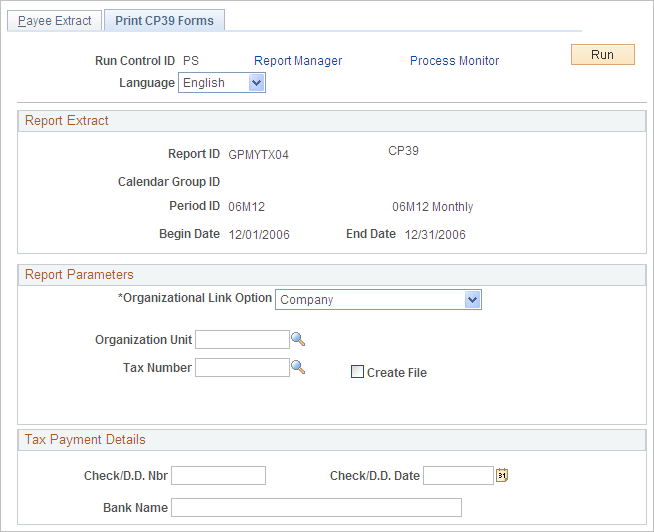
Use the Print CP39 Forms page (GPMY_RC_GPMYTX04) to run the GPMYTX04 SQR to create the CP39 form.
Navigation
Image: Print CP39 Forms page
This example illustrates the fields and controls on the Print CP39 Forms page. You can find definitions for the fields and controls later on this page.
|
Field or Control |
Definition |
|---|---|
| Create File |
Select to create an electronic file. |
Enter report parameters on the Payee Extract page. Then, select the Print CP39 Forms page to enter additional report parameters.