Setting Up Employee EPF Data
This section discusses how to enter employee EPF data.
|
Page Name |
Definition Name |
Usage |
|---|---|---|
|
GPMY_EPF_PYE |
Associate an employer number with an employee, apply the foreign worker rate, set up voluntary contributions, and assign beneficiaries. |
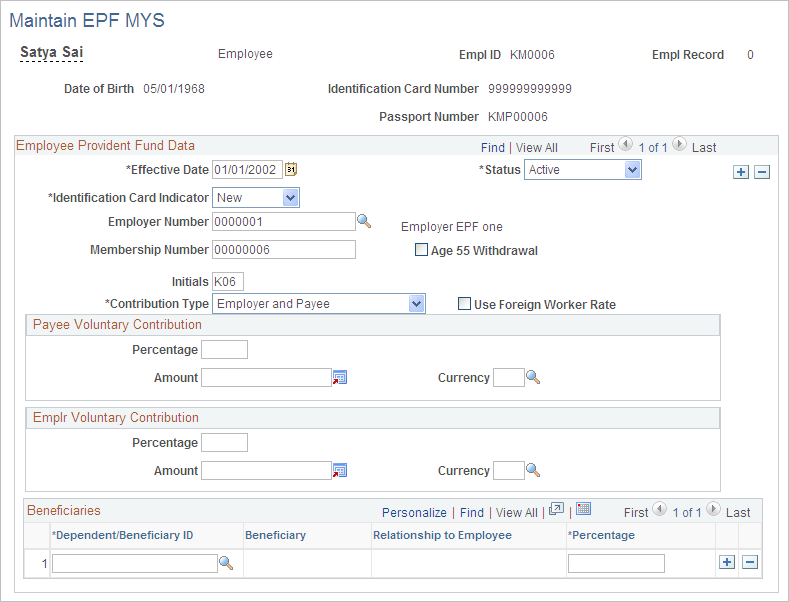
Use the Maintain EPF MYS page (GPMY_EPF_PYE) to associate an employer number with an employee, apply the foreign worker rate, set up voluntary contributions, and assign beneficiaries.
Navigation
Image: Maintain EPF MYS
This example illustrates the fields and controls on the Maintain EPF MYS. You can find definitions for the fields and controls later on this page.
|
Field or Control |
Definition |
|---|---|
| Identification Card Indicator |
Select the type of ID Card number. Values are Old, New. and N/A. This ID card number is used in the statutory EPF reports. |
| Employer Number |
Select the employer's EPF number. |
| Membership Number |
Enter the employee's membership number. |
| Initials |
Enter the employee's initials. After the payee is enrolled in the EPF, the organization uses these initials for reporting purposes. |
| Contribution Type |
Specify who makes the contribution. Values are Employer and Payee, Payee only, and Employer only. |
| Use Foreign Worker Rate |
Select this option to apply the foreign worker rate. This rate is stored in the variable EPF VR ER NON CTZN (currently 5 percent). |
| Payee Voluntary Contribution |
Enter the percentage or amount of the EPF contribution that exceeds the statutory contribution. |
| Employer Voluntary Contribution |
Enter the percentage or amount of the voluntary contribution. A collective employer percentage can be defined through the bracket EPF BR ERVOLPCT. If a voluntary employer percentage is entered here (at the payee level), it overrides the collective employee percentage. |
| Beneficiaries |
Enter beneficiaries. The values that are available in the ID field come from the Dependents page. Enter the appropriate percentage in the Percentage field. |