Identifying Unprocessed Contributions that Can be Refunded
The first step is to identify a participant's unprocessed contributions available for refund.
|
Page Name |
Definition Name |
Usage |
|---|---|---|
|
ST_CONTRIB_REFUND |
Select a participant's unprocessed contributions for refund. You must first enroll participants and gather participant contributions. |
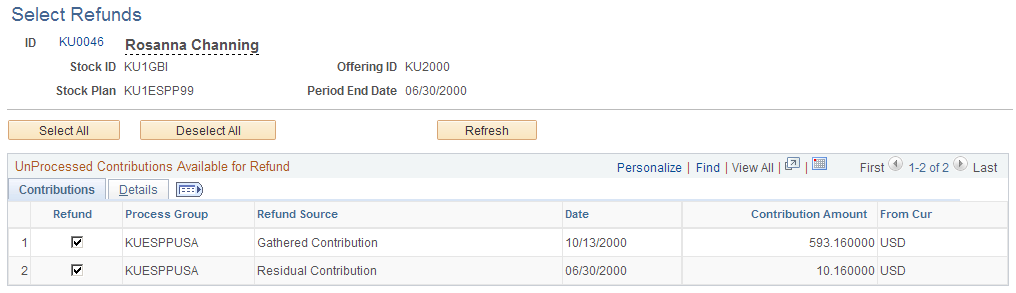
Use the Select Refunds page (ST_CONTRIB_REFUND) to select a participant's unprocessed contributions for refund.
You must first enroll participants and gather participant contributions.
Navigation
Image: Select Refunds page: Details tab
This example illustrates the Select Refunds page: Details tab.
|
Field or Control |
Definition |
|---|---|
| ID |
Click to access the Employee Information page to view employee information. |
| Period End Date |
Displays the offering period end date. |
| Select All |
Click to refund all available contributions. The system selects all Refund fields. |
| Clear All |
Click to undo all the selections. |
| Refresh |
Click to run the ESPP_REFRESH AE process and refresh the page with all contributions available for refund. |
| Refund |
Select to refund this individual contribution. |
| Refund Source |
Displays the source of the refund: Gathered Contribution, Manual Contribution, or Residual Contribution. |
| Date |
Displays the date of the contribution. |