| Oracle Coherenceチュートリアル リリース3.4.1 B53324-01 |
|


 戻る |
 次へ |
この章では、EntryProcessorsを使用して、Coherenceキャッシュのエントリを変更および処理する方法について習得します。この章の内容は次のとおりです。
これまでは、キャッシュ・エントリに対するアクションの実行に、putとgetの各操作を使用してきました。データの並行性を制御するには、キーのロックおよびロック解除のオプションを使用します。しかし、同時データ・アクセスが必要な場合に動作の一貫性を保証する、より優れたデータ操作方法も存在します。EntryProcessors(com.tangosol.util.InvocableMap.EntryProcessor)はエントリに対し処理を行うエージェントで、データが保持されているエントリを直接処理します。実行処理の種類によっては、データの作成、更新、削除など、データを変更する場合があります。または、データの計算処理のみを実行する場合もあります。同一キーに対して動作するEntryProcessorsは、論理的にキューに入れられます。これは、ロックフリー(高パフォーマンス)の処理が実現可能なことを意味します。Lab5では、EntryProcessorのタイプである EntryAggregatorを使用して、グリッド全体でデータを集計しました。com.tangosol.util.InvocableMapインタフェース(NamedCacheを実装する)には、データ操作用の次のメソッドが用意されています。
• Object invoke(Object oKey, InvocableMap.EntryProcessor processor): 個々のオブジェクトについて、渡されたEntryProcessorを起動してその結果を返します。
• Map invokeAll(Collection keys, InvocableMap.EntryProcessor processor): キーのコレクションについて、EntryProcessorを起動してその結果を返します。
• Map invokeAll(Filter filter, InvocableMap.EntryProcessor processor): フィルタ条件に一致するエントリについて、EntryProcessorを起動してその結果を返します。
エントリ・クラスを作成するには、com.tangosol.util.processes.AbstractProcessorを拡張し、process()メソッドを実装できます。たとえば、次のコードは、全従業員の給与を10%増加させるEntryProcessorを作成します。
class RaiseSalary extents AbstractProcessor {
...
public Object process (Entry entry) {
Employee emp = (Employee)entry.getValue();
emp.setSalary(emp.getSalary() * 1.10);
entry.setValue(emp);
return null;
}
RaiseSalaryクラスを起動するには、次のコードを実行します。
empCache.invokeAll(AlwaysFilter.INSTANCE, new RaiseSalary());
この項では、EntryProcessorsを使用して、Coherenceキャッシュのエントリを変更および処理する方法について説明します。
この演習では、JDeveloperを使用して次のクラスを作成します。
従業員を保持するEmployeeクラス
すべてのエントリから起動されるRaiseSalaryクラス
従業員を挿入し、RaiseSalaryを実行するInvokeTestクラス
クラスタにおけるデータの格納先を示すクラス
データ・エントリの変更、および処理を行うJavaクラスを作成する手順は次のとおりです。
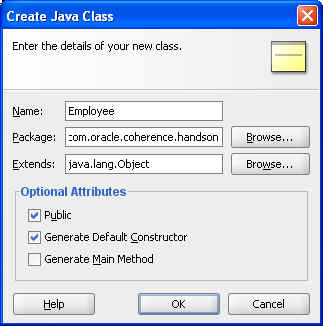
Employeeオブジェクトに新規クラスを作成します。
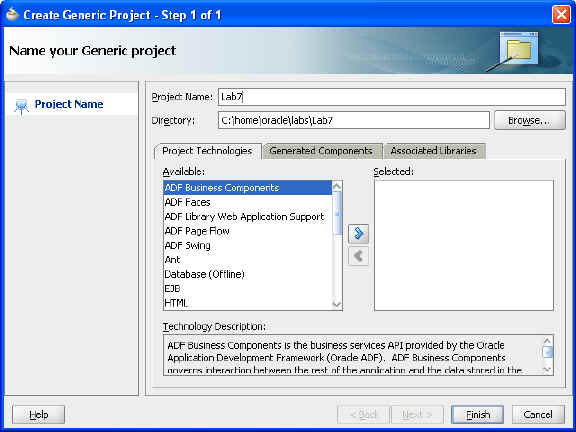
Lab7という新規プロジェクトを作成します。
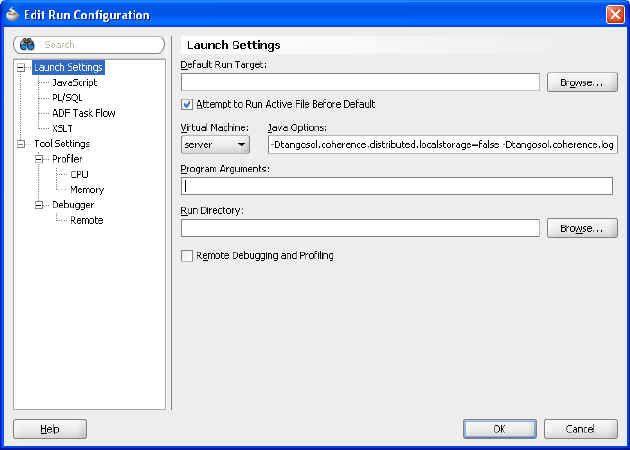
デフォルトのローカル記憶域プロパティを次の値に変更します。
-Dtangosol.coherence.distributed.localstorage=false -Dtangosol.coherence.log.level=3
PortableObjectを実装するEmployeeクラスを作成します。そのクラスに次の属性を追加します。
—private int empId
—private String lastname
—private String firstname
—private double salary
必要なメソッドがすべて実装されたことを確認します(「ソース」メニューを使用する)。
例6-1に、Employeeクラスの可能な実装を示します。
例6-1 Employeeクラスのサンプル
package com.oracle.coherence.handson;

import com.tangosol.io.pof.PofReader;
import com.tangosol.io.pof.PofWriter;
import com.tangosol.io.pof.PortableObject;

import java.io.DataInput;
import java.io.DataOutput;
import java.io.IOException;

import java.math.BigDecimal;

public class Employee implements PortableObject {
    private int empId;
    private String lastname;
    private String firstname;
    private double salary;


    public Employee() {
    }

    public Employee(int empId1, String lastname1, String firstname1,
                    double salary1) {
        super();
        this.empId = empId1;
        this.lastname = lastname1;
        this.firstname = firstname1;
        this.salary = salary1;
    }

    public void setEmpId(int param) {
        this.empId = param;
    }

    public int getEmpId() {
        return empId;
    }

    public void setLastname(String param) {
        this.lastname = param;
    }

    public String getLastname() {
        return lastname;
    }

    public void setFirstname(String param) {
        this.firstname = param;
    }

    public String getFirstname() {
        return firstname;
    }

    public void setSalary(double param) {
        this.salary = param;
    }

    public double getSalary() {
        return salary;
    }

    @Override
    public boolean equals(Object object) {
        if (this == object) {
            return true;
        }
        if (!(object instanceof Employee)) {
            return false;
        }
        final Employee other = (Employee)object;
        if (empId != other.empId) {
            return false;
        }
        if (!(lastname == null ? other.lastname == null : lastname.equals(other.lastname))) {
            return false;
        }
        if (!(firstname == null ? other.firstname == null : firstname.equals(other.firstname))) {
            return false;
        }
        if (Double.compare(salary, other.salary) != 0) {
            return false;
        }
        return true;
    }

    @Override
    public int hashCode() {
        final int PRIME = 37;
        int result = 1;
        result = PRIME * result + ((lastname == null) ? 0 : lastname.hashCode());
        result = PRIME * result + ((firstname == null) ? 0 : firstname.hashCode());
        long temp = Double.doubleToLongBits(salary);
        result = PRIME * result + (int) (temp ^ (temp >>> 32));
        return result;
    }

    public void readExternal(PofReader dataInput) throws IOException {
        this.empId = dataInput.readInt(0);
        this.lastname = dataInput.readString(1);
        this.firstname = dataInput.readString(2);
        this.salary  = dataInput.readBigDecimal(3).doubleValue();

    }

    public void writeExternal(PofWriter dataOutput) throws IOException {
        dataOutput.writeInt(0, this.empId);
        dataOutput.writeString(1, this.lastname);
        dataOutput.writeString(2, this.firstname);
        dataOutput.writeBigDecimal(3, new BigDecimal(this.salary));

    }
}
従業員の給与を10%増加させるクラスを作成します。
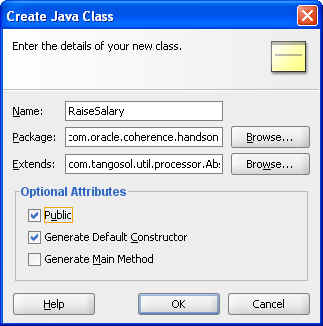
AbstractProcessorを拡張するRaiseSalaryというクラスを作成します。
従業員の給与を10%増加させるprocess()メソッドを実装します。
例6-2に、可能な解決策を示します。
例6-2 RaiseSalaryクラスのサンプル
package com.oracle.coherence.handson;

import com.tangosol.util.processor.AbstractProcessor;
import com.tangosol.util.InvocableMap.Entry;

import java.util.Map;

public class RaiseSalary extends AbstractProcessor {
    public RaiseSalary() {
    }

    public Object process(Entry entry ) {
        Employee emp = (Employee)entry.getValue();
        emp.setSalary(emp.getSalary() * 1.10);
        entry.setValue(emp);
        return null;
    }
}
RaiseSalaryクラスの動作をテストするクラスを作成します。
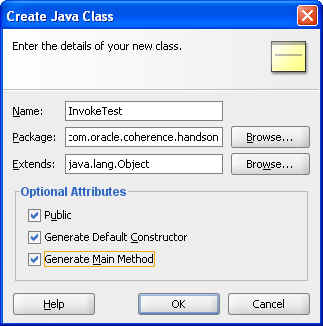
mainメソッドを含み、次のように実行されるInvokeTestというクラスを作成します。
—複数のEmployeeオブジェクトを作成し、employeesキャッシュに追加します。
—作成したオブジェクトでRaiseSalaryメソッドを起動します。
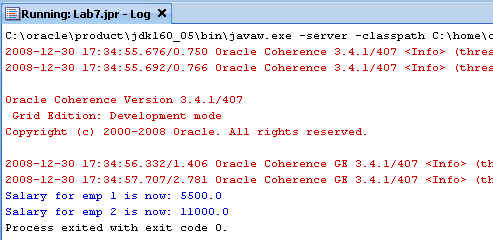
—新しい給与を出力し、その変更内容を確認します。
例6-3に、可能な解決策を示します。
例6-3 RaiseSalaryクラスをテストするサンプル・プログラム
package com.oracle.coherence.handson;

import com.tangosol.net.CacheFactory;
import com.tangosol.net.NamedCache;
import com.tangosol.util.filter.AlwaysFilter;

public class InvokeTest {
    public InvokeTest() {
    }

    public static void main(String[] args) {

        NamedCache empCache = CacheFactory.getCache("employees");

        Employee e1 = new Employee(1,"Middleton","Tim",5000);
        empCache.put(e1.getEmpId(), e1);

        Employee e2 = new Employee(2,"Jones","Chris",10000);
        empCache.put(e2.getEmpId(), e2);

        empCache.invokeAll(AlwaysFilter.INSTANCE, new RaiseSalary());

        e1 = (Employee)empCache.get(e1.getEmpId());
        e2 = (Employee)empCache.get(e2.getEmpId());

        System.out.println("Salary for emp 1 is now: " + e1.getSalary());
        System.out.println("Salary for emp 2 is now: " + e2.getSalary());

    }
}
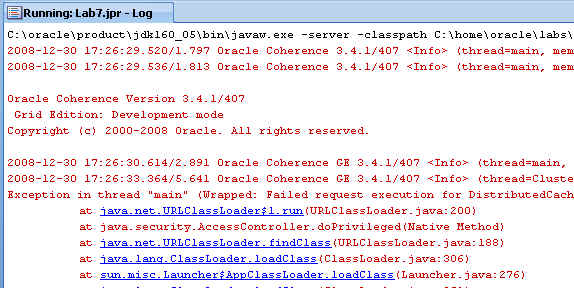
InvokeTestを最初に起動しようとすると、「class not found」エラーが発生します。
その原因と解決方法について示します。
EntryProcessorを起動する場合、そのリクエストは、エントリを含む記憶域が有効なメンバー上で処理されます。
Coherenceキャッシュ・サーバーは、作成したRaiseSalaryオブジェクトやEmployeeオブジェクトをまだ認識していません。これらのオブジェクトは、Coherenceキャッシュ・サーバーのCLASSPATHに追加する必要があります。
cache-server.cmdファイルを編集します。"%java_exec%" -server...で始まる行の-cpエントリを変更し、/home/oracle/labs/Lab7/classesを含めるようにCLASSPATH環境変数を設定します。"%java_exec%"の行は、次のようになります。
"%java_exec%" -server -showversion "%java_opts%" -cp "%coherence_home%\lib\coherence.jar;C:\home\oracle\labs\Lab4\classes;C:\home\oracle\labs\Lab7\classes;C:\home\oracle\labs" com.tangosol.net.DefaultCacheServer %1
キャッシュ・サーバーを再起動します。
InvokeTestを再実行し、RaiseSalaryクラスが機能していることを確認します。
クラスタ内のデータの格納先を示すクラスを作成します。
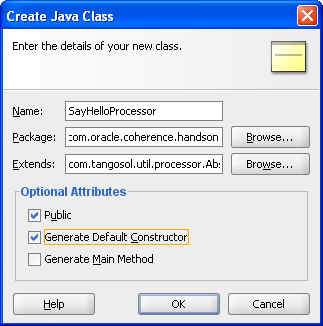
AbstractProcessorを拡張するSayHelloProcessorというクラスを作成します。
「hello」と表示するprocess()メソッドを実装します。
例6-4に、可能な解決策を示します。
例6-4 データの格納先を示すサンプル・プログラム
package com.oracle.coherence.handson;

import com.tangosol.util.processor.AbstractProcessor;
import com.tangosol.util.InvocableMap.Entry;

public class SayHelloProcessor extends AbstractProcessor {
    public SayHelloProcessor() {

    }

    public Object process(Entry entry ) {
        Employee emp = (Employee)entry.getValue();
        System.out.println("\nHello from " + emp.getFirstname() + " " + emp.getLastname() + "\n");
        return null;
    }
}
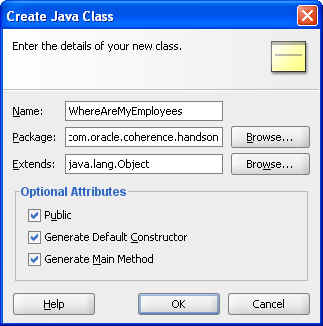
WhereAreMyEmployeesという新規クラスを作成します。このクラスにmainメソッドが存在することを確認します。
例6-5に、可能な解決策を示します。
例6-5 Employeesのメンバーの場所を追跡するサンプル・プログラム
package com.oracle.coherence.handson;import com.tangosol.net.CacheFactory;import com.tangosol.net.NamedCache;import com.tangosol.util.filter.AlwaysFilter;public class WhereAreMyEmployees { public WhereAreMyEmployees() { } public static void main(String[] args) { NamedCache empCache = CacheFactory.getCache("employees"); empCache.invokeAll(AlwaysFilter.INSTANCE, new SayHelloProcessor()); }}
キャッシュのすべてのエントリで、WhereAreMyEmployeesを起動します。
例6-6 1つのキャッシュ・サーバー・コンソールにおけるWhereAreMyEmployeesクラスの出力
...
2008-12-30 18:01:04.411/25.985 Oracle Coherence GE 3.4.1/407 <D5> (thread=Cluste
r, member=1): Member(Id=3, Timestamp=2008-12-30 18:01:04.231, Address=130.35.99.
248:8089, MachineId=49912, Location=site:us.oracle.com,machine:tpfaeffl-pc,proce
ss:5988, Role=OracleWhereAreMyEmployees) joined Cluster with senior member 1

Hello from Tim Middleton

Hello from Chris Jones

2008-12-30 18:01:04.848/26.422 Oracle Coherence GE 3.4.1/407 <D5> (thread=Cluste
r, member=1): Member 3 joined Service DistributedCache with senior member 1
2008-12-30 18:01:04.848/26.422 Oracle Coherence GE 3.4.1/407 <D5> (thread=Distri
butedCache, member=1): Service DistributedCache: sending ServiceConfigSync conta
ining 259 entries to Member 3
2008-12-30 18:01:04.942/26.516 Oracle Coherence GE 3.4.1/407 <D5> (thread=Cluste
r, member=1): TcpRing: disconnected from member 2 due to the peer departure
その他のEmployeesと、2つ目のキャッシュ・サーバーを追加します。WhereAreMyEmployeesクラスを再実行します。キャッシュ・サーバー・コンソール上のメッセージを監視します。
例6-7に、1つ目のキャッシュ・サーバー・コンソールからの応答を示します。
例6-7 キャッシュ・サーバー・コンソール1の応答
2008-12-30 18:04:34.582/236.156 Oracle Coherence GE 3.4.1/407 <D5> (thread=Cluster, member=1): Member(Id=3, Timestamp=2008-12-30 18:04:34.433, Address=130.35.99.248:8090, MachineId=49912, Location=site:us.oracle.com,machine:tpfaeffl-pc,process:3560, Role=OracleWhereAreMyEmployees) joined Cluster with senior member 1Hello from Chris Jones2008-12-30 18:04:35.239/236.813 Oracle Coherence GE 3.4.1/407 <D5> (thread=Cluster, member=1): Member 3 joined Service DistributedCache with senior member 12008-12-30 18:04:35.254/236.828 Oracle Coherence GE 3.4.1/407 <D5> (thread=DistributedCache, member=1): Service DistributedCache: sending ServiceConfigSync containing 259 entries to Member 3
例6-8に、2つ目のキャッシュ・サーバー・コンソールからの応答を示します。
例6-8 キャッシュ・サーバー・コンソール2の応答
2008-12-30 18:04:35.239/27.047 Oracle Coherence GE 3.4.1/407 <D5> (thread=Cluste
r, member=2): Member 3 joined Service DistributedCache with senior member 1

Hello from Tim Middleton

2008-12-30 18:05:07.707/59.515 Oracle Coherence GE 3.4.1/407 <D5> (thread=Cluste
r, member=2): MemberLeft request for Member 3 received from Member(Id=1, Timesta
mp=2008-12-30 18:00:40.286, Address=130.35.99.248:8088, MachineId=49912, Locatio
n=site:us.oracle.com,machine:tpfaeffl-pc,process:4460, Role=CoherenceServer)