Steps to Build and Run the Docker Image
-
Download the domain binary files, PAS Distribution as mentioned in pre-requisites section of this document.
- Extract the PAS distribution.
- Create a directory named externallibs to place the third party application libraries, configuration, and the property files required.
- Copy the following configuration files from <OIPA distribution zip>/conf directory into the externallibs/conf directory:
coherence-cache-config.xml
coherence-config.xml
PAS.properties
EDKeyValue.dat
logging.properties
- Copy the following files from the <Service distribution zip>/libs directory into the externallibs directory:
- commons-collections-3.2.2.jar
commons-logging-1.2-0548efb.jar
el-api-2.2.jar
eclipselink-2.7.4.jar
jakarta.persistence-2.2.3.jar
spring-instrument-5.2.3.RELEASE.jar
- Download aspectj 1.8.10.jar from http://www.eclipse.org/downloads/download.php?file=/tools/aspectj/aspectj-1.8.10.jar
- Open aspectj-1.8.10.jar with an unzipping software and retrieve aspectjrt.jar and aspectjweaver.jar from the lib folder.
- Copy aspectjrt.jar and aspectjweaver.jar into externallibs sub-directory.
Download commons-jexl-1.0.jar from https://mvnrepository.com/artifact/commons-jexl/commons-jexl/1.0 and copy it to externallibs sub-directory.
-
Copy the following jars from Oracle Installation directory (path as mentioned below) to the externallibs folder.
-
. ../Middleware/Oracle_Home/oracle_common/modules/oracle.osdt/osdt_core.jar
-
.. ../Middleware/Oracle_Home/oracle_common/modules/oracle.osdt/osdt_cert.jar
-
.. ../Middleware/Oracle_Home/oracle_common/modules/oracle.pki/oraclepki.jar
-
.. ../Middleware/Oracle_Home/coherence/lib/coherence.jar
-
-
Copy the database drivers for your database into this directory.
-
Oracle – the necessary driver, ojdbc8-12.2.0.1.jar, is included in the externallibs directory.
-
Microsoft SQL Server – download the sqljdbc4.jar library version 4.0 from https://mvnrepository.com/artifact/com.microsoft.sqlserver/sqljdbc4/4.0
-
IBM DB2 – The two necessary .jar files (db2jcc4 and db2jcc4_license_cu) are included with the purchase of the DB2 software, these files are not available for download. Contact your IT department if you need assistance in locating these files.
-
-
The below libraries are optional and they are required for Document generator functionality in OIPA:
-
commons-configuration-1.2.jar
-
commons-lang-2.1.jar
-
CrystalCommon2.jar
-
CrystalReportsRuntime.jar
-
DatabaseConnectors.jar
-
icu4j.jar
-
JDBInterface.jar
-
keycodeDecoder.jar
-
logging.jar
-
-
Use a text editor to open the PAS.properties file that you just copied to the server. The PAS.properties file contains properties for Oracle, SQL Server, and DB2 database types, with the Oracle settings active by default. The inactive settings are commented out with a '#' character at the start of each line. To change a setting, remove the '#' from the required property setting, and insert it at the beginning of the setting you want to de-activate.
-
These properties must match the type of database being used.
Note: Refer to the System Properties document in the Oracle Insurance Policy Administration Documentation for a complete list of all properties and allowed values.
-
application.databaseType
-
jpa.databasePlatform
-
Identify the default locale in the PAS.properties file. The locale selected will determine the translation that is loaded in the database for OIPA when it launches.
-
application.defaultLocale
-
-
For Oracle or Microsoft SQL Server database, skip this step, for DB2 database, you should modify the PAS.properties file to include configuration for case-insensitive searching. Modify the PAS.properties file to include the following line:
-
search.field.text.caseInsensitive=true
-
-
Copy the downloaded OIPA distribution zip under the externallibs/zip directory.
-
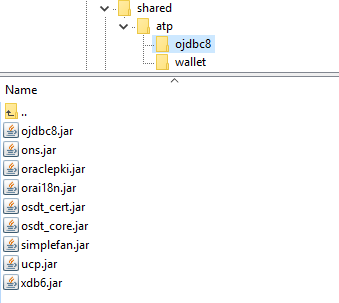
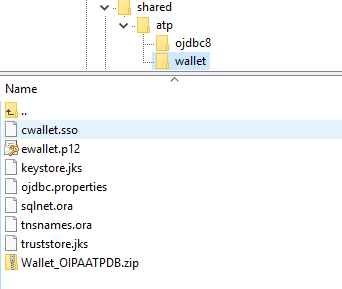
If the PAS application is ATP compliant, then copy the required ATP (Autonomous Transaction Processing) database files under the externallibs/shared directory.
The sample folder structure is as follows:

- Under ojdbc8 folder:
- Under wallet folder:
Note:
1. The Outbound Services Connector (OSC) and document (For document generator) folders are place holders for respective functionality. For more information refer to the OSC Installation and OIPA Document Generator Guide.
2. Deployment of sample.war referenced in scripts is optional and can be commented, it was provided as an example to include OIPA Extensions (External Client Extension).
