Web Application Configuration
Oracle Documaker Enterprise Edition installs three web applications – Documaker Administrator, Documaker Document Factory Dashboard, and Documaker Interactive. Within a OBP-Documaker Integrated solution, some of the capabilities of Documaker Interactive should be restricted from use. These capabilities primarily include the ability to create new documents, the ability to add additional forms to the document set and the ability to add or modify the recipients or Receiving Party information as all of this information is sourced by OBP and should not be modified externally.
You can configure Documaker Interactive using the Entities and Abilities configuration settings within the Documaker Administrator web application.
To Disable the ability to create new documents:
- Login to the Documaker Administrator.
- Select the Entities and Ability Sets tab.
- Click on the Define Ability Sets option.
- Highlight the Drafters ability set Name.
- Click the Pencil icon to edit the Ability Set. The Edit Ability Set pop-up window appears.
- Unchecked the Accessible, Editable, and Visible attributes for these rows:
- Edit
- New Document
- Forms pane
- Add attachment pane
- Update Addressees pane
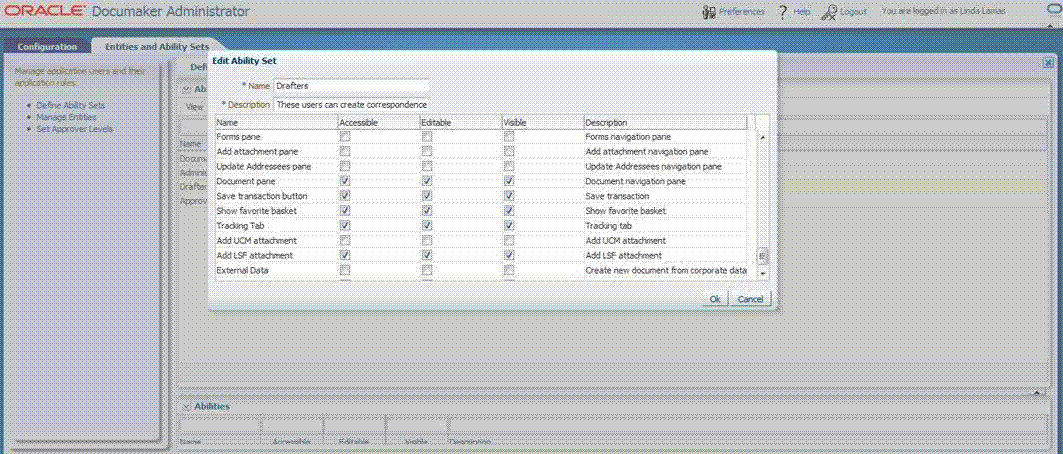
Figure 2.1 - Documaker administration web application