This chapter describes the steps required to set up and execute the ALM Result transformation process.
ALM Results Transformation is the process of pushing the ALM Results from the ALM Processing area to the ALM BI Mart. It transforms both Deterministic and Stochastic ALM results, as well as other related information such as forecast rates and detailed cash flows, based on the type of process and processing options selected.
Topics:
· Overview of the ALM Results Transformation Process
· Tables Populated by ALM Results Transformation
· Executing the ALM Results Transformation Process
· Checking the Execution Status
· Support of Multiple Hierarchies
ALM Results Transformation is used to move ALM result data from ALM Processing Tables to ALM BI FACT Tables for Reporting.
The following Database components are used by the ALM Results Transformation:
· FN_ALM_BI_TRANSFORMATION: Oracle database function.
· PKG_ALM_BI_TRANSFORMATIONS: Oracle database Package invoked by the above function.
Following are the pre-requisites for the ALM Results Transformation Process:
1. An ALM Process (or processes) (Stochastic or Deterministic) has been executed successfully and produced results.
2. Hierarchy Transformation is executed successfully.
3. Dimension Movement (SCD) and DIM_RUN population executed successfully.
4. Dim Dates process executed successfully.
5. All the post-install steps mentioned in the Oracle Financial Services Analytical Applications Infrastructure (OFSAAI) Installation and Configuration Guide and the Oracle Financial Services Asset Liability Management User Guide and Oracle Financial Services Asset Liability Analytics User Guide must be completed successfully.
6. Application users must be mapped to a role that has the seeded batch execution function (BATPRO).
7. Before executing a batch, check if the following services are running on the application server.
§ Iccserver
§ Router
§ AM
§ Messageserver
For more information on how to check if the services are up and on, and how to start the services if you find them not running, see the Oracle Financial Services Analytical Applications Infrastructure User Guide.
Batches must be created for executing the function. This is explained in section Executing the ALM Results Transformation Process.
One or more of the following tables may be included in the ALM Results Transformation process, depending on the calculation element and audit selections in the specific process being transformed. For example, if you have selected to produce only standard cash flow output and are not consolidating multi-currency results, then only the FCT_AGG_BASE_CCY_CASHFLOWS table will be populated by the transformation process. If currency consolidation is selected, and you have multiple currencies in your data set, then additionally the consolidated results table will be populated. Similarly, when the Interest Rate Gap or Liquidity Gap calculation elements are selected in the ALM Process, then results will also be written to the corresponding FCT_ tables. The following are the primary target FCT_ tables populated by the ALM Results Transformation process:
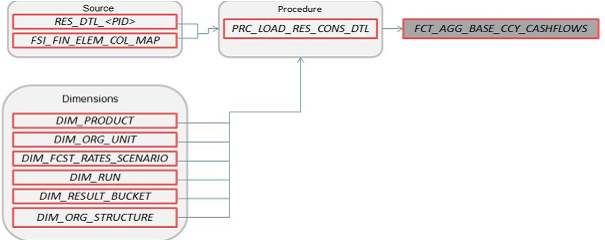
· FCT_AGG_BASE_CCY_CASHFLOWS
Description of FCT_AGG_BASE_CCY_CASHFLOWS follows
Where, RES_DTL_<Process ID> contains the standard (base currency) cash flow output for all current position and forecast balances, across all forecast rate scenarios.
· FCT_AGG_CONS_CCY_CASHFLOWS
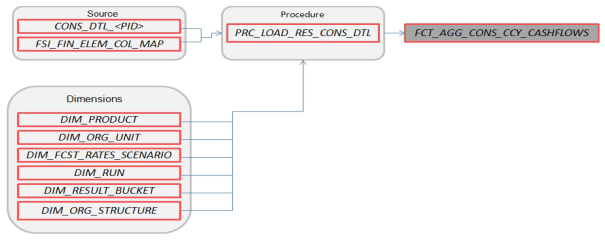
Description of FCT_AGG_CONS_CCY_CASHFLOWS follows
Where, CONS_DTL_<Process ID> contains standard (consolidated to reporting currency) cash flow output for all current position and forecast balances, across all forecast rate scenarios.
· FCT_AGG_BASE_CCY_LR_GAP
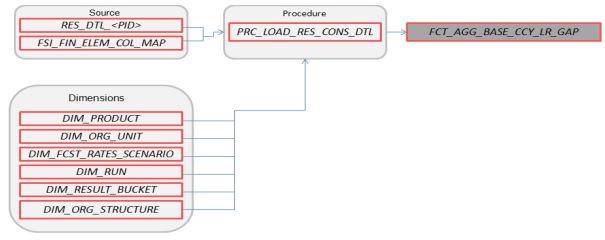
Description of FCT_AGG_BASE_CCY_LR_GAP follows
Where, RES_DTL_<Process ID> contains Liquidity Gap Financial Element (base currency) cash flow output for all current position balances, across all forecast rate scenarios.
· FCT_AGG_CONS_CCY_LR_GAP
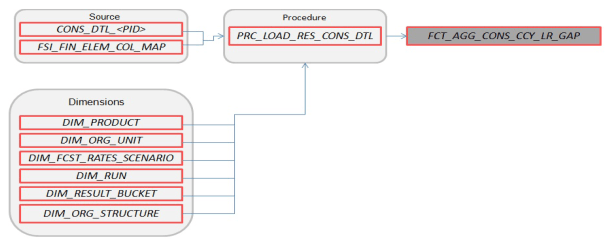
Description of FCT_AGG_CONS_CCY_LR_GAP follows
Where, CONS_DTL_<Process ID> contains Liquidity Gap Financial Element (consolidated to reporting currency) cash flow output for all current position balances, across all forecast rate scenarios.
· FCT_AGG_BASE_CCY_IRR_GAP
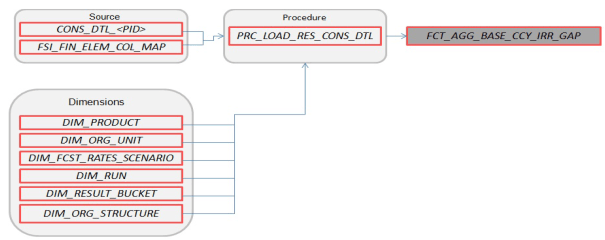
Description of FCT_AGG_BASE_CCY_IRR_GAP follows
Where, CONS_DTL_<Process ID> contains Repricing Gap Financial Element (consolidated to reporting currency) cash flow output for all current position balances, across all forecast rate scenarios.
· FCT_AGG_CONS_CCY_IRR_GAP
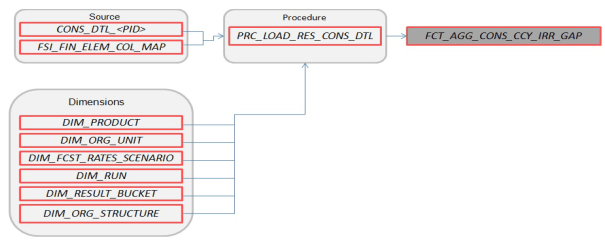
Description of FCT_AGG_CONS_CCY_IRR_GAP follows
Where, CONS_DTL_<Process ID> contains Repricing Gap Financial Element (consolidated to reporting currency) cash flow output for all current position balances, across all forecast rate scenarios.
· FCT_AGG_BASE_CCY_ALM_MEASURES
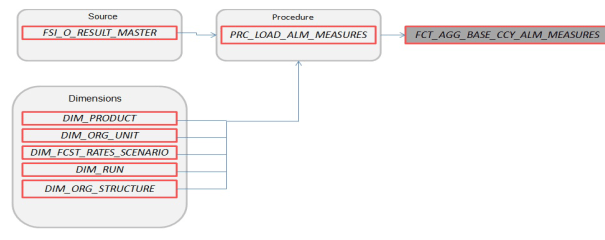
Description of FCT_AGG_BASE_CCY_ALM_MEASURES follows
Where, FSI_O_RESULT_MASTER contains Market Value, Duration, and Convexity information (base currency) for all current position balances, across all forecast rate scenarios.
· FCT_AGG_CONS_CCY_ALM_MEASURES
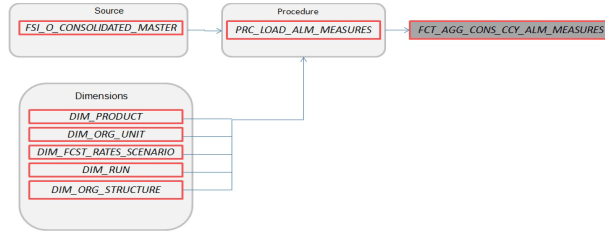
Description of FCT_AGG_CONS_CCY_ALM_MEASURES follows
Where, FSI_O_CONSOLIDATED_MASTER contains Market Value, Duration, and Convexity information (consolidated to reporting currency) for all current position balances, across all forecast rate scenarios.
· FCT_PROCESS_CASHFLOW
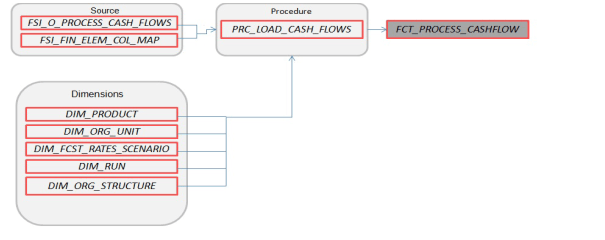
Description of FCT_PROCESS_CASHFLOW follows
Where, FSI_O_PROCESS_CASH_FLOWS contains account level detailed cash flow information for the number of instrument records selected on the Audit block of the ALM Process.
Note: Here, FCT_COMMON_ACCOUNT_SUMMARY is a pre-requisite for FCT_PROCESS_CASHFLOW. To run the Cash flow successfully, first load the table FCT_COMMON_ACCOUNT_SUMMARY(PK) and then FCT_PRCESS_CASHFLOW(FK). There is a Referential Integrity (PK-FK) between these two tables which should be satisfied.
· FCT_RATE_TIERS_CASHFLOW
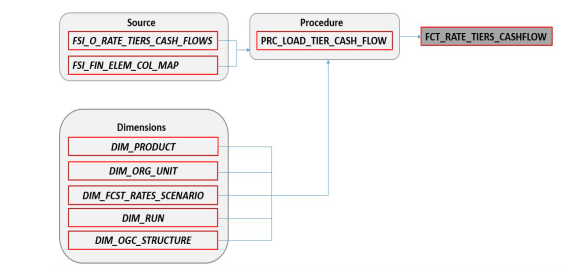
Description of FCT_RATE_TIERS_CASHFLOW follows
Where, FSI_O_PROCESS_CASH_FLOWS contains account level detailed cash flow information for the number of instrument records selected on the Audit block of the ALM Process.
· FCT_CONS_CCY_STOCH_VAR
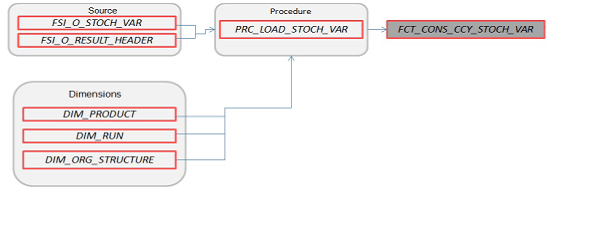
Description of FCT_CONS_CCY_STOCH_VAR follows
Where, FSI_O_STOCH_VAR contains Value at Risk information (in Consolidated Currency) for each Monte Carlo rate path at the Product COA level.
· FCT_AGG_CONS_CCY_STOCH_VAR
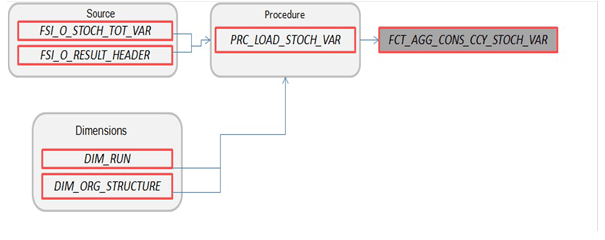
Description of FCT_AGG_CONS_CCY_STOCH_VAR follows
Where, FSI_O_STOCH_TOT_VAR contains Value at Risk information (in Consolidated Currency) for each Monte Carlo rate path at the Portfolio level.
· FCT_CONS_CCY_STOCH_MKT_VAL
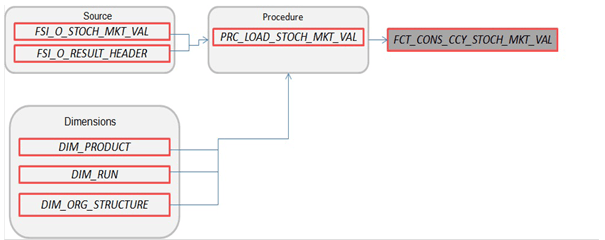
Description of FCT_CONS_CCY_STOCH_MKT_VAL follows
Where, FSI_O_STOCH_MKT_VAL contains Market Value information (in Consolidated Currency) for each Monte Carlo rate path at the Product COA level.
· FCT_CONS_CCY_EAR_AVG
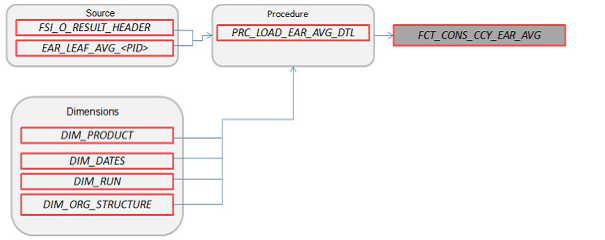
Description of FCT_CONS_CCY_EAR_AVG follows
Where, EAR_LEAF_AVG_<Process ID> contains the average Earnings at Risk information (in Consolidated Currency) across all Monte Carlo rate paths at the Product COA level.
· FCT_CONS_CCY_EAR_DETAIL
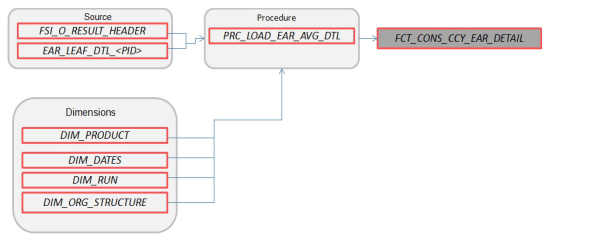
Description of FCT_CONS_CCY_EAR_DETAIL follows
Where, AR_LEAF_DTL_<Process ID> contains Earnings at Risk information (in Consolidated Currency) for each Monte Carlo rate path at the Product COA level.
· FCT_AGG_CONS_CCY_EAR_AVG
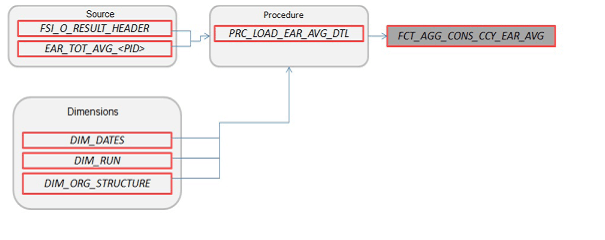
Description of FCT_AGG_CONS_CCY_EAR_AVG follows
Where, EAR_TOT_AVG_<Process ID> contains average Earnings at Risk information (in Consolidated Currency) across all Monte Carlo rate paths at the Portfolio level (net interest income - net interest expense).
· FCT_AGG_CONS_CCY_EAR_DETAIL
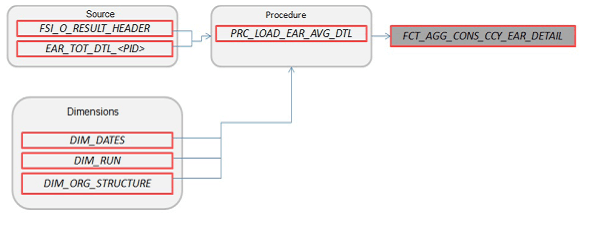
Description of FCT_AGG_CONS_CCY_EAR_DETAIL follows
Where, EAR_TOT_DTL_<PID> contains Earnings at Risk information (in Consolidated Currency) for each Monte Carlo rate path at the Portfolio level (net interest income – net interest expense).
· FCT_STOCH_FCST_INTEREST_RATES
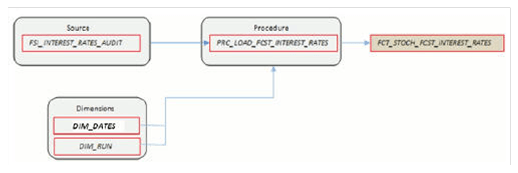
Description of FCT_STOCH_FCST_INTEREST_RATES follows
Where, FCT_STOCH_FCST_INTEREST_RATES contains 1M forward rates output from the Monte Carlo process for each scenario, typically used for Audit purposes.
· FCT_FCST_INTEREST_RATES
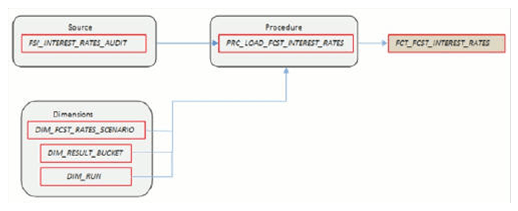
Description of FCT_FCST_INTEREST_RATES follows
Where, FCT_FCST_INTEREST_RATES contains forecast interest rates for each ALM Deterministic Process, for each scenario.
· FCT_FCST_EXCHANGE_RATES
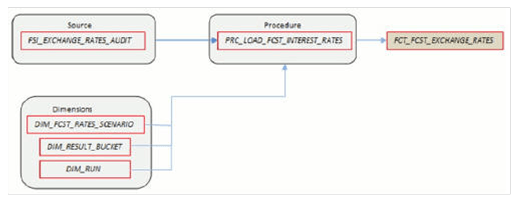
Description of FCT_FCST_EXCHANGE_RATES follows
Where, FCT_FCST_EXCHANGE_RATES contains forecast currency exchange rates for each ALM Deterministic Process, for each scenario.
· FCT_FCST_ECO_IND
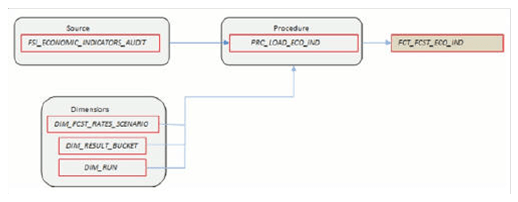
Description of FCT_FCST_ECO_IND follows
Where, FCT_FCST_ECO_IND contains forecast Economic Indicators for each ALM Deterministic Process, for each scenario.
· FCT_ALM_GAP_LIMIT_DTL
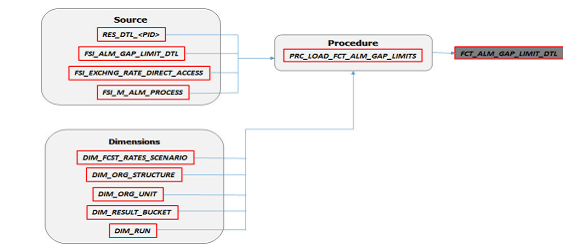
Description of FCT_ALM_GAP_LIMIT_DTL follows
Where, FCT_ALM_GAP_LIMIT_DTL contains a repricing gap limit for each ALM process and for each scenario.
See the Oracle Financial Services Analytical Applications Data Model Data Dictionary or the ALM BI Erwin Data Model to view the detailed structure of these tables.
There are four ways to execute the ALM Results Transformation process. Depending on your preference and particular use case, you can choose to run ALM Results Transformation using any of these methods.
1. Select the ALM Results Transformation option from the Output Preferences block of the ALM Processing window. When this option is selected, the ALM BI Transformation runs automatically as the ALM process run.

Description of Output Preferences block follows
2. From the ALM Processing Summary page, select any ALM Process and then select the Transform ALM Results option. This triggers the immediate execution of the ALM BI transformation process.
3. Create and run a Batch process using the infrastructure Batch Processing.
4. Create and run a batch process using the simplified batch window. For more information, see the Simplified Batch Execution section.
The following steps describe how to execute the ALM Results Transformation process from the OFSAAI Batch Processing framework.
You can execute the function from the Operations framework module of OFSAAI.
Define a new Batch and an underlying Task definition from the Batch Maintenance window of OFSAAI. For more information on defining a new Batch, see the How to Define a Batch section.
To define a new task for a Batch definition, follow these steps
1. Select the check box adjacent to the newly created Batch Name in the Batch Maintenance window.
2. Click Add + from the Task Details grid. The Task Definition window is displayed.
3. Enter the Task ID and Description.
4. Select Transform Data from the Transform Data drop-down list.
5. Select the following from the Dynamic Parameters list:
§ Rule Name: Select ALM_BI_TRANSFORMATION from the list of all available transformations. (This is a seeded Data Transformation which is installed as part of the ALM BI application. If you don't see this in the list, contact Oracle support).
§ Parameter List: Enter the Process ID and Rerun Flag.
§ Process ID indicates the process for which the data is to be transformed from ALM operational tables to ALM BI tables. This is a mandatory parameter.
Rerun Flag indicates whether the current run is a fresh run or a rerun for the same process ID. 'N' indicates a fresh run and 'Y' indicates a rerun. When ALM Results Transformation is executed for a new ALM process, it is treated as a new run. The BI_TRANSFORM_STATUS will be NULL in FSI_PROCESS_RUN_HISTORY for the Process and As-of-date combination.
When the Transformation is performed for an existing process, it becomes a rerun, which means the related FACT table records are first deleted for the process and new results are re-inserted. The BI_TRANSFORM_STATUS will be "1" in FSI_PROCESS_RUN_HISTORY for the Process and As-of-date combination.
The sample parameters for this task are: 40006526, 'Y' (uppercase required).
6. Click Save. The Task definition is saved for the selected Batch.
7. Execute the Batch.
§ You can execute a Batch definition from the Batch Execution window of the OFSAAI Operations module.
§ The function can also be executed directly on the database through SQLPLUS using the following details:
Function Name: FN_ALM_BI_TRANSFORMATION
Parameters: P_BATCH_RUN_ID, P_AS_OF_DATE, PID, and P_RE_RUN_FLAG.
Sample parameter values are 'Batch1','20111231', '40006526', and 'Y'
NOTE |
When prompted for the execution date, select the 'As of Date' corresponding to the ALM results that you want to transform. If some other date is selected, the ALM Result Transformation will not run for the expected data set. |
The Batch execution status can be monitored through the Batch Monitor window of the OFSAAI Operations module.
The status messages in the batch monitor are:
· N: Not Started
· O: On Going
· F: Failure
· S: Success
The Batch Process execution log and the detailed ALM Transformation component log can be accessed on the application server at $FIC_DB_HOME/log/date.
The file name will have the Batch Execution ID.
Sample Path: /dbfiles/home/oracle/OFSAAI/ficdb/log/date. The database-level operations log can be accessed by querying the FSI_MESSAGE_LOG table. The Batch Run ID column can be filtered for identifying the relevant log.
To monitor the progress of the transformation program query the table FSI_MESSAGE_LOG with process ID and batch run ID as follows.:
select * from fsi_message_log where a.process_id=<ProcessID> and batch_run_id=<Batch Run ID>;
Check the .profile file in the installation home if you are not able to find the paths mentioned above.
Multiple hierarchies on a single dimension can be set up in ALMBI.
One can view multiple hierarchies in a report in a single view through the following steps:
1. Create your product hierarchy (for example, Product Hierarchy 1).
2. Perform Hierarchy Transformation.
3. Run the SCD process.
4. Run the ALM Results Transformation process for a particular As of Date.
Records will be populated into the relevant FACT tables for the mentioned hierarchy and As of Date. Similarly, perform these steps for multiple hierarchies and run the ALMBI Transformation accordingly. From this point, you will be able to select any of the multiple hierarchies while designing a new report.