This chapter describes the procedure to work and manage the Product Characteristics Rules.
Topics:
· Overview of Product Characteristic Rules
· Creating Product Characteristic Rules
· Defining Product Characteristic Rules
Product Characteristic Rules are used to define payment, pricing, and repricing characteristics for new business. They are also used to specify general calculation attributes for both existing accounts and new business.
The procedure for working with and managing Product Characteristics is similar to that of other Asset Liability Management business Rules. It includes the following steps:
· Searching for Product Characteristic Rules.
· Creating Product Characteristic Rules.
· Viewing and Editing Product Characteristic Rules.
· Copying Product Characteristic Rules.
· Deleting Product Characteristic Rules.
As part of creating and editing Product Characteristic Rules, you assign product attribute assumptions to applicable products from the product hierarchy.
NOTE:
Oracle Asset Liability Management provides the option to copy, in total or selectively, the product assumptions contained within ALM business Rules from one currency to another currency or a set of currencies or from one product to another product or a set of products.
You create a Product Characteristics Rule to assign attributes to the products.
To create a Product Characteristic Rule, follow these steps:
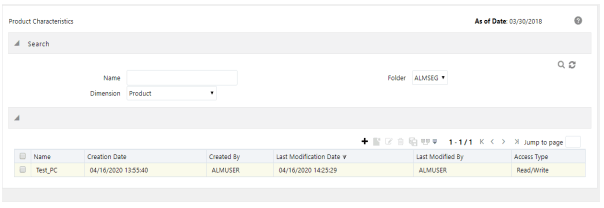
1. Navigate to the Product Characteristics summary page.
Figure 1: Product Characteristics Summary Page
Description of Product Characteristics Summary Page as follows
2. Complete standard steps for this procedure. For more information, see the Overview of Common Rule Management Tasks.
Figure 2: Product Characteristics Window to Create a New Product Characteristics Rule
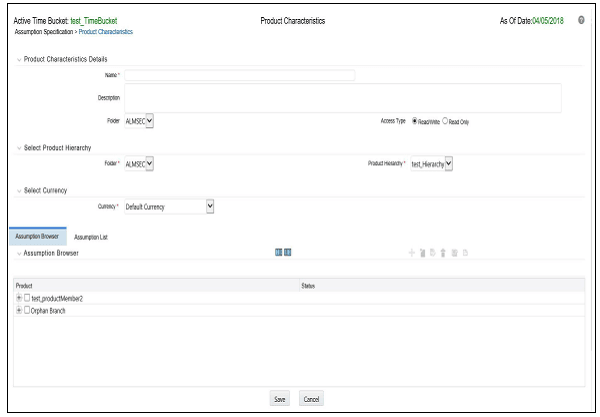
Description of Product Characteristics Window as follows
NOTE:
In addition to the standard steps for creating Rules, the procedure for creating Product Characteristics involves one extra step. After Standard Steps, you must select a product hierarchy. You can define methodologies at any level of the hierarchical product dimension. The hierarchical relationship between the nodes allows the inheritance of methodologies from parent nodes to child nodes.
The definition of a Product Characteristics Rule is part of the Create or Edit Product Characteristics Rule process. When you click Save in the Create Product Characteristics Rule process, the Rule is saved, and the Product Characteristics Rule summary page is displayed. However, Product Characteristic assumptions have not yet been defined in the products at this point. Start defining the Product Characteristic assumptions for product or currency combinations before clicking Save.
Defining Product Characteristics Using Node Level Assumptions
Node Level Assumptions allow you to define assumptions at any level of the Product dimension Hierarchy. The Product dimension supports a hierarchical representation of the chart of accounts to take advantage of the parent-child relationships defined for the various nodes of the product hierarchies when defining Rules. Children of parent nodes on a hierarchy automatically inherit the assumptions defined for the parent nodes. However, assumptions explicitly defined for a child take precedence over those at the parent level.
Prerequisites
Performing basic steps for creating or editing a Product Characteristics Rule.
To define a Product Characteristic Rule, follow these steps:
1. From the Assumption Browser window, select the product (or products) and the currency to define the Product Characteristics. Click Add + icon to launch the Product Characteristic Details window.
2. Select the Currency.
NOTE:
To define assumptions for all currencies with the selected product, select Default Currency.
3. From the Assumption Browser, select the Product or Products.
4. Click the Add Assumption.
5. Enter a value for mandatory fields. Mandatory input fields are marked with a red asterisk.
Else, select one of the seeded Product Profile templates or a user-defined Product Profile to prepopulate the appropriate Product Characteristic fields.
5. From the File menu, select Save.
NOTE:
Using the default currency to setup assumptions can save data input time. At runtime, the calculation engine uses assumptions explicitly defined for a product currency combination. If assumptions are not defined for a currency, the engine uses the assumptions defined for the product and the default currency. If the assumptions are the same across some or all currencies for a specific product, you can input assumptions for the default currency. Be careful when using this option on UI where an Interest Rate Code is a required input. In most cases, you will want to use a currency-specific interest rate curves for pricing instruments within each specific base currency. The Default Currency option, if used will apply a selected Interest Rate Code across all currencies.
6. The Product Characteristic Details window has the following three input tabs:
§ All Business
§ New Business
§ Model Integration
NOTE:
The Model Integration tab will be available only if Moody's structured cash flow library integration is done with ALM.
This section describes about using the assumptions.
From the Assumption Browser window, select the product (or products).
1. Select the Add Assumption.
2. Type a value for each mandatory field. Mandatory input fields are marked with a red asterisk.
You can optionally select one of the seeded Product Profile templates or a user-defined Product Profile to prepopulate the appropriate Product Characteristic fields.
The Assumption List tab is present next to the Assumption Browser in all the windows which have the Assumption Browser. This tab provides the following five search fields:
· Dimension Member Code
· Dimension Member Name
· Dimension Member Description
· Dimension Member Status
· Is Leaf
Dimension Member Code, Name, and Description provide filter criteria for search such as Contains, Starts With, Ends With, and Exactly Matches.
Dimension Member Status is a drop-down list containing values such as, Defined, Not Defined, Inherited, Defined and Inherited, and All.
Is Leaf is a check box that can be toggled.
The search icon initiates the search on the Assumption Browser based on the filter criteria provided in the above-mentioned fields. Reset restores the default search criteria.
The search results will flatten the hierarchy and display all of the products that meet the input criteria. Use the pagination widget to display the number of products per page (up to a maximum of 99). You can proceed to edit or create new Rules in the assumption list tab.
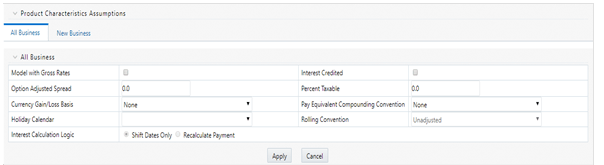
The assumptions made on the All Business tab apply to both current position data and new business balances.
The common Product Characteristic fields listed on the All Business tab are as follows.
Figure 3: All Businesses Tab of Product Characteristic to Define the Product Characteristic Rule
|
Field |
Behavior |
|---|---|
|
Option Adjusted Spread |
The Option Adjusted Spread is used during stochastic processing only. It is an adjustment to the stochastic discount factor used in calculating market value and value at risk. Valid values for this spread are between -5.000% and 5.000%, but the value of less than 2.00% is recommended for the best results. For more information about the calculation of discount factors, see the Oracle Financial Services Cash Flow Engine Reference Guide. |
|
Model with Gross Rates |
If the institution has outsourced loan serving rights for some of the assets (most typically mortgages), the rates paid by customers on those assets (gross rates) will be greater than the rates received by the bank (net rates). For these instruments, both a net and gross rate will be calculated within the cash flow engine and both gross and net rate financial elements will be output. The gross rate is used for prepayment and amortization calculations. The net rate is used for income simulation and the calculation of retained earnings in the auto-balancing process. |
|
Interest Credited |
This option allows interest payments to be capitalized as principal on simple or non-amortizing instruments. |
|
Percent Taxable |
Percent Taxable specifies the percent of income or expense that is subject to the tax rates defined in the active Time Bucket Rule. This is used with the Auto-balancing option in the ALM Process Rules. Percent taxable must be set up for each product and reporting currency or product and default currency combination. |
|
Currency Gain or Loss Basis |
Currency Gain or Loss Basis determines how exchange rate fluctuations are reflected in financial element results for each product and currency combination. The choices are:
For more information on the cash flow calculations associated with currency gain or loss recognition techniques, see the Oracle Financial Services Cash Flow Engine Reference Guide. |
|
Pay Equivalent Compounding Convention |
In most cases, interest rates are not adjusted for the differences in pay-basis between the quote basis of the pricing index and the payment frequency of the account to which the index is assigned. Some instruments, notably Canadian Mortgages, follow a convention that the interest rates are adjusted. In this case, the Pay-Equivalent Compounding Convention must be set to Semi-Annual Quoting Convention. For other accounts, the convention must be set to Do Not Adjust. |
|
Holiday Calendar |
The default value is Blank and is Enabled. This drop-down list contains the list of all holiday calendar definitions defined in the Holiday Calendar window. |
|
Rolling Convention |
The default value is Unadjusted and is Enabled, only when Holiday Calendar is selected in the preceding field. This drop-down list contains the following values:
Payment on an actual day, even if it is a non-business day.
The payment date is rolled to the next business day.
The payment date is rolled to the next business day unless doing so would cause the payment to be in the next calendar month, in which case the payment date is rolled to the previous business day.
The payment date is rolled to the previous business day.
The payment date is rolled to the previous business day unless doing so would cause the payment to be in the previous calendar month, in which case the payment date is rolled to the next business day. *Many institutions have month-end accounting procedures that necessitate this. |
|
Interest Calculation Logic |
There are two options:
|
NOTE:
The Holiday Calendar attributes can be applied directly to the instrument records for an existing business. If they are not applied to the records, the engine will use the definition from the All Business tab to apply Holiday Calendar for existing and New Business.
The assumptions made on the New Business tab impact forecast business only. These assumptions are used together with the other Forecast Assumption Rules including Forecast Balances, Pricing Margins, and Maturity Mix to determine the behavior of the forecast instruments.
Figure 4: New Businesses Tab of Product Characteristic to Define the Product Characteristic Rule
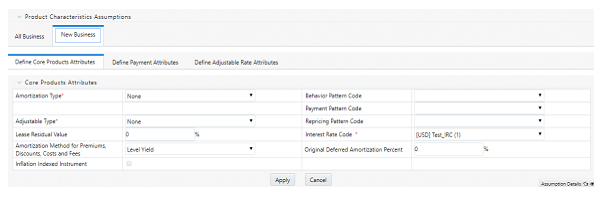
The following secondary tabs are available in New Business tab:
· Define Core Product Attributes
· Define Payment Attributes
· Define Adjustable Rate Attributes
· Define Negative Amortization Attributes
· Define Other Mortgage Attributes *
· Define Inflation Adjustment Attributes **
NOTE:
* This tab will be displayed only if OFS ALM is mapped to ADCo LDM functionality and currency is selected as USD.
** This tab will be displayed, if the Inflation Indexed Instrument option is selected in Define Core Products Attributes tab for New Business.
Relationship Triggers
There are dependencies built into the tabular structure of this window. Based on the assumptions made in the first two tabs, the remaining two tabs may not be active.
|
Field |
Value |
Behavior |
|---|---|---|
|
Amortization Type Code |
Conv. Fixed, Conv Adjust., Adjst/Ng Amrt |
Always interest in arrears, therefore, disables Interest Type. |
|
Amortization Type Code |
Conv. Fixed, Rule-of-78's |
No repricing occurs, therefore disables the Define Negative Amortization Attributes and enables the Adjustable Rate Attributes tab. In this case, Rate Change Rounding Type, Rate Change Rounding Factor (when there is Rounding), Rate Floor Life, and Rate Cap Life fields will be enabled in the Adjustable Rate Attributes tab. |
|
Amortization Type Code |
Adjst/Ng Amrt |
Enables Negative Amortization Attributes tab. |
|
Amortization Type Code |
Payment Pattern |
Enables the Payment Pattern drop-down list. |
|
Amortization Type Code |
Behavior Pattern |
Enables the Behavior Pattern drop-down list. |
|
Amortization Type Code |
Conv Fixed, Conv Adjust., Level Principal, Non-Amortizing |
The Inflation Indexed Instrument check box will be selected. |
|
Adjustable Type Code |
Other Adjustable, Fixed Rate, Floating Rate, or Repricing pattern |
Repricing Frequency is inapplicable, or it is defined elsewhere, therefore disables Repricing Frequency and Multiplier. Enables the Adjustable Rate Attributes tab. When Adjustable Type Code is Fixed, the Adjustable Rate Attributes tab is enabled. In this case, Rate Change Rounding Type, Rate Change Rounding Factor (when there is Rounding), Rate Floor Life, and Rate Cap Life fields will be enabled in the Adjustable Rate Attributes tab. |
|
Adjustable Type Code |
Repricing Pattern |
Enables the Repricing Pattern drop-down list. Also, the repricing attributes that are defined elsewhere are disabled in this Rule. Only periodic increase and decrease, rate change rounding are enabled. |
|
Repricing Frequency |
"0" |
No repricing occurs and therefore disables the Adjustable Rate Attributes tab. |
|
Model with Gross Rates |
Off |
Net Margin Flag options are only necessary when modeling with different gross rates and net rates, and therefore disables Net Margin Flag. |
|
Rate Change Rounding Type |
"No Rounding" or "Truncate" |
Rounding does not apply, and therefore disables Rate Change Rounding Percent. |
|
Currency |
|
Allows display of Interest Rate Codes and Transfer Rate Interest Rate Codes for which the selected currency is the reference currency. In Product Characteristics, Default Currency allows all Interest Rate Codes, regardless of currency. |
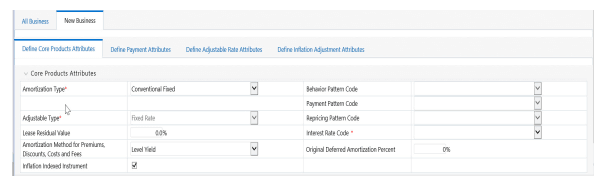
The following is a listing of new business fields used in the Define Core Products Attributes secondary tab of the Product Characteristics Rule.
Figure 5: Define Core Products Attributes Tab to Define the Product Characteristic Rule
|
Field |
Description |
|---|---|
|
Amortization Type |
Method of amortizing principal and interest. The choices consist of all standard OFSAA codes and all additional user-defined codes created through the Payment Pattern and Behavior Pattern interfaces, as follows:
|
|
Adjustable Type |
Determines the repricing characteristics of the new business record. The choices consist of all standard OFSAA codes plus the Repricing Pattern. The standard OFSAA codes are as follows:
|
|
Lease Residual Value |
For Lease instruments, this value specifies the residual amount as a percent of the par balance. |
|
Amortization Method for Premiums, Discounts, and Fees |
Determines the method used for amortizing premiums, discounts, or fees. The available codes are:
|
|
Behavior Pattern Code |
Lists all user-defined behavior patterns created through the user interface. |
|
Payment Pattern Code |
Lists all user-defined payment patterns defined through the user interface. |
|
Repricing Pattern Code |
Lists all user-defined reprice patterns created through the user interface. |
|
Interest Rate Code |
Defines the pricing index to which the instrument interest rate is contractually tied. The interest rate codes that appear as a selection option depending on the choice of currency. The interest rate code list is restricted to codes that have the selected currency as the Reference Currency. If the default currency is chosen, all interest rate codes are available as a selection. |
|
Original Deferred Amortization Percent |
The initial deferred balance expressed as a percent of original par balance. |
|
Inflation Indexed Instrument |
Select this check box to enable the Inflation Indexed tab. |
The following is a listing of new business fields used in the Define Payment Attributes secondary tab of the Product Characteristics Rule.
Figure 6: Define Payment Attributes Tab to Define the Product Characteristic Rule
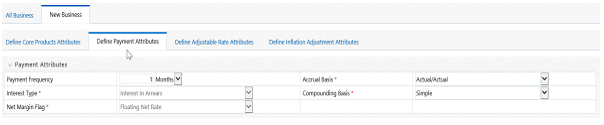
Description of Define Payment Attributes Tab to Define the Product Characteristic Rule as follows
|
Field |
Description |
|---|---|
|
Payment Frequency |
Frequency of payment (P & I), Interest or Principal). For bullet instruments, use zero. |
|
Interest Type |
Determines whether interest is calculated in arrears or advance or if the rate is set in arrears. There are three interest types:
For conventional amortization products, interest in arrears is the only valid choice. |
|
Rolling Convention |
Reserved for future use. |
|
Accrual Basis |
The basis on which the interest accrual on an account is calculated. The choices are as follows:
|
|
Compounding Basis |
Determines the number of compounding periods per payment period. The choices are as follows:
|
|
Net Margin Flag |
The setting of the net margin flag affects the calculation of the Net Rate. The two settings are:
|
NOTE:
* A Holiday Calendar selection is required if Business/252 Accrual Basis is selected. Business/252 Accrual Basis is only applicable to the recalculate option of the Holiday Calendar Rule. If the user selects the shift payment dates, the payment will still be recalculated for the non-holiday or weekend date.
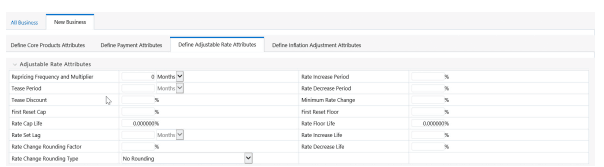
The following is a listing of new business fields used in the Define Adjustable Rate Attributes secondary tab of the Product Characteristics Rule.
Figure 7: Define Adjustable Rate Attributes Tab to define the Product Characteristic Rule
|
Field |
Description |
|---|---|
|
Repricing Frequency |
Contractual frequency of rate adjustment. |
|
Tease Period |
The tease period is used to determine the length of the tease period. |
|
Tease Discount |
The tease discount is used in conjunction with the original rate to calculate the tease rate. The tease rate is the original rate less than the tease discount. |
|
First Reset Cap |
This indicates the maximum delta between the initial rate and the first reset for mortgage instruments that have a tease period. This rate will be applicable at the tease end period, before the first reset. After this, the periodic and lifetime cap value will be applied. The value of this field will be automatically populated from the Product Profile window if the product is mapped to Product Profile and value is defined for First Reset Cap. For example: Current Rate = 3.5% (from the instrument record) Margin = 0.3 % First Reset Cap = 0.5% (from the instrument record) First Reset Floor = 0.1% (from the instrument record) Scenario 1: If New Forecasted Rate = 5.1% (Forecast Rates Assumption) The fully indexed rate (after applying minimum rate change, rounding effects) is higher than the (Current Rate + First Reset Cap). So, the new rate assigned will be 3.5% + 0.5% = 4.0% |
|
First Reset Floor |
This is the initial minimum value for mortgage instruments that have a tease period. This floor rate will be applicable at the tease end period, before the first reset. After this, the periodic and lifetime floor value will be applied. The value of this field will be automatically populated from the Product Profile window if the product is mapped to Product Profile and value is defined for First Reset Floor. |
|
Rate Cap Life |
The maximum rate for the life of the instrument. |
|
Rate Set Lag |
Period by which the rate lookup lags the repricing event date. |
|
Rate Change Rounding Factor |
Percent to which the rate change on an adjustable instrument is rounded. |
|
Rate Change Rounding Type |
The method used for rounding of interest rate codes. The choices are as follows: · No Rounding · Truncate · Round Up · Round Down · Round Nearest |
|
Rate Increase Period |
The maximum interest rate increase allowed during the cycle on an Adjustable Rate instrument. |
|
Rate Decrease Period |
The maximum amount rate can decrease during the repricing period of an Adjustable Rate instrument. |
|
Minimum Rate Change |
The minimum required change in rate on a repricing date. |
|
Rate Floor Life |
The minimum rate for the life of the instrument. |
|
Rate Increase Life |
The maximum interest rate increase allowed during the life of an adjustable-rate instrument used to calculate rate cap based on Forecasted Rate Scenario. If both Rate Increase Life and Rate Cap are defined, the process uses the more restrictive rate. |
|
Rate Decrease Life |
The maximum amount rate can decrease during the life of an adjustable-rate instrument, used to calculate the rate floor based on the Forecasted Rate Scenario. If both rates decrease the life and rate floor are defined, the process uses the more restrictive rate. |
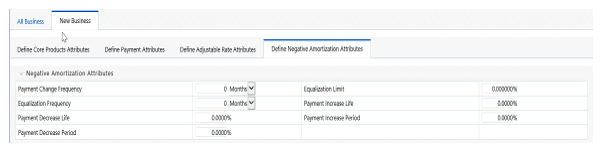
The following is a listing of new business fields used in the Define Negative Amortization Attributes secondary tab of the Product Characteristics Rule:
Figure 8: Define Negative Amortization Attributes secondary tab to define the Product Characteristic Rule
|
Field |
Description |
|---|---|
|
Payment Change Frequency |
The frequency at which the payment amount is recalculated for adjustable negative amortization instruments. |
|
Equalization Frequency |
The frequency at which the current payment necessary to fully amortize the instrument is recalculated. |
|
Payment Decrease Life |
The maximum payment decrease allowed during the life of a negative amortization instrument. |
|
Payment Decrease Period |
The maximum payment decrease allowed during a payment change cycle of a negative amortization instrument. |
|
Equalization Limit |
The maximum negative amortization allowed, as a percent of the original balance, that is, if principal balance must never exceed 125% of the original balance, this column would equal value 125.0. |
|
Payment Increase Life |
The maximum payment increase allowed during the life of a negative amortization instrument. |
|
Payment Increase Period |
The maximum payment increase allowed during a payment change cycle on a negative amortization instrument. |
The following is a listing of new business fields used in the Define Other Mortgage Attributes secondary tab of the Product Characteristics Rule:
Figure 8: Define Other Mortgage Attributes secondary tab to define the Product Characteristic Rule

|
Field |
Description |
|---|---|
|
Customer Credit Score |
The default value of this is 700 and it must be in the range of 300-850. The value of this field will be automatically populated from the Product Profile window, if the product is mapped to Product Profile and value is defined for Customer Credit Score. |
|
Original Loan To Value |
The default value of this is 80 and it must be in the range of 1-300. The value of this field will be automatically populated from the Product Profile window, if the product is mapped to Product Profile and value is defined for Original Loan To Value. |
|
Issuer |
Select the name of the Issuer. The default value is FANNIE_MAE. |
|
Prepayment Index |
This is the first index value fetched by the UI among the defined ADCo Curves. |
This tab will be displayed if ADCo LDM mapping is done, and if the selected currency is USD and the product is of account type Earning Assets.
This tab allows you to make the assumptions based on Moody's structured cash flow library integration for All Business and New business balances.
This tab will be displayed only if you have installed Moody's structured cash flow library. Following are the prerequisites to view the Model Tuning secondary tab:
· Moody's structured cash flow library installed on the setup
· Moody's structured cash flow library enabled for the specific user
· Product is securitized products or loans
You can tune the model using the Tune option. Select the model from the Model Selection drop-down list and click Tune. The following modeling options are available in the Model Selection drop-down list:
· None
· Source System Provided
· ADCo
Based on the selected model, the parameters will vary.
Figure 8: Define Model Integration secondary tab to define the Product Characteristic Rule

|
Field |
Behavior |
|---|---|
|
Prepayments |
This is the magnitude of the prepayment rate. The default value of this is 1, and it must be greater than 0. |
|
Default |
This is the magnitude of the default rate. The default value of this is 1, and it must be greater than 0. |
|
Recovery |
This is the magnitude of the recovery rate. The default value of this is 1, and it must be greater than 0. |
|
Recovery Lag |
This is the recovery lag applied to each loan. The default value of this is 0, and the value range is 1 to 100. |
|
Servicer Advancing |
Select the servicer advancing as None, Interest, or Both. The default value of this is None. |
|
Draw Rates |
This is the magnitude of mortgage Draw rates. The default value of this is 1, and it must be greater than 0. |
Enter values in these parameters if you want to use ADCo LDM integration along with Moody's Structured Cash flow library.
|
Field |
Behavior |
|---|---|
|
SMM for Failed Loans |
This is the failed loan's SMM in percentage. The default value of this is 0 and it must be in the range of 0-100. |
|
MDR for Failed Loans |
This is the failed loan's MDR in percentage. The default value of this is 0 and it must be in the range of 0-100. |
|
Recovery for Failed Loans |
This is the failed loan's recovery in percentage. The default value of this is 0 and it must be in the range of 0-100. |
|
Subprime FICO Loans |
The loan is considered subprime if FICO is less than this value (620 if not provided). The default value of this is 620 and it must be in the range of 300-850. |
|
FICO to use(if not available) |
FICO to use for loans that do not have this information. The default value of this is 680 and it must be in the range of 300-850. |
When the Inflation Indexed Instrument check box is selected on the Define Core Product Attributes secondary tab, the Define Inflation Adjustment Attributes secondary tab is enabled. For more information on Inflation Indexed Instrument calculation, see the Oracle Financial Services Cash Flow Engine Reference Guide.
The Define Inflation Adjustment Attributes secondary tab will be enabled if the Adjustment Type is selected as Conventional Adjust, Conventional Fixed, Level principal, or Non-Amortizing.
Figure 9: Define Inflation Adjustment Attributes secondary tab to define the Product Characteristic Rule

|
Field |
Behavior |
|---|---|
|
Index Name |
Lists all Economic Indicator defined through the user interface. |
|
Capital Protection Category |
Determines Capital protection to be provided to Inflation Indexed Instruments. The choices are:
|
|
Index Adjustment Type |
Determines the type of Index Adjustment. The choices are:
|
NOTE:
For more information on cash flow calculations associated with Inflation Indexed Instrument, see the Oracle Financial Services Cash Flow Engine Reference Guide.
This functionality provides the option to copy, in total or selectively, the product assumptions contained within the ALM assumption Rules from one currency to another currency or a set of currencies, or from one product to another product or set of products.
Copy of assumptions enhances the usability of Oracle Asset Liability Management in a multi-currency environment. For example, if you have 10 currencies enabled in the application and you must input only one set of assumptions, then copy those assumptions across all enabled currencies, instead of having to input 10 full sets, thereby saving a significant amount of input time.
This functionality also reduces the risk associated with data input errors as you must audit inputs for a set of assumptions before executing the copy procedure. The Copy Across Currencies process requires users to select a replacement yield curve for each target currency. These currency-specific IRCs replace the IRC selection made for each product in the source currency selection set. It is possible to edit the target assumptions after the initial copy processes have been completed.
Prerequisite
Define ALM Rule related product assumptions. See:
Overview of Product Characteristic Rules
Overview of Discount Method Rules
Overview of Prepayment Rules
Creating a Forecast Balance Rule
Overview of Maturity Mix Rules
Overview of Pricing Margin Rules
Overview of Transfer Pricing Rules
Overview of Adjustment Rules
To copy the assumptions across Currencies and Products, follow these steps:
1. Navigate to the appropriate ALM Business Rule Assumption Browser.
2. Define assumptions for the source currency product set.
3. Save the assumptions.
4. Select the defined product assumptions using the check boxes corresponding to each product (or Node on the hierarchy) that you want to include in the copy process.
5. Click
Copy Across  .
.
Figure 10: Product selection in the Assumption Browser window to use Copy Across option

On the Copy Across Details page, select the listed currencies either individually using the corresponding check boxes or in total using Select All.
Figure 11: Copy Across window
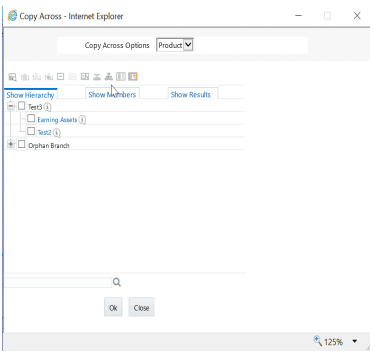
Description of Copy Across window as follows
6. Specify an Interest Rate Code for each selected currency. This is necessary because each interest rate code is specific to a single currency. When copying product assumptions across currencies, you must define the interest rate code for each target currency to replace the Interest Rate Code used for the source currency assumptions.
§ While defining a Rule if the Interest Rate Code is required, then Copy Across (currency) window will have an option to select the Interest Rate Code. For example, Product Characteristic, Discount Methods, Prepayments, Transfer Pricing Rules, and Adjustment Rules windows, the Copy Across (Currency) window will have an option for IRC selection.
§ While defining a Rule if the Interest Rate Code selection is not required, then Copy Across (Currency) window will have the Interest Rate Code selection option disabled. For example, Forecast Balances, Maturity Mix, and Pricing Margin windows, the Copy Across (Currency) window will not have an option for IRC selection.
§ If a Rule does not require the Interest Rate Code selection and RDP selection is required (for, Forecast Balances, Maturity Mix, and Pricing Margin), then Copy Across (Currency) will not have an option to select the IRC.
6. Click Apply to initiate the copy process and to return to the Assumption Browser page.
7. Review the results of the copy process from the Assumption Browser window by selecting a different currency and following the usual navigation to view or edit assumptions. The application displays new assumptions for each product included in the source selection. The copy process replaces pre-existing assumptions for any product-currency combination that is included in the target selection.
8. Click Save on the Assumption Browser window to save the assumptions to the database.