 .
A new row appears in the Product and Currency selection pane.
.
A new row appears in the Product and Currency selection pane.With the Transaction Strategy Rules you can test the impact of various hedging strategies that are integrated with basic scenario modeling assumptions. This functionality supports you to test the alternative strategies and their incremental impact on results. The testing is facilitated by the separation of transaction strategies from basic scenario assumptions allows you to easily view the results with and without the incremental transaction(s). Use this Rule to add specific instrument records to a processing run without changing the actual instrument data.
A transaction is either positive or negative and can be defined for any product leaf member. A Transaction Strategy Rule is made up of any number of individual transactions.
Topics
· Creating a Transaction Strategy Rule
· Defining a Transaction Strategy
To create a new Transaction Strategy Rule, follow these steps:
1. Navigate to the Transaction Strategies Summary page and click Add.
2. In the Transaction Strategy Details page:
§ Enter the Name.
§ Enter the Description. This is an optional field.
§ Select a Folder and the Access Type.
3. In the Product Characteristics pane:
§ Select the Product Characteristics folder and assumption Rule from the drop-down list. For additional information on setting up and defining Product Characteristic Rules, See the Product Characteristics section.
NOTE:
The Product Characteristics Rule that you select determines the hierarchy and available list of products for selection within the Transaction Strategy Rule. The dependent Product Characteristics Rule also provides default characteristics for any selected product. After defined the product, the red status box turns to green.
4. Select one of the four rate volume relationships. For more information and definitions, see the Rate Dependency Patterns.
If any relationship is selected, select the desired Rate Dependency Pattern from the Rate Dependency Pattern drop-down list.
5. Click Save or continue to define Transaction Strategy details.
To define a Transaction Rule, follow these steps:
1. To add a new
transaction or instrument record to the Rule, click Add.
A new row appears in the Product and Currency selection pane.
To delete a transaction or instrument record, check
the box next to the product you want to delete and then click Delete
 .
.
2. After you add a new transaction row, navigate to Product column.
3. Click
Selector  icon
to open the Hierarchy Browser and select a product leaf member.
The currency code defaults to the currency defined in Application Preferences.
For more information, see the Application Preferences section.
icon
to open the Hierarchy Browser and select a product leaf member.
The currency code defaults to the currency defined in Application Preferences.
For more information, see the Application Preferences section.
4. After adding the product and selecting appropriate product dimension member from the Hierarchy Browser to define the attributes for the transaction.
5. Based on the Product Members – Account Type attribute, you will be directed to either an On-Balance Sheet Attribute window or an Off-Balance Sheet Attribute window.
On-Balance Sheet Attributes
The On-Balance Sheet Attribute window has following four tabs to define the strategy Rule for On-Balance Sheet transactions (non-derivative).
The last two bullets are optional based upon the product type definition in the first and second bullet.
· Define Core Product Attributes
· Define Payment Attributes
· Define Adjustable Rate Attributes
· Define Negative Amortization Attributes
· Define Other Mortgage Attributes*
· Define Inflation Adjustment Attributes**
· Define Tiered Interest Rate Attributes***
NOTE:
** This tab is displayed, if the Inflation Indexed Instrument option is selected on Define Core Products Attributes tab for New Business.
*** This tab is available if Adjustable Type is selected as Tiered Balance Interest Rate on Define Core Products Attributes tab.
Embedded Option Flag and Inflation Indexed Instrument flags cannot be selected together. If both are selected, then an error message is displayed “Indexed Instrument does not support Embedded Option. Do you want to continue?”.
Off-Balance Sheet Attributes
The Off-Balance Sheet Attribute window has following two tabs to define the strategy Rule for Off-Balance Sheet transactions.
· Define Core Product Attributes
· Define Leg Level Attributes: The Leg Attributes are separated into two subtabs:
· Receiving Leg/IR CAP
· Paying Leg/IR Floor
The values are populated with the default settings from the corresponding leaf member in the selected Product Characteristics Rule. You can modify them as required.
You can add as many transactions for any leaf member.
New Business in Bonds with Embedded Options is supported through the Transaction strategy. In the Define Core products Attributes tab of Transaction strategy definition, select the Embedded Option check box to define the Embedded Option new business rules.
After selecting an On-Balance Sheet product in the Product and Currency, define the characteristics of the transaction. To define the attributes of the transaction, follow these steps:
1. Select the check box next to the product.
Figure 1: Defining an On-Balance Sheet Transaction Rule
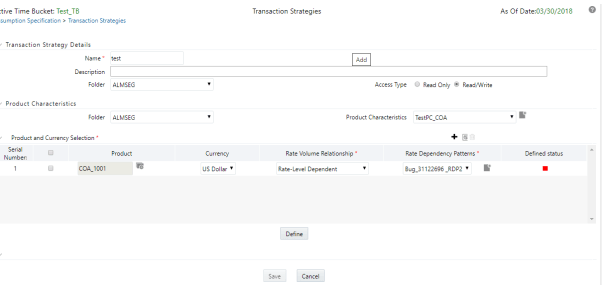
Description of the On-Balance Sheet Transaction Rule page as follows
2. Enter details for the product and click Define.
The default information from the product definition appears in the Core Attributes tab, and the relationship triggers defines what input fields are necessary. For more information on product setup, see the Product Characteristics section.
NOTE:
· For Bermudan Exercise type, provide multiple exercise dates and strike value
3. Enter details for Define Core Products Attributes tab and click Save.
Figure 2: Define Core Products Attributes tab for defining On-Balance Sheet transaction
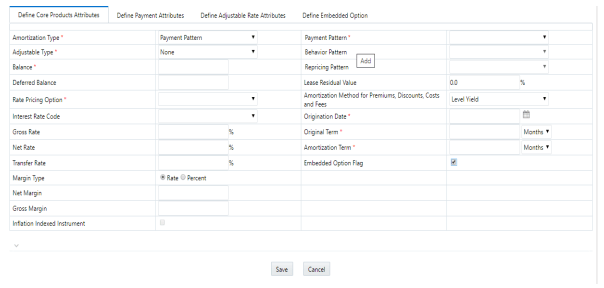
Description of the Core Products Attributes tab for defining On-Balance Sheet transaction
|
Field |
Description |
|---|---|
|
Amortization Type |
Method of amortizing principal and interest. This list consists of all standard OFSAA codes and all additional user-defined codes created through the Payment Pattern and Behavior Pattern interfaces, as follows:
This field is not editable if the Derivative Type is selected as FX Contract and subtype is selected as Spot or Forward. |
|
Adjustable Type
|
Determines the repricing characteristics of the new business record. This list consists of all standard OFSAA codes and all additional user-defined repricing patterns created through the Repricing Pattern interface. The codes are as follows:
When Adjustable Type Code is Fixed Rate, the Adjustable Rate Attributes tab is enabled. In this case, Rate Change Rounding Type, Rate Change Rounding Factor (when there is Rounding), Rate Floor Life, and Rate Cap Life fields are enabled in the Adjustable Rate Attributes tab. |
|
Balance |
Represents either the originating balance for transaction strategy records originating in the future or the current balance for transaction strategy records representing already originated accounts. If the Origination Date is in the past, the current balances are from the As Of Date. |
|
Deferred Balance |
Current Unamortized Deferred Balance associated with Instrument (such as, Premium, Discount, Fees, and so on.) |
|
Rate Pricing Option |
This drop-down list has following two Rate Pricing options: Direct Input - This option allows you to input rates for new business in the Transaction Strategy. Assign During Processing: This option uses the Origination Date and Interest Rate Code (IRC) specified in the Transaction Strategy and pulls the corresponding rate from the Forecast Rates Assumption, that is, it is priced dynamically during the simulation. |
|
Interest Rate Code |
Defines the pricing index to which interest rate is contractually tied. The interest rate codes appears in Interest Rate Code drop-down list depending on the selected currency. |
|
Gross Rate |
Gross rate on the instrument (such as, paid by the customer). |
|
Net Rate |
The nominal interest rate on instrument owed to or paid by, the financial institution. |
|
Transfer Rate |
The associated Transfer Rate for the account. |
|
Margin Type |
The Margin Type can be selected as Rate or Percentage.
For more information, see the OFS Cash Flow Engine Reference Guide. |
|
Net Margin |
The contractual margin over the interest rate code used in computing net rate. Gross margin minus any fees. |
|
Gross Margin |
Contractual spread over interest rate code used in the calculation of the gross rate. |
|
Payment Pattern |
You must select User-defined pattern if Payment Pattern is selected from the Amortization Type options. This field is not editable if the Derivative type is FX Contracts and subtype is selected Spot or Forward. For more information, see the Payment Pattern section. |
|
Behavior Pattern |
You must select User-defined pattern if Behavior Pattern is selected from the Amortization Type options. For more information, see the Behavior Pattern section. |
|
Repricing Pattern |
You must select User-defined pattern if Repricing Pattern is selected from the Adjustable Type options. For more information, see the Repricing Pattern section. |
|
Amortization Method For Prem, Disc, Costs And Fees |
Select Level Yield or Straight Line |
|
Lease Residual Value |
The residual value of a lease in the percentage of the original balance. |
|
Origination Date |
The date of the origination for the transaction account. This day can be in the future or the past. |
|
Original Term |
The contractual term at origination date in units (days, months, or years). |
|
Amortization Term |
Term upon which amortization is based in units (days, months, years). This field is not editable if the Derivative Type is selected as FX Contract and subtype is selected as Spot or Forward. |
|
Embedded Option Flag |
If an Embedded Option check box is selected, the Amortization Type must be non-amortizing. A warning message is displayed Embedded Options only supported for non-amortizing instruments. This check box enables the Define Embedded Options tab. |
|
Inflation Indexed Instrument |
Select this check box to make Inflation Indexed tab enabled. |
NOTE:
All fields with the red * are mandatory fields and must be populated. Disabled check boxes cannot be edited.
4. Enter details for Define Payment Attributes tab and click Apply.
The default information from the product definition appears in the payment attributes tab, and the relationship triggers defines what input fields are necessary. For more information on product setup, see Product Characteristics.
Figure 3: Define Payment Attributes tab for defining On-Balance Sheet transaction
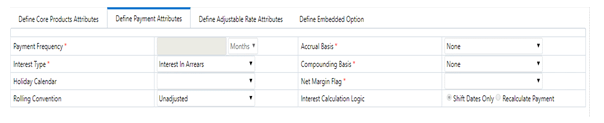
Description of the Payment Attributes tab for defining On-Balance Sheet transaction as follows
|
Fields |
Description |
|---|---|
|
Payment Frequency |
Frequency of payment (P & I, Interest, or Principal) in units (days, months, or years). For bullet instruments, use zero. This field is not applicable if the Derivative type is FX Contracts and subtype is selected Spot or Forward. |
|
Interest Type |
Determines whether interest is calculated in arrears or advance or if the rate is set in arrears. Following three interest types are available:
For conventional amortization products, interest in arrears is the only valid choice. This field is not editable if Derivative type is FX Contracts and subtype is selected as Spot or Forward. |
|
Holiday Calendar |
The default value is Blank and is enabled. This drop-down list contains the list of all holiday calendar definitions defined in the Holiday Calendar UI. For more information, see the Holiday Calendar section. |
|
Rolling Convention |
The default value is Unadjusted and is enabled, only when Holiday Calendar is selected. This drop-down list contains following values:
Many institutions have month-end accounting procedures to use this. |
|
Accrual Basis |
The basis on which the interest accrual on an account is calculated. This drop-down list has following options:
Note: A Holiday Calendar selection is required if the business/252 accrual basis is selected. Business/252 accrual basis is only applicable to the recalculate option of the Holiday Calendar Rule. If you select the shift payment dates, then payment is still recalculated for the non-holiday/weekend date. |
|
Compounding Basis |
Determines the number of compounding periods per payment period. This drop-down list has following options:
|
|
Net Margin Flag |
The setting of the Net Margin flag affects the calculation of Net Rate. This drop-down list has following options: Floating Net Rate - the net rate reprices in conjunction with the gross rate, at a value net of fees. Fixed Net Rate - the net rate equals a fixed fee equal to the net margin. This field is not applicable if the Derivative type is FX Contracts and subtype is selected Spot or Forward |
|
Interest Calculation Logic |
The following two options are available for Interest Calculation Logic: Shift Dates Only: If a future payment date (as computed by the cash flow engine (CFE)) falls on a designated holiday (including weekends), the CFE will shift the payment date from the holiday as per the rolling convention. No changes will be made to the payment amount or accrual amount; this is simply shifting the date on which the cash flow will post. The subsequent payment dates resume according to the original schedule. Recalculate Payment: This option includes the same holiday calendar definition as in the Shift Dates Only option, but it also takes one additional step to recalculate the interest payment amount (and interest accruals) based on the actual number of days in the (adjusted) payment period. The instrument records use the payment frequency (term and multiplier) and the re-price frequency (term and multiplier) in association with the next/last payment date and next/last re-pricing date to determine when the cash flow will post. The CFE logic is enhanced to acknowledge holiday dates and re-compute the payment/interest amount given the change in days. Also, the engine gets back on the scheduled track of payment events after a holiday event occurs in one (or many sequential) events. |
NOTE:
All fields with the red * are mandatory fields and must be populated. Disabled check boxes cannot be edited.
5. Enter details in Define Adjustable Rate Attributes tab and click Save.
This tab is used only if there is an adjustable or floating rate Product Characteristic that needs additional definition. The default values predefined by the product appears, and the irrelevant fields will be disabled based on the product type.
Figure 4: Define Adjustable Rate Attributes tab for defining On-Balance Sheet transaction
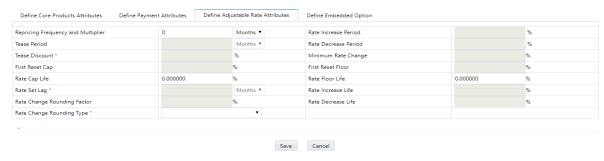
|
Fields |
Description |
|---|---|
|
Repricing Frequency And Multiplier |
Contractual frequency of rate adjustment in units (days, months, or years). |
|
Tease Period |
The tease period frequency is used to determine the length of the tease period in units (days, months, or years). |
|
Tease Discount |
The tease discount is used in conjunction with the original rate to calculate the tease rate. |
|
First Reset Cap |
This is the initial maximum value for mortgage instruments that have a tease period. This cap rate will be applicable at the tease end period, prior to the first reset. After this, the periodic and lifetime cap value will be applied. |
|
Rate Cap Life |
Maximum rate allowed during the life of the instrument. This field is not editable (blank) if the Derivative type is FX Contracts and subtype is selected Spot or Forward. If the Derivative type is Interest Rate Cap or Collar, then this field stores the Cap or Strike Rate values. |
|
Rate Set Lag |
Period by which the payment recalculation lags the date of the interest rate used for calculation in units (days, months, or years). This field is not editable(blank) if the Derivative type is FX Contracts and subtype is selected Spot or Forward. |
|
Rate Change Rounding Factor |
Percent to which the rate change on an adjustable instrument is rounded. This field is not editable(blank) if the Derivative type is FX Contracts and subtype is selected Spot or Forward. |
|
Rate Change Rounding Type |
The method used for rounding of interest rate codes. The choices are as follows: no rounding, truncate, round up, round down, round nearest. This field is not editable(blank) if the Derivative type is FX Contracts and subtype is selected Spot or Forward. |
|
Rate Increase Period |
The maximum interest rate increase allowed during the cycle on an adjustable-rate instrument. This field is not editable(blank) if the Derivative type is FX Contracts and subtype is selected Spot or Forward. |
|
Rate Decrease Period |
The maximum amount rate can decrease during the repricing period of an adjustable-rate instrument. This field is not editable(blank) if the Derivative type is FX Contracts and subtype is selected Spot or Forward. |
|
Minimum Rate Change |
The minimum required change in rate on a repricing date. This field is not applicable if the Derivative type is FX Contracts and subtype is selected Spot or Forward. |
|
First Reset Floor |
This is the initial minimum value for mortgage instruments that have a tease period. This floor rate is applicable at the tease end period, prior to the first reset. After this, the periodic and lifetime floor values are applied. |
|
Rate Floor Life |
The minimum rate for the life of the instrument. This field is not editable(blank) if the Derivative type is FX Contracts and subtype is selected Spot or Forward. If the Derivative type is Interest Rate Floor or Collar, then this field stores the Floor or Strike Rate values. |
|
Rate Increase Life |
The maximum interest rate increase allowed during the life of an adjustable-rate instrument. This is used to calculate rate cap based on forecasted rates scenario. If Rate Increase Life and Rate Cap are defined, then process uses the more restrictive rate. This field is not editable(blank) if the Derivative type is FX Contracts and subtype is selected Spot or Forward. |
|
Rate Decrease Life |
The maximum amount rate can decrease during the life of an adjustable-rate instrument. This is used to calculate the rate floor based on the forecasted rate scenario. If Rate Decrease Life and Rate Floor are defined, then process uses the more restrictive rate. This field is not editable(blank) if the Derivative type is FX Contracts and subtype is selected Spot or Forward. |
NOTE:
All fields with the red * are mandatory fields and must be populated. Disabled check boxes cannot be edited.
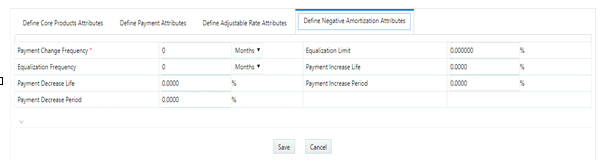
6. Enter details in the Negative Amortization Attributes tab and click Save.
This tab is used only for a product with negative amortization characteristics that needs additional definition. The default values predefined by the product appears, and the irrelevant fields are disabled based on the product type. If the Amortization Type is not Adjustable Negative Amount, then all the fields are disabled.
Figure 5: Define Negative Amortization Attributes tab for defining an On-Balance Sheet transaction
|
Fields |
Description |
|---|---|
|
Repricing Frequency And Multiplier |
Contractual frequency of rate adjustment in units (days, months, or years). |
|
Tease Period |
The tease period frequency is used to determine the length of the tease period in units (days, months, or years). |
|
Tease Discount |
The tease discount is used in conjunction with the original rate to calculate the tease rate. |
|
First Reset Cap |
This is the initial maximum value for mortgage instruments that have a tease period. This cap rate will be applicable at the tease end period, prior to the first reset. After this, the periodic and lifetime cap value will be applied. |
|
Rate Cap Life |
Maximum rate allowed during the life of the instrument. This field is not editable (blank) if the Derivative type is FX Contracts and subtype is selected Spot or Forward. If the Derivative type is Interest Rate Cap or Collar, then this field stores the Cap or Strike Rate values. |
|
Rate Set Lag |
Period by which the payment recalculation lags the date of the interest rate used for calculation in units (days, months, or years). This field is not editable(blank) if the Derivative type is FX Contracts and subtype is selected Spot or Forward. |
|
Rate Change Rounding Factor |
Percent to which the rate change on an adjustable instrument is rounded. This field is not editable(blank) if the Derivative type is FX Contracts and subtype is selected Spot or Forward. |
|
Rate Change Rounding Type |
The method used for rounding of interest rate codes. The choices are as follows: no rounding, truncate, round up, round down, round nearest. This field is not editable(blank) if the Derivative type is FX Contracts and subtype is selected Spot or Forward. |
|
Rate Increase Period |
The maximum interest rate increase allowed during the cycle on an adjustable-rate instrument. This field is not editable(blank) if the Derivative type is FX Contracts and subtype is selected Spot or Forward. |
|
Rate Decrease Period |
The maximum amount rate can decrease during the repricing period of an adjustable-rate instrument. This field is not editable(blank) if the Derivative type is FX Contracts and subtype is selected Spot or Forward. |
|
Minimum Rate Change |
The minimum required change in rate on a repricing date. This field is not applicable if the Derivative type is FX Contracts and subtype is selected Spot or Forward. |
|
First Reset Floor |
This is the initial minimum value for mortgage instruments that have a tease period. This floor rate is applicable at the tease end period, prior to the first reset. After this, the periodic and lifetime floor values are applied. |
|
Rate Floor Life |
The minimum rate for the life of the instrument. This field is not editable(blank) if the Derivative type is FX Contracts and subtype is selected Spot or Forward. If the Derivative type is Interest Rate Floor or Collar, then this field stores the Floor or Strike Rate values. |
|
Rate Increase Life |
The maximum interest rate increase allowed during the life of an adjustable-rate instrument. This is used to calculate rate cap based on forecasted rates scenario. If Rate Increase Life and Rate Cap are defined, then process uses the more restrictive rate. This field is not editable(blank) if the Derivative type is FX Contracts and subtype is selected Spot or Forward. |
|
Rate Decrease Life |
The maximum amount rate can decrease during the life of an adjustable-rate instrument. This is used to calculate the rate floor based on the forecasted rate scenario. If Rate Decrease Life and Rate Floor are defined, then process uses the more restrictive rate. This field is not editable(blank) if the Derivative type is FX Contracts and subtype is selected Spot or Forward. |
NOTE:
All fields with the red * are mandatory fields and must be populated. Disabled check boxes cannot be edited.
7. Enter details in the Other Mortgage Attribute tab and click Save.
This tab is available only if you are mapped to the ADCo LDM function.
8. Enter details in the Inflation Adjustment Attributes tab and click Save.
This tab is available when Inflation Indexed Instrument check box is selected on Define Core Products Attributes tab. The fields on this tab are used to enter Inflation Indexed details.
For more information on the cash flow calculations associated with Inflation indexed instrument, see the Oracle Financial Services Cash Flow Engine Reference Guide.
9. Enter details in the Tiered Interest Rate Attributes tab and click Save.
This tab is available if Adjustable Type is selected as Tiered Balance Interest Rate on Define Core Products Attributes tab. This tab includes the details for Tiered Balance Interest Rate that can be used during the ALM processing. For more information, see the ALM Processing section.
10. After saving the attributes, if the definition is successful, then defined status turns to green.
11. 10. A message is displayed to ask if you want to define another product/currency combination, click Yes to continue. Else, click No to go back to the Transaction Strategies Summary page.
After selecting an Off-Balance Sheet product in the product and currency selection pane, define the characteristics of the transaction. To define the attributes of the transaction, follow these steps.
1. Select the check box next to the product and click Define.
Figure 6: List of Derivatives for defining an Off-Balance Sheet transaction

Description of the Derivatives for defining an Off-Balance Sheet transaction as follows
2. In the Derivatives pane, select the Derivative Type and Derivative Subtype.
The following derivative types are available in Derivative Types drop-down list:
§ Swap
§ Option
§ FX Contracts
The following derivative subtypes are available in Derivative Subtype drop-down list:
§ If the Derivative Type is a Swap, select one of the seven swap types: Vanilla, Basis, Set in Arrears, Forward, Asset, Amortizing, or Cross Currency.
§ If the Derivative Type is an Option, select one of the three types: Interest Rate Cap, Interest Rate Floor, and Interest Rate Collar.
§ If the Derivative Type is FX Contracts, select subtype Spot or Forward.
3. Enter details in the Core Products Attributes tab and click Save.
Figure 7: Core Products Attributes tab for defining an Off-Balance Sheet transaction
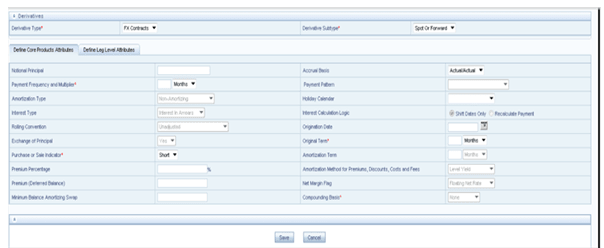
§ Depending on the relationship triggers on the type and subtype products, relevant fields are editable. For more information, see Table 1.
§ Enter additional if required and click Save.
4. Enter details in the Leg Attributes tab and click Save.
Figure 8. Leg Attributes tab for defining an Off-Balance Sheet transaction
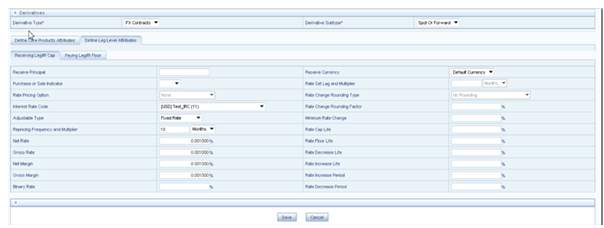
Description of the Leg Attributes tab for defining an Off-Balance Sheet transaction as follows
§ Receiving Leg / IR Cap tab: Use this tab to define the Receiving Leg or the Cap Characteristics. The fields are editable based on the relationship triggers of the Derivative Type and Derivative Subtype. For FX Contracts Derivative type, Receive Principal, pay Principal, Receive Currency, and Pay Currency are mandatory fields.
§ Paying Leg / IR Floor tab: Use this tab to define the pay side, or the interest rate floor. The fields are editable based on the relationship triggers of the Derivative Type and Derivative Subtype.
5. After saving the attributes, if the definition is successful, then defined status turns to green.
6. A message is displayed to ask if you want to define another product/currency combination, click Yes to continue. Else, click No to go back to the Transaction Strategies Summary page.