Data Entry Forms and Queries functionality is provided to allow you to create user-friendly Data Entry Screens with a choice of layouts, which aids easy data view and data manipulation. You can select tables based on which you can create forms that can be used in any Application.
Acronyms
· Defi: Data Entry Forms and Queries.
· Data Model: A logical map that represents the inherent properties of the data independent of software, hardware or machine performance considerations. The model shows data elements grouped into records, as well as the association around those records.
· Star Schemas: It is the simplest of data warehouse schemas. This schema resembles a star diagram. While the center contains one or more fact tables the points (rays) contain the dimension tables.
In a star schema, only one join is needed to establish the relationship between the fact table and any one of the dimension tables which optimizes queries as all the information about each level is stored in a row.
Designing Data Entry Forms
The Data Entry Forms and Queries menu has three options, namely, Form designer, Data Entry and Excel Upload options.
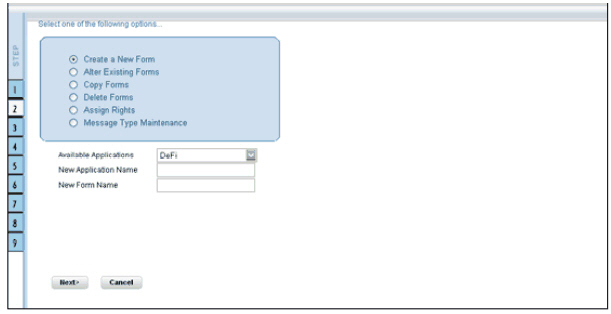
To Design forms, click Form Designer to open the Forms Designer Wizard. In this screen, you can create, alter, copy or delete forms. Create a new Form is the default
option that is chosen when you open the wizard. The various steps involved in the creation of the form are displayed in the left pane of the screen. You can also assign User Rights to already defined Forms.
The first screen of the Forms Designer wizard is displayed as Step 2, Step 1 being the login screen.