This module provides information on configuring the Oracle Financial Services Analytical Application (OFSAA) server-centric software for multiprocessing through the Process Tuning UI.
NOTE:
This appendix is shared with other OFS Applications including Funds Transfer Pricing and Asset Liability Management. OFS Balance Sheet Planning and OFS Asset Liability Management share the same OFSAA Server-Centric Software (Cash Flow Engine) for Deterministic Processing. Within this appendix, all references to Static Deterministic Multiprocessing for Asset Liability Management Processes apply equally to Balance Sheet Planning Processes.
ATTENTION:
The Process Tuning UI is available for definition ONLY for a User who has a role mapping that of 'Administrator' or 'Auditor'. The 'Auditor' Role mapped user has 'READ-ONLY' access to Process Tuning UI.
This appendix covers the following topics:
· Specifying Multiprocessing Parameters
For more information on OFSAA Process Tuning Options, see the Doc ID 1307766.1
By default, Multiprocessing is disabled for all applications. Multiprocessing is enabled by setting application-specific parameters located under the Common Object Maintenance > Process Tuning. The following applications and features have Multiprocessing Settings:
· Asset Liability Management – Deterministic and Stochastic Processing
· Balance Sheet Planning – Deterministic Processing
· Funds Transfer Pricing – Standard and Stochastic Processing
NOTE:
BSP does not support Stochastic Processing.
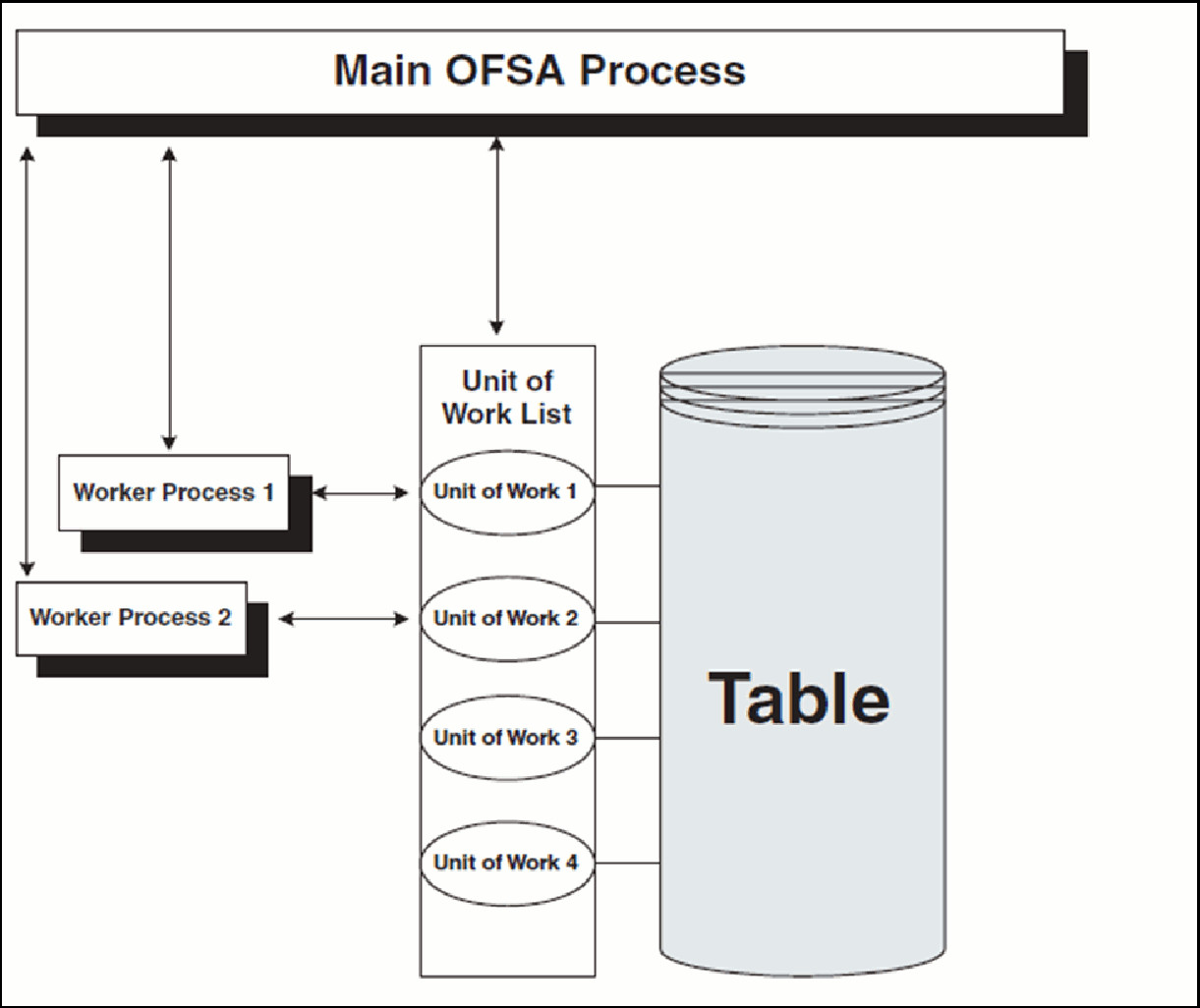
OFSAA Multiprocessing is based on the concept of a unit of work. A unit of work is a set of rows from the database. A single OFSAA Process becomes multiple processes by dividing the single process according to distinct sets of rows. Units of work are distributed to worker processes until all processes have been completed. To achieve multiple parallel processes, the following options must be configured:
· Creating a list or lists of units of work
· Defining the number of worker processes to service the units-of-work lists
· Defining how the worker processes service the unit-of-work lists
The specifics of each option are discussed. The following diagram illustrates the basic Multiprocessing Principles:
1. The main process makes a list of all units of work that must be processed.
2. The main process spawns worker processes. Each worker process is assigned a unit of work by the main process.
3. When all units of work have been completed, the worker process exits and the main process finishes any clean-up aspects of processing.
4. During processing the following is true:
§ Each worker process must form its own database connection.
§ A unit of work is processed only by a single worker process.
§ Different units of work are processed at the same time by different worker processes.
NOTE:
If data is not distributed well across physical devices, I/O contention may offset the advantage of parallelism within OFSAA for I/O bound processing. It is recommended that users choose a dimension or combination of dimensions that produce a relatively equal distribution of data records.
The Multiprocessing Options are the settings and parameters that control how individual ALM or FTP Processes are processed by the Cash Flow Engine. The seeded data model includes default settings for all of the Multiprocessing Options, but you can also customize the settings for your own use. This section describes the different Multiprocessing Options as well as how to customize each. These options are:
· Units of Work
· Unit-of-Work Servicing
· Worker Processes
Units of Work
The OFSAA Processing engines determine units of work for any job based upon the Process Data Slicing Code Assignment. The Data Slicing Code comprises one or more columns by which data in the (processing) table is segmented. The individual segments are the defined Units of Work.
The Process Tuning user interface enables you to specify different unit-of-work definitions for your processes. You could specify one unit-of-work definition for one set of processes and then specify a different unit-of-work definition for another set of processes.
The OFSAA Processing Engines determine the units of work for a job by executing the following statement (with filtering criteria applied) on every table the process is Run against:
select distinct<data slice columns>from<table>where<filter condition>;
where <data slice columns>is the comma-separated list of columns used for data slicing, <table>is the name of the instrument table being processed, and <filter condition>is the additional filter (if any) for the process. All portfolio tables with numeric columns will be used for Data Slicing.
Default Unit-of-Work Definitions
OFSAA provides three default Unit-of-Work Definitions:
PROCESS_DATA_SLICES_CD |
PROCESS_DATA_SLICES_SEQ |
COLUMN_NAME |
1 |
1 |
ORG_UNIT_ID |
1 |
2 |
COMMON_COA_ID |
2 |
1 |
ORG_UNIT_ID |
3 |
1 |
COMMON_COA_ID |
Any single Process Data Slice Code can comprise multiple columns. As an example of this, the PROCESS_DATA_SLICES_CD = 1 comprises both ORG_UNIT_ID and COMMON_COA_ID. The PROCESS_DATA_SLICES_SEQ identifies the precedence for the columns within the Process Data Slices CD.
Unit-of-Work Servicing
Unit-of-work servicing identifies how the OFSAA Processing Engines interact with Oracle Database Table Partitioning.
What is Partitioning
Partitioning addresses the key problem of supporting very large tables and indexes by enabling you to decompose them into smaller and more manageable pieces called partitions. After partitions are defined, SQL statements can access and manipulate the partitions rather than entire tables or indexes. Partitions are especially useful in Data Warehouse Applications, which commonly store and analyze large amounts of Historical Data.
What Is Unit-of-Work Servicing?
Unit-of-work Servicing specifies how individual units of work are processed for a table that is partitioned.
For a partitioned table, an application Rule Type/ Rule Step can create multiple units-of-work lists by executing the following statement (with filtering criteria applied) on every table partition the process is Run against:
select distinct<data slice columns>from<table_partition_n>
For example,
SELECT DISTINCT REV.COLUMN_NAME, MLS.DISPLAY_NAME from REV_TAB_COLUMNS REV, REV_TAB_COLUMNS_MLS MLS
WHERE REV.TABLE_NAME=MLS.TABLE_NAME AND REV.COLUMN_NAME=MLS.COLUMN_NAME
AND REV.TABLE_NAME='PORTFOLIO' AND REV.DATA_TYPE='NUMBER' AND MLS.MLS_CD='US'
UNION SELECT 'DATA_SLICE_ID' COLUMN_NAME,'Data Slice' DISPLAY_NAME from DUAL
UNION SELECT 'FINANCIAL_ELEM_ID' COLUMN_NAME,'Financial Element' DISPLAY_NAME from DUAL ORDER BY DISPLAY_NAME;
where <data slice columns>is the comma-separated list of columns used for Data Slicing. Any column in a table can be used for data slicing. <table_partition_n> are the unique table partitions of a table where n is assumed to be greater than 1.
The different Servicing Methodologies are stored in the FSI_PROCESS_PARTITION_CD and FSI_PROCESS_PARTITION_MLS tables. You cannot add any customized Servicing Methodologies. The Servicing Methodologies provided in OFSAA are as follows:
PROCESS_PARTITION_CD |
PROCESS_PARTITION |
0 |
Do not use partitions (single servicing) |
1 |
Use shared partitions (Cooperative Servicing) |
2 |
Use non-shared partitions (Dedicated Servicing) |
These methodologies are defined as follows:
· Single Servicing
· Cooperative Servicing
· Dedicated Servicing
Single Servicing
Single Servicing indicates that the OFSAA Processing engine fulfills unit-of-work requests regardless of any table partitioning. As each individual process completes, it requests the next unit-of-work segment, whether or not that segment belongs in the same Table Partition.
Use Single Servicing when you do not have Oracle Table Partitioning in your database.
Cooperative Servicing
Cooperative Servicing indicates that the OFSAA Processing engine fulfills unit-of-work requests so that each process works against a specific partition unless it is idle. Idle processes then work against the next available unit-of-work segment, whether or not that segment belongs in the same Table Partition.
Dedicated Servicing
Dedicated Servicing indicates that the OFSAA Processing engine fulfills unit-of-work requests so that each process works against a specific partition.
Examples of How Worker Processes Service Units of Work
FSI_PROCESS_ID_STEP_RUN_OPT.PROCESS_PARTITION_CD defines how Worker Processes service the units-of-work list or lists. As explained in the define units-of-work list or lists step, an FSI_PROCESS_ID_STEP_RUN_OPT.PROCESS_PARTITION_CD equal to 0 results in a single units-of-work list. With a single units-of-work list, all available worker processes service the list until all units of work are complete. When FSI _PROCESS_ID_STEP_RUN_OPT.PROCESS_PARTITION_CD equals 1 or 2 and the table to be processed is partitioned, multiple units of work lists are created. The following scenarios explain how the worker processes service multiple units-of-work lists:
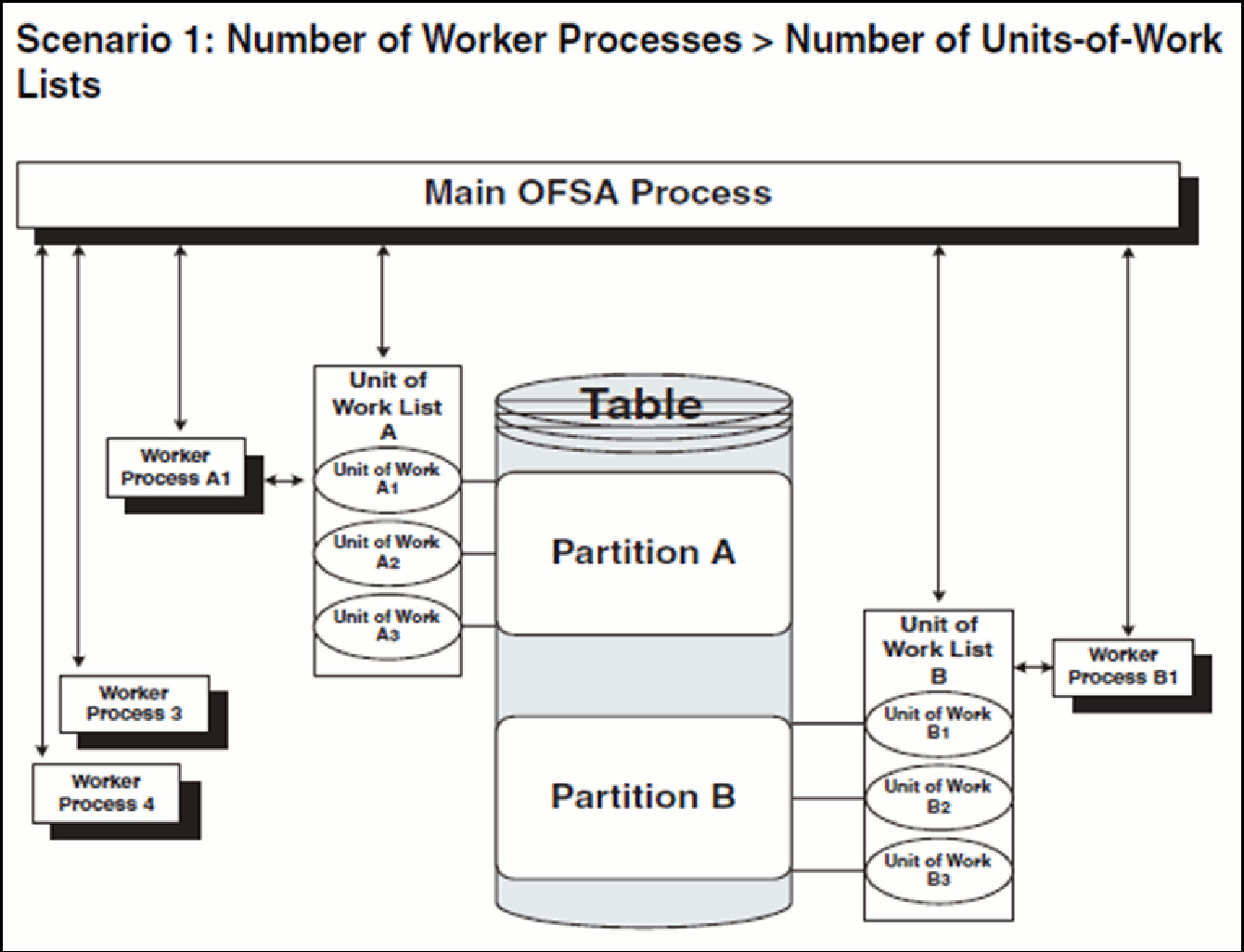
· The main process makes two lists of all units of work that need to be processed, unit-of-work list A and unit-of-work list B, respectively. (The setup is that the Table has two partitions.)
· The main process spawns four worker processes. A dedicated worker process is assigned to service each units-of-work list, Worker Process A1 and Worker Process B1 respectively. (The setup is (FSI_PROCESS_ID_STEP_RUN_OPT.NUM_OF_PROCESSES = 4)
If FSI_PROCESS_ID_STEP_RUN_OPT.PROCESS_PARTITION_CD equals 1, Worker Process 3 and Worker Process 4 assist Worker Process A1. When a unit-of-work list is complete, the available worker processes assist dedicated worker process on their unit-of-work List.
If FSI_PROCESS_ID_STEP_RUN_OPT.PROCESS_PARTITION_CD equals 2, Worker Process 3 and Worker Process 4 do not assist the dedicated worker processes
· When all units of work have been completed, the worker process exits and the main process finishes any clean-up aspects of processing.
· During processing the following is true:
Each worker process must form its own database connection.
A unit of work is processed only by a single worker process.
Different units of work are processed at the same time by different worker processes.
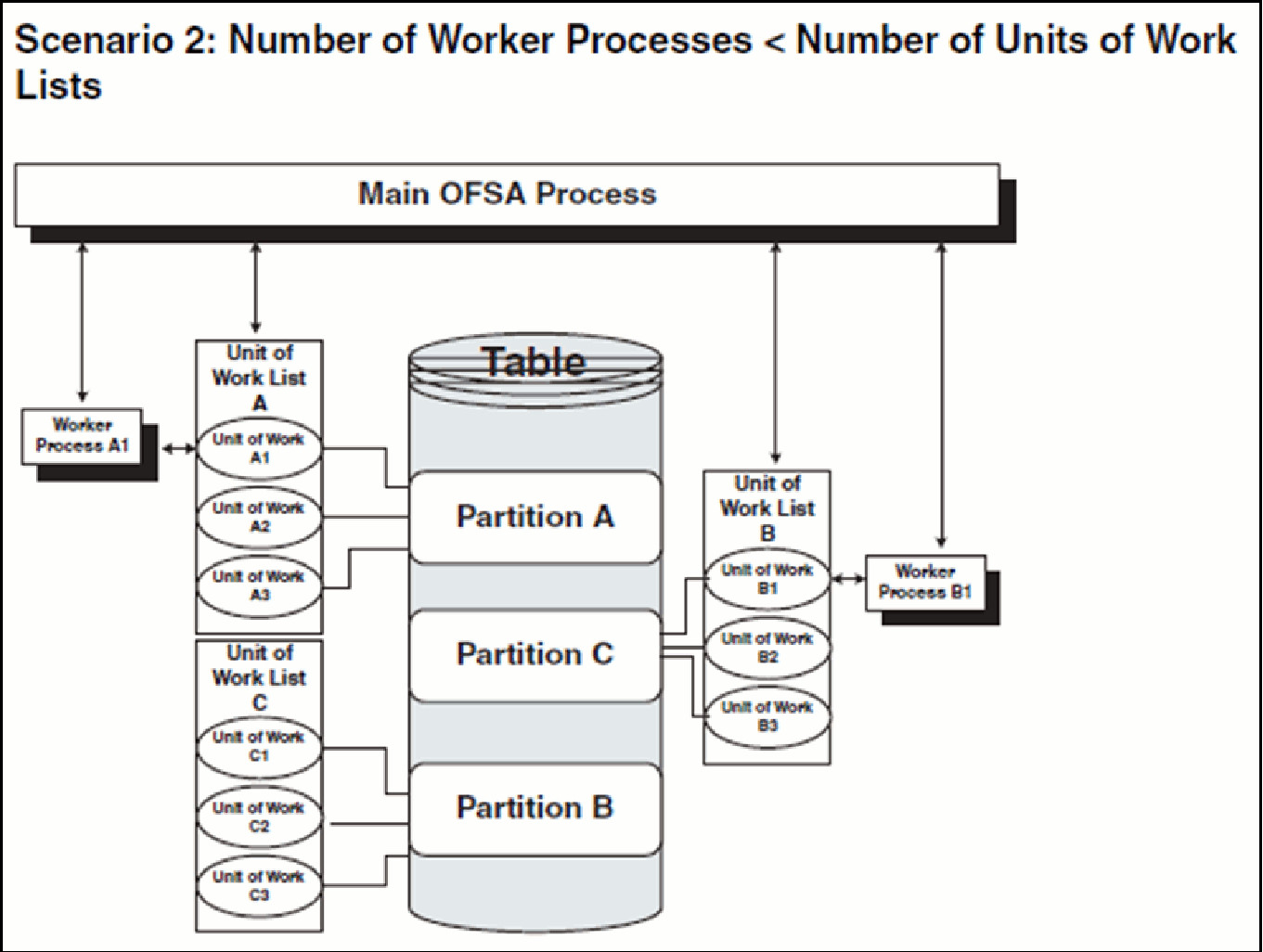
· The main process makes three lists of all units of work that need to be processed: unit-of-work list A, unit-of-work list B, and unit-of-work list C, respectively. (The setup is that the Table has three partitions).
· The main process spawns two worker processes. A dedicated worker process is assigned to service a units-of-work list, Worker Process A1 and Worker Process B1 respectively. (The setup is (FSI_PROCESS_ID_STEP_RUN_OPT.NUM_OF_PROCESSES = 2).
If FSI_PROCESS_ID_STEP_RUN_OPT.PROCESS_PARTITION_CD equals 1, Worker Process A1 and Worker Process B1 work until all units of work are complete from all three unit-of-work lists.
If FSI_PROCESS_ID_STEP_RUN_OPT.PROCESS_PARTITION_CD equals 2, the first worker process to complete their unit-of-work List services unit-of-work list C. When the other worker process completes their list, the worker process exits.
· When all units of work have been completed, the worker process exits and the main process finishes any clean-up aspects of processing.
· During processing the following is true:
Each worker process must form its own Database connection.
A unit of work is processed only by a single worker process.
Different units of work are processed at the same time by different worker processes.
Worker Processes
Worker Processes refer to the number of individual processes working simultaneously, to complete the job. The Main OFSAA Process launches the individual worker processes. OFSAA enables you to specify the number of worker processes for your jobs.
Users can access the multi-processing / tuning UI under the Common Object Maintenance on the LHS Menu.
The application installation process seeds default multiprocessing parameters. By default, multiprocessing is turned off for all processes. To turn on multiprocessing, Application Administrators can define Process tuning assumptions at the application level or for individual processes.
This section discusses the following topics:
· Multiprocessing Assignment Levels
· Defining Multiprocessing
· Engine Overrides
Multiprocessing Assignment Levels
Multiprocessing Parameters can be specified at different levels. A Multiprocessing Assignment Level is the category of ALM or FTP execution that is processed with a designated set of Multiprocessing Parameters.
OFSAA provides multiprocessing assignments at the following levels:
· Rule Type
· Rule Step
· Rule Name
Rule Type
When specifying Multiprocessing Parameters at the Rule Type level, all Rule Names for that Rule Type are processed with the designated parameters.
The OFSAA Multiprocessing UI allows you to designate a set of Multiprocessing Parameters used for a specific Rule Step within a given Rule Type.
NOTE:
BSP uses PROCESS_ENGINE_CD = 2 (that is, BSP uses the Asset Liability Management rule type).
The valid Rule Type values present in the 'Rule Type' drop-down list are:
FSI_PROCESS_ENGINE_CD |
|
|
PROCESS_ENGINE_CD |
DESCRIPTION |
RULE TYPE |
2 |
Asset | Liability Management Process |
Asset | Liability Management |
3 |
Funds Transfer Pricing Process |
Funds Transfer Pricing |
The OFSAA Multiprocessing UI allows you to designate a set of Multiprocessing Parameters used for a specific Rule step within a given Rule Type.
Rule Step
The Rule Step identifies a particular phase of an OFSAA Process. Rule Steps are reserved names specific to each Rule Type.
Each Rule Step Name applies to a specific Rule Type.
The mapping of the list of valid Rule Steps and the Rule Type for which they apply is as follows:
PROCESS_ENGINE_CD |
RULE STEP NAME |
0 |
ALL |
2 |
Client Data by Prod |
2 |
Client Data by Prod, Org |
2 |
Client Data by Prod, Currency |
2 |
Monte Carlo client data |
3 |
ALL |
Rule Name
Users can optionally specify multiprocessing parameters at the Rule Name level to override any parameters assigned at the Rule Type level. This enables you to individualize your multiprocessing options to handle situations unique to specific Processes. In most cases, defining multi-process assumptions at the Application / Rule Step level is sufficient.
The list of valid Rule Names is populated from the FSI_M_OBJECT_DEFINITION_B and FSI_M_OBJECT_DEFINITION_TL tables.
Only Rule Names of the following Process types are available for Multiprocessing:
· Asset | Liability Management Process
· Funds Transfer Pricing Process
Defining Multiprocessing
The process of defining Multiprocessing involves associating Multiprocessing Parameters to OFSAA Rule Types and/or Rule Names. Included in this section are the following topics:
· Parameter Tables
· How to Specify Parameters
Parameter Tables
While defining multiprocessing, the user interface inserts data into the following objects:
FSI_PROCESS_ID_RUN_OPTIONS
FSI_PROCESS_ID_STEP_RUN_OPT
FSI_PROCESS_ID_RUN_OPTIONS_V (Read Only View)
TABLE_NAME |
DISPLAY_NAME |
DESCRIPTION |
FSI_PROCESS_ID_RUN_OPTIONS |
Process ID Run Options |
This table specifies the Rule Name (ALM Process / FTP Process) for a single Process Type. |
FSI_PROCESS_ID_STEP_RUN_OPT |
Process ID Step Run Options |
This table stores the Process Tuning Definition and contains the Rule Name (ALM Process / FTP Process) and process tuning option selections. |
FSI_PROCESS_ID_RUN_OPTIONS_V |
Process ID Run Options View |
This table provides a read-only view based on FSI_PROCESS_ID_RUN_OPTIONS and FSI_PROCESS_ID_STEP_RUN_OPT tables. |
Each table is described as follows:
FSI_PROCESS_ID_RUN_OPTIONS
COLUMN_NAME |
DESCRIPTION |
Display Name |
PROCESS_RUN_OPTION_SYS_ID |
Rule Name (ALM Process / FTP Process) System ID Number |
System ID Number |
PROCESS_ENGINE_CD |
Process Engine Code that run this Rule Name (ALM Process / FTP Process) |
Process Engine Code |
FSI_PROCESS_ID_STEP_RUN_OPT
COLUMN_NAME |
DESCRIPTION |
Display Name |
PROCESS_STEP_RUN_SYS_ID |
This stores the Rule Name's (ALM Process / FTP Process) System ID Number. |
System ID Number |
PROCESS_ENGINE_STEP_CD |
Rule Step of the Rule Name getting the Process Data Slices Code and Process Partition Code |
Step Name |
NUM_OF_PROCESSES |
Number of Processes |
Number of Processes |
COMMIT_FREQ |
The number of rows after which the process commits changes. |
Commit Frequency |
ARRAY_SIZE_ROWS |
The number of rows updated in a single call to the database. |
Array Size Rows |
PROCESS_PARTITION_CD |
Process Partition code used by this Rule Name (ALM Process / FTP Process) in this step |
Process Partition Code |
PROCESS_DATA_SLICES_CD |
Process Data Slices Code used by this Rule Name (ALM Process / FTP Process) in this step |
Process Data Slices Code |
PROCESS_ENGINE_CD |
Process Engine Code that run this Rule Name (ALM Process / FTP Process) |
Process Engine Code |
FSI_PROCESS_ID_RUN_OPTIONS_V
COLUMN_NAME |
DESCRIPTION |
Display Name |
SYS_ID_NUM |
Rule Name (ALM Process / FTP Process) System ID Number |
System ID Number |
STEP_NAME |
Rule Step of the Rule Name getting the Process Data Slices Code and Process Partition Code |
Step Name |
PROCESS_ENGINE_CD |
Process Engine Code that run this Rule Name (ALM Process / FTP Process) |
Process Engine Code |
NUM_OF_PROCESSES |
Number of Processes |
Number of Processes |
PROCESS_DATA_SLICES_CD |
Process Data Slices Code used by this Rule Name (ALM Process / FTP Process) in this step |
Process Data Slices Code |
PROCESS_PARTITION_CD |
Process Partition code used by this Rule Name (ALM Process / FTP Process) in this step |
Process Partition Code |
COMMIT_FREQ |
The number of rows after which the process commits changes. |
Commit Frequency |
ARRAY_SIZE_ROWS |
The number of rows updated in a single call to the database. |
Array Size Rows |
How to Specify Parameters
The setup of multiprocessing is broken down into the following steps:
· Assignment Level Details
· Parameter Specification
· Multi-Processing Options
· Assign Unit-of-Work Servicing Methodology
For each step, the relevant Multiprocessing Parameters are described. Some applications override the multiprocessing configuration to handle special processing conditions. The Engine Overrides Section explains these special processing conditions.
Assignment Level Details
The 'Rule Type', 'Rule Step', and 'Rule Name' columns identify the Assignment Level for Multiprocessing.
Procedure:
1. Log on to Financial Services Applications with the User ID/password that has 'Administrator' Privileges.
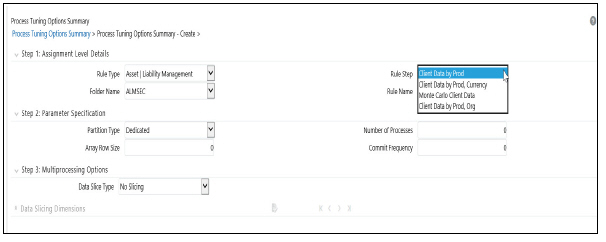
2. Navigate to Common Object Maintenance > Process Tuning Options Summary Page. This page is the gateway to Process Tuning Options-related functionality.
3. Click Add to create a new Process Tuning Assumption. Note, you can create only one process tuning assumption per combination of Rule Type and Rule Name.
4. The Process Tuning Options Summary – The Create page is displayed.
5. Step - 1: Assignment Level Details Block is the first block.

6. This block contains 4 fields - Rule Type, Rule Step, Folder Name, and Rule Name.
7. Select the required Rule Type.
8. Folder Name is a drop-down to assist rule-name selection, filtered by selected folder.
9. Select the required Rule Step. Rule Step is a drop-down that is filtered based on its mapping to the Rule Type selected.
10. Select the required Rule Name. Rule Name is a drop-down that displays rules of the selected type, within the specified folder.
The system supports four assignment levels. Because an application allows configurations that mix these levels, it is important to understand the order in which the application resolves the Multiprocessing Parameters when the configuration mixes assignment levels. The order is:
11. Specific Step of a specific Process for an engine
12. All Steps of a specific Process for an engine
13. Specific Step of all Processes for an engine
The next step after defining Assignment Level details is to define the Multiprocessing Parameters. Multiprocessing Parameters include inputs for the following:

· Partition Type
· Array Row Size
· Number of Processes
· Commit Frequency
The following describes inputs for each parameter:
Partition Type
Partition Type selection is required when table partitioning is being used within your instrument tables. If no partitioning is being done, then the default selection of “No Partitioning” should be selected. If partitioning is being done, then users should select either Dedicated or Cooperative. For more information on these selections, see the section on Multiprocessing Options > Unit of Work servicing.
Number of Processes
The number of processes selection indicates the number of concurrent processes to be launched by the engine. Typically, the number of processes should be less than or equal to the number of CPUs available on the server. Users should experiment with the number of processes setting to find the optimal value.
Array Row Size and Commit Frequency
You must do some trials to set these at the optimum level. Commit frequency can be set as 999 and array size rows as 500. Setting the array update size to be greater than the commit frequency does not affect because the array update size is limited by commit frequency.
To use Commit_Freq = 0 Or > 0, below are recommendations:
· If only "Process Cash Flow" writing is applicable as part of the process definition, then use Commit_Freq optimally greater than 0.
· If "Process Cash Flow" is not applicable but output to RES_DTL, CONS_DTL, and so on is done (as part of process definition), then the entry should be set to "0" in case commit is required at UOW (that is Unit of Work) End.
· If both "Process Cash Flow" and output to RES_DTL, CONS_DTL are applicable, then you should set Commit_Freq > 0 to take benefit of the Process Cash Flow Bulk Processing. If commit at the end of UOW is sought, then this setting should be set to "0".
Step 3 in the Multiprocessing Setup includes the following selections:

Data Slice Type
Data Slice Type is a static drop-down with 2 values [Distinct Values, No Slicing]. Users should choose distinct values to enable multiprocessing. After choosing distinct values, users are required to further select their Data Slicing Dimensions.
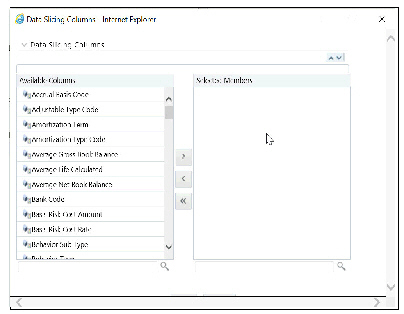
DataSlicing Dimensions
Choose the edit option to launch a pop-up window to select the slicing columns:
NOTE:
All portfolio tables with numeric columns will be used for Data slicing, The columns with null values cannot be used for data slicing.
Engine Overrides
For some conditions, the OFSAA Processing Engines override the Multiprocessing Definition for an assignment level. The overrides are as follows:
Balance Sheet Planning
Balance Sheet Planning configures the data slicing columns automatically using the Product Leaf Column defined in the active Application Preferences as the default slicing column for all runs. The Balance Sheet Planning engine adds more slicing columns based upon the parameters specified in the Balance Sheet Planning Process, as follows:
· If Product/Organizational Unit functional dimensions are selected, the engine adds ORG_UNIT_ID as an additional slicing column.
· If Product/Currency functional dimensions are selected, the engine adds ISO_CURRENCY_CD as an additional slicing column.
· If Product/Organizational/Currency functional dimensions are selected, the engine adds ORG_UNIT_ID and ISO_CURRENCY_CD as additional slicing columns.
Tuning for Optimal Multiprocessing settings is an exercise similar to tuning a database. It involves experimentation with different settings under different load conditions.
Database Bound versus Engine Bound Jobs
OFSAA jobs fall into the following two categories:
· Database Bound—Those jobs that spend more time within database manipulations.
· Engine Bound—Those jobs whose calculations are complex, with the time spent with Database Operations being small compared to the amount of time doing calculations.
The following table lists OFSAA jobs by Application and identifies whether the job is usually database bound or Engine bound.
Application |
Job Type |
Generic Job Type |
OFSAA / DB Bound |
MP Enabled |
Comments |
Asset | Liability Management |
Detail Processing (Current position, Gap, Market Value) |
Row by Row |
OFSAA |
Yes |
All processing except Formula Results and Auto Balancing |
Asset | Liability Management |
Formula Results |
Row by Row |
OFSAA |
No |
Formula Results is not currently functional and will be available in a later release |
Asset | Liability Management |
Auto Balancing |
Row by Row |
OFSAA |
No |
|
The scalability of database-bound jobs is largely determined by the size of the database server. The scalability of Engine bound jobs is determined by the size of the Application Server.
Tuning the OFSAA Database from the Application Layer
Despite the many multiprocessing options, tuning the OFSAA database from the application layer is achieved by following a simple process. The process is as follows:
1. Identify the OFSAA job types that are used by your organization.
2. For each job type, time runs for a series of Number of Processes settings, defined in Step 2: Parameter Details.
3. Based on the results, determine the appropriate setting per application.
Special Considerations
Because of the nature of parallel processing performed by OFSAA, different processes tend to need to access the same tables at the same time. Unless care is taken in designing the layout of the database tables, this can lead to I/O contention, which in turn, can reduce scalability.
While configuring a BSP Process user can choose to output detailed Cash Flows (either all or part). This data is stored in table FSI_O_PROCESS_CASH_FLOWS. When a process is re-run either for the same As-of-Date or for a different date existing data of that process is deleted from this table before calculations initiate. When the volume of data is high this can take time thereby impacting overall performance. The following recommendations will help improve this.
1. Create a non-unique index on column RESULT_SYS_ID of table FSI_O_PROCESS_CASH_FLOWS. The index is expected to make DELETE of existing data faster when a process is re-Run.
2. FSI_O_PROCESS_CASH_FLOWS can be partitioned by RESULT_SYS_ID. Automatic List Partitioning can be used so that partitions get added automatically when a new process is defined and executed.
3. Before executing the BSP Process, existing data for that process can be removed from FSI_O_PROCESS_CASH_FLOWS by using the DELETE of the TRUNCATE PARTITION function. This will ensure that the engine does not spend time doing that activity.
Some other server and database level settings that can improve performance are:
1. REDO Log size of the database can be increased. This will reduce log switch waits and improve overall time for Analytical Operations.
2. CURSOR_SHARING parameter of the database can be set to FORCE. By doing this database will try to convert SQL queries generated by the Cash Flow Engine to use bind variables which will reduce hard parses and can improve performance.
The above are just for guidance and you must take the help of Database Administrators and other system personnel to implement the above taking your specific infrastructure and other requirements into consideration.