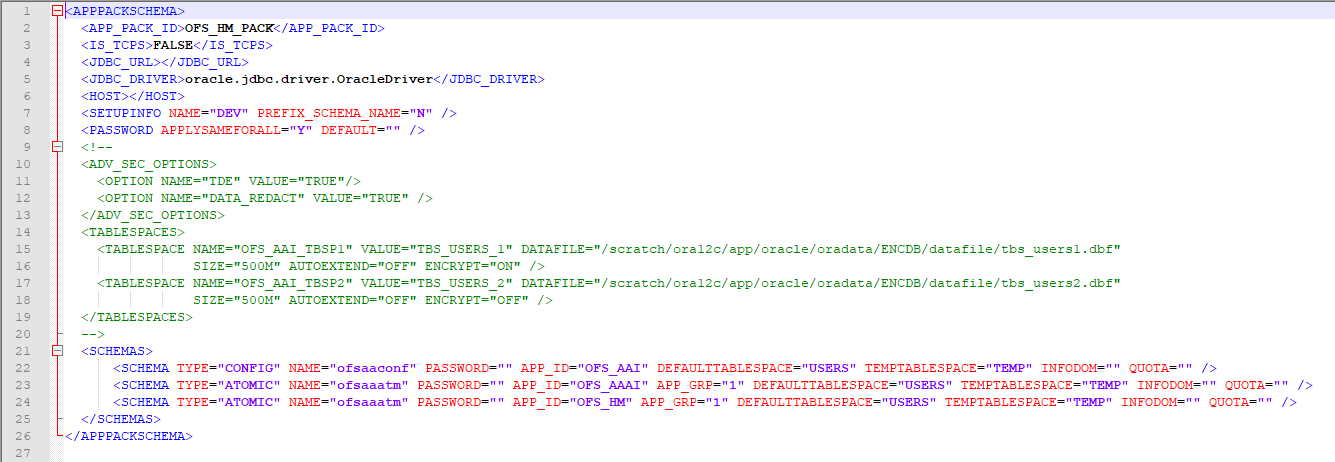
If the installation is being performed for RDBMS, provide the Pack specific schema details in the OFS_HM_SCHEMA_IN.xml file.
You can configure the following types of schemas:
CONFIG: This schema holds the entities and other objects required for OFSAA setup configuration information. Only one CONFIG schema per OFSAA instance is permitted.
ATOMIC: This schema holds the data model entities. One ATOMIC schema is attached to one Information Domain. You can have multiple ATOMIC schemas for a single OFSAA instance.
This section describes how to create database schemas, objects within schemas, and assigning appropriate grants.
Specify the database schemas required for the installation in the OFS_HM_SCHEMA_IN.xml file. Update the values of the various tags and parameters available in this file before executing the schema creator utility.
This file must be configured only if the database is RDBMS.
To configure the OFS_HM_SCHEMA_IN.xml file, follow these steps:
Log in to the system as a non-root user.
Navigate to the OFS_HM_PACK/schema_creator/conf directory.
Edit the OFS_HM_SCHEMA_IN.xml file using a text editor.
Figure 11: Sample OFS_HM_SCHEMA_IN.xml File
Configure the values as mentioned in the following table and save the file.
NOTE |
On successful execution of the utility, the passwords entered in the OFS_HM_SCHEMA_IN.xml file are nullified. |
Table 21: OFS_HM_SCHEMA_IN.xml file Parameters
Tag Name or Attribute Name |
Description |
Mandatory (Y or N) |
Default Value or Permissible Value |
Comments |
<APP_PACK_ID> |
Seeded unique ID for the OFSSAA Application Pack |
Y |
OFS_HM _PACK |
Do not modify this value. |
<IS_TCPS> |
Enter if the TCPS configuration is required. |
Y |
Seeded, with FALSE as the default value. |
Modify this to TRUE if you require the installer to uptake the configuration. |
<JDBC_URL> |
Enter the JDBC URL. NOTE: You can enter the following JDBC URL types: RAC/ NON-RAC enabled database connectivity URL. TCPS RAC/ NON-RAC enabled database connectivity URL provided the <IS_TCPS> tag value is TRUE. Wallet-enabled JDBC URL. |
Y |
Example: jdbc:oracle:thin:@< DBSERVER IP/ HOST/ IP>:<PORT>:<SID> or jdbc:oracle:thin:@//[HOS T][:PORT]/ SERVICE or jdbc:oracle:thin:@(DESCRI PTION=(ADDRESS_ LIST=(ADDRESS=(PROT OCOL=TCP)(HOST=[HO ST])(port=[PORT]))(ADD RESS=(PROTOCOL=TCP) (HOST=[HOST])(PORT=[ PORT]))(LOAD_ BALANCE=yes)(FAILOV ER=yes))(CONNECT_ DATA=(SERVICE_ NAME=[SERVICE]))) For example: jdbc:oracle:thin:@//dbhos t.server.com:1521/service 1 or jdbc:oracle:thin:@//dbsho st.server.com:1521/scan-1 or jdbc:oracle:thin:@(DESCRI PTION=(ADDRESS_ LIST=(ADDRESS=(PROT OCOL=TCP)(HOST=dbhost1.server.com) (port=1521))(ADDRESS=(PROTOCOL=TCP)(HOST=dbhost2.s erver.com)(PORT=1521))( LOAD_BALANCE=yes)(FAILOV ER=yes))(CONNECT_ DATA=(SERVICE_NAME=service1))) or <JDBC_URL>jdbc:oracle:thin:@(DESCRIPTION = (ADDRESS = (PROTOCOL =TCPS)(HOST = dbhost.server.com)(PORT = 2484)) (CONNECT_DATA =(SERVER = DEDICATED) (SERVICE_NAME=SERVICEID))(security=(ssl_server_cert_dn=CN=dbhost))) or jdbc:oracle:thin:/@ |
Ensure to add an entry (with SID/ SERVICE NAME) in the tnsnames.ora file on the OFSAA server. The entry must match with the SID/ SERVICE NAME used in the JDBC URL. Ensure that you have configured: The correct Oracle Wallet with the credentials for stored Sys, Config, and Atomic Users. The JDBC URL as follows: jdbc:oracle:thin:/@ For more information on how to configure Oracle Wallets for OFSAA Installation and Data Sources, see the OFS Analytical Applications Infrastructure Administration Guide. |
<JDBC_DRIVER> |
This driver's name is seeded by default. |
Y |
Example: oracle.jdbc.driver.OracleDriver |
Only JDBC Thin Driver is supported. Do not modify this value. |
<HOST> |
Enter the Hostname/ IP Address of the system on which you are installing the OFSAA components. |
Y |
Hostname/ IP Address |
|
<SETUPINFO>/PREFIX_SCHEMA_NAME |
Identifies whether the value specified in <SETUPINFO>/NAME attribute must be prefixed to the schema name. |
N |
YES or NO |
The default value is YES. |
<SETUPINFO>/NAME |
Enter the acronym for the type of implementation. This information is displayed in the OFSAA Home Page. On executing the schema creator utility, this value is prefixed with each schema name. For example: dev_ofsaaconf, uat_ofsaatm. |
Y |
Seeded, with REG PREFIX_SCHEMA_NAME="N as the default value. Accepts strings with a minimum length of two and a maximum of four. Example: DEV, SIT, PROD |
This name appears in the OFSAA Landing Page as "Connected To: xxxx". The schemas that are created get this prefix. For example, dev_ofsaaconf, uat_ofsaaconf, and so on. |
<PASSWORD>/ DEFAULT* |
Enter the password if you want to set a default password for all schemas. You also must set the APPLYSAME- FORALL attribute as Y to apply the default password for all the schemas. |
N |
Seeded, with oracle123 as the default value. The maximum length allowed is 30 characters. Special characters are not allowed. |
On successful execution of the utility, the entered password in the OFS_<APP PACK>_SCHEMA_IN.xml file is cleared. |
<PASSWORD>/ APPLYSAMEFORALL |
If you have entered Y in APPLYSAME- FORALL attribute and also have specified individual passwords for all the schemas, then the specified individual passwords will take precedence. |
Y |
Default N Permissible: Y or N. Enter Y if you want to apply the password specified in the DEFAULT attribute for all the schemas. If you enter as N, you must provide individual passwords for all schemas. |
Setting this attribute value is mandatory if the DEFAULT attribute is set. |
<SCHEMA>/TYPE |
The different types of schemas that are supported in this release are ATOMIC and CONFIG. By default, the schemas types are seeded based on the Application Pack. |
Y |
ATOMIC/CONFIG |
Only One CONFIG schema can exist in the file. Do not edit this attribute value. This schema identifies as the CONFIGURATION schema that holds the OFSAA setup detains and other Metadata information. Multiple ATOMIC schemas can exist in the file. |
<SCHEMA>/NAME |
The schemas’ names are seeded based on the Application Pack by default. You can edit the schema names if required. The Schema Name will have a prefix of the SETUPINFO/ NAME attribute.
|
Y |
Seeded, with OFSCONFIG as the default value. The permissible length is 15 characters and only alphanumeric characters are allowed. No special characters allowed except underscore '_'. |
SETUPOINFO/NAME attribute value is prefixed to the schema name being created. For example, if a name is set as 'ofsaatm' and setupinfo as 'uat', then schema being created is 'uat_ofsaatm'. . |
<SCHEMA>/PASSWORD |
Enter the password of the schema to be created. If this attribute is left blank, then the password specified in the <PASSWORD>/DEFAULT attribute is applied as the Schema Password. |
N |
The maximum length allowed is 30 characters. Special characters are not allowed. |
It is mandatory to enter the password if you have set the <PASSWORD>/ APPLYSAMEFORALL attribute as N. |
<SCHEMA>/APP_ID |
The Application ID is seeded based on the Application Pack by default. |
Y |
Unique seeded values are: OFS_AAI OFS_HM |
Identifies the Application/ Product for which the schema is being created. Do not edit this attribute value. Do not modify this value. |
<SCHEMA>/DEFAULTTABLESPACE |
Enter the available default tablespace for DB User. If this attribute is left blank, then USERS is set as the default tablespace. |
N |
Seeded, with USERS as the default value. Permissible Any existing valid tablespace name. |
Modify this value to associate any valid tablespace with the schema. |
<SCHEMA>/TEMPTABLESPACE |
Enter the available temporary tablespace for DB User. If this attribute is left bank, TEMP is set as the default tablespace. |
N |
Seeded, with TEMP as the default value. Permissible Any existing valid temporary tablespace name. |
Modify this value to associate any valid tablespace with the schema. |
<SCHEMA>/QUOTA |
Enter the quota to be set on the DEFAULTTABLESPACE attribute for the schema/ user. Minimum: 500M or Unlimited on default Tablespace. |
N |
Permissible values are a minimum of 500M or UNLIMITED as the default value. Example: 600M/m 20G/g UNLIMITED/unlimited |
Modify this value to grant the specified quota on the mentioned tablespace to the user. |
<SCHEMA>/ INFODOM |
Enter the name of the Information Domain to associate this schema. The schema creator utility automatically derives an Information Domain Name based on the Application Pack if no value is specified for this attribute. |
N |
Seeded, with OFSINFDOM as the default value. Permissible length is 16 characters and only alphanumeric characters are allowed. No special characters are allowed. |
|
<ADV_SEC_OPTIONS>/ |
Parent tag to hold Advance Security Options. |
N |
|
Uncomment the tag and edit if you want to add security options. For example, TDE and Data Redact. For details, see the example in the comments for the <TABLESPACE>/ENCRYPT tag. |
<ADV_SEC_OPTIONS>/TDE |
Tag to enable/disable TDE. |
N |
The default is FALSE. To enable TDE, set this to TRUE. |
Ensure this tag is not commented if you have uncommented <ADV_SEC_OPTIONS> |
<ADV_SEC_OPTIONS>/DATA_REDACT |
Tag to enable/disable the Data Redaction feature. |
N |
The default is FALSE. To enable DATA_REDACT, set this to TRUE |
Ensure this tag is not commented if you have uncommented<ADV_SEC_OPTIONS> |
<TABLESPACES> |
Parent tag to hold <TABLESPACE> elements |
N |
NA |
Uncomment the tag and edit. ONLY if tablespaces are to be created as part of the installation. For details, see the example following the table. When TDE is TRUE in ADV_SEC_OPTIONS, then the <TABLESPACES> tag must be present in the XML file. |
<TABLESPACE>/NAME |
Logical Name of the tablespace to be created. |
Y |
|
Name, if specified, must be referred in the <SCHEMA DEFAULTTABLESPACE= "##NAME##"> attribute. Note the ## syntax. |
<TABLESPACE>/VALUE |
Physical Name of the tablespace to be created. |
Y |
NA |
Value, if specified, is the actual name of the TABLESPACE. |
<TABLESPACE>/DATAFILE |
Specifies the location of the data file on the server. |
Y |
NA |
Enter the absolute path of the file to be created. |
<TABLESPACE>/AUTOEXTEND |
Specifies if the tablespace must be extensible or have a hard limit. |
Y |
ON or OFF |
Set to ON to ensure that the tablespace does not run out of space when full. |
<TABLESPACE>/ENCRYPT |
Specifies if the tablespace(s) must be encrypted using TDE |
Y |
ON or OFF |
Set to ON to ensure that the tablespaces when created are encrypted using TDE. NOTE: Encryption of tablespaces requires enabling Transparent Data Encryption (TDE) on the Database Server. Example: The following snippet shows that TDE is enabled and hence the tablespace is shown with encryption ON. <ADV_SEC_OPTIONS> <OPTION NAME="TDE" VALUE="FALSE"/> <OPTION NAME="DATA_REDACT" VALUE="FALSE" /> </ADV_SEC_OPTIONS> <TABLESPACES> <TABLESPACE NAME="OFS_AAI_TBSP_1" VALUE="TS_USERS1" DATAFILE="/ scratch/ora19c/app/oracle/oradata/OFSPQA19cDB/ts_users1.dbf" SIZE="500M" AUTOEXTEND="ON" ENCRYPT="ON" /> <TABLESPACE NAME="OFS_AAI_TBSP_2" VALUE="TS_USERS2" DATAFILE="/ scratch/ora19c/app/oracle/oradata/OFSPQA19cDB/ts_users2.dbf" SIZE="500M" AUTOEXTEND="ON" ENCRYPT="ON" /> </TABLESPACES>
<SCHEMAS> <SCHEMA TYPE="CONFIG" NAME="ofsaaconf" PASSWORD="" APP_ID="OFS_AAI" DEFAULTTABLESPACE="##OFS_AAI_TBSP_1##" TEMPTABLESPACE="TEMP" QUOTA="unlimited"/> <SCHEMA TYPE="ATOMIC" NAME="ofsaaatm" PASSWORD="" APP_ID="OFS_AAAI" DEFAULTTABLESPACE="##OFS_AAI_TBSP_2##" TEMPTABLESPACE="TEMP" QUOTA="unlimited" INFODOM="OFSAAAIINFO"/> </SCHEMAS> |