This section contains detailed information on Viewing HM objects in the Metadata Browser.
Topics
Metadata Browser (Object and Application View)
Viewing HM Objects in Metadata Browser
Metadata Browser (Object and Application View) provides a common repository of metadata Objects created in OFSAAI and applications hosted in OFSAAI. Using this view, you can identify the usage of base Objects in higher-level Objects and the mapping of Objects to Applications. It enables to perform traceability and impact analysis. It also allows you to view the data flow and the workflow of the application and understand the usage of Objects within the application.
Metadata Browser (MDB) supports Application to view and Object view: In Application view, you can browse through the metadata created using the applications hosted in OFSAAI. In Object view, you can view the metadata created in OFSAAI.
To access the Metadata Browser (Object and Application View), your role Business Analyst (SYSBAU) must be mapped to the SCR_MDB function. For more information on mapping functions to a role, see Function - Role Map.
The Application view provides the top-down approach to view the defined metadata. The Application view shows the list of Applications at the parent level, and the Child elements are Runs for the application. This list will grow dynamically based on the Run definitions mapped to Application, through this tab users can view Run execution details in Metadata Browser.
For more information on Metadata Browser, see the Metadata Browser section of Oracle Financial Services Analytical Application Infrastructure (OFSAAI) User Guide.
Topics
You can configure the Metadata Browser for HM using the following steps:
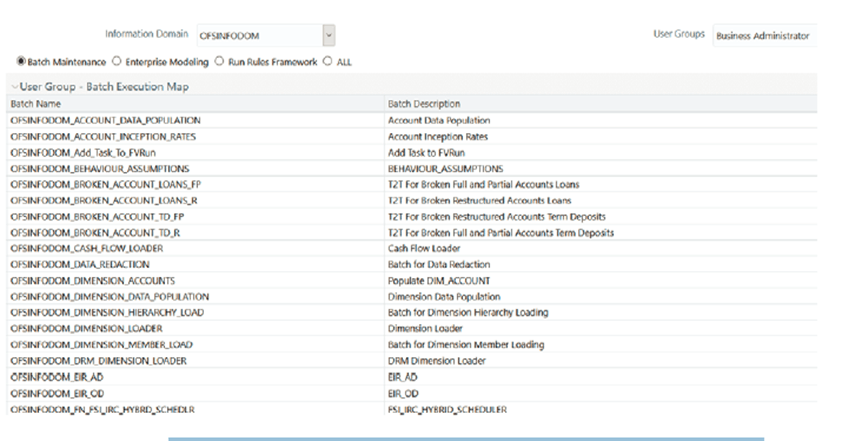
1. Map the MDB batch to User - Group using the Common Object Maintenance > Object Administration > Object Security > Batch Execution Rights as mentioned here:
For more information, see Command Line Utility to Publish Metadata in Metadata Browser section in Oracle Financial Services Analytical Application Infrastructure (OFSAAI) User Guide.
For more information, see the Batch Execution section of Oracle Financial Services Analytical Application Infrastructure (OFSAAI) User Guide.
2. Execute the Batch for MDB publish.
3. Navigate to Metadata Browser (Object and Application) window of the respective application.
Hedge Management under Oracle Financial Services Analytical Applications has the Metadata Browser (MDB).
To view HM applications and objects in MDB, perform the following steps:
1. After successful execution of the Batch for MDB Publish, in the Applications tab of the Oracle Financial Services Analytical Applications window, in the Left-Hand Side (LHS) menu under Hedge Management, choose Metadata Browser. You can also access Metadata Browser in the Object Administration tab.
2. Click the Application tab under the Metadata Browser window to view the HM applications.
3. Click the Object tab under the Metadata Browser window to view HM objects:
4. Under Process Metadata > Rules, all the rules defined under the HM window are displayed.