1 Feature Summary
This chapter describes the feature enhancements in this release.
Noteworthy Enhancements
This guide outlines the information you need to know about new or improved functionality in the Oracle Retail Customer Engagement (ORCE) update and describes any tasks you might need to perform for the update. Each section includes a brief description of the feature, the steps you need to take to enable or begin using the feature, any tips or considerations that you should keep in mind, and the resources available to help you.
-
Feature
-
Module Impacted
-
Scale
-
Small: These UI or process-based features are typically comprised of minor field, validation, or program changes. Therefore, the potential impact to users is minimal.
-
Larger: These UI or process-based features have more complex designs. Therefore, the potential impact to users is higher.
-
-
Delivered
-
Is the new feature available for use immediately after upgrade or must the feature be enabled or configured? If no, the feature is non-disruptive to end users and action is required (detailed steps below) to make the feature ready to use.
-
-
Customer Action Required?
-
You must take action before these features can be used. These features are delivered disabled and you choose if and when to enable them.
-
| Feature | Module Impacted | Scale | Delivered | Customer Action Required? |
|---|---|---|---|---|
| Segment Management | Segment | Larger | Enabled with Segment Foundation | No |
New Feature Description
This section describes the new features.
Segment Management
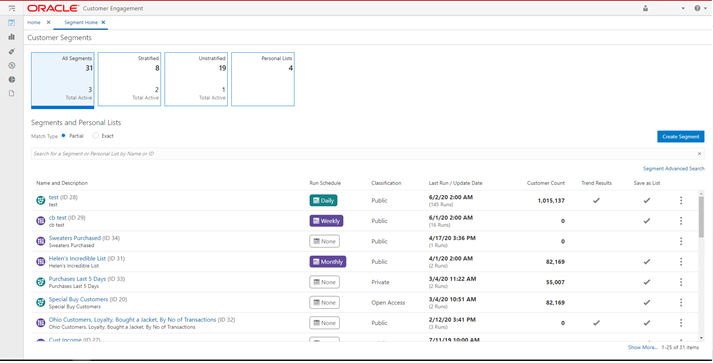
The segment functionality is now available on the modern user interface.
-
The following segment functionality is now in the JET UI:
-
Stratified Segments
-
Unstratified Segments
-
Personal Lists (formerly known as Manual Segment)
-
Segment Home
-
Segment Scorecards (Stratified, Unstratified, and Personal Lists)
-
-
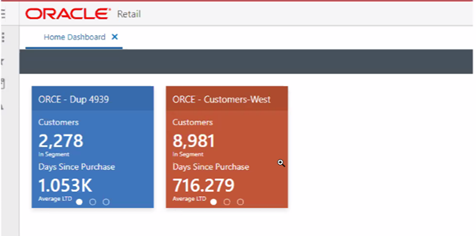
Segment Tile for Oracle Retail Home:
-
Segment specific tiles can be created in Retail Home
-
Tile data is configurable via setup in Retail Home
-
Clicking the tile will route the user to their CE home page (Customer Home, Promotion Home, or Classic View)
-