
A typical Balance Computation implementation can involve a large number of computation instances given the number of Data Origins, GL Types and currencies. There is commonly a bell-curve distribution of processing times for each compuatation rule. Some complete in seconds, some complete in minutes, and others may take hours to complete. The run time of an computation is normally closely related to the volume of data it generates, however, there may be instances when an computation runs slower than it must due to stale database statistics, skews in the data being queried, a lack of appropriate indexes, or a poor execution plan generated by the database optimizer. Your DBA may be able to enhance the overall performance of the database by gathering database statistics more frequently, generating additional indexes, or by other tuning techniques. One such additional tuning technique is to add hints to your queries.
The data from the balance sheet is categorized by the GL types. Within each of these GL types (Service Tasks), for execution, you can invoke multiple threads in the database. This process can be governed by the following methods:
· Parallelize Executions using the FSI_OPTIMIZATION_SETTINGS table
A typical Balance Computation implementation can involve a large number of computation instances given the number of Data Origins, GL Types and currencies. Frequently, many of these rules must be executed sequentially; and in larger implementations, end-to-end execution times can exceed allowable thresholds. One way to reduce end-to-end runtime is to execute as many processes as possible in parallel. Other ways to reduce your end-to-end runtime include tuning your database, employing hints on your slowest running computations (see SQL Hints), or upgrading your hardware (more CPUs, more memory, faster Input/Output subsystems, and so on). Having a more powerful database server will not improve your performance if hardware resources are left idle. When executing computation rules sequentially, you will utilize only a single CPU on your database server.
OFSBCE allows you to utilize Oracle Parallel Execution. To capture the idle system resources, Oracle Parallel Execution subdivides the SQL statements into multiple independent units of work each of which can run in parallel.
NOTE |
In OFSBCE, you can add the alter table partition for all the processing tables for each posting date or effective date of the journal entries. |
The Oracle database supports parallel execution of SQL statements through the use of the following:
· The PARALLEL clause for selected tables and indexes
· Parallel SQL Hints
· Alter Session statements to enable subsequent SQL operations to run in parallel
Working with your DBA, you can choose to establish specific degrees of parallelism for selected tables and indexes utilizing the PARALLEL clause. You can also elect to employ parallel SQL Hints on selected computation rules (see SQL Hints). Either of these approaches can be employed to encourage the database the run SELECT statements in parallel (Parallel Query), but the third mechanism is required if you want to encourage the database to run DML statements in parallel (UPDATE, INSERT, DELETE, MERGE, and so on). Employing Parallel Query can help, however, most of the computation execution time is consumed by the DML queries where you are modifying the database. To utilize Parallel DML, the session from which a SQL query is issued must be specifically enabled for Parallel DML.
Each time an computation rule is executed, a new database session is established. Each computation starts by issuing a series of Alter Session statements based on parameters that you define in the FSI_OPTIMIZATION_SETTINGS table. This parameter table contains four parallel parameters as follows:
· Parallel Query
· Parallel DML
· Parallel Degree of Parallelism
· Parallel Degree Policy
There must be only one row in the FSI_OPTIMIZATION_SETTINGS table. Upon installation, this one row is seeded with the following values:
Table 14: Seeded values in the FSI_OPTIMIZATION_SETTINGS table row
Column Name |
Seeded Value in a Row |
PROCESS_TYPE |
2 |
PARALLEL_QUERY |
1 |
PARALLEL_DML |
1 |
PARALLEL_DOP |
|
PARALLEL_DEGREE_POLICY |
3 |
The data seeded into the FSI_OPTIMIZATION_SETTINGS table OOTB is shown in the following image.
NOTE |
There must be only one row of data for each PROCESS_TYPE and V_EXECUTION_IDENTIFIER combination. If there are more than one rows for a given combination, the engines refer to the row for which the rownum is returned as 1 for the given combination of values. |
Figure 98: FSI_OPTIMIZATION_SETTINGS table
The columns in the FSI_OPTIMIZATION_SETTINGS table and possible values are as follows:
· The PROCESS_TYPE column: For the Process Type, 2, 4, 6, and 12 are passed from the PMF process when setting up the Service Tasks. The Process Types 8 and 10 are read by the system during the backdated daily and average balance processes. The possible values for this column are as follows:
Table 15: The PROCESS_TYPE column details
PROCESS_TYPE column |
Process Name to which the Process Type is applicable |
2 |
Management Ledger Daily Movement Computation |
4 |
Management Ledger Average Balance Computation |
6 |
Management Ledger Revaluation Computation |
8 |
Management Ledger Backdated Daily Movement Computation |
10 |
Management Ledger Backdated Average Balance Computation |
12 |
Management Ledger Backdated Data Identification Process |
· The PARALLEL_DML column: The default value is 1 - Enable. The possible values for this column are as follows:
Table 16: The PARALLEL_DML column details
PARALLEL_DML column |
Associated Action |
1 |
Enable |
2 |
Disable |
3 |
Force |
· The PARALLEL_QUERY column: The default value is 1 – Enable. The possible values for this column are as follows:
Table 17: The PARALLEL_QUERY column details
PARALLEL_QUERY column |
Associated Action |
1 |
Enable |
2 |
Disable |
3 |
Force |
· The PARALLEL_DEGREE_POLICY column: The default value is 3 – Auto. The possible values for this column are as follows:
Table 18: The PARALLEL_DEGREE_POLICY column details
PARALLEL_QUERY column |
Associated Action |
1 |
Manual |
2 |
Limited |
3 |
Auto |
· The PARALLEL_DOP column: Use this column to mention the number of parallel threads required in an execution process. The possible values are integers between 0 and 99.
· The SOURCE_HINT column: This column contains database hints that are used during the select operations performed during processing. See the SQL Hints section for more information.
· The TARGET_HINT column: This column contains database hints that are used during the insert operations performed during processing. See the SQL Hints section for more information.
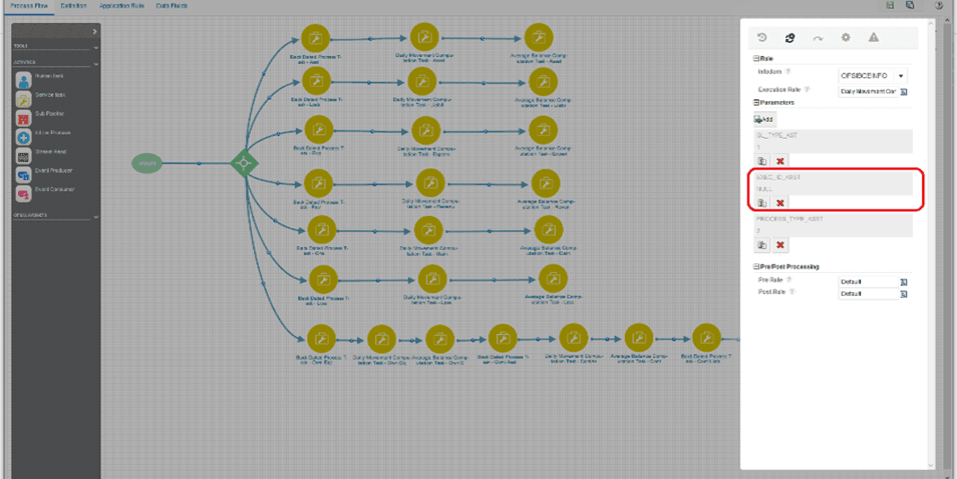
· The V_EXECUTION_IDENTIFIER column: This column is used to identify the optimization settings to a specific branch within the PMF process. This can be helpful in the following illustrated scenario.
Scenario: When the volume distribution by the General
Ledger types is such that the Assets contains a significantly higher volume
when compared to the Revenue accounts. For performance reasons, the user
may want to the process the journals specific to Assets at a parallelism
degree of 16 v/s revenue accounts at a parallelism degree of 4. The value
in this column helps the process to identify the row of optimization settings
to be used for a specific branch. This column allows an input of type
VARCHAR2 with a maximum length of 50 characters. This value is passed
to the system from within the PMF process when you double-click the required
Service Task. This illustration is shown in the image (click the  ).
).
Figure 99: Rule Implementation in the Service Task
The specific Alter Session statements generated by the computation engine for the different possible parallel parameter values are mentioned in the following sections.
The following sections provide information about the behavior of the Balance Computation engine given different possible configuration options of the parameters found in the FSI_OPTIMIZATION_SETTINGS. Oracle Parallel Execution refers to a rich set of core database functionality. For a thorough discussion of Oracle Parallel Execution, including Parallel Query and Parallel DML, see the list of documentation resources found at the end of this appendix.
When the PARALLEL_QUERY option in the FSI_OPTIMIZATION_SETTINGS table is set to DISABLE, the engine will begin each rule by issuing the following statement:
ALTER SESSION DISABLE PARALLEL QUERY;
Setting Parallel Query to DISABLE will ensure that no SELECT statement issued by the computation engine will run in parallel.
When the PARALLEL_QUERY option in the FSI_OPTIMIZATION_SETTINGS table is set to ENABLE, the engine will begin each rule by issuing the following statement:
ALTER SESSION ENABLE PARALLEL QUERY;
When Parallel Query is enabled, the database may elect to execute a SELECT statement in parallel if it is run against an object (table or index) that has been declared or altered through the use of the PARALLEL clause.
Two examples of the use of the PARALLEL clause to alter a table follow:
ALTER TABLE FSI_MGMT_LGR_DAILY_BALANCES PARALLEL 8;
ALTER TABLE FSI_MGMT_LGR_DAILY_BALANCES PARALLEL (DEGREE DEFAULT);
In the earlier first example, the database may elect to parallelize a SELECT statement against the FSI_MGMT_LGR_DAILY_BALANCES table using a Degree of Parallelism equal to 8. In the second example, the database may elect to parallelize a SELECT statement against the FSI_MGMT_LGR_DAILY_BALANCES table using the default Degree of Parallelism as determined by the database but only if PARALLEL_DEGREE_POLICY is set to Auto (default parallelism and PARALLEL_DEGREE_POLICY are discussed further as follows).
The database may also elect to execute a SELECT statement in parallel if a parallel SQL hint is included in the SELECT statement. A parallel SQL hint will override the Degree of Parallelism assigned to a table or index through the PARALLEL clause. If the tables and indexes against which a SELECT statement is executed have not been defined using the PARALLEL clause and if the SELECT statement does not include a parallel hint, then the SQL statement will always run serially (in a single thread).
If the tables and indexes against which a SELECT statement is executed have been defined using the PARALLEL clause or if the SELECT statement includes a parallel hint, the database may elect to run in parallel if it is possible to do so. The conditions necessary for the database to choose parallelize a query are complex and beyond the scope of this discussion – for details, see the listing of documentation resources found at the end of this appendix.
When the PARALLEL_QUERY option in the FSI_OPTIMIZATION_SETTINGS table and the PARALLEL_DOP parameter are set to values mentioned in the FSI_OPTIMIZATION_SETTINGS table, the engine will begin each rule by issuing the following statement:
ALTER SESSION FORCE PARALLEL QUERY;
After this ALTER SESSION statement, subsequent SELECT statements are executed with a default Degree of Parallelism unless (a) the objects against which the SELECT statement operates have been defined as having a specific Degree of Parallelism through the use of the PARALLEL clause or (b) the SELECT statement includes a parallel hint. Again, a parallel hint will override the Degree of Parallelism specified through a PARALLEL clause.
The default Degree of Parallelism is determined by the database and is generally a function of the number of CPU's on your server. For details on how the Oracle database determines the default Degree of Parallelism, see Oracle Database VLDB and Partitioning Guide.
When the PARALLEL_QUERY option in the FSI_OPTIMIZATION_SETTINGS table is set to FORCE and the PARALLEL_DOP parameter is set to a non-NULL integer value (8 in this example), the engine will begin each rule by issuing the following statement:
ALTER SESSION FORCE PARALLEL QUERY PARALLEL 8;
The subsequent behavior of Parallel Query is the same as where no specific Degree of Parallelism has been specified except that the database will employ the Degree of Parallelism you have set in your PARALLEL_DOP parameter instead of using the database's default Degree of Parallelism. Your PARALLEL_DOP parameter will override any Degree of Parallelism stemming from a PARALLEL clause associated with a table or index, but a Degree of Parallelism specified in a parallel hint will override your PARALLEL_DOP parameter setting.
Regardless of its value, the PARALLEL_DOP parameter is ignored when the PARALLEL_QUERY parameter is set to either DISABLE or ENABLE.
Limitations in Using Parallel DML
A Parallel DML operation's lock requirements are very different from the serial DML requirements. For these and other reasons, the database imposes some restrictions on Parallel DML operations.
One such restriction is that while a single transaction can contain multiple parallel DML statements that modify different tables, after a parallel DML statement modifies a table no subsequent statement (DML or query) can access the same table again in the same transaction. For this reason, Parallel DML is disabled, regardless of your parameter settings, for any computation rule that both debit and credit the same table. For computation rules that both debit and credit the same table and which you want to ensure run in parallel, it is recommended that you divide your one computation rule into two rules (one rule for the debit side and one rule for the credit side).
Parallel DML can not be set (regardless of the parameter settings) for any computation rule where the Output tables (Credit/Debit) are the same tables as the Source/Driver tables.
For more information regarding the restrictions on Parallel DML, see Oracle Database Data Warehousing Guide.
When the PARALLEL_DML option in the FSI_OPTIMIZATION_SETTINGS table is set to DISABLE, the engine will begin each rule by issuing the following statement:
ALTER SESSION DISABLE PARALLEL DML;
Setting Parallel DML to DISABLE will ensure that no DML statement issued by the computation engine will ever run in parallel.
When the PARALLEL_DML option in the FSI_OPTIMIZATION_SETTINGS table is set to ENABLE, the engine will begin each rule by issuing the following statement:
ALTER SESSION ENABLE PARALLEL DML;
When Parallel DML is enabled, the database may elect to execute a DML statement in parallel if it is run against an object (table or index) that has been declared (or altered) using the PARALLEL clause.
The database may also elect to execute a DML statement in parallel if a parallel SQL hint is included in the DML statement. A parallel SQL hint will override the Degree of Parallelism assigned to a table or index through the PARALLEL clause. If the tables and indexes against which a SELECT statement is executed have not been defined using the PARALLEL clause and if the SELECT statement does not include a parallel hint, then the SQL statement will always run serially (in a single thread).
When the PARALLEL_DML option in the FSI_OPTIMIZATION_SETTINGS table is set to FORCE and the PARALLEL_DOP parameter is set to NULL, the engine will begin each rule by issuing the following statement:
ALTER SESSION FORCE PARALLEL DML;
After this ALTER SESSION statement, subsequent DML statements are executed with the default Degree of Parallelism for the database unless (a) the objects against which the SELECT statement operates have been defined as having a specific Degree of Parallelism through the use of the PARALLEL clause or (b) the SELECT statement includes a parallel hint. A parallel hint will override the Degree of Parallelism specified through a PARALLEL clause. Again, for details on how the Oracle database determines the default Degree of Parallelism, see Oracle Database VLDB and Partitioning Guide.
When the PARALLEL_DML option in the FSI_OPTIMIZATION_SETTINGS table is set to FORCE and the PARALLEL_DOP parameter is set to a non-NULL integer value (4 in this example), the engine will begin each rule by issuing the following statement:
ALTER SESSION FORCE PARALLEL DML PARALLEL 4;
The subsequent behavior of Parallel DML is the same as where no specific Degree of Parallelism has been specified except that the database will employ the Degree of Parallelism you have set in your PARALLEL_DOP parameter instead of using the database's default Degree of Parallelism. Your PARALLEL_DOP parameter will override any Degree of Parallelism stemming from a PARALLEL clause associated with a table or index, but a Degree of Parallelism specified in a parallel hint will override your PARALLEL_DOP parameter setting.
Regardless of its value, the PARALLEL_DOP parameter is ignored when the PARALLEL_QUERY parameter is set to either DISABLE or ENABLE.
A new feature in Oracle 11gR2, PARALLEL_DEGREE_POLICY specifies whether or not automatic Degree of Parallelism, statement queuing, and in-memory parallel execution will be enabled. These 3 topics are covered in depth by the documentation resources found at the end of this appendix.
When the PARALLEL_DEGREE_POLICY option in the FSI_OPTIMIZATION_SETTINGS table is set to MANUAL, the engine will begin each rule by issuing the following statement:
ALTER SESSION SET PARALLEL_DEGREE_POLICY = 'MANUAL';
The subsequent behavior of both Parallel Query & Parallel DML is the same is it would have been prior to Oracle 11gR2. SQL statements will only be processed in parallel for objects declared with a PARALLEL clause or if a parallel SQL hint is included. Additionally, the Balance Computation Engine PARALLEL_QUERY parameter must be set to either ENABLE or FORCE (for Parallel Query) and the PARALLEL_DML parameter must be set to either ENABLE or FORE (for Parallel DML).
When the PARALLEL_DEGREE_POLICY option in the FSI_OPTIMIZATION_SETTINGS table is set to LIMITED, the engine will begin each rule by issuing the following statement:
ALTER SESSION SET PARALLEL_DEGREE_POLICY = 'LIMITED';
Under the LIMITED policy, automatic Degree of Parallelism is enabled for some statements but statement queuing and in-memory Parallel Execution are disabled. Automatic Degree of Parallelism is only applied to those statements that access tables or indexes decorated explicitly with the DEFAULT degree of parallelism using the PARALLEL clause. Statements executed against tables or indexes defined using an explicit Degree of Parallelism through the PARALLEL clause or statements including a parallel SQL hint may also run in parallel.
When the PARALLEL_DEGREE_POLICY option in the FSI_OPTIMIZATION_SETTINGS table is set to AUTO, the engine will begin each rule by issuing the following statement:
ALTER SESSION SET PARALLEL_DEGREE_POLICY = 'AUTO';
Under the AUTO policy, the automatic Degree of Parallelism, statement queuing, and in-memory parallel execution features are all enabled. Under this policy, the Oracle database automatically decides if a statement must execute in parallel or not and what Degree of Parallelism it must use. The database also determines if the statement can be executed immediately or if it must be queued until more system resources are available. Finally, the database decides if the statement can take advantage of the aggregated cluster memory or not. For more details, see the documentation resources as follows.
Oracle Database Parallel Execution Fundamentals: An Oracle White Paper – October 2010
Oracle® Database Data Warehousing Guide, 11g Release 1
Part Number B28313-02
http://download.oracle.com/docs/cd/B28359_01/server.111/b28313.pdf
See in particular:
· Enabling Parallel DML
· Space Considerations for Parallel DML
· Locks for Parallel DML
· Restrictions on Parallel DML
Oracle® Database New Features Guide, 11g Release 2
Part Number E10881-01
https://docs.oracle.com/cd/E11882_01/server.112/e41360/toc.htm
See in particular section In-Memory Parallel Execution
Oracle® Database VLDB and Partitioning Guide, 11g Release 2 (11.2)
Part Number E16541-08
https://docs.oracle.com/cd/E18283_01/server.112/e16541.pdf
See in particular: Chaapter 8: Using Parallel Execution
Oracle® Database Performance Tuning Guide, 11g Release 2 (11.2)
Part Number E16638-04
https://docs.oracle.com/cd/E28271_01/server.1111/e16638.pdf
OFSBCE allows users to utilize SQL Hints to tune the performance of computation rules. SQL Hints provide a mechanism to instruct the optimizer to choose a desired query execution plan based on specified hint criteria. The Balance Computation engine reads user-defined hints that are stored in the FSI_OPTIMIZATION_SETTINGS in the SOURCE_HINT and the TARGET_HINT columns. The hints specified in SOURCE_HINT column are used applied during processing by the computation engine in the fetch part of the query. Similarly, TARGET_HINT column values are applied during processing to the insert/set part of the computation.
For information about using the Hints, see the Using Optimizer Hints section in the Oracle Database Performance Tuning Guide, 11g Release 2 (11.2).
NOTE |
· Hints must be defined by users; there are no default hints. · There is currently no user interface for the definition of hints. Your DBA can assist you in defining, testing, and optimizing SQL Hints. SQL Hints must be manually inserted into the FSI_OPTIMIZATION_SETTINGS table. · You may determine an allocation's SYS_ID_NUM by performing a mouse-over on the allocation rule's name in the Allocation Specification summary screen. · Hints are limited to 250 characters for each SOURCE_HINT and TARGET_HINT. |