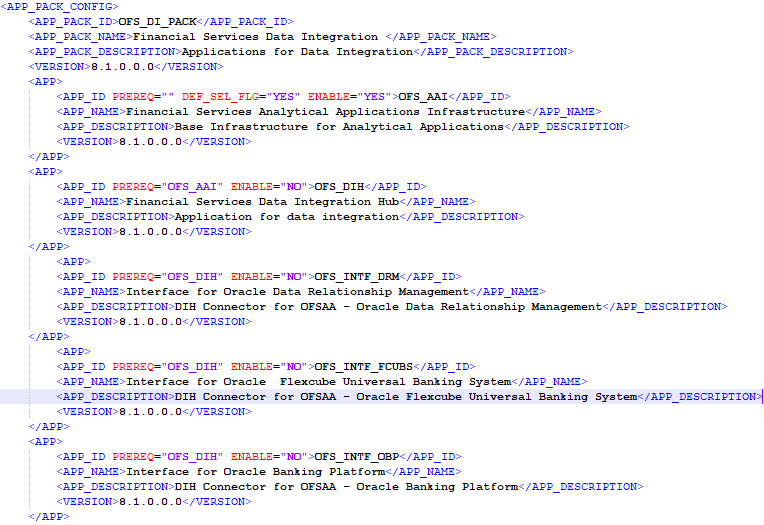
To install for Big Data, provide the Pack specific schema details in the OFS_DI_SCHEMA_BIGDATA_IN.xml file.
The types of schemas that you can configure are:
· CONFIG: This schema holds the entities and other objects required for OFSAA setup configuration information. Only one CONFIG schema per OFSAA instance is permitted. This schema is created only in RDBMS.
· METADOM: This schema holds the data model entities. One METADOM schema is attached to one Information Domain. You can have multiple DATADOM schemas for a single OFSAA instance. This schema is created only in RDBMS. It has only platform entities that hold the metadata details. However, it does not hold the data model entities.
· DATADOM: This schema holds data model entities. One DATADOM schema is attached to one Information Domain. You can have multiple DATADOM schemas for a single OFSAA instance.
To create Hive schemas and objects within for the various application schemas, update the values of the various tags and parameters available in the OFS_DI_SCHEMA_BIGDATA_IN.xml file before executing the schema creator utility.
|
NOTE |
This file must be configured only in case of the OFSDI Application Pack installation for the HDFS ONLY target. This file configuration is not required for an RDBMS ONLY target installation. |
To configure the OFS_DI_SCHEMA_BIGDATA_IN.xml file, follow these steps:
1. Log in to the system as a non-root user.
2. Navigate to the OFS_DI_PACK/schema_creator/conf/ directory.
§ Delete OFS_DI_SCHEMA_IN.xml.
3. Edit the OFS_DI_SCHEMA_BIGDATA_IN.xml file using a text editor and configure the values as mentioned in the following table.
Figure 9: Sample of the OFS_DI_BIGDATA_SCHEMA_IN.xml file
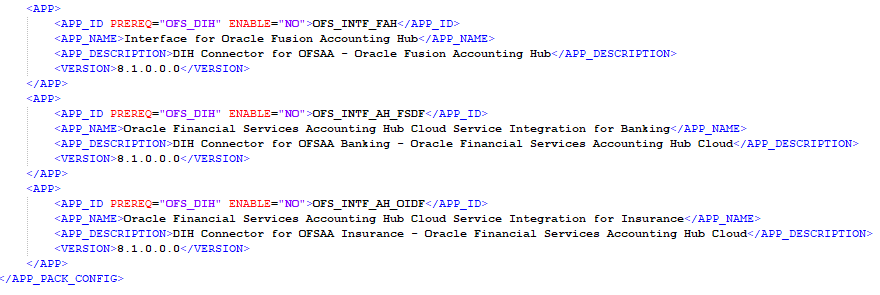
Table 11: OFS_DI_BIGDATA_SCHEMA_IN.xml file (APPPACKSCHEMA Parameters)
|
Tag Name/ Attribute Name |
Description |
Mandatory (Y/N) |
Default Value/ Permissible Value |
Comments |
|
<APP_PACK_ ID> |
Seeded unique ID for the OFSAA Application Pack. |
Y |
Seeded |
DO NOT modify this value. |
|
<JDBC_URL> |
Enter the JDBC URL. NOTE: You can enter the RAC/ NON-RAC enabled database connectivity URL. |
Y |
Example, jdbc:oracle:thin:@<HOST/ IP>:<PORT>:<SID> or jdbc:oracle:thin:@//[HOS T][:PORT]/SERVICE or jdbc:oracle:thin:@(DESCRI PTION=(ADDRESS_ LIST=(ADDRESS=(PROT OCOL=TCP)(HOST=[HO ST])(port=[PORT]))(ADD RESS=(PROTOCOL=TCP) (HOST=[HOST])(PORT=[ PORT]))(LOAD_ BALANCE=yes)(FAILOV ER=yes))(CONNECT_ DATA=(SERVICE_ NAME=[SERVICE]))) For example, jdbc:oracle:thin:@//dbhos t.server.com:1521/service 1 or jdbc:oracle:thin:@//dbsho st.server.com:1521/scan-1 or jdbc:oracle:thin:@(DESCRI PTION=(ADDRESS_ LIST=(ADDRESS=(PROT OCOL=TCP)(HOST=dbho st1.server.com)(port=1521) )(ADDRESS=(PROTOCO L=TCP)(HOST=dbhost2.s erver.com)(PORT=1521))( LOAD_ BALANCE=yes)(FAILOV ER=yes))(CONNECT_ DATA=(SERVICE_ NAME=service1))) |
For an HDFS ONLY target installation, this URL must be of the RDBMS instance that hosts the Application’s METADOM. |
|
<JDBC_ DRIVER> |
By default, this driver name is seeded. NOTE: Do not modify this attribute value. |
Y |
Example, oracle.jdbc.driver.OracleD river |
Only JDBC Thin Driver is supported. DO NOT modify this value. |
|
<HOST> |
Enter the Hostname or IP Address of the system on which you are installing the OFSAA components. |
Y |
Host Name or IP Address |
|
|
<SETUPINFO>/ PREFIX_ SCHEMA_ NAME |
Identifies if the value specified in<SETUPINFO>/ NAME attribute must be prefixed to the schema name. |
N |
YES or NO |
Default value is YES. |
|
<SETUPINFO>/ NAME |
Enter the acronym for the type of implementation. This information will be displayed in the OFSAA Home Page. NOTE: On executing the schema creator utility, this value will be prefixed with each schema name. For example, dev_ ofsaaconf, uat_ofsaaatm. |
Y |
Accepts strings with a minimum length of two and a maximum of four. For example, DEV, SIT, PROD |
This message appears in the OFSAA Landing Page as Connected To: xxxx. The schemas being created would get this prefix. For example, dev_ ofsaaconf, uat_ofsaaconf, and so on. |
|
<PASSWORD>/ DEFAULT* |
Enter the password if you want to set a default password for all schemas. NOTE: You also need to set the APPLYSAMEFORALL attribute as Y to apply the default password for all the schemas. |
N |
The maximum length allowed is 30 characters. Special characters are not allowed. |
Applies only to the RDBMS type METADOM schema (or schemas). |
|
<PASSWORD>/ APPLYSAMEFO RALL |
Enter as Y if you want to apply the password specified in the DEFAULT attribute for all the schemas. If you enter as N, you need to provide individual passwords for all schemas. NOTE: If you have entered Y in APPLYSAMEFORALL attribute and also have specified individual passwords for all the schemas, then the specified individual passwords will take precedence. |
Y |
Default - N Permissible - Y or N |
NOTE: Setting this attribute value is mandatory If the DEFAULT attribute is set. Applies only to the RDBMS type METADOM schema (or schemas). |
|
<SCHEMAS>/ TYPE=RDBMS |
Identifies the RDBMS schema details. |
Y |
Default names for schemas within the pack would be derived in absence of any value specified. |
In an HDFS ONLY target installation, the Application’s METADOM (that hosts the metadata) for an application is stored in RDBMS schema and the data model entities of the application are stored in the DATADOM (which would be on Hive). |
|
<SCHEMA>/ TYPE |
The different types of schemas that are supported in this release are ATOMIC, CONFIG, SANDBOX, and ADDON. By default, the schemas types are seeded based on the Application Pack. NOTE: Do not edit this attribute value. |
Y |
ATOMIC, CONFIG, SANDBOX, or ADDON. NOTE: SANDBOX AND ADDON schemas are not applicable for OFS AAAI Application Pack. |
Only One CONFIG schema can exist in the file. This schema identifies as the CONFIGURATION a schema that holds the OFSAA setup details and other metadata information. Multiple ATOMIC, SANDBOX, ADDON schemas can exist in the file. ATOMIC schema refers to the METADOM within the Information Domain schema. SANDBOX schema refers to the SANDBOX schema. ADDON schema refers to other miscellaneous schemas (not applicable for this Application Pack). |
|
<SCHEMA>/ NAME |
By default, the schemas names are seeded based on the Application Pack. You can edit the schema names if required. NOTE: The Schema Name will have a prefix of the SETUPINFO/ NAME attribute. SCHEMA NAME must be the same for all the ATOMIC Schemas of applications within an Application Pack. |
Y |
The permissible length is 15 characters and only alphanumeric characters allowed. No special characters allowed except underscore '_'. |
SETUPINFO/ NAME attribute value would be prefixed to the schema name being created. For example, if the name is set as 'ofsaaatm' and setupinfo as 'uat' then schema being created would be 'uat_ofsaaatm'. NAME must be the same where APP_GRP=1 for all SCHEMA tags (not applicable for this Application Pack). |
|
<SCHEMA>/ PASSWORD |
Enter the password of the schema to be created. NOTE: If this attribute is left blank, then the password specified in the <PASSWORD>/DEFAULT attribute is applied as the Schema Password. |
N |
The maximum length allowed is 30 characters. Special characters are not allowed. |
NOTE: You need to mandatorily enter the password if you have set the <PASSWORD>/ APPLYSAMEFORALL attribute as N. |
|
<SCHEMA>/ APP_ID |
By default, the Application ID is seeded based on the Application Pack. NOTE: Do not edit this attribute value. |
Y |
Unique Seeded Value. |
Identifies the Application or Product for which the schema is being created. DO NOT modify this value. |
|
<SCHEMA>/ DEFAULTTABL ESPACE |
Enter the available default tablespace for DB User. NOTE: If this attribute is left blank, then USERS is set as the default tablespace. |
N |
Default value: USERS Permissible value: Any existing valid tablespace name. |
Modify this value to associate any valid tablespace with the schema. |
|
<SCHEMA>/ TEMPTABLESP ACE |
If this attribute is left blank, then TEMP is set as the default tablespace. |
N |
Default value: TEMP Permissible value: Any existing valid temporary tablespace name. |
Modify this value to associate any valid tablespace with the schema. |
|
<SCHEMA>/ QUOTA |
Enter the quota to be set on DEFAULTTABLESPACE attribute for the schema or user. By default, the quota size is set to 500M. Minimum: 500M or Unlimited on default Tablespace. |
N |
For example, 600M/m 20G/g UNLIMITED/unlimited |
Modify this value to grant the specified quota on the mentioned tablespace to the user. |
|
<SCHEMAS>/ TYPE=HDFS |
Type of schemas being created. |
Y |
|
Refers to the DATADOM of the Application Pack being installed. |
|
<HIVE_ SERVER_ HOST> |
IP or HostName of the server where HIVE is installed |
Y |
|
|
|
<HIVE_LIB_ PATH> |
Folder path where HIVE related drivers or jar files are copied |
Y |
|
Should contain the list of jars mentioned in the section Copying Jars to OFSAA Installation Folder and krb5.conf, keytab files. Manually copy the preceding listed files from CDH distribution to this identified folder. |
|
<SCHEMA>/ NAME |
By default, the schemas names are seeded based on the Application Pack. You can edit the schema names if required. NOTE: The Schema Name will have a prefix of the SETUPINFO/ NAME attribute. |
Y |
The permissible length is 20 characters and only alphanumeric characters allowed. |
Schema Name must not be the same as Schema Name specified for Schema Type ATOMIC. |
|
<SCHEMA>/ TYPE |
Identifies the type of schema where the data model entities would reside. |
Y |
By default, the TYPE attribute in this tag is set to DATADOM. |
DO NOT modify this value. |
|
<SCHEMA>/ DB TYPE |
Identifies the type of driver to be used for the connection. |
Y |
By default, the only supported type is HIVE in this release. |
In the upcoming releases, the type value can be HIVE or IMPALA and so on. |
|
<SCHEMA>/<PROPERTY>/CO MMENT |
COMMENTS for HIVE schema. |
N |
|
|
|
<SCHEMA>/<PROPERTY>/LO CATION |
You can optionally specify a location for the table data. |
N |
|
|
|
<CONNECTION_PROPERTIES>/<PROPERTY>/J DBC_DRIVER |
HIVE JDBC driver details. |
Y |
com.cloudera.hive.j dbc4.HS2Driver |
The default cloudera HiveServer 2 driver name. |
|
<CONNECTION_PROPERTIES>/<PROPERTY>/J DBC_URL |
Enter the HIVE JDBC URL. |
Y |
Valid Hive JDBC URL to be specified. |
Specify the Hive JDBC URL to connect to the Hive Server. |
|
<CONNECTION_PROPERTIES>/<PROPERTY>/ AUTH_TYPE |
Authentication Type. |
Y |
Permissible values: KERBEROS_WITH_ KEYTAB |
Only “Kerberos with keytab” based authentication supported in this release. |
|
<CONNECTION_PROPERTIES>/<PROPERTY>/ AUTH_ALIAS |
Alias name for authentication credentials. |
Y |
|
An Alias name mapping to a principal and password combination specified in the following tags. |
|
<CONNECTION_PROPERTIES>/<PROPERTY>/ PRINCIPAL |
Authentication principal name. |
Y |
|
Principal name used in authentication to connect to the Hive Server. |
|
<CONNECTION_PROPERTIES>/<PROPERTY>/ PASSWORD |
Authentication password. |
Y |
|
Password used in authentication to connect to the Hive Server. |
|
<CONNECTION_PROPERTIES>/<PROPERTY>/ KRB_GSSJAAS_ FILE_NAME |
A keytab file containing pairs of Kerberos principals and an encrypted copy of that principal's key. |
Y |
|
This file must be copied to the location specified in <HIVE_LIB_PATH>. |
|
<CONNECTION_PROPERTIES>/<PROPERTY>/ KRB_REALM_ FILE_NAME |
REALM configuration file. |
Y |
|
This file must be copied to the location specified in <HIVE_LIB_PATH>. |
4. Save the file.