icon.
icon.All definitions, that is, GL-GL Reconciliation as well as GL-PP Reconciliation definitions are seen in Metadata to view the summary of all the definitions in Metadata Browser.
To publish the metadata, perform the following steps:
1. From the Home page, click Administration
icon.
The Administration page appears.
2. Select the Infodom from the Information Domain drop-down list.
Figure 107: Object Adminstration - Administration Page
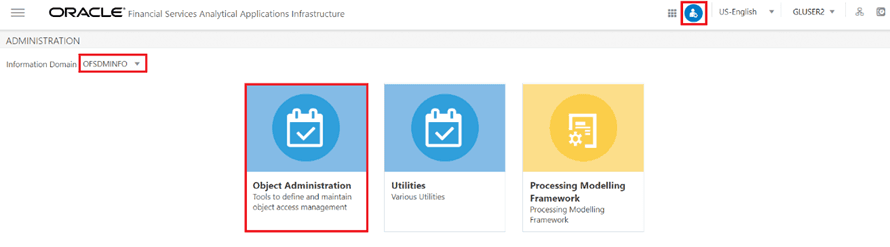
3. Click Object Administration and select the Metadata Browser option. The Metadata Browser page appears.
Figure 108: Metadata Browser Page
NOTE:
You can also navigate to the Metadata Browser page by clicking an Application. For example, Financial Services Analytical Applications Reconciliation Framework. The Navigation Tree displays a menu.
Click Common Tasks, and then click the Metadata Browser to display the Metadata Browser in a separate window.
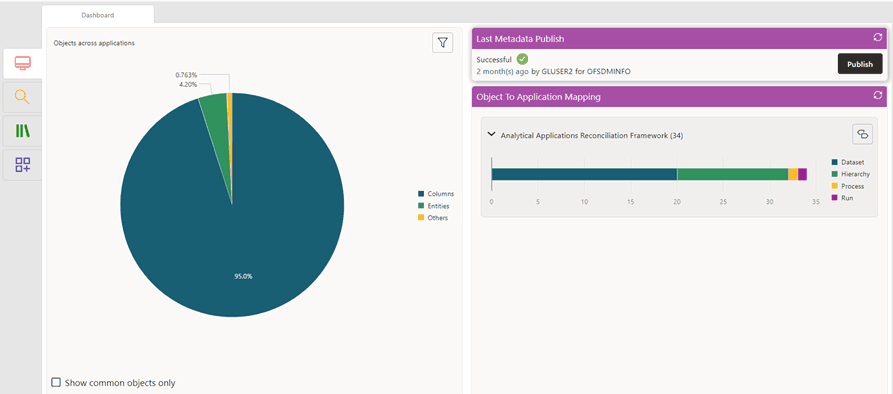
4. On the Last Metadata Publish pane, click Publish. The available Information Domains are displayed in a drawer window.
5. Select the required Information Domain and click OK.
Figure 109: Last Metadata Publish pane

The Last Metadata Publish pane displays details such as the time elapsed since the metadata was last published, the user who published the Metadata, and the Information Domains to which the metadata was published.
For more information on Metadata Browser, see the Metadata Browser User Guide.
Metadata Browser API for reconciliation framework uses the metadata code 6600 in the MDB_POP_IMPL_LIST. There is an MD_TYPE whose seeded number is 6600, against which class_name ‘com.ofs.erm.gl.MDBBrowser’ is present. In the same table for column ‘INCLUDE’, ensure the flag is mentioned as ‘N’. To run it, the flag should be ‘Y’.
All GL definitions are synced with the Metadata browser once the page is refreshed.
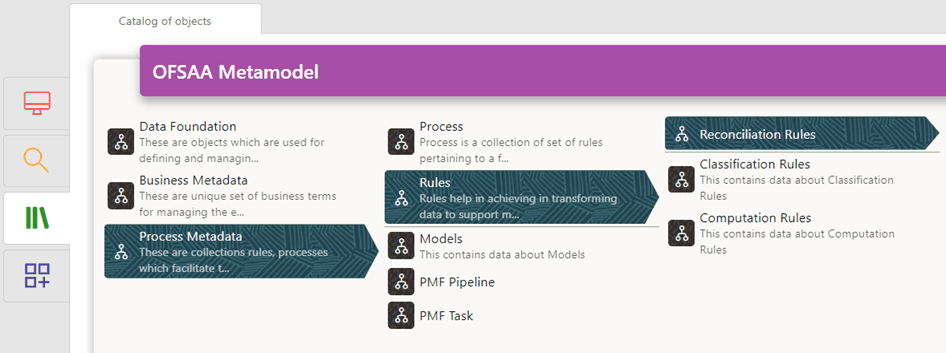
Under the Rules tab, all the definitions are listed by their map name and version number.
Figure 110: OFSAA Metamodel