Creating Bot Definitions
Create Bot Definitions in PeopleSoft to create chatbot clients in PeopleSoft for the Skills created in ODA.
|
Page Name |
Definition Name |
Usage |
|---|---|---|
|
EOCB_BOTSRCH_FL |
Search or view the list of available bot definitions. |
|
|
EOCB_ADDBOTDEFN_FL |
Add a Bot ID. |
|
|
EOCB_BOTDEFN_FL |
Configure the Bot ID. |
|
|
EOCB_BRNDTMPL_FL |
Configure the branding for the Bot ID. |
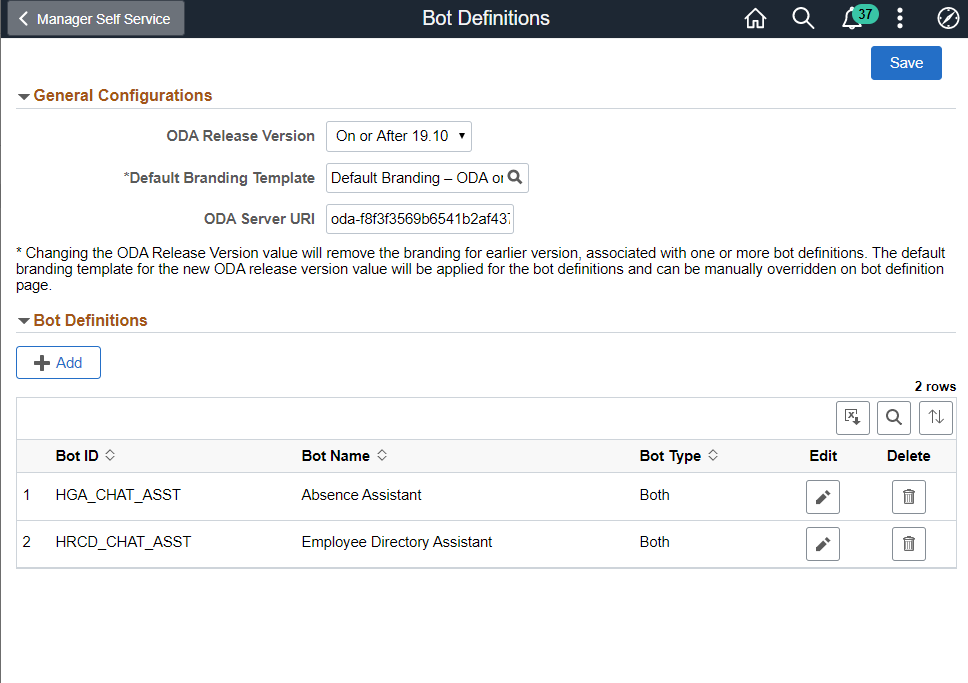
Use the Bot Definition page (EOCB_BOTSRCH_FL) to view, edit or add a new bot definition.
Navigation
Image: Bot Definitions Page
Bot Definitions Page
|
Field or Control |
Definition |
|---|---|
| Field |
Description |
| ODA Release Version |
Choose whether your ODA version is 19.10 and above or if it is below 19.10 |
| Default Branding Template |
Choose the default branding template for the chatbots. |
| ODA Server URI |
Enter the Uniform Resource Identifier of your ODA instance. |
The Bot Definitions page lists all the chatbots.
Use the Add button to add a new bot definition.
Use the Edit button corresponding to a bot to edit the bot definition.
Use the Delete button corresponding to a bot to delete the bot definition.
Use the Add Bot Definition page (EOCB_ADDBOTDEFN_FL) to add a new Bot Definition. To access this page, click the Add button on the Bot Definition page.
Image: Add Bot Definition page
Add Bot Definition page

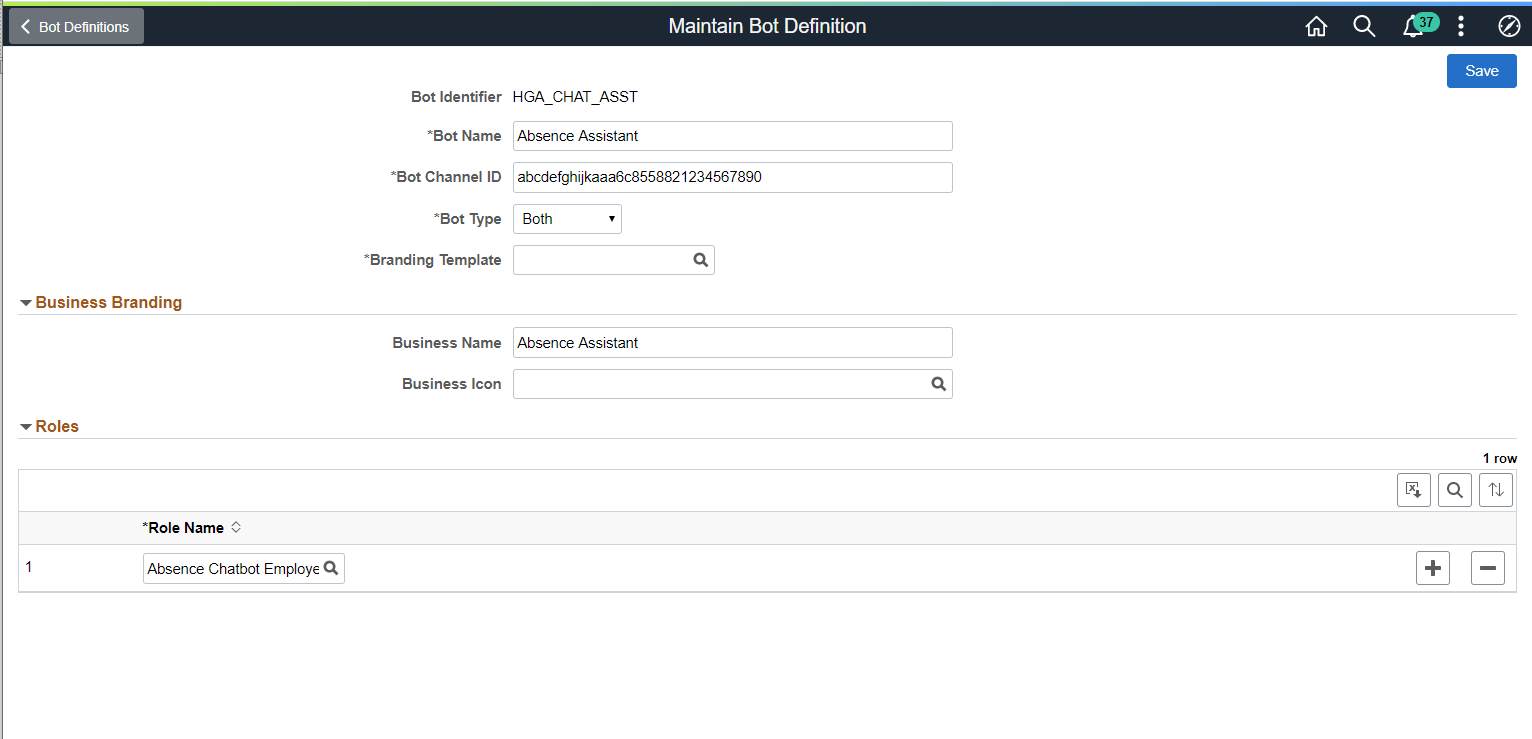
Once the Bot Definition name is added, use the maintain Bot Definition page (EOCB_BOTDEFN_FL) to configure the bot definition.
Image: Maintain Bot Definition page
Maintain Bot Definition page
|
Field or Control |
Definition |
|---|---|
| Field |
Description |
| Bot name |
Name of the Bot |
| Bot Channel ID |
Enter the Channel Id generated by the corresponding channel in ODA. For more details, see Creating the Web Channel |
| Bot Type |
Chose how the bot client needs to be rendered. Available types are:
|
| Branding Template |
Choose the Branding template for the bot. |
| Business Name |
Name of the Bot as it appears to users. |
| Business Icon |
Choose the icon for the bot |
| Role Name |
Add the user roles that should have access to the bot. |
Use the Maintain Branding Template page (EOCB_BRNDTMPL_FL) to control the branding aspects of the bot definition.
Image: Maintain Branding Template page
Maintain Branding Template page.

|
Field or Control |
Definition |
|---|---|
| Field |
Description |
| Template Name |
Name of the template. |
| Custom Properties |
Choose the custom properties for the bot available from ODA to customize the bot layout, color and icons. In the Name filed, enter the appropriate name reference listed in the ODA documentation to set the custom property. |
| Custom Text |
PeopleSoft provisions custom text to overwrite the custom texts provided by default by ODA. The overriding text is created as a message catalog entry. The message catalog entry is assigned to the custom text key value. Choose the appropriate Custom Text references available in the ODA documentation to configure the default text that is displayed in the chat client. |