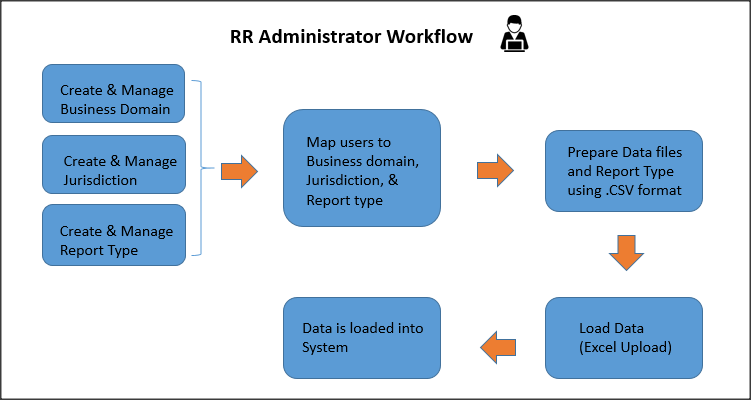
You will find the activities performed by the CRR Administrator in the Oracle Financial Services Compliance Regulatory Report Cloud Service (OFS CRR CS) explained here. The primary job of an CRR Administrator is to create and manage business domains and jurisdictions while also mapping map users to the required business domains, jurisdictions, and report types. They also prepare the reference data in a specific template in .csv format and load it into the OFS CRR CS.
Users mapped to a particular jurisdiction, business domain, and report type can access reports. This mapping restricts others from accessing specific business domains, jurisdictions, and report types.
Security controls to access data in the OFS CRR CS is defined in the following table. You can view and manage a report if the you are authorized with the requisite controls.
Table : Security in the OFS CRR Cloud Service
Type |
Control |
Description |
| Roles | Features and Functions |
This security layer identifies features and functions users can access within the OFS CRR CS. |
| Business Domains | Report information |
This security layer enables you to restrict access along operational business lines and practices. Users can only see reports that are assigned to at least one of the business domains they have access to. |
| Jurisdiction | Report information |
This security layer enables you to restrict access using geographic locations. Users can only see reports that belong to the jurisdiction they have access to. |
| Report Type | Report information |
This security layer enables you to restrict access to specific types of investigations. To see a report, users must have access to view the specific report type assigned to the report. To configure the report type, see Data Preparation. |
The workflow for the OFS CRR CS Administrator is depicted here.
OFS CRR CS Administration Workflow
Description for OFS CRR CS Administration Workflow
· Business Domains: A Business Domain is an operational line of business for which data access permission is differentiated. You can view and modify the existing business domains, if required, you can also create new business domains. For example, retail, private, and so on.
· Jurisdictions: A jurisdiction is any territory where certain laws apply and where judicial authority can be exercised such as, a country, state, or region. For example, the USA, Canada, and so on.
· Report Type: The report types are created, modified, and uploaded manually using the Excel Upload option.
· Security Mappings: The security attributes help an organization restrict its users based on jurisdictions, business domains, and report types to access data. If you update the business domain or jurisdiction, you must also map users to them.
· Data Preparation and Loading (Excel Upload): Prepare the required data to upload into the system using the specific template in the .csv (comma-separated value) format.
Users with OFS CRR CS Administrator privilege must be mapped to CRRADMIN GROUP to perform actions.
The OFS CRR CS is qualified to run on Microsoft Edge Chromium and Google Chrome web browsers.
Your System Administrator provides the Uniform Resource Locator (URL), User ID, and Password to access the service.
To access the OFS CRR CS, follow these steps:
1. Enter the URL in the web browser using the following format:
<Protocol>://<HostName>:<Port_Number >/dashboard>
2. The OFS CRR CS login page is displayed.
3. Enter your User Name and Password.
4. Click Sign In. The Oracle Financial Services Crime and Compliance Management Anti Money Laundering Cloud Service landing page is displayed.
5. In the Left Hand Side (LHS) Navigation List, click Compliance Regulatory Reporting. The Compliance Regulatory Reporting tasks list is displayed.
6. Click the required tasks- Excel Upload (Data Loading ) and Security Mapping to navigate to the respective pages.