
KYC assesses the risk a customer poses to the bank or Financial Institution (FI). It is an ongoing process of assessing a customers’ risk. The FI can adjust the risk model based on your evaluation. Customers are assessed in different stages of their relationship with the bank. User administration involves creating and managing users and providing access rights based on their roles.
Topics:
· Process Flow for Administrator
· Quick Tour of Know Your Customer
The system administrator can perform the required tasks and configurations in the following order. Optionally, you can also configure and execute pipelines on a new environment, and import or copy pipelines if you are moving data between environments.
The following figure illustrates the onboarding process flow for a KYC Administrator.
Figure: Onboarding Process Flow for Administrator
The following figure illustrates the batch process flow for a KYC Administrator.
Figure: Batch Process Flow for Administrator
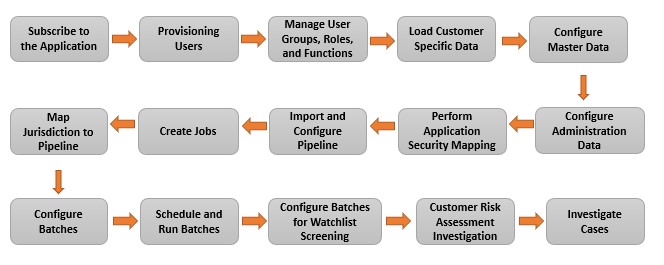
The following table provides an overview of the tasks and the order to execute these tasks using the Know Your Customer application.
Table 2: Quick Tour of Know Your Customer
Order |
Tasks |
Who Does This? |
Applicable for Onboarding? |
Applicable for Batch? |
Details and Documentation |
1 |
Subscribe to the Application |
Tenant Admin |
Yes |
Yes |
Subscribe to the application. For more information on the subscription process, see Getting Started with Oracle Financial Services Crime and Compliance Management Cloud Service. |
2 |
Provision Users |
System Admin |
Yes |
Yes |
Configure Security Management System (SMS) to create users, roles, and implement user authorization and authentication. For more information on provisioning users, see Setup your Cloud Account. |
3 |
Manage User Groups, Roles, and Functions |
System Admin |
Yes |
Yes |
Create user groups, create roles, map users to user groups, map user groups to roles, and map roles to functions. For more information on the steps involved, see Identity Management. |
4 |
Load Customer Specific Data |
Data Admin |
No |
Yes |
Load customer-specific data such as sample staging data, business domain, and jurisdiction data to the application for further processing. For more information, see Data Loading. |
5 |
Configure Master Data |
KYC Admin |
Yes |
Yes |
Define the master data values. For more information, see Master Data. |
6 |
Configure Know Your Customer Administration Data |
KYC Admin |
Yes |
Yes |
Define the KYC Administration data values. For more information, see Know Your Customer Administration Data. Note: It is mandatory to configure Relationship Type Assessment Mapping for Onboarding and Periodic Review Assessment Configuration for Batch. |
7 |
Perform Application Security Mapping |
System Admin |
Yes |
Yes |
Create security attributes that allow or restrict access to users. For more information, see Oracle Financial Services Crime and Compliance Management Cloud Service Application Security. |
8 |
Import and Configure Pipelines |
KYC Admin |
Yes |
Yes |
· Import the ready-to-use pipelines to the Customer Screening application, create a copy of the imported pipelines and save it as a new pipeline. For more information, see Importing Pipelines and Copying Pipelines. · Create new pipelines and configure the same as per your requirements. To create pipelines, see Creating Pipelines. |
9 |
Create Jobs |
KYC Admin |
Yes |
Yes |
Create jobs to define a collection of instructions for executing pipelines against threshold sets. For more information on how to create jobs, see Using Jobs. |
10 |
Map Pipeline to Jurisdiction |
KYC Admin |
Yes |
Yes |
Map a ready-to-use pipeline or add a new pipeline and map it to one or more jurisdictions. For more information, see Jurisdiction Pipeline Mapping. |
11 |
Configure Batches |
KYC Admin |
No |
Yes |
Define batches specific to Know Your Customer in the Scheduler Service window. For more information, see Managing Batches section of Pipeline Designer and Scheduler Service. |
12 |
Onboard Prospects |
KYC Admin |
Yes |
No |
KYC supports both synchronous and asynchronous real-time API for risk assessment. · For asynchronous call: Source system (Onboarding application/CRM) invokes KYC real-time API for risk assessment with required JSON payload. KYC Application returns back a request ID. Later, source system can fetch the risk assessment details by invoking feedback API with the request ID. · For synchronous call: Source system (Onboarding application/CRM) invokes KYC real-time API for risk assessment with required JSON payload and receives the risk assessment feedback. For more information on the sample JSON, see Know Your Customer API Guide. |
13 |
Schedule and run batches |
KYC Admin |
No |
Yes |
Schedule and run the KYC-specific batches in the Scheduler window to load data. For more information, see Managing Batches section of Pipeline Designer and Scheduler Service. |
14
|
Configure and run the batches for watchlist screening |
KYC Admin |
No |
Yes |
Configure and run the batches specific to watchlist screening in the Schedule window to load watchlist data. For more information, see Managing Batches section of Pipeline Designer and Scheduler Service. |
15 |
KYC Investigation (Prospect Risk Assessment) |
Analysts and Investigators |
Yes |
No |
Investigate the KYC Prospect Risk assessments using the Know Your Customer Menu. For more information, see Risk Assessments Guide. |
16 |
KYC Investigation (Customer Risk Assessment) |
Analysts and Investigators |
No |
Yes |
Investigate the KYC Customer Risk assessments using the Know Your Customer Menu. For more information, see Risk Assessments Guide. |
17 |
Investigate Cases |
Analysts and Investigators |
Yes |
Yes |
Investigate and monitor cases. For more information, see Investigating Cases. |
This section provides you an overview of the Know Your customer application workflows.
The following figure illustrates the Know Your Customer Onboarding workflow for Asynchronous Call.
Figure: Know Your Customer Onboarding Workflow for Asynchronous Call
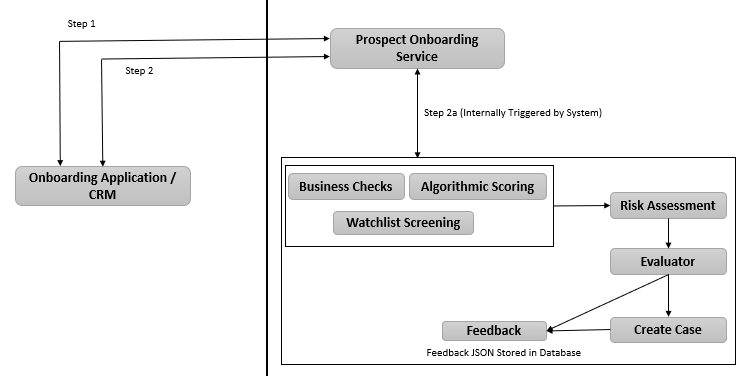
§ Step 1 indicates Post API request call with application details and response with Request ID and application ID.
§ Step 2 indicates Get API request call with Request ID and response with Risk Assessment details for all the applicant(s).
§ Step 2a indicates Fetching risk assessment details.
The following figure illustrates the Know Your Customer Onboarding workflow for Synchronous Call.
Figure: Know Your Customer Onboarding Workflow for Synchronous Call
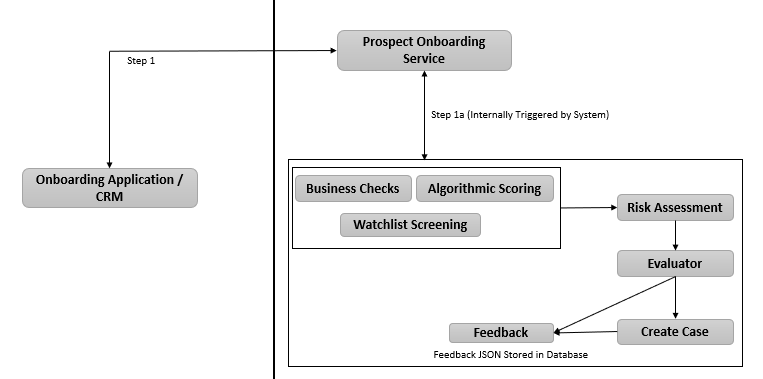
§ Step 1 indicates Post API request call with application details and response with risk assessment details for all the applicant(s).
§ Step 1a indicates sending back risk assessment details.