This section provides information about Regulatory Dimension Tables in the Regulatory Reporting for Australian Prudential Regulation Authority (OFS REG REP APME) application and step-by-step instructions to use this section.
This section includes the following topics:
· Overview of Reclassification of Regulatory Dimensions
· Overview of Reclassification of Regulatory Dimensions Population
· Dimension Data Expectations through SCD
· Overview of Mappers for Reclassification of Regulatory Dimensions
· Maintenance of Mappers for Reclassification of Regulatory Dimensions
· Loading Mapper Maintenance through Backend
· Usage of Mapper Tables in Data Flow and Reports
Topics:
· Overview of Reclassification of Regulatory Dimensions
· Dimension Data Expectations through SCD
· Overview of Mappers for Reclassification of Regulatory Dimensions
· Maintenance of Mappers for Reclassification of Regulatory Dimensions
· Loading Mapper Maintenance through Backend
· Usage of Mapper Tables in Data Flow and Reports
There are certain Regulatory Dimensions in OFS REG REP APME, which are pre-populated with a standard set of values. These values are used by downstream applications for various reporting requirements. There are equivalent customer-specific dimension tables that are populated using a Slowly Changing Dimension (SCD) process. It is required to reclassify these user-specific values to standard / regulatory specific values as the reporting expects these standard set of values. The reclassification is done using out of the box Mapper Definitions under the Mapper Maintenance screen.
By default, all standard dimensions are pre-populated with seeded data. It is mandatory to have data in user-specific dimensions and then maintain the reclassifications. Therefore, you must execute the SCDs and then map the reclassification codes under Mapper Maintenance.
These are out of the box mappers that are available in Oracle Financial Services Data Foundation (OFSDF) for the regulatory dimension reclassifications:
· MAP_GL_CODE_REP_LINE: Mapper for GL Code to Reply Code
Mapper Details for APRA, MAS, RBI and HKMA
The mappers used in reclassification rules for APRA, MAS, RBI and HKMA are as follows:
Table 7: APRA Mapper Reclassification Rules
Sl. No. |
Rule Code |
Rule Name |
Mapper Name |
Source Dim Table |
Source Dim Column |
Target Dim Table |
Target Dim Column |
1 |
RGRLJP01 |
RG - RL - Party Category Classification |
MAP_PART_TYP_PART_CAT_APRA |
DIM_PARTY_TYPE |
V_PARTY_TYPE_CODE |
DIM_REG_PARTY_CATEGORY |
V_REG_PARTY_CAT_CD |
2 |
RGRLJP02 |
RG - RL - Product Category Classification |
MAP_PROD_TYP_PROD_CAT_APRA |
DIM_PRODUCT_TYPE |
V_ACCT_PROD_TYPE |
DIM_REG_PRODUCT_CATEGORY |
V_REG_PROD_CAT_CD |
3 |
RGRLJP03 |
RG - RL - Interest Type Classification |
MAP_INTTYP_REG_INTTYP_APRA |
DIM_INTEREST_TYPE |
V_INTEREST_TYPE |
DIM_REG_INTEREST_TYPE |
V_REG_INTEREST_TYPE_CD |
4 |
RGRLJP11 |
RG- RL - Regulatory Loan Purpose |
MAP_LNPUR_REG_LNPUR_APRA |
DIM_LOAN_PURPOSE |
V_LOAN_PURPOSE_CODE |
DIM_REG_LOAN_PURPOSE |
V_REG_LOAN_PURPOSE_CODE |
5 |
RGRLJP13 |
RG- RL - Reg Industry Classification |
MAP_IND_REG_IND_APRA |
DIM_INDUSTRY |
V_D_CUST_INDUSTRY |
DIM_REG_INDUSTRY |
V_REG_INDUSTRY_CODE |
6 |
RGRLJP16 |
RG- RL - Reg Party Details Reclassification |
MAP_PARTYP_PARCAT_DET_APRA |
DIM_PARTY_TYPE |
V_PARTY_TYPE_CODE |
DIM_REG_PARTY_CATEGORY |
V_REG_PARTY_CAT_CD |
7 |
RGRLJP17 |
RG- RL - Regulatory Lease Purpose |
MAP_LSPUR_REG_LSPUR_APRA |
DIM_LEASE_PURPOSE |
V_LEASE_PURPOSE_CODE |
DIM_REG_LEASE_PURPOSE |
V_REG_LEASE_PURPOSE_CODE |
8 |
RGRLJP24 |
RG - RL - APRA - Reg Repayment Type Reclassification |
MAP_PYTYP_REG_REPAYTYP_APRA |
DIM_REPAYMENT_TYPE |
V_REPAYMENT_TYPE |
DIM_REG_REPAYMENT_TYPE |
V_REG_REPAY_TYPE_CODE |
9 |
RGRLJP25 |
RG- RL - Reg Application Party Classification |
MAP_REG_APP_PARTY_CAT_APRA |
DIM_PARTY_TYPE |
V_PARTY_TYPE_CODE |
DIM_REG_PARTY_CATEGORY |
V_REG_PARTY_CAT_CD |
10 |
RGRLJP26 |
RG- RL - Reg Application Interest Type Classification |
MAP_REG_APP_INT_TYP_APRA |
DIM_INTEREST_TYPE |
V_INTEREST_TYPE |
DIM_REG_INTEREST_TYPE |
V_REG_INTEREST_TYPE_CD |
11 |
RGRLJP27 |
RG - RL - Reg Application Product Classification |
MAP_REG_APP_PROD_CAT_APRA |
DIM_PRODUCT_TYPE |
V_ACCT_PROD_TYPE |
DIM_REG_PRODUCT_CATEGORY |
V_REG_PROD_CAT_CD |
12 |
RGRLJP28 |
RG- RL - APRA - Mitigant Type Reclassification in Mitigants |
MAP_MIT_TYP_STD_MIT_APRA |
DIM_MITIGANT_TYPE |
V_MITIGANT_TYPE |
DIM_STD_MITIGANT_TYPE |
V_STD_MITIGANT_TYPE_CODE |
13 |
RGRLJP31 |
RG- RL - APRA - Fixed Assets Reclassification |
MAP_FXASST_REG_FXASST_APRA |
DIM_FIXED_ASSETS |
V_FIXED_ASSET_CD |
DIM_REG_FIXED_ASSETS |
V_REG_FIXED_ASSET_CD |
14 |
RGRLJP33 |
RG- RL - APRA - Compensation Type Classification |
MAP_REG_COMPTYP_APRA |
DIM_COMPENSATION_TYPE |
V_COMPENSATION_TYPE_CODE |
DIM_REG_COMPENSATION_TYPE |
V_REG_COMPENSATION_TYPE_CODE |
15 |
RGRLJP34 |
RG- RL - APRA - Balance Type Classification |
MAP_STD_BALANCE_TYP_APRA |
DIM_BALANCE_TYPE |
V_BALANCE_TYPE |
DIM_STD_BALANCE_TYPE |
V_STD_BALANCE_TYPE |
16 |
RGRLJP35 |
RG- RL - APRA - Special term Classification |
MAP_STD_SPECIAL_TERM_APRA |
DIM_SPECIAL_TERM |
V_SPECIAL_TERM_CODE |
DIM_STD_SPECIAL_TERM |
V_STD_SPECIAL_TERM_CODE |
Table 8: MAS Mapper Reclassification Rules
Sl. No. |
Rule Code |
Rule Name |
Mapper Name |
Source Dim Table |
Source Dim Column |
Target Dim Table |
Target Dim Column |
1 |
RGRLMS01 |
RG - RL - MAS - Party Category Classification |
MAP_PART_TYP_PART_CAT_MAS |
DIM_PARTY_TYPE |
V_PARTY_TYPE_CODE |
DIM_REG_PARTY_CATEGORY |
V_REG_PARTY_CAT_CD |
2 |
RGRLMS02 |
RG - RL - MAS - Product Category Classification |
MAP_PROD_TYP_PROD_CAT_MAS |
DIM_PRODUCT_TYPE |
V_ACCT_PROD_TYPE |
DIM_REG_PRODUCT_CATEGORY |
V_REG_PROD_CAT_CD |
3 |
RGRLMS10 |
RG - RL - MAS - Mitigant Type Reclassification in Placed Collateral |
MAP_MITTYP_STDMIT_FPC_MAS |
DIM_MITIGANT_TYPE |
V_MITIGANT_TYPE |
DIM_STD_MITIGANT_TYPE |
V_STD_MITIGANT_TYPE_CODE |
4 |
RGRLMS11 |
RG - RL - MAS - Mitigant Type Reclassification in Mitigants |
MAP_MIT_TYP_STD_MIT_MAS |
DIM_MITIGANT_TYPE |
V_MITIGANT_TYPE |
DIM_STD_MITIGANT_TYPE |
V_STD_MITIGANT_TYPE_CODE |
5 |
RGRLMS12 |
RG - RL - MAS - Account Purpose Reclassification |
MAP_ACTPUR_REG_ACTPUR_MAS |
DIM_ACCOUNT_PURPOSE |
V_ACCOUNT_PURPOSE_CODE |
DIM_REG_ACCOUNT_PURPOSE |
V_REG_ACCOUNT_PURPOSE_CODE |
6 |
RGRLMS13 |
RG - RL - MAS - Reg Industry Classification |
MAP_IND_REG_IND_MAS |
DIM_INDUSTRY |
V_D_CUST_INDUSTRY |
DIM_REG_INDUSTRY |
V_REG_INDUSTRY_CODE |
7 |
RGRLMS15 |
RG - RL - MAS - Reg Account Status Classification |
MAP_ACCTST_REG_ACCTST_MAS |
DIM_ACCT_STATUS |
V_D_ACCOUNT_STATUS |
DIM_REG_ACCT_STATUS |
V_REG_ACCOUNT_STATUS_CD |
8 |
RGRLMS19 |
RG - RL - MAS - Interest Type Classification |
MAP_INTTYP_REG_INTTYP_MAS |
DIM_INTEREST_TYPE |
V_INTEREST_TYPE |
DIM_REG_INTEREST_TYPE |
V_REG_INTEREST_TYPE_CD |
9 |
RGRLMS20 |
RG- RL - MAS - Reg Party Details Reclassification |
MAP_PARTYP_PARCAT_DET_MAS |
DIM_PARTY_TYPE |
V_PARTY_TYPE_CODE |
DIM_REG_PARTY_CATEGORY |
V_REG_PARTY_CAT_CD |
Table 9: RBI Mapper Reclassification Rules
Sl. No. |
Rule Code |
Rule Name |
Mapper Name |
Source Dim Table |
Source Dim Column |
Target Dim Table |
Target Dim Column |
1 |
RLIN_FRAS_REG_PARTY_TYPE_01 |
Reg IN FRAS Reg Party Type |
MPIN_ACC_PARTY_REG_PARTY |
DIM_PARTY |
V_PARTY_TYPE |
DIM_REG_PARTY_TYPE |
V_REG_PARTY_CD |
2 |
RLIN_FRAS_REG_DEPOSIT_TYPE_01 |
Reg IN FRAS Reg Deposit Type |
MPIN_ACC_PROD_REG_DEPOSIT |
DIM_PRODUCT |
V_PROD_CODE |
DIM_REG_DEPOSIT_TYPE |
V_REG_DEPOSIT_TYPE_CD |
3 |
RLIN_FRAS_PROD_REG_PROD_TYPE |
Reg IN FRAS Reg Prod Type |
MPIN_ACC_PROD_REG_PROD |
DIM_PRODUCT |
V_PROD_CODE |
DIM_REG_PRODUCT_TYPE |
V_REG_PROD_TYPE_CODE |
4 |
RLIN_FRAS_PRTYTYP_REG_PRTYCAT |
RG - IN RL - Party Category Classification |
MPIN_PART_TYPE_PART_CAT |
DIM_PARTY_TYPE |
V_PARTY_TYPE_CODE |
DIM_REG_PARTY_CATEGORY |
V_REG_PARTY_CAT_CD |
5 |
RLIN_FRAS_PRODTYPE_REG_PRODCAT |
RG - IN RL - Product Category Classification |
MPIN_PROD_TYPE_PROD_CAT |
DIM_PRODUCT_TYPE |
V_ACCT_PROD_TYPE
|
DIM_REG_PRODUCT_CATEGORY |
V_REG_PROD_CAT_CD |
6 |
RLIN_FRAS_REG_LN_PURPOSE |
RG- IN RL - Regulatory Loan Purpose |
MPIN_LNPUR_REG_LNPUR
|
DIM_LOAN_PURPOSE |
V_LOAN_PURPOSE_CODE |
DIM_REG_LOAN_PURPOSE |
V_REG_LOAN_PURPOSE_CODE |
7 |
RLIN_FRAS_ACCT_REG_IND |
RG- IN RL - Reg Industry Classification |
MPIN_IND_REG_IND
|
DIM_INDUSTRY |
V_D_CUST_INDUSTRY |
DIM_REG_INDUSTRY |
V_REG_INDUSTRY_CODE |
8 |
RLIN_FMIT_STD_MIT_TYPE |
RG- IN RL - Mitigant Type Reclassification in Mitigants |
MPIN_MIT_TYPE_STD_MIT |
DIM_MITIGANT_TYPE |
V_MITIGANT_TYPE |
DIM_STD_MITIGANT_TYPE |
V_STD_MITIGANT_TYPE_CODE |
Table 10: HKMA Mapper Reclassification Rules
Sl. No. |
Rule Code |
Rule Name |
Mapper Name |
Source Dim Table |
Source Dim Column |
Target Dim Table |
Target Dim Column |
1 |
RGRLHK01 |
RG - RL - Party Category Classification - HKMA |
MAP_PART_TYP_PART_CAT_HKMA |
DIM_PARTY_TYPE |
V_PARTY_TYPE_CODE |
DIM_REG_PARTY_CATEGORY |
V_REG_PARTY_CAT_CD |
2 |
RGRLHK02 |
RG - RL - Product Category Classification - HKMA |
MAP_PROD_TYP_PROD_CAT_HKMA |
DIM_PRODUCT_TYPE |
V_ACCT_PROD_TYPE |
DIM_REG_PRODUCT_CATEGORY |
V_REG_PROD_CAT_CD |
3 |
RGRLHK03 |
RG - RL - Interest Type Classification - HKMA |
MAP_INTTYP_REG_INTTYP_HKMA |
DIM_INTEREST_TYPE |
V_INTEREST_TYPE |
DIM_REG_INTEREST_TYPE |
V_REG_INTEREST_TYPE_CD |
4 |
RGRLHK11 |
RG- RL - Regulatory Loan Purpose - HKMA |
MAP_LNPUR_REG_LNPUR_HKMA |
DIM_LOAN_PURPOSE |
V_LOAN_PURPOSE_CODE |
DIM_REG_LOAN_PURPOSE |
V_REG_LOAN_PURPOSE_CODE |
5 |
RGRLHK13 |
RG- RL - Mitigant Type Reclassification in Mitigants - HKMA |
MAP_MIT_TYP_STD_MIT_HKMA |
DIM_MITIGANT_TYPE |
V_MITIGANT_TYPE |
DIM_STD_MITIGANT_TYPE |
V_STD_MITIGANT_TYPE_CODE |
6 |
RGRLHK14 |
RG- RL - Fixed Assets Reclassification - HKMA |
MAP_FXASST_REG_FXASST_HKMA |
DIM_FIXED_ASSETS |
V_FIXED_ASSET_CD |
DIM_REG_FIXED_ASSETS |
V_REG_FIXED_ASSET_CD |
7 |
RGRLHK15 |
RG- RL - Compensation Type Classification - HKMA |
MAP_REG_COMPTYP_HKMA |
DIM_COMPENSATION_TYPE |
V_COMPENSATION_TYPE_CODE |
DIM_REG_COMPENSATION_TYPE |
V_REG_COMPENSATION_TYPE_CODE |
8 |
RGRLHK16 |
RG- RL - Account Purpose Classification - HKMA |
MAP_ACTPUR_REG_ACTPUR_HKMA |
DIM_ACCOUNT_PURPOSE |
V_ACCOUNT_PURPOSE_CODE |
DIM_REG_ACCOUNT_PURPOSE |
V_REG_ACCOUNT_PURPOSE_CODE |
9 |
RGRLHK17 |
RG- RL - Mitigant Type Reclassification in Placed Collateral - HKMA |
MAP_MITTYP_STDMIT_FPC_HKMA |
DIM_MITIGANT_TYPE |
V_MITIGANT_TYPE |
DIM_STD_MITIGANT_TYPE |
V_STD_MITIGANT_TYPE_CODE |
10 |
RGRLHK18 |
RG- RL - Property Type Classification - HKMA |
MAP_PROPTYP_REG_PROPTYP_HKMA |
DIM_PROPERTY_TYPE |
V_PROPERTY_TYPE_CODE |
DIM_REG_PROPERTY_TYPE |
V_REG_PROPERTY_TYPE |
11 |
RGRLHK19 |
RG- RL - Reg Industry Classification - HKMA |
MAP_IND_REG_IND_HKMA |
DIM_INDUSTRY |
V_D_CUST_INDUSTRY |
DIM_REG_INDUSTRY |
V_REG_INDUSTRY_CODE |
12 |
RGRLHK20 |
RG- RL - Standard Balance Type Classification - HKMA |
MAP_STD_BALANCE_TYP_HKMA |
DIM_BALANCE_TYPE |
V_BALANCE_TYPE
|
DIM_STD_BALANCE_TYPE |
V_STD_BALANCE_TYPE |
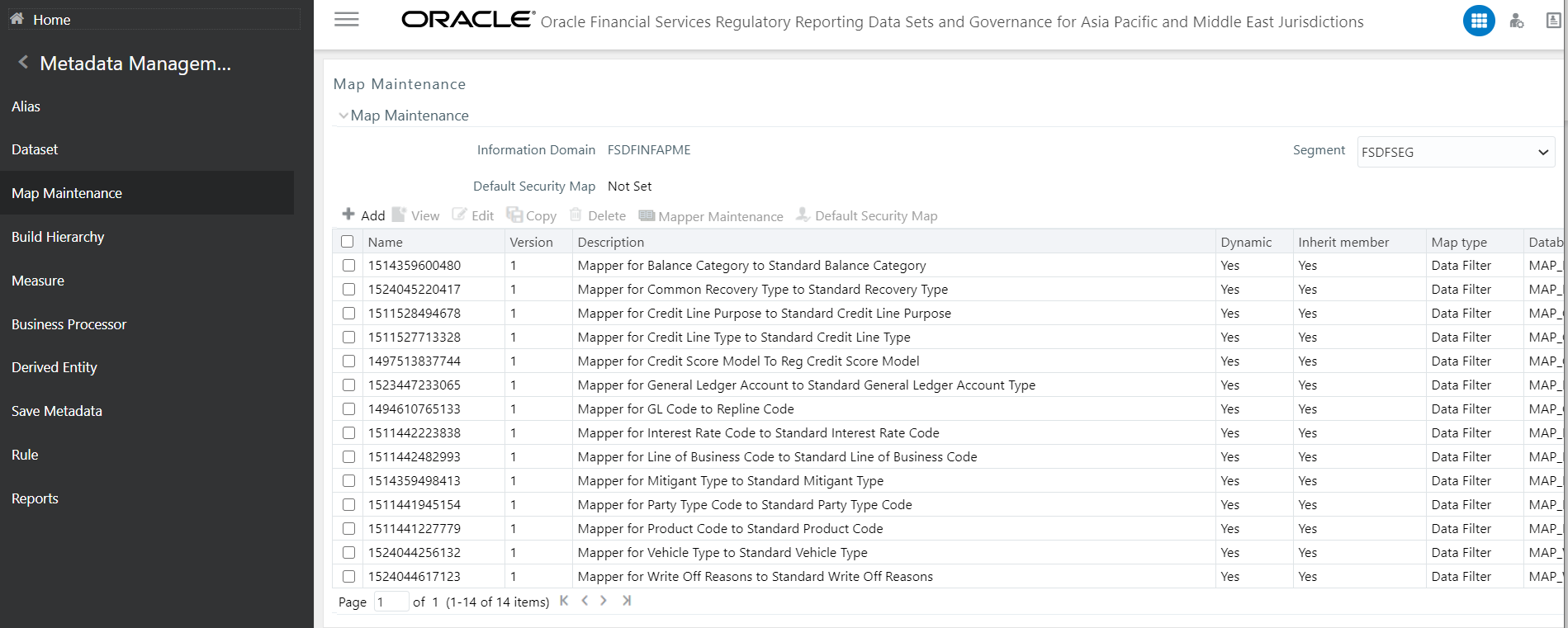
The mapper can be maintained under OFSAAI.
1. Login to OFSAA, navigate to Oracle Financial Services Regulatory Reporting Data Sets and Governance for Asia Pacific and Middle East Jurisdictions, select Metadata Management and then select Map Maintenance.
Figure 34: Map Maintenance Page
2. For illustration, we have selected Mapper for GL Code to Repline Code. Click Mapper Maintenance.
Figure 35: Mapper Maintenance Page

3. OFS REG REP APME maps OTH and MSG out-of-the-box for this mapper. The remaining mappings can be maintained by the user according to user-specific values.
Figure 36:Mapper Maintenance Search Result Page

Prerequisites for Mapper Maintenance
4. Login to OFSAA, navigate to Oracle Financial Services Regulatory Reporting Data Sets and Governance for Asia Pacific and Middle East Jurisdictions, select Metadata Management and then select Map Maintenance. Load all the required user-specific dimensions using SCD.
5. To Resave these hierarchies, select these hierarchies and click Save
§ HCMDF001 - Hier - Map Common Product
§ HCMDF002 - Hier - Map Common Standard Product Type
§ HCMDF003 - Hier - Map Common Party Type
§ HCMDF004 - Hier - Map Common Standard Party Type
§ HCMDF005 - Hier - Map Common Interest Rate Curve
§ HCMDF006 - Hier - Map Common Standard Interest Rate Curve
§ HCMDF007 - Hier - Map Common Line of Business
§ HCMDF008 - Hier - Map Common Standard Line of Business
§ HCMDF009 - Hier - Map Common Credit Line Type
§ HCMDF010 - Hier - Map Common Standard Credit Line Type
§ HCMDF011 - Hier - Map Common Credit Line Purpose
§ HCMDF012 - Hier - Map Common Standard Credit Line Purpose
§ HCMDF013 - Hier - Map Common Mitigant Type
§ HCMDF014 - Hier - Map Common Standard Mitigant Type
§ HCMDF015 - Hier - Map Common Balance Category
§ HCMDF016 - Hier - Map Common Standard Balance Category
§ HCMDF017 - Hier - Map Common General Ledger Code
§ HCMDF018 - Hier - Map Common Standard General Ledger Type
§ HCMDF019 - Hier - Map Common Vehicle Type
§ HCMDF020 - Hier - Map Common Standard Vehicle Type
§ HCMDF021 - Hier - Map Common Write Off Reasons
§ HCMDF022 - Hier - Map Common Standard Write Off Reasons
§ HCMDF023 - Hier - Map Common Recovery Type
§ HCMDF024 - Hier - Map Common Standard Recovery Type
Figure 37: Metadata Resave page

Possible Mapping Combinations
One Standard Dimension table in the source can be mapped only to one Standard Dimension table. One to Many or Many to Many mapping leads to error in T2T as the records are duplicated. From the illustration, the possible combinations for Mitigant Type to Standard Mitigant Type Mapping are One to One and Many to One Mappings.
· One to One Mapping: You can map one Mitigant Type Data Model to one Standard Mitigant Type Data Model using the Mapper Maintenance Screen. Here, you must select one value in the Mitigant Type Data Model and one value in the Standard Mitigant Type data model.
· Many to One Mapping: You can map many values in the Mitigant Type data model to one value in the Standard Mitigant Type data model using the Mapper Maintenance Screen.
To conduct One to One or Many to One mapping:
6. Login to OFSAA, navigate to Oracle Financial Services Regulatory Reporting Data Sets and Governance for Asia Pacific and Middle East Jurisdictions, select Metadata Management and then select Map Maintenance.
Figure 38: Map Maintenance Page
7. Select an existing Map. For illustration, Mapper for GL Code to Repline Code value is selected. Select the Mapper Maintenance icon.
8. The Mapper Maintenance Window opens (in this illustration, the Map - Mapper for GL Code to Repline Code Window opens). To conduct One to One or Many to One mapping, in the Member Combinations section, click Add.
Figure 39: Map Maintenance Add Page

9. The Add Mappings pop-up window opens. In this illustration:
§ To map One to One: select one value each in General Ledger Code for Mgmt Reporting data model, Debit Credit Indicator for Mgmt Reporting Data Model, GL Rollup Signage for Mgmt Reporting Data Model, and one value in Reporting Line Code for Mgmt Reporting Data Model, and click Go. Repeat this step for each One to One Data Model Mapping, and then click Save.
In this illustration, 200001MAP1 - 200001MAP1 is mapped to C – Credit, N – Negative Multiplier, and 1001 - Redeemable Cumulative Preference Shares.
Figure 40: One to One Mapping Window

§ To map Many to One: select more than one value each in General Ledger Code for Mgmt Reporting Data Model, one or more value in Debit Credit Indicator for Mgmt Reporting Data Model, GL Rollup Signage for Mgmt Reporting Data Model, Reporting Line Code for Mgmt Reporting Data Model, and click Go. Repeat this step for each Many to One Data Model Mapping, and then click Save.
§ In this illustration:
§ 200001MAP1 - 200001MAP1 is mapped to C – Credit and D – Debit, N – Negative Multiplier and P – Positive Multiplier, 1 – Total Assets, and 1001 - Redeemable Cumulative Preference Shares and 1002 - Redeemable Non-Cumulative Preference Shares.
§ 200001MAP2 - 200001MAP2 is mapped to C – Credit and D – Debit, N – Negative Multiplier and P – Positive Multiplier, 1 – Total Assets, and 1001 - Redeemable Cumulative Preference Shares and 1002 - Redeemable Non-Cumulative Preference Shares.
Figure 41: One to Many Mapping window
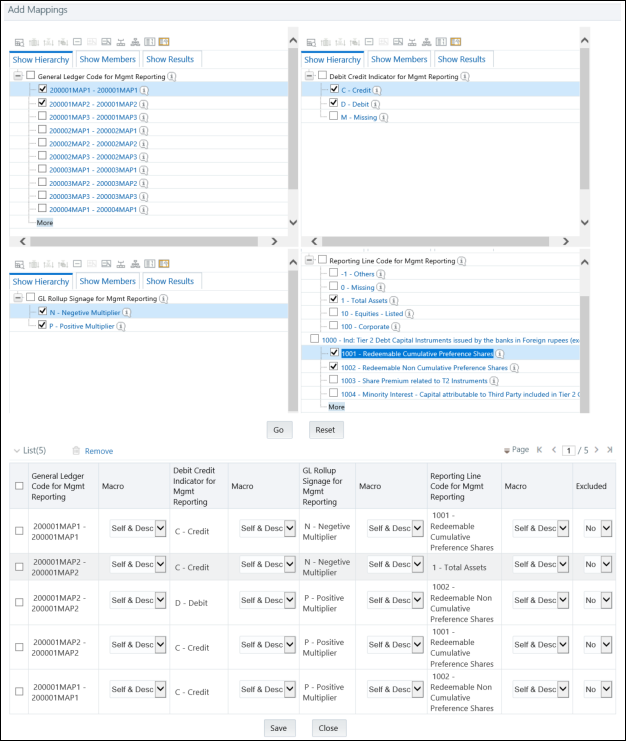
10. An acknowledgment is displayed: Confirm Save? To confirm and save data, click ‘Yes’. In the Mapper Maintenance Window, in the Mapped combinations and the Mapped Member's Sections, you can see the newly conducted mapping.
Load each Physical table in Atomic Schema with V_MAP_ID as mentioned against each mapper,
V_MEMBER_1 => Customer Specific Value Dimension's Member Code, V_MEMBER_2 => Standard Dimension’s Member Code.
This following Mapper Physical Table is required details:
Table 11: Mapper Physical Table
PHYSICAL TABLE |
V_MAP_ID |
MAP_GL_CODE_REP_LINE |
1494610765133 |
Mapping Table to Address FSDF Bugs for 8121 Release
This table provides information to address the FSDF Issues
addressed in this release.
For more information, see the Known Issues Section in the OFS
REG REP APME 8121 Release Notes
Table 12: Mapper Details to Address FSDF Issues
Source Details |
|
|
|
|
|
|
|
|
|
|
|
Target Details |
|
|
|
Entity Name |
Field/Expression Name |
Data Type |
Field Format |
Is Null Allowed |
SQL Expression |
Destination Entity Name |
Destination Field Name |
SQL Function |
Null If |
Default If |
Data Type |
Entity Name |
Field/Expression Name |
Data Type |
Field Format |
STG_CASA |
F_SECURED_IND |
String |
|
Y |
|
FCT_COMMON_ACCOUNT_SUMMARY |
F_SECURED_FLAG |
|
|
|
Char(1) |
STG_CASA |
F_SECURED_IND |
String |
|
STG_SWAPS_CONTRACTS |
N_MTM_VALUE |
Number |
|
Y |
|
FCT_COMMON_ACCOUNT_SUMMARY |
N_MTM_VALUE |
|
|
|
NUMBER(22,3) |
STG_SWAPS_CONTRACTS |
N_MTM_VALUE |
Number |
|
STG_BORROWINGS |
N_INT_COST |
Number |
|
Y |
|
FCT_COMMON_ACCOUNT_SUMMARY |
N_INT_EXPENSE |
|
|
|
NUMBER(22,3) |
STG_BORROWINGS |
N_INT_COST |
Number |
|
|
|
|
|
|
|
|
|
|
|
|
|
|
|
|
|
The mapper maintenance output is always physically stored in underlying tables. These tables are registered in OFSAA as an object. Therefore, these tables can be used, without any restrictions, in any of the metadata that requires reclassification. OFS REG REP APME Data Flows (T2Ts and Rules) make use of this information to populate the Standard Dimension Surrogate Keys of Results area tables.