Security at Product Level
A Product is defined in Group as a Group Benefits Plan Template which provides the basis for a Group Customer’s Plan instance and/or serves to group similar Group Benefits Plan Templates (referred to as “Sub-Products”). When Plans are created they belong to either a Product or Sub-Product. Plans can be created through Group Customer screens or through Palette.
For group policy administration, user has the ability to create plan dynamically using OIPA application. That means user can create plans without using palette and avoids the need of migrating the changes in production environment. When creating a new security group, there is an automated method available to grant access to the plans via the palette.
System has the ability to define plan level security at parent product level and all plans automatically inherit it. It allows you to create /use plans dynamically without involving any changes to the palette. It also avoids the need for frequent migration of security data from development environment to production environment.
Security Consideration
When a Plan is created through OIPA, it receives a copy of parent Product security as default. All levels of security at company and plans as defined in palette, all security levels defined at the immediate parent, and all transaction security available to the plan gets copied.
Any Change in permissions for a Plan from this default would need to be made through Palette for that plan.
For the copied permissions for the plans created through OIPA to take effect, log out and log in back to OIPA. If created in Palette; the security is set up through Plan Security Node in Admin Explorer. When created through OIPA, set up the security via palette to access the plan pages in OIPA. The palette changes and security changes defined in this document allow you to set up security at Product level or sub product level which a plan can use as default. For Plans created in OIPA, this allow you to access plan Pages without the need to set up security permissions via palette.
Setting up Plans and Plan Pages Security at Product Level or Child Product Level in Palette
To set up Product level Security, navigate to the Admin Explorer in Palette | Security | Application Security | Security Group | Name of the Security Group |Plan Security, and perform the following step:
- Expand Plan Security Node to get lists of all companies and subsidiary Companies in OIPA at the same level.
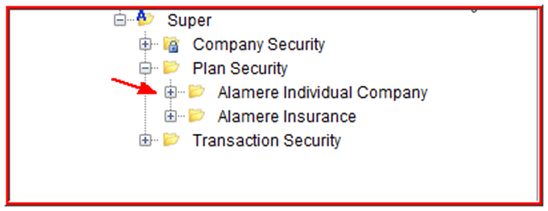
- Expand each subsidiary company to get all products available under it.
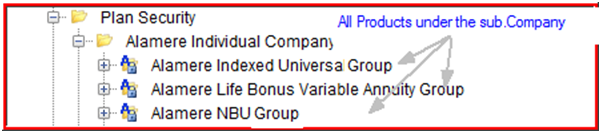
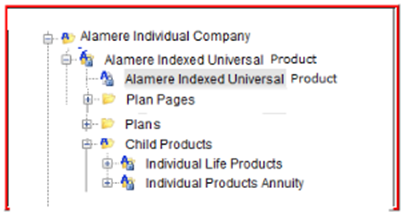
- Expand a Product name to get the following:
- Product Name Node
- Plan Pages Folder
- Plan Folder ( Contains individual plan nodes for all plans available under this Product)
- hierarchically display Child Product Nodes if any
- Right-click at any parent or child Product node to get the following options:
- Grant Access to All Plan Pages
- Remove Access From All Plan Pages
- Grant Access to All Plans
Additional to above three right-click menu options, at Child Product/s and plan levels, "Copy Parent Access" option is available.
Option Function Condition Grant Access to All Plan Pages Grants the product level security access, to all plan pages of the product or child product. In case of new plans from OIPA under an existing security group. Remove Access From All Plan Pages Removes the product level security access, to all plan pages of the product or child product. In case of plans from OIPA under an existing security group. Grant Access to All Plans Grants the product level security access, to all plans of the product or child product. In case of existing plans or group customers from OIPA under a new security group. Copy Parent Access Copy the security permissions of parent product.
You can then edit those permissions or keep it as is for that level.
If security permissions are available at immediate parent. If security is not set up at immediate parent , this option do not appears on right-click.
Security can be set up at Product level for the Plans and Plan Pages. Plans under the product inherit this security automatically. Any changes to the Plan pages security at product level do not propagate downstream, but any plan created in OIPA under the product copy this security set up as default.
For any Child Products under the Product hierarchy. Plans under the child product inherit child product security automatically. Any changes to the Plan pages security at Child product level do not propagate downstream . But any plan created in OIPA under the child product copy this security at set up as default.
When a Product or Child Product or Plans are created in Palette, there is no default security. User need to go to Admin Explorer and set up the security permissions for plan pages explicitly at any level.
Provide right click menu options at each parent or child Product name nodes that will allow user provision to Grant Access to all plan pages or Remove access to all plan pages. User can also individually set security by opening plan pages folder and navigating to each plan page security node.
Before setting up a plan security, it is not required to set up Product and Child Product security in the hierarchical structure, but it is up to the configure to take care of the fact that if a plan is created dynamically in OIPA, there needs to be security permissions available at the immediate parent for plans to be accessible for the users without setting up permissions in palette for those plans.
While checking in security permissions at product and Child product level in Palette, give the following warning message when there are children in lower hierarchy (plans or child products) available :
"The security permissions will not be automatically copied down to products or plans in lower hierarchy."
Setting up Transaction Security in Palette at Product/ Child product Levels
After Company, Product and /or Plan security have been defined, the transactions associated with the company, Product and plans are displayed under the Transaction Security folder in Admin Explorer.
Currently all companies and subsidiary companies display under the transaction security node at the same level like in plan security. Under each subsidiary company, all product name nodes appear.
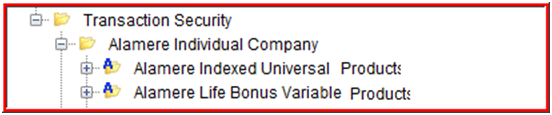
Opening the individual products will display Transactions Folder that would list all transactions under the product, Plans Folder, Child Products Folder in that specific order. Within Plan Folder, all Plans under the Product will be displayed. Opening the node for the plans will display all plan transactions.
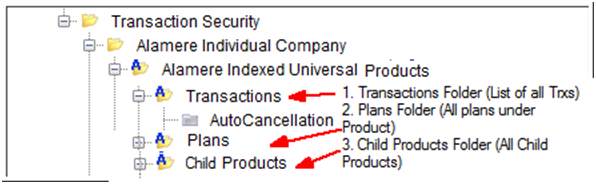
Within the child product folder all Child product names are available. Under each Child Products, the hierarchical display of folders are similar to Product, as shown in below image
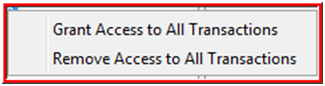
Security can be added or removed to all transactions in a product by right-clicking on the product name node. Security can also be assigned to individual transactions by opening the Product folder and then the transactions folder and then selecting specific transaction.
Security can be added or removed to all transactions in a child product/s by right-clicking on the child product's name. Security can also be assigned to individual transactions by opening the child Product folder and selecting a specific transaction. Plans under the child product will be displayed under child product hierarchically. Opening up plan folder will list all plans under the Product or child product/s. Security can be set up for Plan transactions as it is currently.
When a transaction is created at Product level, those transaction nodes gets added to downstream child products and Plans in Palette. When transactions are created at child product level, those transaction nodes are also added to Plans underneath. In palette transaction security, allow option at Child Product and Plans below to copy parent transaction security permissions access on right-click. This option is available only if security permission setting are available for those transactions at immediate parent level. The right-click menu option is "Copy Parent Access." When you select this option, it give a warning as : "Existing security will be overwritten if this operation is completed. Do you wish to continue?"
While checking in security permissions at product and Child product level transactions in Palette, it gives the following warning message when there are children in lower hierarchy (plans or child products) available : "The security permissions will not be automatically copied down to products or plans transactions in lower hierarchy."
Configuration Detail:
This feature has not introduced any new configuration or changes to existing configuration, but plan pages under product and transactions currently within the product hierarchy would need security to be manually added.
