Integration
Release 23.10
Export, Update, and Import Records with Line Items
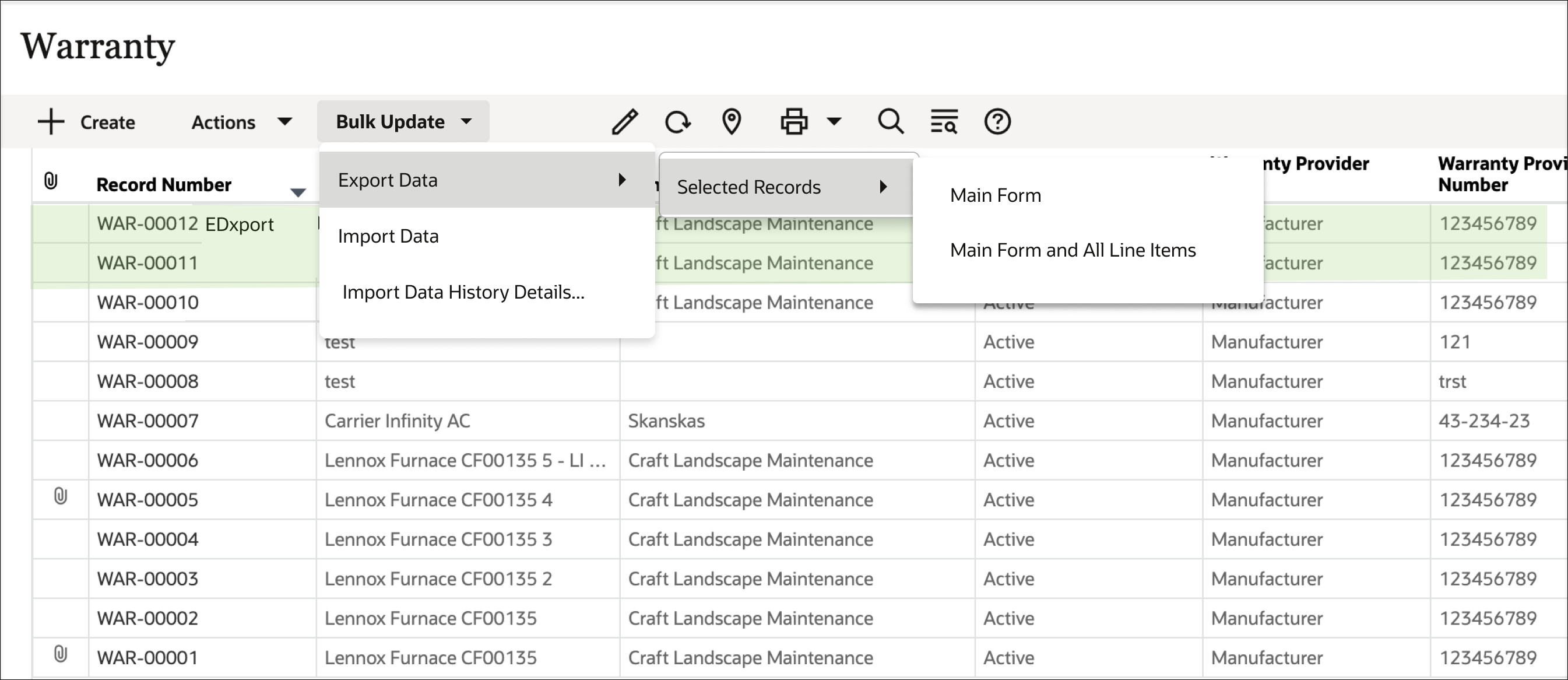
Export data from multiple records – including both main form and line item data – to a spreadsheet, make changes to the existing data, and import that back into Unifier to update those records and line items.
Exported files will contain three or more worksheets: Instructions, the Main Form, and a worksheet for each line item tab in the business process record.

Improved Error Messaging
More detailed and descriptive error messages are now provided when creating or updating records or line items through integration.
This includes situations where validation rules fail, when data element value errors occur, and when duplicate picker values are found.
RESTful Service for Workflow Business Processes
An administrator can now grant required access to Get and Update business process workflows for RESTful services.
Such services provide the list of users associated with a workflow business process record in a shell or company, including record owner, assignees, and those included in CC fields.
Users can also be added or removed through RESTful services.
Sort Cost Sheets via REST
Sort CBS Codes in a Project Cost Sheet using a REST call.
Update Shell Options via REST
Retrieve and update shell options via REST, including:
- Add / Update currency codes
- Add / Delete Links
- Add / Remove Custom Prints
- Add / Remove P6 and OPC Projects on the Integration tab
- All fields on the Options tab
Create Snapshots in Cash Flow Detail Curves
Use a RESTful service to create or delete a snapshot of a detailed cash flow curve.
Last Published Tuesday, November 21, 2023