
Shared Information in an IBSS Cluster
Clusters in IBSS share common information and common features but each individual instance holds unique cache and log files. The common information includes the config.xml file, database environments, and SoftLibraries. This allows for information that is shared to be consistent throughout the IBSS cluster. For example, if you make a change to a database environment, the config.xml file gets updated. Since every IBSS instance in the cluster has access to the updated config.xml file, every instance is updated. Likewise if you make an update to a SoftLibrary, you do not need to update every IBSS instance. You can do one update. All IBSS instances have access to the updated SoftLibrary.
When you set up a cluster, each individual IBSS deployment is entered as a node. Each node has an
IBSS home page. As part of a cluster, each node is presented on each IBSS home. It does not matter from where you enter the environment or subscriber information. Each node shares the same configuration file so each node sees the same information.
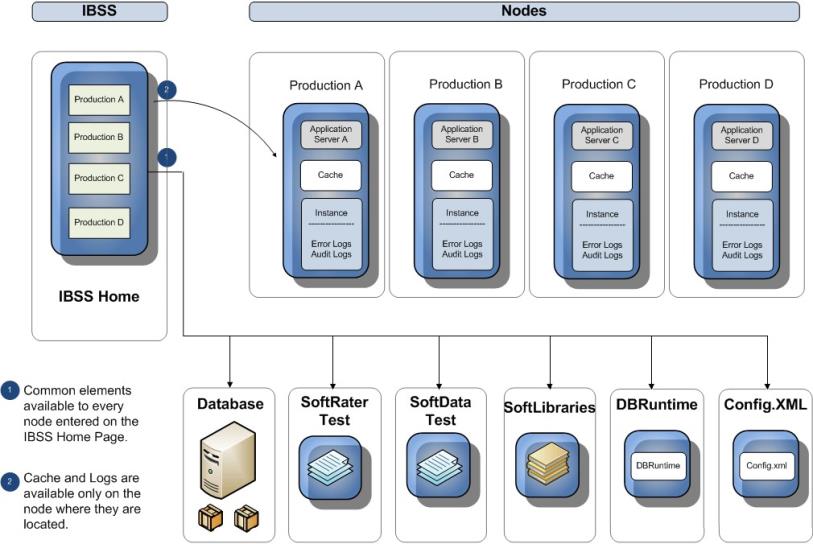
Shared Information in an IBSS Cluster
Once nodes are created in the IBSS cluster, SoftRater and SoftData can utilize any node for testing. For example, if you wanted to test a SoftData call on node A, you would select node A from the node option on the SoftRater Test Interface page. You would not have to enter the node A IBSS instance and perform the test from there. You can test from any node in the cluster. If you then wanted to test node B, you would select node B from the option. You would not have to enter the node B IBSS instance.
The areas that are unique to each node in the cluster are cache and Instance files. Cache holds the rating environment information obtained from the database. This information is used in subsequent rate requests. Cache can be purged across all members of the cluster or only for the selected node.
Another area unique to each node is the Instance file. The Instance file holds error and audit logs for each member of the cluster. These logs are unique to the instance and no information is shared. Individual error and audit logs can assist when debugging issues. You can see the actions performed by each IBSS instance without having to sort through logs that do not refer to the node in question.
