Loading Packages
Loading a package takes the logic stored in the package and places it in the database, so that it can be rated against. Packages can be loaded from any SoftRater environment.
- The Packages subtab automatically loads the list of packages for the first SoftRater environment on the Settings tab. You can select a different environment and click Get Listing! to update the list of packages.

Selecting a Package for Loading
- Select the package you would like to load and click Load or right-click and select Load.
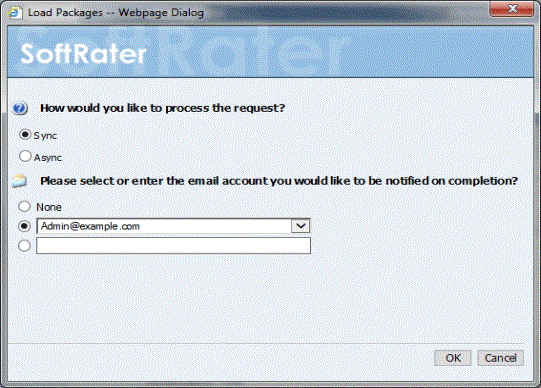
Loading a Package
- When you have finished choosing your options, click OK.
- If you chose the Sync load option, the package listing should refresh and an icon (
 ) will appear next to the loaded package.
- If you chose the Async load option, you should receive a message that the request was successful.
When the process finishes, if email notifications have been entered, emails are sent with the results. If no email has been selected, nothing is sent. Refresh the listing and an icon() is displayed next to the loaded package.
To verify that the load request has or has not been processed, enter the Services page. Under the Insbridge Message Service  Message Process, select SoftRater – Package. Click View Messages. Any outstanding requests will be listed.
Note: Please make sure that the Insbridge Message Service is running. If the message service is not running, a message will be displayed at the top of the window.
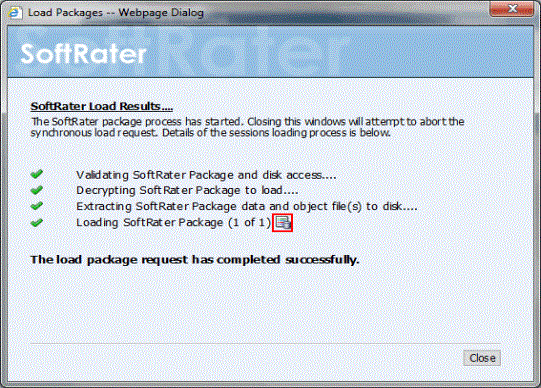
Load Packages Results
Sync requests have a SoftRater Load Request Report immediately available. Click the report icon to view. Please see Load Request Report for more information.
Note: If you load a package for a program that already has a package loaded, the original package will be unloaded and the new package will be loaded in its place. The old package will remain on disk until deleted and can be reloaded at any time.