Using Set Underwriting to Fail and Set Message
You can add a set message step after a set underwriting to fail to return a message. In this example, underwriting will fail if the effective date is within 10 days of the current system date.
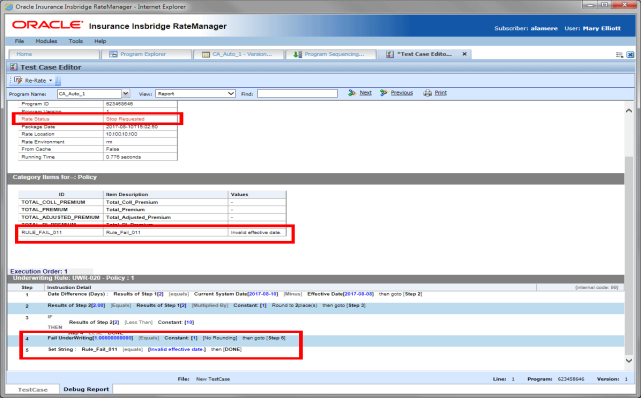
Underwrite Fail and Set Message Example
- Step 1: Determine the date difference between the effective date and the current system date.
- Step 2: Multiple the results of step 1 by 1.
- Step 3: If the result of step 2 is less than 10, go to step 4, set underwriting to fail, else done.
- Step 4: Set underwriting to fail.
- Step 5: Set Message where the result variable RULE_FAIL_001 contains the message “Invalid Effective date.”
Add the result for step 5 to the output mapping and the message is displayed if the underwriting rule fails. A message returned in the summary at the top of the debug report may be easier to locate than scrolling through the report looking for the rule that failed.