Hyperlinks to RateManager Elements
The debug report contains hyperlinks that open an element for editing.
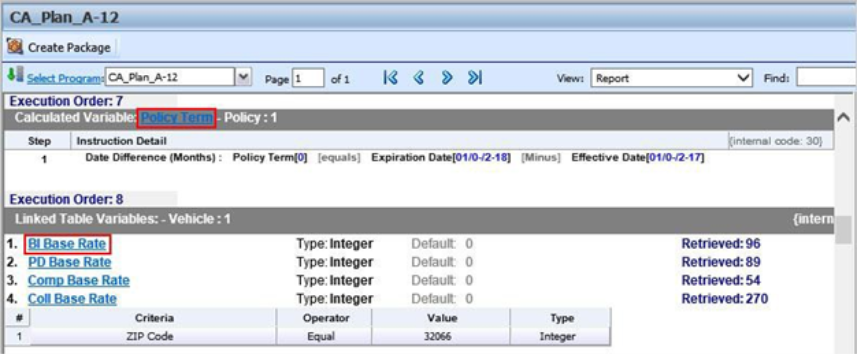
Available elements include: algorithms, calculated variables, driver assignments, filter rules, and table variables. Links are located in the name of the element. Clicking the link opens the edit screen for the element. After editing, the program can be re-packaged on the Debug Report tab.
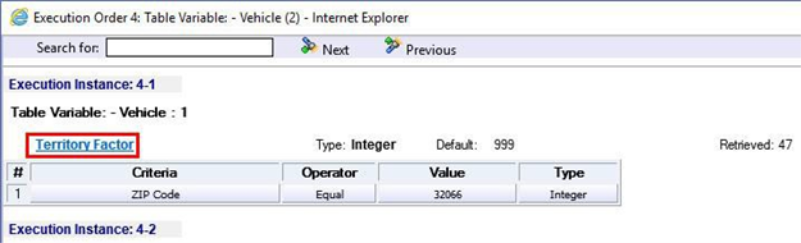
Write permissions must be in place to edit elements. An error message is displayed if permissions are not in place. Package permissions must be in place to package a program.
Hyperlinks are on the debug report only. No links are available when the report is in XML view, worksheet view or sample worksheet view.
Advanced Options
Advanced Algorithm Looping is displayed on the Debug Report.

In the gray information bar you will see the [Advanced Option] indicator. The DO WHILE condition that caused the looping will be listed, as well as the details of the condition. The maximum number of loops and the number of loops performed will be displayed.
The Loop Instance will show the number of the last loop run. To view the details of this loop, click the hyper-linked show loop details link. This will place you on the looping details screen. This screen will only display the details of that loop. You can view any loop run by entering in the number in the Loop Instance box. For example, if you wanted to see the details of loop 9, you would enter 9 in the Loop Instance box and click the show loop details link. The properties of the 9th loop would be displayed in a separate screen.

The looping details screen contains the summary policy information and the looping algorithm information. If any result variables were set during the looping, a table will be displayed at the top of the tab, organized by loop iteration.