4. Define Attributes Specific to Derivative Products
This chapter explains how you to define attributes specific to a Derivative product.
This chapter contains the following sub-topics:
1) Derivatives Product Definition
2) Derivatives Revaluation Contract Fair Values
3) Derivatives Revaluation Branch Interest Rates
4) Derivatives Revaluation Contract Interest Rates
4.1 Derivatives Product Definition
This section contains the following sub-topics:
2) Preference
4.1.1 Create Derivative Product
This topic describes the systematic instruction to create derivative product.
Prerequisite:
Specify User ID and Password, and login to Homescreen.
Context:
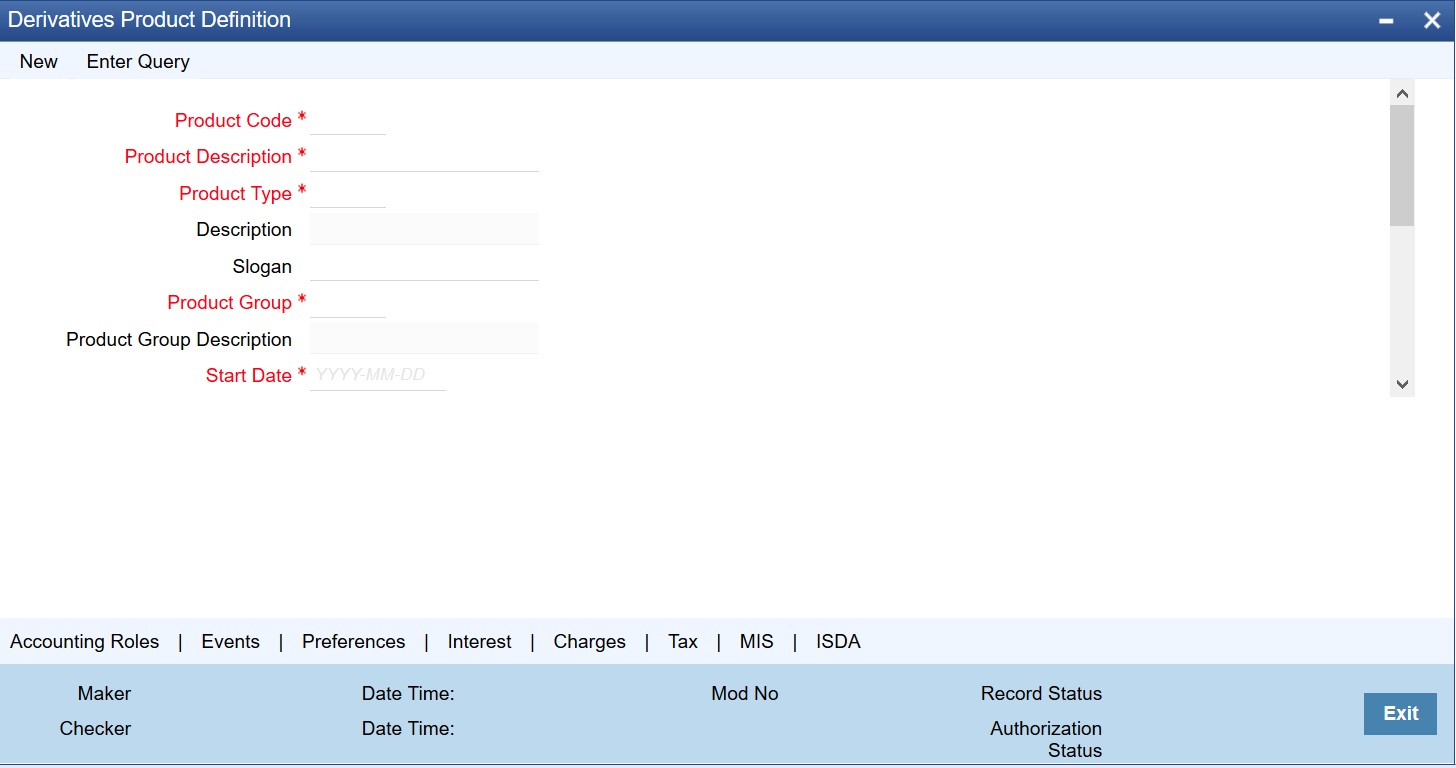
In Derivatives Product Definition screen, specify basic information about the derivative product such as Product code, the description, etc.
1.On Homescreen, type DVDPRMNT in the text box, and click next arrow.
Step Result: Derivative Product Definition screen is displayed.
Figure 4.1: Derivatives Product Definition Screen
2.On Derivative Product Definition screen, specify the fields and click Ok.
For more information about the fields, please refer to Table 4.1: Derivative Type Field Description.
For any product created in Oracle Banking Treasury, click the appropriate icon in the horizontal array of icons in the screen to define generic attributes such as:
•Interest Details
•Tax Details
For a derivative product, in addition to these generic attributes, define specific other attributes. These attributes are discussed in detail in this chapter.
Define the attributes specific to a derivative product in the Derivatives Product Maintenance screen and the Product Preferences screen. In these screens, specify the product type and set the product preferences respectively. For further information on the generic attributes refer to the following Oracle Banking Treasury User Manuals under Modularity:
•Product Definition
•Interest
•Charges and Fees
•Tax
•User Defined Fields
•Settlements
Table 4.1: Derivative Type Field Description
|
Field |
Description |
|---|---|
|
Product Code |
Identify the derivative product created with a unique Product Code. This code must be unique across all the modules of Oracle Banking Treasury. The field is mandatory. |
|
Product Description |
Describes the product created in this field. The description entered here helps to identify the product all through the module. |
|
Product Type |
Specify the Product Type. The product type identifies the basic nature of a product. The derivative types maintained through the Derivative Type Maintenance screen reflects in the options list available for this field. A derivatives product created belongs to any one of the following types: •Forward Rate Agreements •Interest Rate Swaps •Cross Currency Swaps |
|
Product Slogan |
Specify a slogan for the product created that suitably announces the product to your customers. |
|
Product Group |
The product type identifies the basic nature of a product. The derivative types maintained through the ‘Derivative Type Maintenance’ screen reflects in the options list. Invoke the list of the product groups maintained in the bank and choose the product group to which the product that you are creating belongs. |
|
Start Date |
Specify an offered date. Specify the date in the Start Date Field. |
|
End Date |
Specify the date until the product is open in the field. note: Do not enter a date that is earlier than the current system date. It is not possible to offer a product beyond the specified end date. If an end date is not specified for a product, it can be offered from an indefinite period. |
|
Remarks |
Specify the remarks related to the product. Its for reference. |
|
Exchange Rate Variance (in%) |
Defines the exchange rate variance that allows for a derivatives product. This variance is expressed in percentage. For a special customer, or in special cases, use an exchange rate (a special rate) that is greater than the exchange rate f3rmaintained for a currency pair. The variance is referred to as the Exchange Rate Variance. When creating a product, express an Exchange Rate Variance Limit in terms of a percentage. This variance limit would apply to all contracts associated with the derivatives product. |
|
Override Limit |
If the variance between the default rate and the rate input varies by a percentage that is between the Override Limit and the Rate Stop Limit, save the transaction (involving the product) by providing an override. |
|
Stop Limit |
If the variance between the default rate and the rate input varies by a percentage greater than or equal to the Stop Limit, its not possible to save the transaction involving the product. |
|
Rate Code |
Select the appropriate rate from the option list to specify whether to use Mid Rate for all Cross Currency transactions or the Buy/Sell Rate is used, depending on the nature of the transaction. It is required to maintain Buy, Sell, and Mid Rates for every Currency Pair and Rate Type combination. |
|
Rate Type Preferred |
Specify the Rate Type that should be used for Cross Currency transactions. The adjoining option list displays all the Rate Types maintained through the ‘Rate Type Definition’ screen. You can choose the appropriate one. |
This topic describes the systematic instruction to define specific preferences screen.
1.On Derivative Product Preferences, Click Preference to process the Derivatives Product Preferences and to define specific preferences for the product.
The Product Code and Product Type are defaults from the Product Maintenance screen.
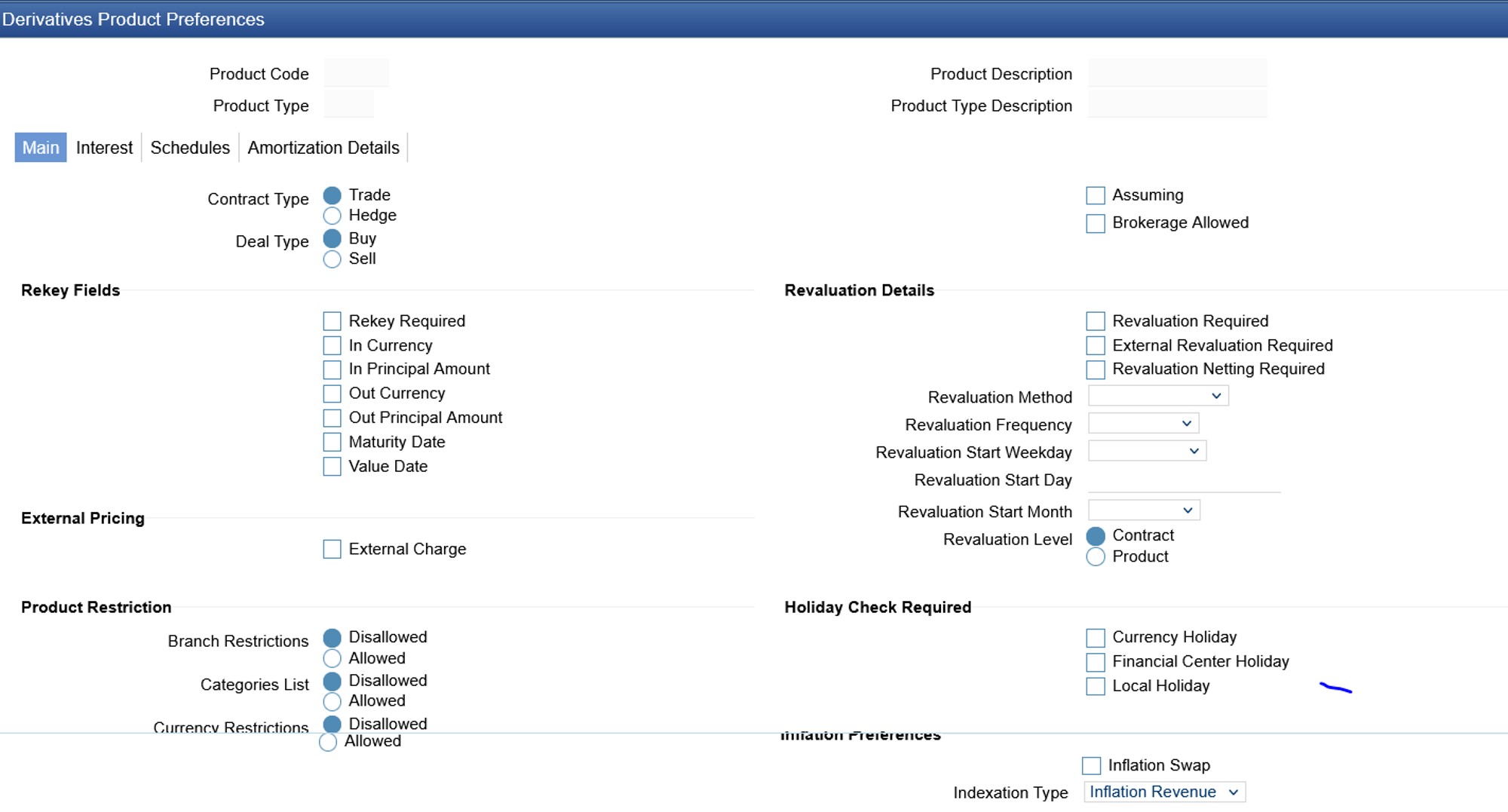
Preferences options are available for defining the attributes of a product. The preferences that define for a product are inherited by all derivative contracts that are associated with the product.
Figure 4.2: Derivative Product Preferences
2.On Derivative Product Preferences, specify the fields and click Ok.
For more information on fields, refer to the Table 4.2: Main Tab - Field Description.
Table 4.2: Main Tab - Field Description
|
Field |
Description |
|---|---|
|
Contract Type |
Indicate whether the product for which you are defining preferences is meant for Trade contracts or Hedge contracts. note: Its possible to Amend this preference while entering the details of the contract. |
|
Deal Type |
The first preference defines the derivative product is the Deal Type. Indicate the default nature of deals processed under this product. The choices available for these fields are: •Buy •Sell note: The deal type that you specify will default to contracts under this product. However, you are allowed to change this while entering the details of the contract. |
|
Assuming |
Check this box to indicate that the assumed contract is from the counterparty. Uncheck this box if the product is used for a fresh contract. |
|
Brokerage Allowed |
Specify whether brokerage must be applied to deals involving this product by checking the box. If the brokerage is specified for the product, you can waive it for specific deals. But if you have specified that brokerage is not applicable to the product, it will not be able to levy brokerage on a specific deal involving the product. |
|
Rekey Fields |
When a derivative contract is processed for authorization - as a crosschecking mechanism, specify that the values of certain fields should be entered before the contract is authorized called the Rekey option. While defining the product, indicate the fields whose values need to specify before an authorized contract. Thus, it becomes mandatory for you to specify the values of rekey fields for all contracts linked to the product. note: It is possible to amend this preference while entering the details of the contract Specify the following as rekey fields: •In Currency •Out Currency •Maturity Date •In Principal Amount •Out Principal Amount •Value Date If no rekey fields are defined, the details of the contract are displayed immediately, when the authorizer calls the product for authorization. |
|
External Pricing |
Specify the fields. |
|
External Charge |
Check this box to indicate that external charges are fetched from external pricing and billing engine for contracts created under this product. External Charge is enabled only when the system integrates with external pricing and billing engine (PRICING_INTEGRATION = Y at CSTB_PARAM level). |
|
Revaluation Details |
You may want to revalue your deal portfolio periodically to account for the gains and losses due to changes in the market interest rates or exchange rates. Oracle Banking Treasury provides a feature to revalue the worth of derivative contracts linked to the product based on the Fair Price the Contract Rate or the Bank Rate. |
|
Revaluation Required |
Revalue the worth of contracts associated with the product at regular intervals. Check this box to indicate whether revaluation is required for the defined product. note: At the time of processing a contract if decided that revaluation is not required, then choose to waive this option (even if at the product level you have specified that revaluation is necessary for contracts involving the product). However at the product level, you have specified that revaluation is not required, then while processing the contract you will not be allowed to choose the revaluation option. |
|
External Revaluation Required |
Select the check box next to the External Revaluation Required, for the revaluation to be done externally. If this field is checked, ensure to set the external revaluation level to either branch level or product level in Derivative Branch Parameter Maintenance. |
|
note: You can choose either the option Revaluation Required or External Revaluation Required at a time. Both these options cannot be chosen at the same time. |
|
|
Revaluation Netting Required |
If indicated that revaluation is required for the product, then indicate whether accounting passed entries is at the leg level or the contract level. Check this box to indicate that revaluation entries should be passed at the contract leg level. |
|
Revaluation Level and Method |
In Oracle Banking Treasury, revaluation entries can be passed either at the product level or at the contract level. After indicating the level for revaluation, indicate the method to be used for revaluation. The options available are: •Fair Price •Contract Rate •Branch specific Interest Rate The revaluation level and specified method determines how the product is revalued. note: Each of the above methods explained in detail in the chapter titled Defining Fair Price revaluation methods. |
|
Revaluation Frequency |
The frequency with which a product must be revalued has to be specified as a product preference. Once you have indicated the level and the method for revaluation, you can specify the frequency with which a product must be revalued. The frequency are one of the following: •Daily •Weekly •Monthly •Quarterly •Half Yearly •Yearly note: If the revaluation date falls on a holiday, the revaluation is done as per your holiday handling specifications in the Branch Parameters screen. |
|
Revaluation Start Weekday |
In the case of weekly revaluation, specify the day of the week on which revaluation must be carried out. For example, if the revaluation must be carried out every Friday is specified, then the contract or product (depending on the level specified) is revalued every Friday of the week. note: The specified Revaluation Frequency at the product level cannot be changed while processing the contract. |
|
Revaluation Start Day |
In the case of monthly, quarterly, half-yearly or yearly revaluation, specify the date on which the revaluation must be done during the month. For example, if you specify the date as 30, revaluation will be carried out on that day of the month, depending on the frequency. To fix the revaluation date for the last working day of the month, specify the date as 31 and indicate the frequency. If you indicate the frequency as monthly, the revaluation is done at the end of every month - that is, on 31st for months with 31 days, on 30th for months with 30 days and 28th or 29th, as the case may be, for February. If you specify the frequency as quarterly and fix the revaluation date as 31, the revaluation is done on the last day of the month at the end of every quarter. It works similarly for half-yearly and yearly revaluation frequency. |
|
Revaluation Start Month |
If you set the revaluation frequency as quarterly, half-yearly or yearly, you have to specify the month in which the first revaluation has to begin, besides the date on which the revaluation should be done. For instance, You have selected the half-yearly option and specified the start date as 31 and the start month as of June, the system will do the first revaluation on the 30th of June for the period from 1st January to June 30th, and the second one on 31st December for the period from 1st July to 31st December. |
|
Currency Holiday |
Select this check box, to execute the currency holiday calendar validation of the dates and movement of schedules. |
|
Financial Center Holiday |
Select this check box, to execute the financial center holiday calendar validation of the dates and movement of schedules. |
|
Local Holiday |
Select this check box, to execute the local holiday validation of the date and movement of schedules. |
|
Inflation Preferences |
Specify the following fields. |
|
Inflation Swap |
Check this box to indicate that the product type must be Inflation swap. |
|
Indexation Type |
Select the indexation type from the adjoining drop-down list. The list displays the following values: •Inflation Revenue •Zero Coupon •Year on year |
3.On Derivatives Product Preferences screen, click Interest Tab
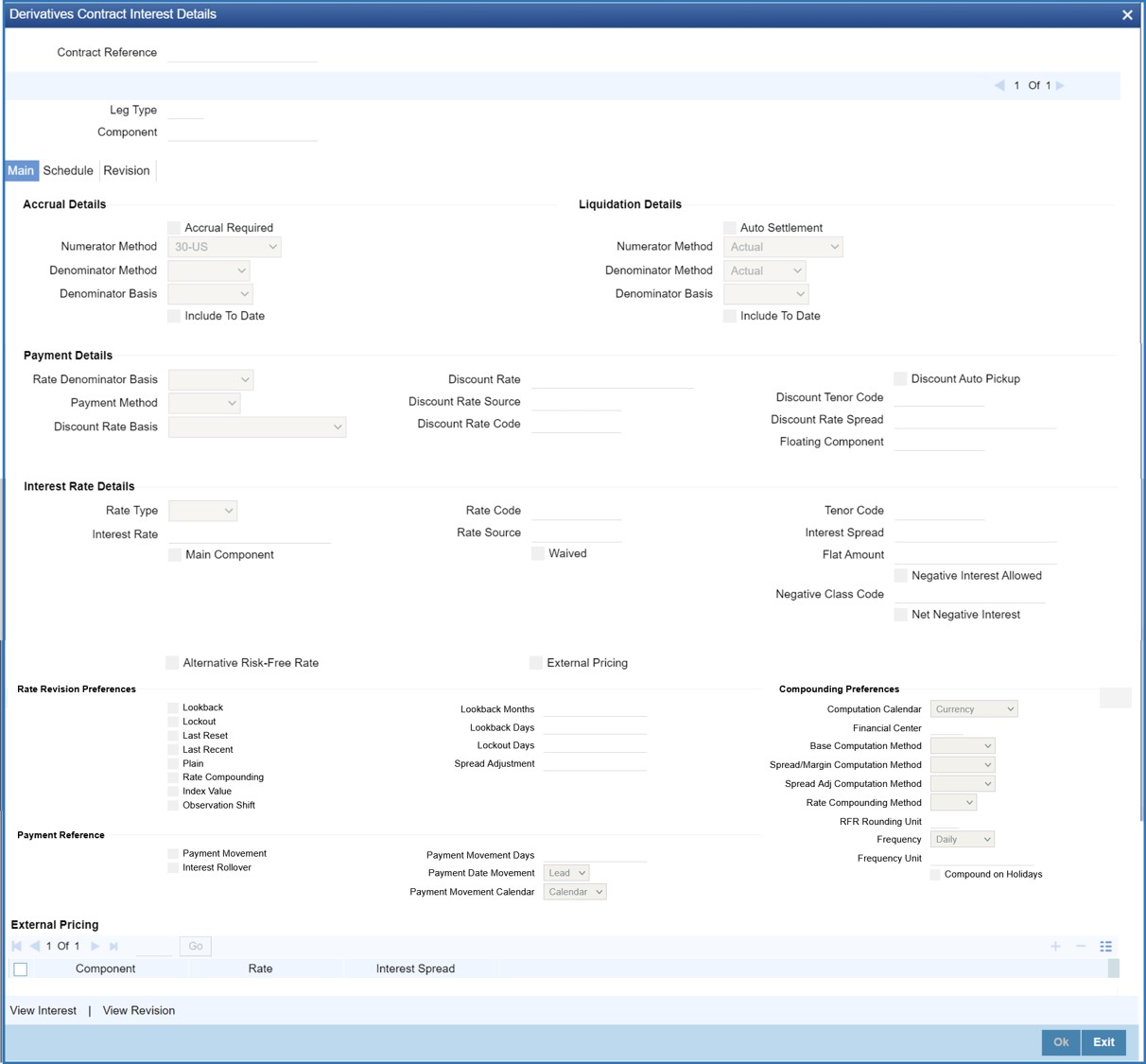
Step Result: Interest screen is displayed.
Figure 4.3: Derivative Product Preference Interest Tab
4.On Derivatives Product Preferences Interest screen, specify the fields, and click Ok.
For more information on fields, please refer to Table 4.3: Interest Field tab- Field Description.
As part of setting up the product preferences, you have to specify the relevant interest accrual details. The accrual details that you specify will be made applicable to all hedge contracts associated with the product.
Indicate whether interest must be accrued at the product or contract level for hedge deals. The interest accrual specifications must be done for both the inward and outward legs of the contract.
Table 4.3: Interest Field tab- Field Description
|
Field |
Description |
|---|---|
|
Interest Accrual Level |
Check the box to indicate whether interest accrual is required for the contract. Leave the box unchecked to indicate that accrual is not applicable. note: Specify the accrual related details individually for the In and Out legs to indicate that interest accrual is required for the contract. Here you can indicate the level at which accrual entries should be passed for the in leg of the contract. The options available are: •Product •Contract •At the product level, accruals will be passed for the product and currency combination. Those contracts for which accrual is required will be identified by the system and accrual entries will be passed based on the accounting entry set-up defined. |
|
Interest Accrual Level |
Indicates the level at which accrual entries must be passed for the in the leg of the contract. The available options are: •Product •Contract At the product level, accruals will be passed for the product and currency combination. Those contracts for which accrual is required will be identified by the system, and accrual entries are passed based on the accounting entry set-up defined. At the contract level, accruals are passed for individual contracts linked to the particular product. |
|
In Leg Denominator Basis |
Specify the interest accrual rate for the inward leg of the contract as one of the following: •Per annum •Per schedule period |
|
Out Leg Denominator Basis |
Specify the interest accrual rate for the outward leg of the contract as one of the following: •Per annum •Per schedule period |
|
Allow External Rate Revision |
Click the Allow External Rate Revision check-box to indicate that for the contracts linked to this product, you can allow rate revision based on the rates uploaded from an external system. |
|
In Leg/Out Leg Interest Accrual Details |
|
|
The details maintained here are specific to the interest calculation methods to be applied during accruals. Any of the following combinations are allowed for calculating interest: |
|
|
Actual / Actual |
Click on Actual in Numerator Method field. Click on Actual in Denominator Method field. The Actual number of days in the period, and the Actual number of days in that year. |
|
Actual / 365 |
Click on Actual in Numerator Method field click on 365 days in the Denominator Method field. The number of actual calendar days for which calculation is done or 365 days in a year. |
|
Actual – Japanese / Actual |
This is similar to the Actual/365 method except that leap days are always ignored in the denominator day count calculation. Click on Actual in the Denominator Method field, click on Actual Japanese in the Numerator Method field. |
|
365 – ISDA / Actual |
Sum of (A) and (B) are: A = (Interest accrual days falling within the leap year) / 366 B = (Interest accrual Days not falling within the leap year) / 365 The denominator is the actual number of days in a year. Click on 365 ISDA in Numerator Method field; click on Actual in Denominator Method field. |
|
Actual / 360 |
Click on Actual in Numerator Method field; click on 360 in Denominator Method field. The actual number of calendar days for which calculation is done / 360 days. |
|
The General Formula used for the day count method is given below: Day count fraction = Number of Interest Accrual Days/ (Numerator) Days/ in the specified period (Per Annum/Per Period) (Denominator) note: Setting the Interest Frequency is done in the same manner as setting the Revaluation Frequency. |
|
|
Numerator Method |
Select the Interest method that should be applied during accrual for in/out leg from the adjoining drop down list. The list displays the following values: •1 •ACT-ISMA •30-Euro •30-US •Actual •30-ISDA •30-PSA •Actual-Japanese |
|
Denominator Method |
Select the Interest method that should be applied during accrual for in/out leg from the adjoining drop down list. The list displays the following values: •360 •365 •Actual •1 •ACT-ICMA |
|
Include To Date |
Check this box, to take into account on the last day in an accrual period when arriving at the accrual days. |
|
In Leg/Out Leg Interest Liquidation Details |
Specify the fields: |
|
Numerator Method |
Select the Interest method that should be applied for liquidation for in/out leg from the adjoining drop down list. The list displays the following values: •1 •ACT-ISMA •30-Euro •30-US •Actual •30-ISDA •30-PSA •Actual-Japanese |
|
Denominator Method |
Select the Interest method that should be applied for liquidation for in/out leg from the adjoining drop down list. The list displays the following values: •360 •365 •Actual •1 •ACT-ICMA |
5.Once you authorize the deal at the contract level, no changes will be allowed at the deal level for contract.
6.On Derivatives Product Preferences screen, click Schedules Tab
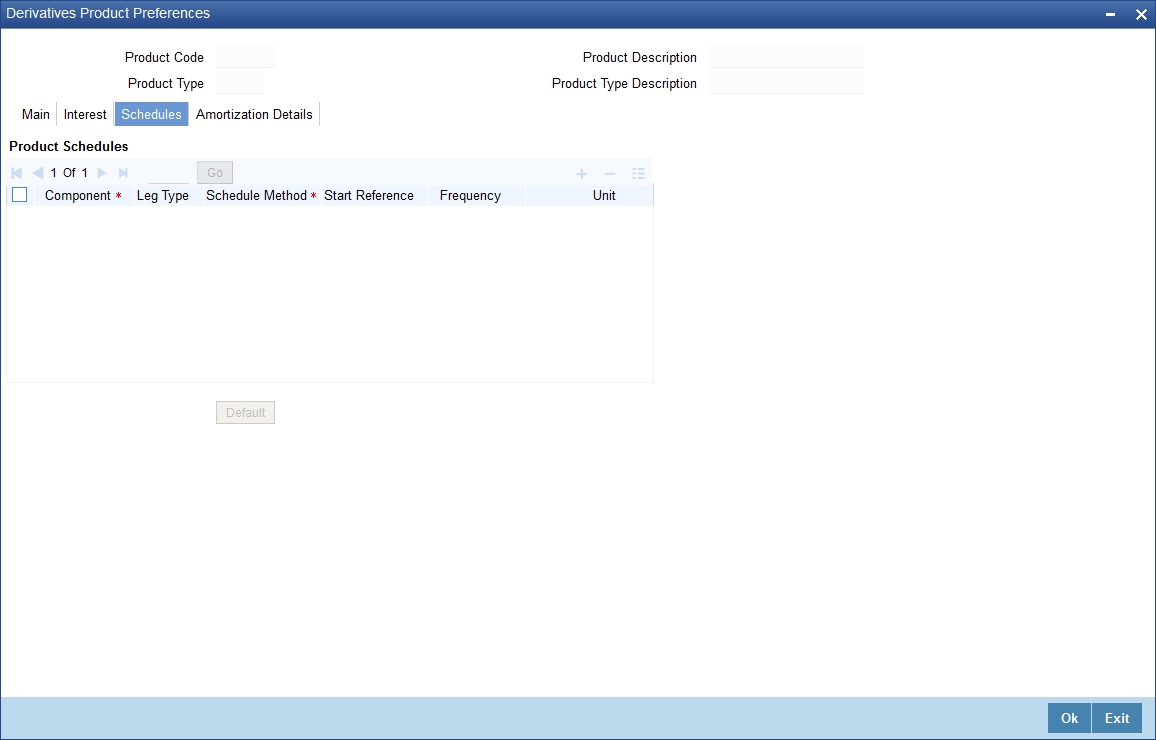
Step Result: Schedules screen is displayed.
Figure 4.4: Derivative Product Preference Schedules Tab
7.On Schedules screen, specify the fields, and click Ok.
For more information on fields, please refer to Table 4.4: Product Schedule Details - Field Description.
The schedule preferences for each of these components have to be defined separately for both the In and Out legs. Click the Schedules tab in the Product Preferences screen.
Specify the interest accrual preferences you have to indicate the repayment schedules for the following components:
•Principal (Repayment of principal schedules)
•Interest (Repayment of interest schedules)
•Revision of interest rates for a contract with periodic interest rates
Table 4.4: Product Schedule Details - Field Description
|
Field |
Description |
|---|---|
|
Component |
Specify the component for which you are defining the schedule. |
|
Leg Type |
Indicates whether the component displayed is an In leg component or an Out leg component. |
|
Schedule Method |
Indicates the schedule type to which the component belongs. The component belongs to any one of the following types: •Principal (Repayment of principal schedules •Interest (Repayment of interest schedules •Revision of interest rates for a contract with periodic interest rates •Principal Reset: Identifies the schedule method as principal reset |
|
Start Reference |
The reference date is the date based on which the repayment schedules for the various components (Principal, Interest, Revision) is calculated. Specify the scheduled start period must either be based on the Value Date of the contract or that it must be based on a Calendar Date. If you specify that the reference should be the Value Date the dates for scheduled repayment dates will be determined by the date of initiation of the contract and the frequency that you specify. If the Reference is specified as Calendar Date, the dates for scheduled repayments are based on the Start Day, Month, and Frequency combination. |
|
Frequency |
The frequency of schedules that you specify along with the Start Reference and the Frequency Unit will determine the actual repayment schedules for the particular component. By default, the frequency will be Bullet, which means that all the repayments are made on the maturity date of the contract. Change the frequency to any one of the following options: •Daily •Weekly •Monthly •Quarterly •Half-yearly •Yearly note: If the Reference is set as the Value Date, the repayment dates will be calculated using the Value Date, the frequency, and the Unit of Frequency. If the Reference is set as Calendar Date, the repayment dates will be calculated based on the Frequency, Unit of Frequency, Start Month, and the specified Start Day. |
|
Frequency Unit |
Specify the frequency to indicate the unit of frequency to set the Frequency, the Component, (the Principal, Interest or Revision component) and Start Reference combination. For example, Scenario 1 •You have indicated that the schedule liquidation should be based on the Calendar Date in the Start Reference field. Subsequently, you indicate that liquidations should happen on every 25th of the month. •The Effective Date or the Value Date of the contract is 12th March 2000. Regardless of the effective date, the first liquidation will be carried out on the 25th of March. •Since you want this process to continue i.e., liquidations should be carried out on the 25th of every month till the contract matures. Therefore you need to specify the frequency as Monthly and enter 1 in Unit field. •Schedules will be repaid once in every month on the 25th till the contract matures. Scenario 2 •You have indicated that liquidation of schedules should be based on the Value Date and specify that the frequency for liquidation as Monthly. Next, you specify that the frequency unit should be 2. •The schedules will be liquidated once in every two months since the frequency unit is 2. |
|
Schedule Start Weekday |
When the repayment schedule frequency is set Weekly, indicate the day of the week on which liquidation must be carried out. For instance, if you indicate the weekday preference as Wednesday, then liquidation will be carried out every week on every Wednesday. |
|
Schedule Start Day |
When the Start Reference is set as Calendar Date, indicate the date on which the schedule is due to start. For instance, if the frequency specified is daily, set the date on which the first daily schedule should fall due. When the frequency monthly indicates the day of the month, in which the liquidation should fall due, the scheduled repayment dates are computed using the Frequency, the Unit, (Start) Month and the specified (Start) Day. |
|
Schedule Start Month |
If you have set the Reference as Calendar Date, and the frequency as quarterly, half-yearly or annual, you can indicate the month in which the first schedule falls due. Based on your specifications, the subsequent schedule dates will be calculated. |
|
Adhere to Month End |
If the schedule frequency is in terms of a month, you choose to indicate that the schedule days must adhere to Month- Ends. The implication of this option is explained in the following example. |
|
For example, during defining preferences for a derivative product. You would like to maintain several derivatives under this product. We study the impact of the Adhere to Month End option regarding a derivative maintained under the Product. Assume the Effective Date of the contract (with floating interest) is 01 January 2000, and the Maturity Date is 31 December 2000. You have specified that the principal schedule frequency is quarterly. If you choose the Adhere to Month End option, the schedules for this derivative would be due on the following dates: •31 March 2000 •30 June 2000 •30 September 2000 •31 December 2000 If you do not choose the Adhere to Month End option, the schedules for this derivative would be due on the following dates: •31 March 2000 •30 June 2000 •30 September 2000 •30 December 2000 The schedule dates for all derivatives maintained under the product is calculated similarly. |
|
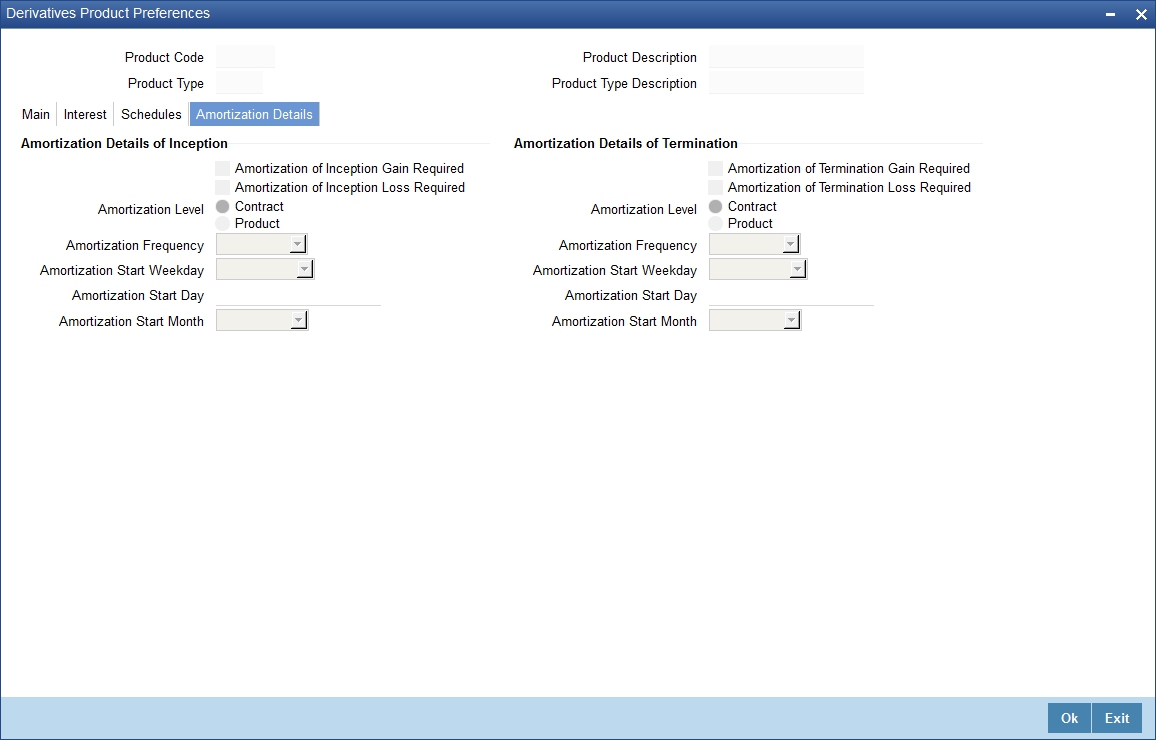
8.On Derivatives Product Preferences screen, click Amortization Details Tab
Step Result: Amortization screen is displayed.
Figure 4.5: Amortization Details tab
9.On Amortization screen, specify the fields, and click Ok.
For more information on fields, please refer to Table 4.5: Amortization Details - Field Description.
The Product Code and Product Type are by default from the Product Maintenance screen. In this screen, specify the following:
Table 4.5: Amortization Details - Field Description
|
Field |
Description |
|---|---|
|
Amortization of Inception/Termination Gain Required |
Indicates whether inception/termination gain requires amortization. Check the respective box to indicate that amortization is required for inception/termination gain. Uncheck if amortization is not required. note: If you choose these options, then amortization of inception/termination gain will be made applicable to all contracts associated with the product. You can, however, change it while entering the details of the contract. But if you indicate that amortization is not required, then you will not be allowed to change this preference while processing the contract. |
|
Amortization of Inception/Termination Loss Required |
Indicates whether inception/termination loss requires amortization. Check the respective box to indicate that amortization is required for inception/termination gain. Uncheck if amortization is not required. note: If you choose these options, then amortization of inception/termination loss will be made applicable all contracts associated with the product. You can however change it while entering the details of the contract. At the time of inception, Gain or Loss is distributed throughout the period from Effective Date to Maturity Date of the contract. At the time of termination, Gain or Loss is distributed throughout the period from Termination Date to Maturity Date of the contract. In case of Termination Gain/Loss, system amortizes from the Termination Date to the Maturity Date of the contract; Whereas, in case of Inception Gain/Loss, system amortizes from the Effective Date to the Maturity Date of the contract. |
|
Amortization Level |
Indicate the level at which the amortization entries for inception/termination gain and/or loss should be passed. The options available are: •Product •Contract At the product level, amortization entries will be passed for the product and currency combination. The system identifies those contracts, which need to be amortized for inception gain and/or loss and passes accounting entries based on the set-up defined for accounting entries. At the contract level inception gain/loss amortization entries will be passed for individual contracts linked to the particular product. |
|
Amortization Frequency |
Indicate the amortization level for gain and loss of contract inception and termination, you have to specify the frequency at which amortization should take place. The frequency can be one of the following: •Daily •Weekly •Monthly •Quarterly •Half yearly •Yearly |
|
Amortization Start Weekday |
In the case of weekly accrual, you should specify the day of the week on which interest accruals should be carried out. For instance if you specify that accruals should be carried out every Friday, then the contract or product (depending on the level specified) will be accrued on every Friday of the week. |
|
Amortization Start Day |
In the case of monthly, quarterly, half yearly or yearly amortization, you should specify the date on which the amortization should be done during the month. For example, if you specify the date as 30, amortization will be carried out on that day of the month, depending on the frequency. If you want to fix the amortization date for the last working day of the month, you should specify the date as 31 and indicate the frequency. If you indicate the frequency as monthly, the amortization will be done at the end of every month - that is, on 31st for months with 31 days, on 30th for months with 30 days and on 28th or 29th, as the case may be, for February. Specify the frequency as quarterly and fix the amortization date as 31, amortization will be done on the last day of the month at the end of every quarter. It works similarly for half-yearly and yearly amortization frequency. If the amortization date falls on a holiday, the amortization is done as per your holiday handling specifications in the Branch Parameters screen. |
|
Amortization Start Month |
If the amortization frequency is set to quarterly, half yearly or yearly, specify the month in which the first amortization has to begin, besides the date on which the amortization must be done. For example, if the half-yearly option is selected, and specified the start date as 31 and the start month as June. The system process the first amortization on the 30 of June for the period from January 1 to 30th June. The second one is done on the 31st of December for the period from 1st July to 31st December. |
Context:
The maintenance in this screen is used for confirmation check of specific derivative deal events.
1.On Derivatives Product Preferences screen, click ISDA.
Step Result: ISDA Confirmation Preferences is displayed.
Figure 4.6: ISDA Confirmation Preferences
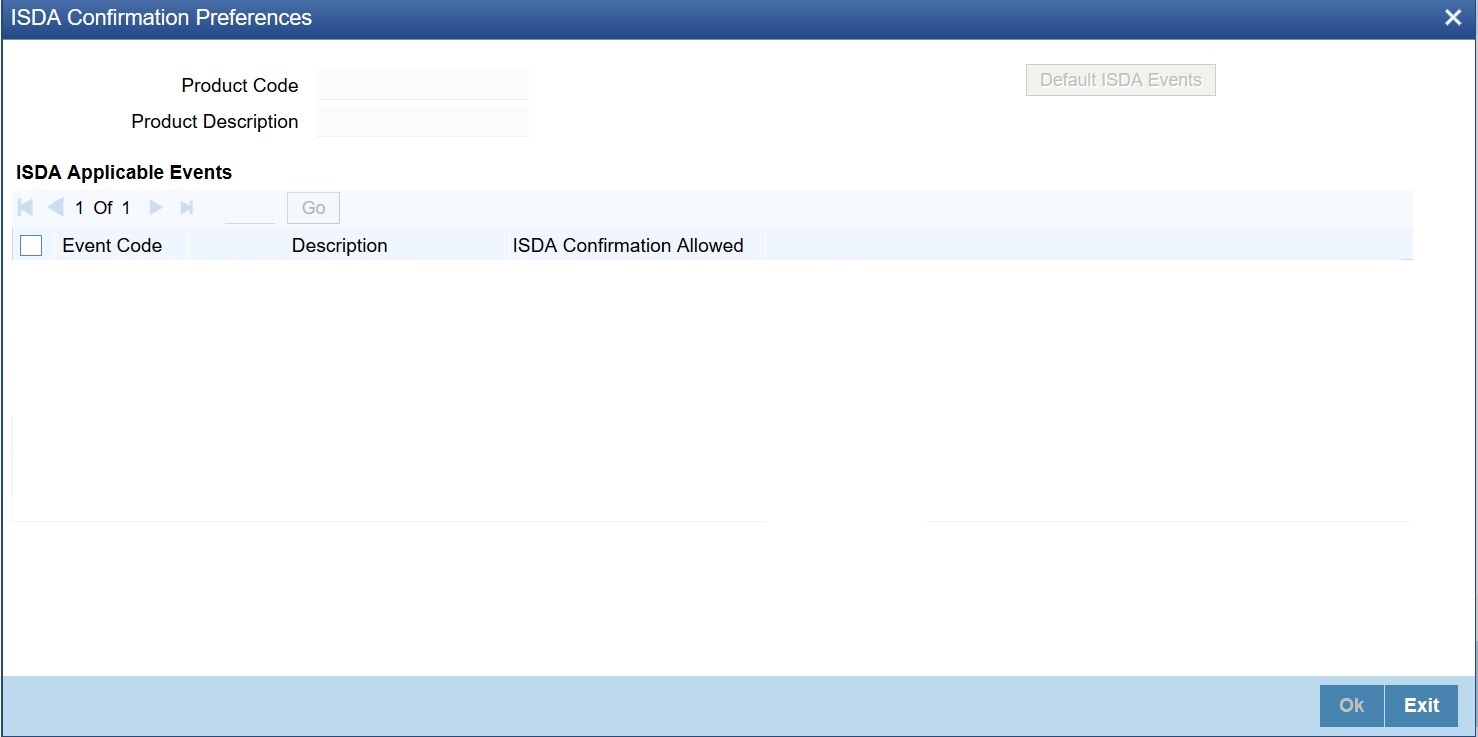
2.On the ISDA confirmation preferences screen, Click ISDA Confirmation, to populate the list of ISDA events applicable for the module.
3.Select the check box next to the Description based on the requirement.
4.Click Ok to save the details or Exit to close the screen.
1.On Derivatives Product Preferences screen, click Interest.
Step Result: Interest Details screen is displayed.
Figure 4.7: Interest Details
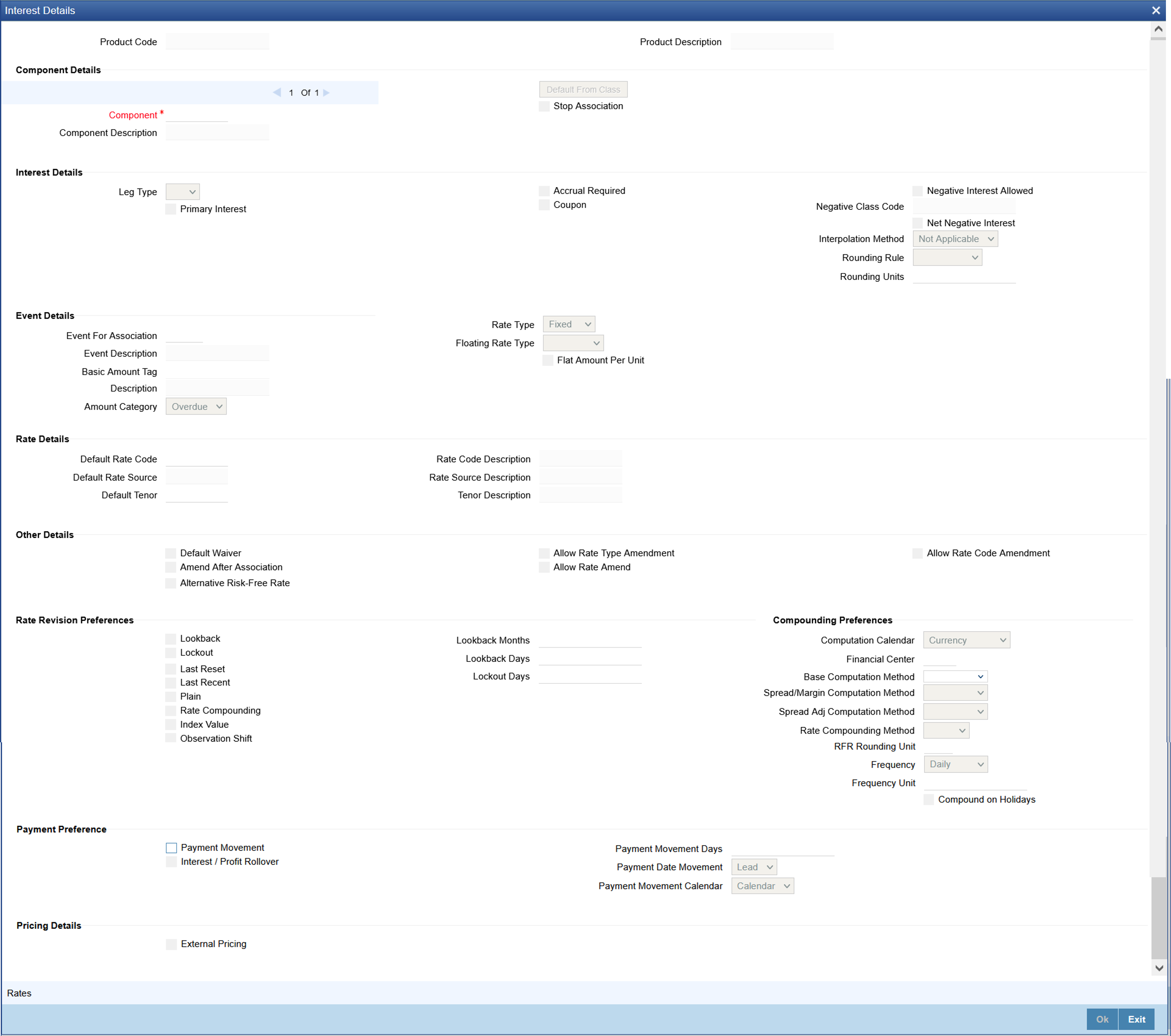
2.On the Interest Details screen, specify the details as required.
For information on fields, refer to the below table
Table 4.6: Interest Details - Field description
|
Field |
Description |
|---|---|
|
Alternate Risk Free Rate |
Identifies if the interest class is enabled for RFR |
|
Alternative Risk Free Rate Preferences |
Select any one of the below RFR calculation methods check box from the below options: •Lookback •Payment Movement •Lockout •Interest Rollover •Last Reset •Last Recent •Plain The user can also select the combination of the below RFR calculation method: •Lookback and Lockout •Lookback, Lockout, and Payment Movement |
|
Lookback |
The user can select Lookback as RFR preference if the Rate Method is In-Arrears. The observation period for the interest rate calculation starts and ends a certain number of days prior to the Interest period. As a result, you can choose the interest payment to be calculated prior to the end of the interest period. |
|
Lookback Days |
Specify the Lookback days. This field is relevant only if 'Rate Method' is 'In-Arrears' or bearing and RFR method is Lookback. |
|
Lockout |
The user can select Lockout as RFR preference if the Rate Method is In-Arrears. Lockout means that the RFR is frozen for a certain number of days prior to the end of an interest period (lockout period). During this time, the RFR of lockout period days is applied for the remaining days of the interest period. As a result, the averaged RFR can be calculated a couple of days before the end of the Interest period. |
|
Lockout Days |
Specify the Lockout Days. This field is relevant only if Rate Method is In-Arrears or bearing and RFR method is Lockout. |
|
Payment Movement |
The user can select Payment Movement as RFR preference if the Rate Method is In-Arrears. In this method, Interest payments are delayed by a certain number of days and are due a few days after the end of an interest period. |
|
Payment Movement Days |
This field is applicable only if Rate Method is In-Arrears or Bearing and RFR method is Payment Movement. Enter the Number of days by which the interest payments are delayed by a certain number of days and are thus due a few days after the end of an interest period. |
|
Negative Interest Allowed |
Check this box to indicate the negative rate should be allowed for DV module. |
|
Negative Class Code |
The system defaults this value from Treasury Interest Class Maintenance screen. |
|
Net Negative Interest |
Check this box to indicate that the system should internally net the positive and negative amounts being paid to the customer during interest liquidation. |
|
Interpolation Method |
Select the required interpolation method from the adjoining drop-down list. The list displays the following values: •Not Applicable •Linear If the option Linear is selected, then the system uses Interpolation formula. Rounding Rule and Precision is mandatory in this case |
|
Rounding Rule |
Select the required rounding rule from the adjoining drop-down list. The list displays the following values: •Blank •Up •Down •Trunc •Round Near |
|
Rounding Units |
Specify the Rounding Units value to round daily index value to the nearest whole number and use it for interest calculation. |
|
Event Details |
Specify the following fields. |
|
Rate Type |
Select the rate type from the adjoining drop-down list. The list displays the following values: •Inflation •Fixed •Floating •Special |
|
Rate Revision Preferences |
Specify the following fields. |
|
Lookback Months |
Specify the number of months to look back to capture the Lag. |
|
Compounding Preferences |
Specify the following fields. |
|
Computation Calendar |
Select the Computation Calendar from the drop-down list, when RFR is selected for interest calculation. The available options are: •Currency •Financial Calendar |
|
Financial Center |
This field is mandatory if the Financial Center is selected as computation calendar. Select the code of the financial center from the displayed list of values. |
|
Base Computation Method |
The Base Computation Method is either simple or compounded. |
|
Spread\ Margin Computation Method |
Spread\ Margin computation method can be maintained as either Simple or compounded. |
|
Spread Adjustment Method |
Spread adjustment method is kept as either Simple or compounded. |
|
Rate Compounding |
This represents whether the rate compounding is applied for each calculation period. When enabled, system opts for rate compounding instead of amount compounding, the amount difference comes into effect only if any pre-payment is done. For more information on RFR Rate Compounding, refer to the attached RFR Rate Compounding calculation worksheet. |
|
RFR Rounding Unit |
Specify the Rounding Units value to round daily index value to the nearest whole number and use it for interest calculation. It is applicable only when RFR index value is used. |
|
Frequency |
Select the compounding frequency of the interest from the adjoining drop-down list. The list displays the following values: •Daily •Weekly •Monthly •Quarterly •Half Yearly •Yearly •Bullet |
|
Frequency Unit |
Specify the frequency for compounding interest. |
|
Compound on Holidays |
Check this box to indicate that the compounding must be done on holidays. The system allows to check this box only if the Frequency is selected as ‘Daily’ |
|
Payment Preferences |
Specify the following fields. |
|
Payment Date Movement |
Select the date on when the payment movement is to be done. The list displays the following values: •Lead •Lag If the option LEAD is selected, then the payment is preponed. If the option LAG is selected, then the payment is deferred. |
|
Payment Movement Calendar |
Select the payment movement calendar. The list displays the following values: •Calendar •Business If the option Calendar is selected, then the system skips the Holiday Preferences selected at the contract level. If the option Business is selected, it considers holiday treatment specified for schedule as per the Holiday Preferences selected at the contract level. |
|
Interest Rollover |
Check this box to indicate that interest rollover is allowed. Interest Rollover method can be used as a combined method along with one each of In-arrears & In-advance methods. Payments are set in advance and any missed interest relative to in- arrears is rolled over into the next payment period. This option combines a first payment (installment payment) known at the beginning of the interest period with an adjustment payment known at the end. The adjustment payment can be made a few days later or at the end of the next accrual period. Interest rollover with negative interest rate is allowed for In-arrear method. |
|
Plain |
Check this box to indicate that Plain method is allowed. This field is relevant, only if Rate Method is In-Arrears or bearing. System uses averaged SOFR over current interest period, paid on first day of next interest period. |
|
Last Reset |
Check this box to indicate that the Last Reset method is allowed. This field is relevant only if Rate Method is In-Advance. In this option, the system determines the interest payments on the basis of the averaged RFR of the previous period. |
|
Last Recent |
Check this box to indicate that the Last Recent method is applicable. This field is relevant only if the Rate Method is In-Advance. note: In this option, a single RFR or an averaged RFR for a short number of days, is applied for the entire interest period |
|
Base Computation Method |
Select the base computation method from the adjoining drop-down list. The list display the following values: •Simple •Compounded |
|
Spread\ Margin Computation Method |
Select the spread or margin computation method from the adjoining drop-down list. The drop-down list displays the following value: •Simple •Compounded |
|
Spread Adjustment Method |
Select the spread adjustment method from the adjoining drop-down list. The drop-down list displays the following value: •Simple •Compounded |
|
Rate Compounding |
This representswhether the rate compounding isapplied for each calculation period. When enabled, system opts for rate compounding instead of amount compounding, the amount difference comes into effect only if any pre-payment is done. For more information on RFR Rate Compounding, refer to the attached RFR Rate Compounding calculation worksheet. |
|
Rate Compounding Method |
Select the Rate Compounding Method from the drop-down list. The available options are: •CCR •NCCR This Rate Compounding method produces a rate for a period by applying the RFR compounding formula to the RFR rate and applying the compounded rate to the principal to calculate the interest due. Rate Compounding supports two methods: 1. Cumulative Compounded Rate (CCR) Calculates the compounded rate at the end of the interest period and it is applied to the whole period. It allows calculation of interest for the whole period using a single compounded rate. 2. Non-Cumulative Compounded Rate (NCCR) It is derived from Cumulative Compounded Rate i.e., Cumulative rate as of current day minus Cumulative rate as of prior Banking day. This generates a daily compounded rate which allows the calculation of a daily interest amount. Rate Compounding supports below RFR methods: Arrear Method •Lookback •Lockout •Payment Movement •Plain |
|
Index Value |
Select the Index Value check box to use the RFR index rate. The RFR Index measures the cumulative impact of compounding RFR on a unit of investment over time. Index Value supports below RFR preferences: Arrear Method •Lookback •Lockout •Payment Movement •Plain Advance Method •Last Reset •Last Recent For more information on RFR Index Value, refer to the attached RFR Index Value calculation worksheet. |
|
Observation Shift |
Select the Observation Shift check box to apply observation Shift to RFR calculation. The observation shift mechanism provides the rate to be calculated and weighted by reference to the Observation Period rather than the relevant interest period. Observation Shift Currently supports below RFR Methods and combination. •Lookback •Lockout •Lookback and Lockout combination For more information on RFR Observation Shift, refer to the attached RFR Observation Shift calculation worksheet. |
|
RFR Rounding Unit |
Specify the Rounding Units value to round daily index value to the nearest whole number and use it for interest calculation. It is applicable only when RFR index value is used. |
During save, the system performs the following validations:
•Attribute of derivative type must be encapsulated at derivative product.
•Only the below fields are enabled for inflation rate type component:
•Lookback
•Lookback Months
•Payment Movement
•Payment Movement Days
•Payment Date Movement
•Payment Movement Calendar
–During the process of selection or clearing the RFR flag, the respective rate code mapping is done.
•The system allows the maintenance of two different RFR calculation methods on both the legs.
•All the Amendment validations to RFR fields are applicable in the interest sub-screen.
•Mapping of an interest class to in-advance RFR methods (Last reset and last recent) for an interest leg is allowed only when the derivative type of the product is with interest payment method as advance for that leg.
•Mapping of an interest class to in-arrear RFR method (Lookback, Payment Movement, Lockout, Plain, Interest rollover) for an interest leg is allowed only when the derivative type of the product is with interest payment method as arrears for that leg. The system allows you to map RFR to only the primary component for each in and out legs.
•System allows to map RFR only to the primary component for each in and out legs accrual frequency must be daily for the legs, which is RFR enabled.
•Daily revision schedule is mandatory for RFR enabled interest component(s).
•Ensure the Accrual required flag is selected for RFR enabled interest component(s).
The system performs the following validations related to ‘Net Negative Interest’ and ‘Negative Interest Allowed’ fields:
•If you have checked the ‘Net Negative Interest’ check-box, then during interest liquidation the system internally nets the positive and negative amounts being paid to the customer for the contract.
•The system allows you to check this box, only for products with negative interest allowed main component. It will not allow you to modify once the authorization is done at the product level.
To ensure that the rates stay within the stipulated limits, the Derivatives module supports Minimum and Maximum Rate pick up for RFR enabled contracts.
If the derived RFR rate for a contract considering the base rate and spread adjustment is less than the minimum rate, the minimum rate maintained is applied on the contract.
If the derived RFR rate for a contract considering the base rate and spread adjustment is greater than the maximum rate, the maximum rate is applied on the contract overriding the RFR rates.
Compounding Calculation Basis
•The system supports the compound calculation basis for fixed rate type on Holidays.
•You can enable the 'Compound on Holidays' checkbox under Interest sub-screen, which defaults from product during creation of DV contract. The system will perform compounding calculation on holidays considering the Holiday preference.
•If the Local/currency/financial holiday check-box is toggled-on under Holiday preference sub-screen and the 'Compound on Holidays' screen is enabled, the system will not perform the compounding calculation on holidays. The simple interest calculation will be carried out for both working and non-working days (holiday).
•If the Base computation method is selected as 'Simple Interest' and 'Compound on holidays' checkbox is checked, the system will perform the simple interest calculation for working day and compound interest on holidays.
•If the Base computation method is selected as 'Compound Interest' and 'Compound on holidays' checkbox is checked, the system will perform the compounding interest calculation for both working day and holidays.
•If the Base computation method is selected as 'Compound Interest' and 'Compound on holidays' checkbox is not checked, then on holidays, it will be simple.
•The basis computation preference is selected for Non RFR component for fixed rate type leg along with the RFR component.
3.On the Interest Details screen, click Rates.
Step Result: Interest Currency Limits screen is displayed.
Figure 4.8: Interest Currency Limits
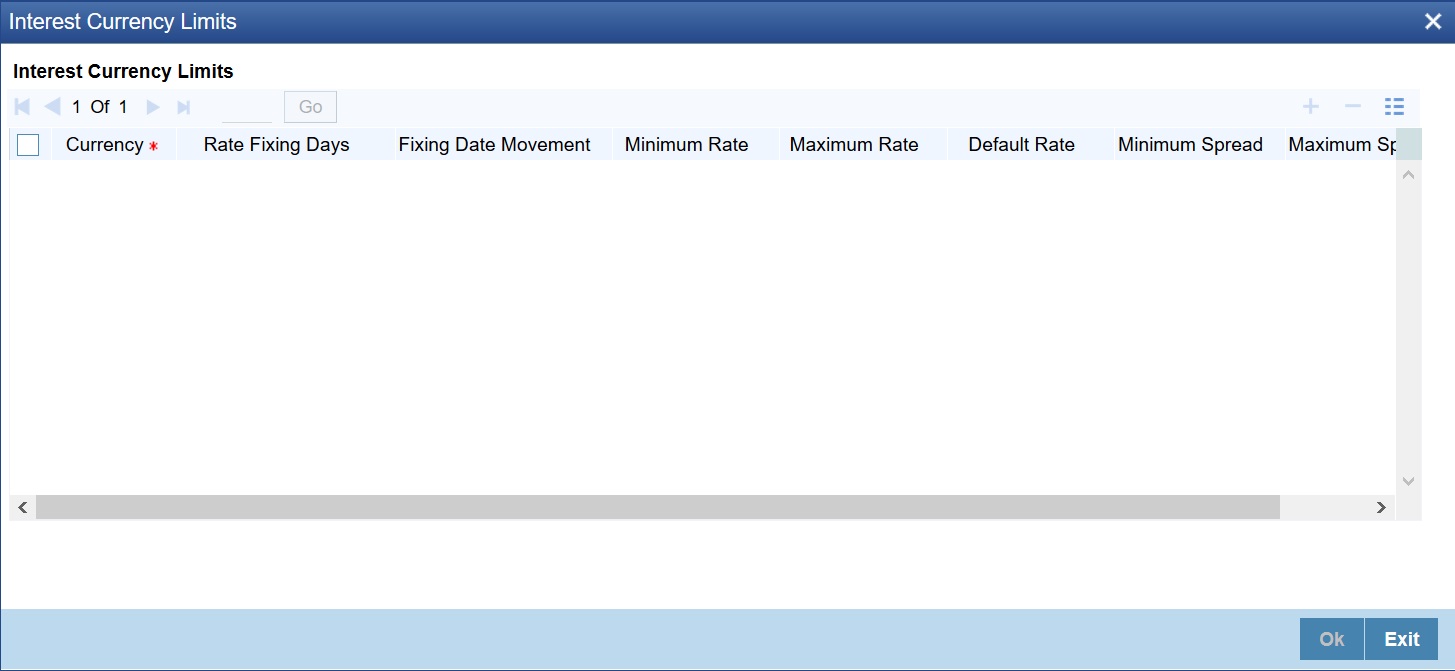
4.On the Interest Currency Limits screen, specify the details as required.
For Field Description, see the below table:
Table 4.7: Interest Currency Limits - Field Description
|
Field |
Description |
|---|---|
|
Currency |
Select the Currency from the list displayed. |
|
Rate Fixing Days |
Specify the rate fixing days as required. |
|
Fixing Date Movement |
Select the movement from the list displayed, the options are Forward and Backward. |
|
Minimum Rate |
Specify the Minimum rate as required. |
|
Maximum Rate |
Specify the Maximum rate as required. |
|
Default Rate |
Specify the Default rate as required. |
|
Minimum Spread |
Specify the Minimum Spread as required. |
|
Maximum Spread |
Specify the Maximum rate as required. |
4.2 Derivatives Revaluation Contract Fair Values
This topic describes the following sub-topics:
1)Define the Fair Price Revaluation Methods
2)Maintain Fair Values for Revaluing a Contract
3)Operations on the Contract Fair Price Maintenance record
4.2.1 Define the Fair Price Revaluation Methods
Revaluation is used to revalue all active trade deals based on the revaluation frequency parameters specified through the Preferences screen while defining products. Since the market rates are constantly in a state of flux, revalue the worth of all active trade deals periodically.
In Oracle Banking Treasury, revalue the worth of contracts by using either one of the following methods. They are as follows:
•Maintaining Contract Fair Prices whereby you have to indicate the fair price of individual contracts, is used for revaluation.
•Maintain branch level forward interest rates through Maintaining Branch Interest Rates, determines the fair price used for revaluation. Fair price is calculated based on the interest rates and will apply to In or Out leg based on the contract.
•Maintaining Contract Interest Rates to maintain contract specific forward interest rates determines the fair price used for revaluation. Fair price is calculated based on the interest rates apply to In or Out leg based on the contract.
Your preference for revaluing contracts linked to the particular product will default to all the contacts linked to that product. However, you can change this preference at the time of processing the contract.
Each of these revaluation methods have been explained in detail in the following sections.
4.2.2 Maintain Fair Values for Revaluing a Contract
This topic describes the systematic procedure to maintain fair values for revaluing a Contract.
Context:
If indicated that a particular contract must be revalued based on the contract fair price, the system automatically inserts a record in the Revaluation Contract Fair Price Maintenance screen for that contract. This is done during the Beginning of Day batch process based on the revaluation frequency specified at the product level. This concept can be explained with the help of an example:
You have set the revaluation frequency of the contract bearing the reference number 000DV21992950177 to monthly. The first revaluation was done on 1st January 2000. The next is due on the 1st of February 2000. On the 1st of February 2000 the system automatically inserts another record in the ‘Contract Fair Price Maintenance’ screen for the contract 000DV21992950177. You have to unlock the record, enter the in/out leg values and the net fair value of the contract.
Prerequisite:
Specify User ID and Password, and login to Home screen.
1.On Home screen, type DVDCNVAL in the text box, and click next arrow.
Step Result: Derivatives Revaluation Contract Fair Values screen is displayed.
Figure 4.9: Derivative Revaluation Contract Values screen
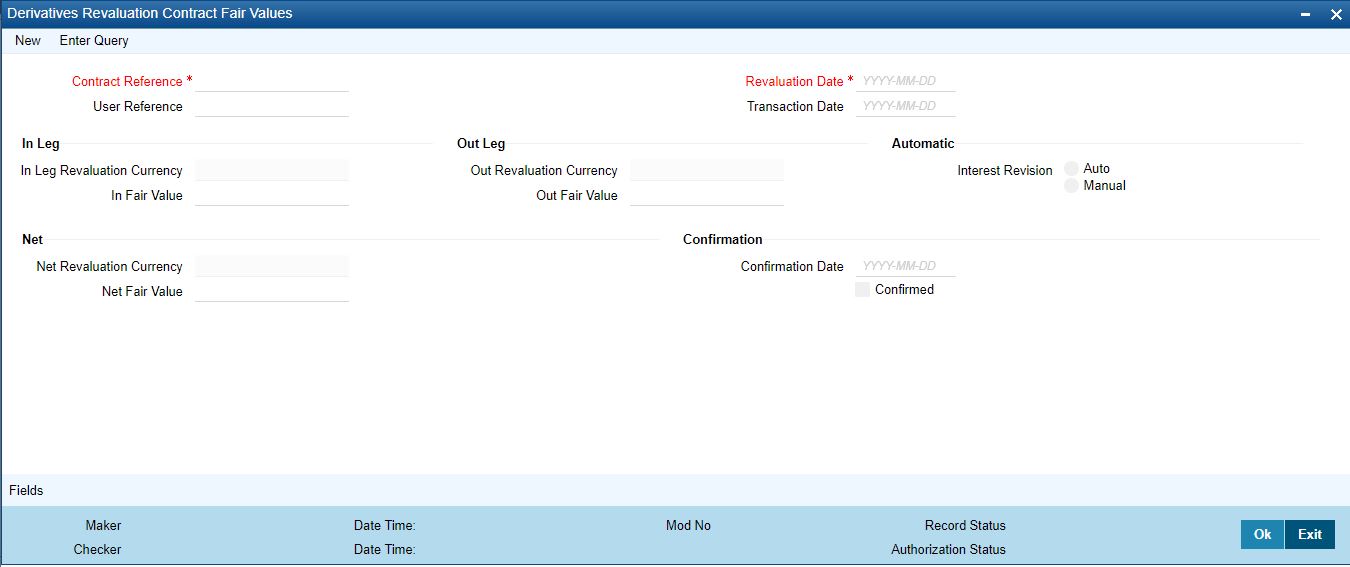
2.On Derivatives Revaluation Contract Fair Values screen, specify the fields.
3.On Derivatives Revaluation Contract Fair Values screen, select new to change the revaluation frequency of a specific contract.
Step Result: Revaluation Contract Fair Value screen is displayed.
4. On Revaluation Contract Fair Value screen, select the reference number of the contact to change revaluation frequency. Enter the revaluation date, the new in and out leg values, and the net fair value.
5.Select the Summary option under Contract Price to call an existing contract price maintenance record.
On the Summary screen, double click a record to open it.
6.Click the unlock icon or select Unlock from the menu to modify the in and out leg values. Enter the in and out leg values, and compute the new net fair value and save the record.
During bulk upload of these fair values for multiple contracts, Oracle Banking Treasury expects the following information to be present in the upload message:
•Contract Reference No
•Effective Date
•InLeg Value
•OutLeg Value
If any of these values are missing for any record, the system will terminate the upload process and raise an error as Net Fair value will default from Inleg and Outleg fair values.
The single record and bulk record uploads requests are handled in bulk requests itself for the following:
•DV Fair value
•DV Rate Revision
The system will also raise an error if:
•Contract Reference Number is not valid
•Duplicate record exists for the Contract Reference Number and Effective date
•combination
•Revaluation date is greater than the application date
Run the fair value upload process any time before the DV batch is processed during the day. During the DV batch, contract revaluation is done based on the fair value uploaded.
The system selects the option Auto if a revaluation record is created automatically during EOD batch. Create the revaluation record manually and select the option as Manual.
note: Typically, the manual revaluation record is created on the booking date, as by then the EOD batch would not have run.
Indicate the net fair value of the contract as of the revaluation date. The entered value includes the effect of the in the leg and out leg of the contract.
When the currencies of both the in and out leg of the contract are the same you have to calculate the net fair value of the contract by deducting the out leg amount from the in leg amount.
The Fair Value in the In Leg field amounts to USD 1,000,000.00.
The Fair Value in the Out Leg field amounts to USD 500,000.000
Since both the values are in the same currency, USD 500,000.000 deducted from USD 1,000,000.00 amounts to USD 500,000.000. Thus enter USD 500,000.000 as the Net Fair Value.
Suppose, the currencies of both the legs of the contract are different then the Base Currency specified at the time of Contract Input is accepted as the default currency for the Net Fair Value. Compute the Net Fair value using the existing exchange rates.
After indicating the respective values, indicate the confirmation. Only confirmed records will be picked up and processed for revaluation by the End of Day batch process.
4.2.5 Operations on the Contract Fair Price Maintenance record
Apart from maintaining a new fair price for a particular contract, you can perform any of the following operations (if any function under the Actions menu is disabled, it means that the function is not allowed for the record) on an existing record.
•Amend the details of a record
•Authorize a record
Refer to the Oracle Banking Treasury User Manual on Common Procedures for details of these operations.
4.3 Derivatives Revaluation Branch Interest Rates
This section contains the following sub-topics:
1)Define the Fair Price Revaluation Methods
2)Maintain Fair Values for Revaluing a Contract
3)Operations on the Contract Fair Price Maintenance record
4.3.1 Maintain Branch-wise Forward Interest Rates
This topic describes the systematic procedure to maintain Branch-wise Forward Interest Rates
Context:
Branch level maintenance of forward interest rates is necessary for revaluing those contracts for which you have indicated that revaluation must be according to the Branch Rates.
Oracle Banking Treasury identifies those contracts, which are to be revalued according to the forward interest rates maintained at the branch level and creates records in the Revaluation Branch Interest Rate screen based on the revaluation date. Unlock each record and indicate appropriate interest rates for specific interest periods.
Prerequisite:
Specify User ID and Password, and login to home screen.
1.On Home screen, type DVDBRRAT in the text box, and click next arrow.
Step Result: Derivatives Revaluation Branch Interest Dates screen is displayed.
Figure 4.10: Derivatives Revaluation Branch Interest Dates
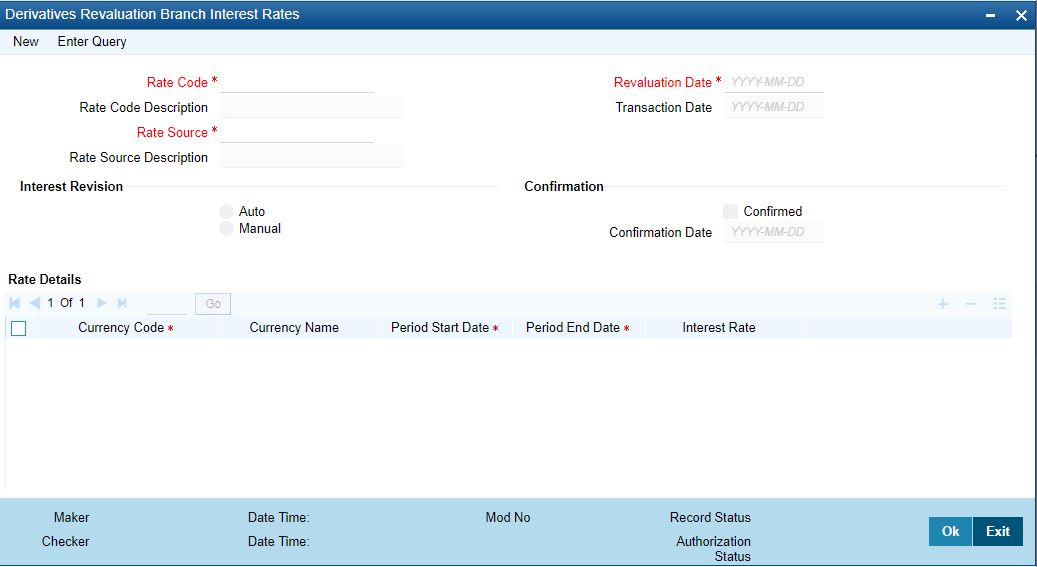
2.On Derivatives Revaluation Branch Interest Dates screen, specify the fields.
For more information on fields, refer to Table 4.8: Derivatives Revaluation Branch Interest Rates Field Description.
The advantage in maintaining branch-wise interest rates is when multiple contracts require the same rate(s) for processing revaluation, (the tenor and currency combination should be the same) the BOD function identifies all the required rates and inserts a single record into this screen.
If you are maintaining details of a new interest rate for your branch, select New from the Actions menu in the Application tool-bar or click the new icon. The Branch Interest Rates Maintenance screen displays without any details.
If a branch interest rate record is defined, choose the Summary option under Branch Rates. From the Summary screen, double-click a record to open.
Table 4.8: Derivatives Revaluation Branch Interest Rates Field Description
|
Field |
Description |
|---|---|
|
Rate Code and Rate Source |
If the details of a new interest rate for your branch are maintained, indicate the rate code that is to be associated with the interest rate. Identify a valid code from the list of rate codes available. Subsequently, indicate the source to which the rate code belongs. When you indicate the codes linked to the rate code, and source the description assigned to them will default in the adjacent fields. |
|
Revaluation Date |
All those contracts, which must be revalued as per the interest rates maintained at the branch level, will be revalued as of the revaluation date. While maintaining details of a new interest rate, indicate the date based on which contracts is revalued. |
|
Interest Revision |
The system revises interest rates automatically when the daily batch for derivatives is run using the Branch specific Interest rate revaluation method. |
|
Confirmation |
Check this box to confirm that the correct interest rate is entered. Once you check this box, the current system date displays in the Date field. note: If this box left unchecked, then this record will not be taken up for revaluation processing. |
|
Rate Details |
Since the system identifies the currency and tenor of forwarding rates required for each revaluation date, on the Revaluation Date revaluation is considered to only those contracts with the particular Rate Code, Rate Source, and Currency combination. |
|
Currency Code |
Choose the currency to maintain the Interest Rate. Once the Currency Code is selected, the description assigned to it displays in the adjacent field. |
|
Period Start and End Date |
Specify the start and end dates for the interest rate you are defining. |
|
Interest Rate |
Enter the interest rate for the particular rate code. The interest rate specified is meant for your branch and is used to determine the Fair Value of all those contracts for which you have indicated that branch-level interest rates are to be used for revaluation. Further, the revaluation is done for only those contracts with the particular Rate Code, Rate Source, and Currency combination for the particular Revaluation Date. Click the add button and enter the relevant details to define a new forward interest rate for a specific interest period. To delete an existing rate, highlight the rate and click on the delete button. |
4.3.2 Branch wise Forward Interest Rate Maintenance record Operations
Apart from maintaining a new forward interest rate, you can perform any of the following operations (if any function under the Actions menu is disabled, it means that the function is not allowed for the record) on an existing record.
•Amend the details of a record
•Authorize a record
Refer to the Oracle Banking Treasury User Manual on Common Procedures for details of these
operations.
4.4 Derivatives Revaluation Contract Interest Rates
This section contains the following sub-topics:
1) Maintain Branch-wise Forward Interest Rates
2) Maintain Contract specific Forward Interest Rates for Revaluation
4.4.1 Maintain Contract specific Forward Interest Rates for Revaluation
This topic describes the systematic procedure to maintain contract specific Forward Interest Rates for Revaluation.
Context:
Maintain contract specific forward interest rates to revalue those contracts whose fair price is to be determined based on the forward interest rates maintained for the particular contract.
The system creates and stores records in the Contract Interest Rates Maintenance screen for those contracts whose fair price is to be determined based on the forward interest rates maintained for the contract.
Prerequisite:
Specify User ID and Password, and login to Homescreen.
1.On Homescreen, type DVDCNRAT in the text box, and click next arrow.
Step Result: The Derivatives Revaluation Contract Interest Rates screen is displayed.
Figure 4.11: Derivatives Revaluation Contract Interest Rates
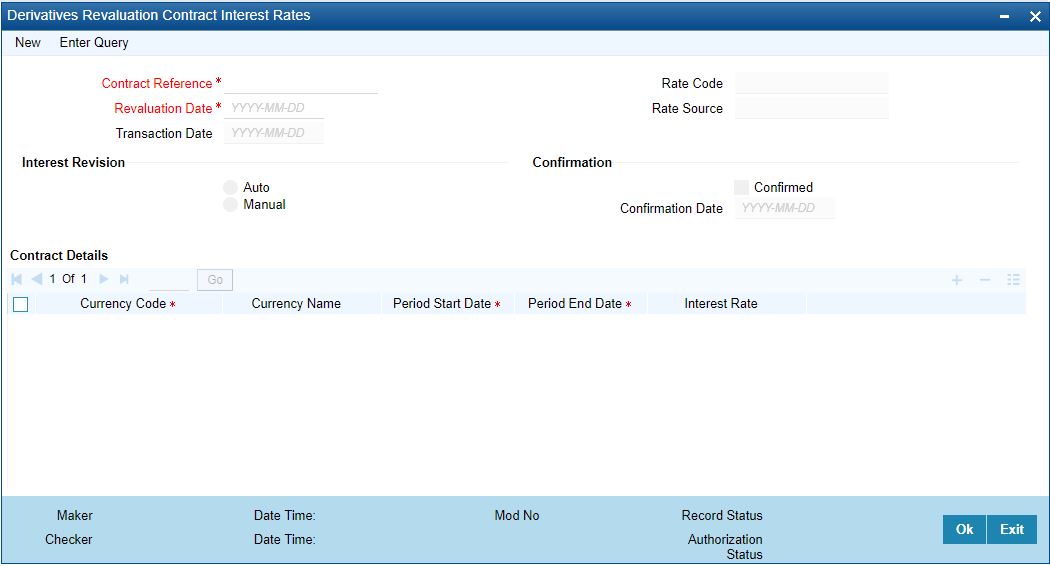
2.On Derivatives Revaluation Contract Interest Rates screen, specify the fields.
3.On the Summary screen, click Summary options under the contract screen to indicate the forward interest rates of individual contracts. Select Unlock from the Actions menu in the Application tool bar or click the unlock icon.
Enter the interest rate(s) required for each contract and confirm it.
4.Select New from the Actions menu in the Application tool bar or click the new icon, for an ad hoc revaluation of a particular contract.
Contract Interest Rates Maintenance screen is
be displayed.
note: The interest rate(s) that entered is used to determine the Fair Value for revaluing that particular contract.
5.Select the reference number of the contract which is to be 4-23 revalued after indicating the new revaluation date of the contract, you can specify the new interest rate for the interest period.
4.5 Operation of Contract Specific Forward Interest Rate Maintenance record
Apart from maintaining a new contract specific forward interest rate, you can perform any of the following operations (if any function under the Actions menu is disabled, it means that the function is not allowed for the record) on an existing record.
•Amend the details of a record
•Authorize a record
Refer to the Oracle Banking Treasury User Manual on Common Procedures for details of these operations.
4.6 List of Glossary - Derivative Module - General Maintenance
DVDPRMNT
Derivative Product Definition - 4.1.1 Create Derivative Product (p. 26)
Derivatives Revaluation Contract Fair Values- 4.2.2 Maintain Fair Values for Revaluing a Contract (p. 56)
Derivatives Revaluation Branch Interest Rates - 4.3.1 Maintain Branch-wise Forward Interest Rates (p. 59)
Derivatives Revaluation Contract Interest Rates - 4.4.1 Maintain Contract specific Forward Interest Rates for Revaluation (p. 61)