This topic contains the following subtopics:
2)Define Rate codes for Risk Free rates
4)Treasury Interest Class Definition
7)Money Market Value Dated changes
Provision to consume Risk Free Rates (RFR) or any other index rate daily from a published source is provided. The system integrates product processor with centralized interest calculation engine. The Product Processor sends appropriate parameters to the Interest Calculation Engine per deal and receives the interest rate and computed interest amount.
RFR supports interest rate calculation on both simple average method and the compounding method, where the system adds accrued interest to the principal. The system maintains the daily interest amount and daily rate for each Money Market contract.
RFR supports negative interest rate calculations using arrears method.
The required accruals are posted on currency working days only. Reconcile interest accruals for payouts at the end of the interest period.
RFR supports both the back and future value date bookings with proper interest application.
The MM module supports the below RFR methods.
In Arrear Method supported for bearing type of products include the below types:
•Lookback
•Lockout
•Payment Delay
•Plain
•Interest Rollover
In addition to the above, the Money Market module also supports below RFR combination methods:
•Lookback and Lockout
•Lookback and Payment Delay
•Lockout and Payment Delay
•Lookback, Lockout, and Payment Delay
In Advance method supported for discounted and true discounted products include the below types
•Last reset
•Last recent
For detailed information on RFR calculation method for each type, refer to the attached RFR calculation method worksheet.
11.2 Define Rate codes for Risk Free rates
This topic provides the instructions to define the rate codes for risk free rates.
Context:
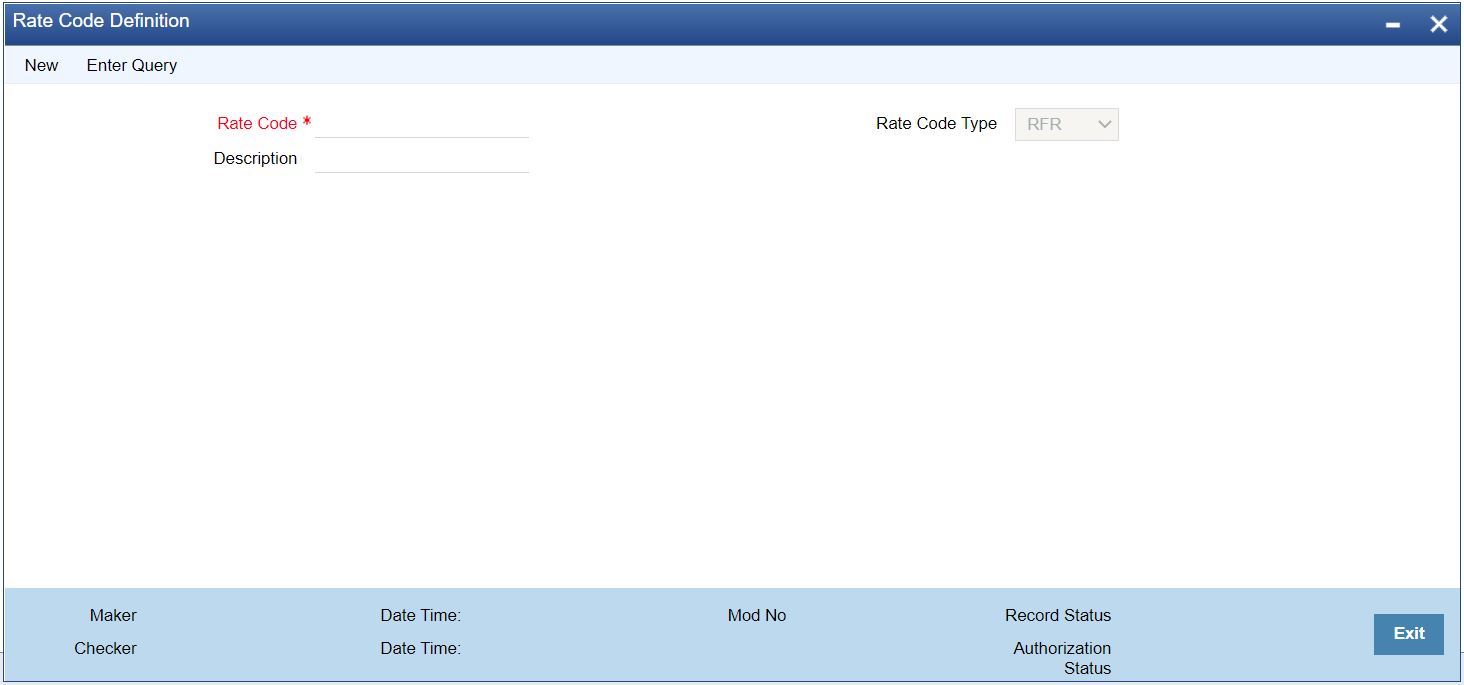
RFR codes is maintained at the Rate Code Definition screen.
1.On the Homepage, type CFDFRTCD in the text box, and click the next arrow.
Step Result: Rate Code Definition screen is displayed.
Figure 11.1: Rate Code Definition
2.Specify the fields in the Rate Code Definition screen
Select Rate Code Type from the drop-down list. By default, the system displays the value
as RFR which is used to maintain the RFR rate for the rate code. You can also select Inflation or Other based on the required maintenance.
This topic provides the instructions to capture the Risk Free Rates.
Context:
Selected Overnight Risk Free rates is maintained in this screen.
1.On the Homepage, type CFDRFRRT in the text box, and click the next arrow.
Step Result: RFR Rate Input screen is displayed.
Figure 11.2: RFR Rate Input
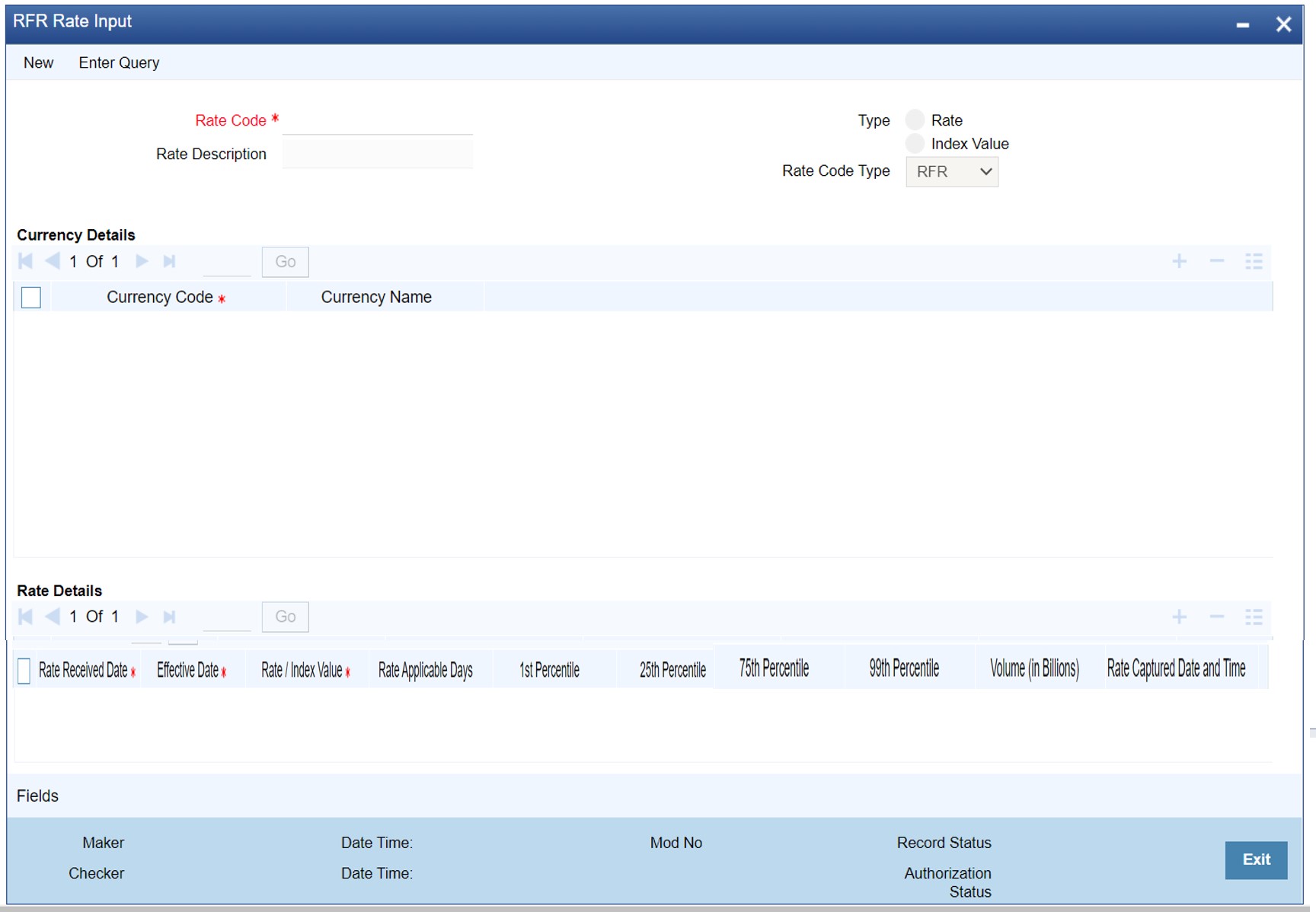
2.On the RFR Rate Input screen, specify the details as required.
For information on fields refer to:
Table 11.1: RFR Rate Input - Field Description
|
Field |
Description |
|---|---|
|
Rate Code |
Identifies the Risk Free Reference Rate Code |
|
Rate Description |
Defines the RFR rate code |
|
Type |
Choose the type of Maintenance: •Rate •Index |
|
Currency Code |
Identifies the currency mapped to RFR code |
|
Rate Received Date |
The date on which our system received the RFR rate |
|
Effective date |
Applicable RFR effective date |
|
Interest rate |
RFR on the respective effective date |
|
Rate Applicable days |
Number of days the RFR is applicable for |
|
Percentile |
Percentile of RFR defined as 1st, 25th,75th and 99th |
|
Volume in Billions |
Identifies the RFR volume in count of billions |
11.4 Treasury Interest Class Definition
This topic provides the instructions to capture the Treasury Interest Class Definition details.
Context:
Treasury Interest Class Definition supports RFR methods and computation preferences.
1.On the Homepage, type CFDTRINC in the text box, and click the next arrow.
Step Result: Treasury Interest Class Definition screen is displayed.
Figure 11.3: Treasury Interest Class Definition
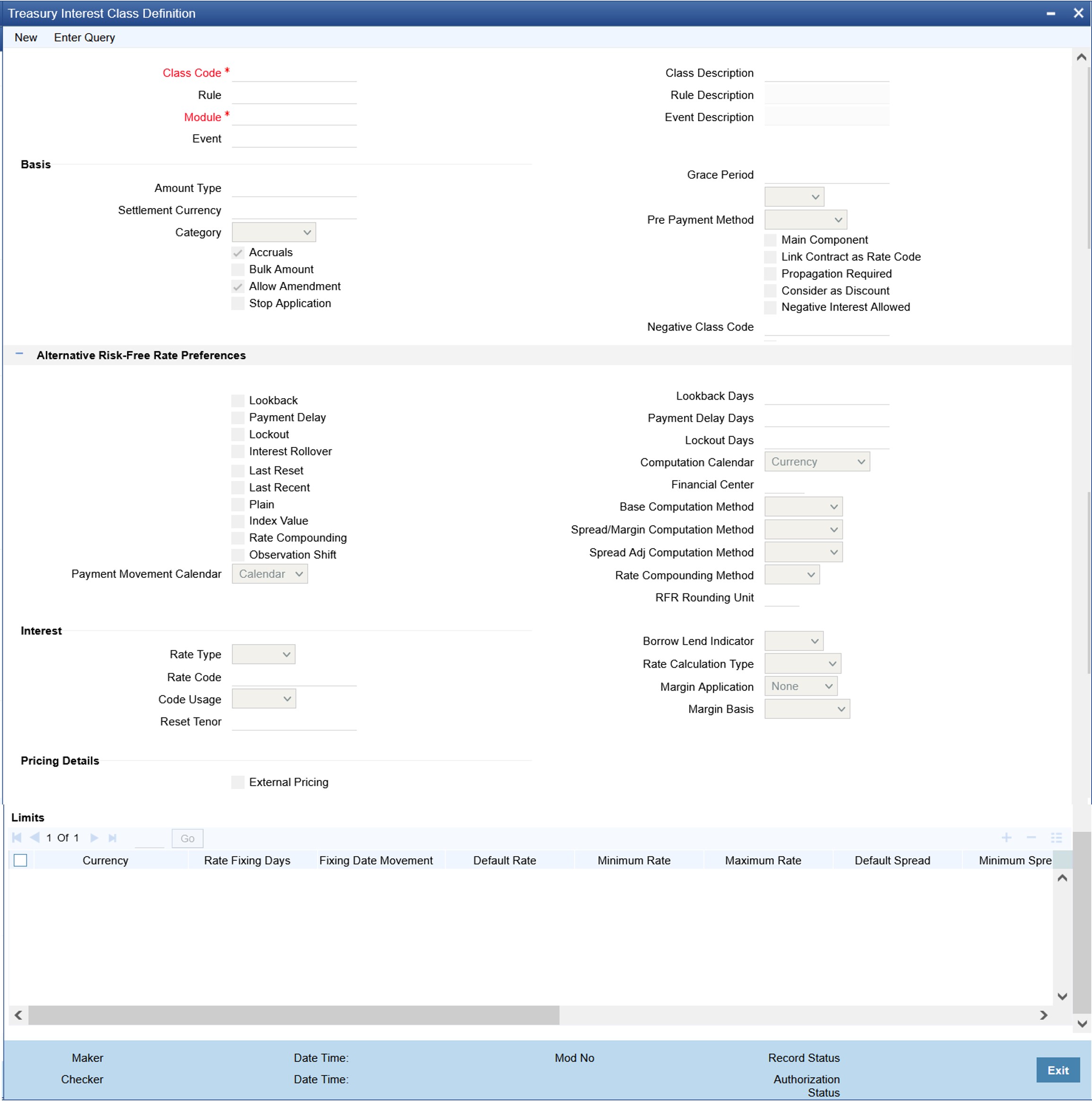
2.On the Treasury Interest Class Definition screen, specify the details as required.
For information on fields refer to: Table 11.2: Treasury Interest Class Definition - Field Description
Table 11.2: Treasury Interest Class Definition - Field Description
|
Field |
Description |
|---|---|
|
Alternative Risk Free Rate |
Identifies if the interest class is enabled for RFR |
|
Alternative Risk Free Rate Preferences |
User can select any one of the below RFR calculation methods: •Lookback • Payment delay • Lockout • Interest Rollover •Last reset •Last recent •Plain The user can also select the combination of the below RFR methods: •Lookback and Lockout •Lookback and Payment Delay •Lockout and Payment Delay •Lookback, Lockout, and Payment Delay |
|
Lookback |
The user can select Lookback as RFR preference if the Rate Method is In-Arrears. The observation period for the interest rate calculation starts and ends a certain number of days prior to the Interest period. As a result, you can choose the interest payment to be calculated prior to the end of the interest period. |
|
Lookback Days |
This field will only be relevant if 'Rate Method' is 'In-Arrears' or bearing and RFR method is Lookback. |
|
Lockout |
The user can select Lockout as RFR preference if the Rate Method is In-Arrears. Lockout means that the RFR is frozen for a certain number of days prior to the end of an interest period (lockout period). During this time, the RFR of lockout period days is applied for the remaining days of the interest period. As a result, the averaged RFR can be calculated a couple of days before the end of the Interest period. |
|
Lockout Days |
This field will only be relevant if 'Rate Method' is 'In-Arrears' or bearing and RFR method is Lockout. |
|
Payment Delay |
The user can select Payment Delay as RFR preference if the Rate Method is In-Arrears. In this method, Interest payments are delayed by a certain number of days and are thus due a few days after the end of an interest period. |
|
Payment Delay Days |
This field is relevant if 'Rate Method' is 'In-Arrears' or bearing and RFR method is Payment delay. Number of days by which the interest (or installment) payments are delayed by a certain number of days and are thus due a few days after the end of an interest period. |
|
Interest Rollover |
Check this box to indicate that interest rollover is allowed. Interest Rollover method can be used as a combined method along with one each of In-arrears & In-advance methods. Payments are set in advance and any missed interest relative to in arrears is rolled over into the next payment period. This option combines a first payment (installment payment) known at the beginning of the interest period with an adjustment payment known at the end. The adjustment payment can be made a few days later or at the end of the next accrual period. Interest rollover with negative interest rate is allowed for In-arrear method. |
|
Plain |
This field is relevant if Rate Method is In-Arrears or bearing and RFR method is Plain. System uses averaged RFR over current interest period, paid on first day of next interest period. |
|
Last Reset |
This field is relevant if 'Rate Method' is 'In-Advance' and 'Rate Convention' is Last reset. In this option, interest payments are determined on the basis of the averaged RFR of the previous period. |
|
Last Recent |
This field is relevant if 'Rate Method' is 'In-Advance' and 'Rate Convention' is Last recent. In this option, a single RFR or an averaged RFR for a short number of days, are applied for the entire interest period |
|
Index Value |
Select the Index Value check box to use the RFR index rate. The RFR Index measures the cumulative impact of compounding RFR on a unit of investment over time. Index Value supports below RFR preferences. 1)Arrear Method •Lookback •Lockout •Payment Delay •Plain 2)Advance Method •Last Reset •Last Recent For more information on the RFR Index Value, refer to the attached RFR Index Value calculation worksheet. |
|
Observation Shift |
Select the Observation Shift check box to apply observation Shift to RFR calculation. The observation shift mechanism provides the rate to be calculated and weighted by reference to the Observation Period rather than the relevant interest period. Observation Shift Currently supports below RFR Methods and combination. •Lookback •Lockout •Lookback and Lockout combination For more information on the RFR Observation Shift, refer to the attached RFR Observation Shift calculation worksheet. |
|
Payment Movement Calendar |
Select the payment movement calendar from the drop-down list. The list displays the following values: •Calendar •Business If the option Calendar is selected, then the system skips the Holiday Preferences selected at the contract level. If the option Business is selected, it considers holiday treatment specified for schedule as per the Holiday Preferences selected at the contract level. |
|
Computation Calendar |
Select the Computation Calendar from the drop-down list, when RFR is selected for interest calculation. The available options are: •Currency •Financial Calendar |
|
Financial Center |
This field is mandatory if the Financial Center is selected as a computation calendar. Select the code of the financial center from the displayed list of values. |
|
Base Computation Method |
The Base Computation Method is either simple or compounded. |
|
Spread\ Margin Computation Method |
Spread\ Margin computation method can be maintained as either Simple or compounded. |
|
Spread Adjustment Method |
Spread adjustment method is kept as either Simple or compounded. |
|
Rate Compounding |
This represents whether the rate compounding is applied for each calculation period. When enabled, system opts for rate compounding instead of amount compounding, the amount difference comes into effect only if any pre-payment is done. For more information on RFR Rate Compounding, refer to the attached RFR Rate Compounding calculation worksheet. |
|
RFR Rounding Unit |
Specify the Rounding Units value to round daily index value to the nearest whole number and use it for interest calculation. It is applicable only when RFR index value is used. |
|
Rate Compounding Method |
Select the Rate Compounding Method from the drop-down list. The available options are: •CCR •NCCR This Rate Compounding method produces a rate for a period by applying the RFR compounding formula to the RFR rate and applying the compounded rate to the principal to calculate the interest due. Currently it’s applicable for MM & SR modules. Rate Compounding supports two methods: 1. Cumulative Compounded Rate (CCR) Calculates the compounded rate at the end of the interest period and it is applied to the whole period. It allows calculation of interest for the whole period using a single compounded rate. 2. Non-Cumulative Compounded Rate (NCCR) It is derived from Cumulative Compounded Rate i.e., Cumulative rate as of current day minus Cumulative rate as of prior Banking day. This generates a daily compounded rate which allows the calculation of a daily interest amount. Rate Compounding supports below RFR preferences: Arrear Method •Lookback •Lockout •Payment Movement •Plain |
3.On the Treasury Interest Class Definition screen, specify the details as required.
The following steps are followed:
–Rate code Field will fetch all the rate codes maintained at CFDFLTRI (floating rate code) and
–CFDRFRRT(RFR codes).
–Having the RFR flag checked, the rate code selected is maintained in CFDRFRRT(RFR codes) screen.
–Selecting the rate code is a mandate when RFR flag is checked.
–Likewise having RFR flag unchecked, select a rate code maintained in CFDFLTRI (floating rate code).
–Under limits multi-block, the system allows the saving of record for RFR mapped rate code currency only. Example for RFR code: RFR only USD currency record is permitted. If in case any other currency is maintained, the system validates accordingly throws an error.
–For an RFR rate code currency, entering min and max rate is allowed.
–There are no restrictions on the interest basis selection for RFR rate code.
–RFR usage is allowed only for the Main interest component.
–The system allows multiple Interest class records for same RFR code and currency but with different preferences.
–After the Interest class maintenance is saved and authorized, the system allows you to unlock the RFR details and modify it based on the requirement.
This topic provides the instructions to capture the RFR details in money market product.
Context:
The Money market Product screen, Interest call form is enhanced to have similar new fields introduced in Treasury Interest Class Definition (CFDTRINC) screen.
Prerequisite:
Login to the homepage and navigate to the Money Market Product screen.
1.On the Money Market Product Screen, click Interest.
Step Result: ICCF details screen is displayed.
Figure 11.4: ICCF details
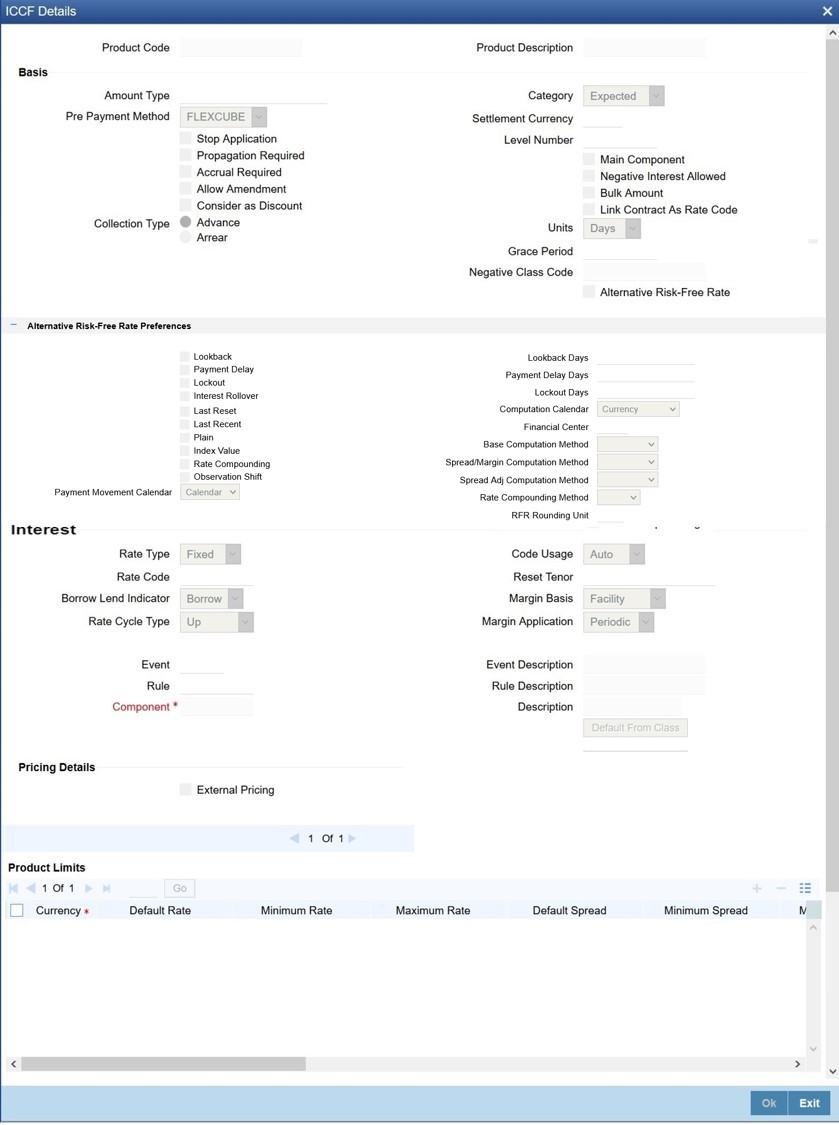
2.On the ICCF details, specify the details as required.
During the creation and unlock after the authorization, user can change RFR preferences after defaulted from interest class.
When RFR flag is checked, a RFR rate code is used.
System allows mapping of only one RFR interest class as the main component.
note: Once contact is saved and authorized, the RFR preferences cannot be changed.
This topic provides the instructions to capture the RFR details in Money Market Contract.
Context:
The Money Market Contract screen, Interest call form is enhanced to have similar new fields introduced in Treasury Interest Class Definition (CFDTRINC) screen.
Prerequisite:
Login to the homepage and navigate to the Money Market Contract screen.
1.On the Money Market Contract Screen, click Interest.
Step Result: ICCF screen is displayed.
Figure 11.5: ICCF
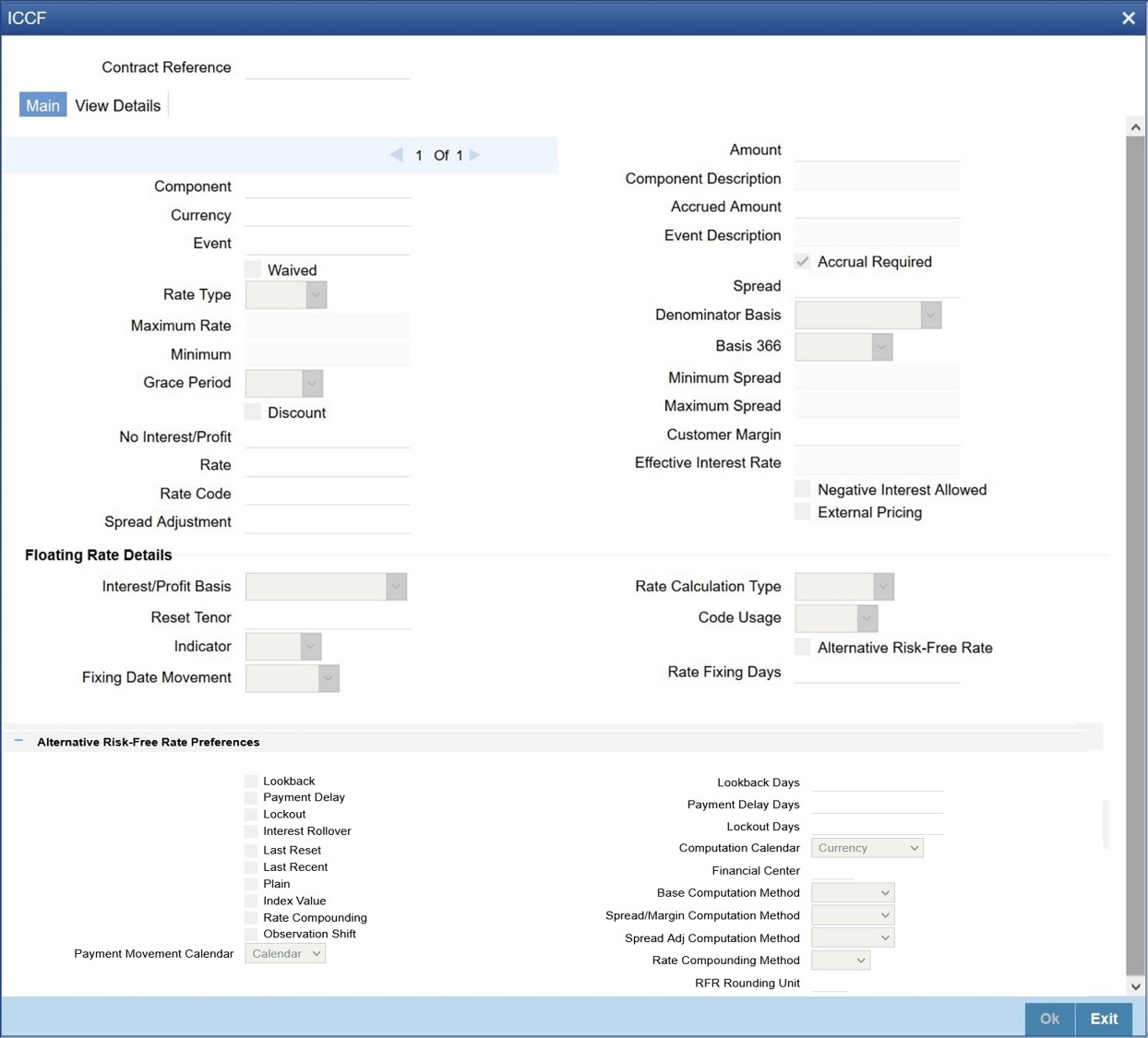
2.On the ICCF details, specify the details as required.
During the creation, user can change RFR preferences after defaulted from product level.
When RFR flag is checked, rate code has to be RFR code.
Spread Adjustment field is enabled and is used only for RFR component. Existing spread field is disabled and nullified for RFR component.
System allows mapping of only one RFR interest class as main component for a contract.
Existing Rate Fixing Days field is used as lookback days only for RFR Advance methods.
Once contract is saved and authorized, the RFR preferences cannot be changed.
For information on Interest rate details in schedules explode, see the section
3.Effective interest rate is displayed as per the below calculation as an example. Consider a contract with Lookback RFR calculation method with below details:
–Trade date= 04 March 2020
–Value date= 04 March 2020
–Maturity date= 16 March 2020
–System date= 16 March 2020
–Principal= USD 95000
–Lookback days= 1
–Customer margin=0
–Spread adjustment= 0
–Base amount calc method= Lookback compounded
–Interest basis= Actual/Actual
Below is the calculation for accruals (based on RFR rates taken as an example)
|
Calender Date |
Effective Date |
Rate |
Principal |
Accrual |
|---|---|---|---|---|
|
4-Mar |
3-Mar |
1.01% |
95000 |
2.621585 |
|
5-Mar |
4-Mar |
1.02% |
95002.62 |
2.647614 |
|
6-Mar |
5-Mar |
1.03% |
95005.27 |
8.020937 |
|
9-Mar |
7-Mar |
1.04% |
95013.29 |
2.699831 |
|
10-Mar |
9-Mar |
1.05% |
95015.99 |
2.725869 |
|
11-Mar |
10-Mar |
1.06% |
95018.72 |
2.751908 |
|
12-Mar |
11-Mar |
1.07% |
95021.47 |
2.77795 |
|
13-Mar |
12-Mar |
1.08% |
95024.25 |
8.411982 |
|
16-Mar |
14-Mar |
1.09% |
95032.66 |
2.877378 |
Taking the final accrual as 32.63 USD with a simple interest calculation method for nominal of USD 95000 for a period from 04 March to 16 March 2020, the effective rate is calculated to be:
Effective rate= 1 + (32.63*365)/(95000*13)= 1.00938947
4.To ensure that the rates stay within the stipulated limits, the MM module supports Minimum and Maximum Rate pick up for RFR enabled contracts.
If the derived RFR rate for a contract considering the base rate and spread adjustment
is less than the minimum rate, the minimum rate maintained is applied on the contract.
If the derived RFR rate for a contract considering the base rate and spread adjustment is greater than the maximum rate, the maximum rate is applied on the contract overriding the RFR rates.
11.7 Money Market Value Dated changes
This topic provides the instructions to capture the RFR details in Money Market Value dated changes.
Context:
The Money Market Value Amendment screen, Interest call form is enhanced to have similar new fields introduced in Treasury Interest Class Definition (CFDTRINC) screen.
Prerequisite:
Login to the homepage and navigate to the Money Market Value Amendment screen.
1.On the Money Market Value Amendment Screen, click Interest.
Step Result: ICCF details screen is displayed.
Figure 11.6: ICCF Details
2.On the ICCF screen, below fields are editable during VAMI
•Customer Margin
•Spread Adjustment
No change is allowed for a RFR contract with payment delay method in between the schedule actual due date and the payment date calculated after adding payment delay days.
Swift Messaging
MT320 SWIFT message generated during BOOK, LIQD & ROLL events, should have proper field values for below tags:
•32H Amount to be Settled
•34E Currency and Interest Amount
•37G Interest Rate
MT350 SWIFT message generated during interest payouts should have proper field values for below tags:
•34B Currency and Interest Amount
•37J Interest Rate
Contract Advices
Below MM Confirmation and Roll over advices should have proper interest data fields.
Message types are:
•MMCONDEP
• MMCONPLA
• MM_ROLL_ADV
Intraday Deals
Booking and liquidation of MM intraday deals is supported for the contracts.
Back dated and Future dated Contract Booking
RFR contracts supports both back and future dated booking.
In case of future dated contract, the deal is uninitiated on BOOK date, and the same is processed on the value date during EOD.
When the deal is initiated, the system derives the interest rate and amount.
Liquidate back date schedules
When you book a Back dated MM contract having the check for Liquidate backdated schedules and if there is back dated interim payment schedule, interest amount for the schedule is derived and settled on save.
Interest Accrual
Interest is calculated and accrued based on the selected computation methods.
Interest Liquidation
During interest liquidation, cumulative accrued interest amount is paid. RFR supports both Manual and Auto Liquidation of schedules.
Back dated and future dated Value dated amendments
RFR to support booking Back dated and Value dated amendments and required adjustment is taken care.
Prepayments and withdrawals
In case of partial payments, interest calculation considers the outstanding principal amount.
Negative Interest rates
RFR does support negative interest rate calculations.
Roll Over
When roll preference is set as the principal only then the cumulative interest accrued is liquidated on value date on contract.
Liquidation Delay
The system supports the delay in liquidating the contract till all the RFR rates are available. Liquidation will happen once the rate is received on the maturity date during EOD batch processing.
Note: This functionality is applicable to RFR related contracts only (Plain Method).
CFDFRTCD
Rate Code Definition - 11.2 Define Rate codes for Risk Free rates
RFR Rate Input - 11.3 Risk Free Rates
Treasury Interest Class Definition - 11.4 Treasury Interest Class Definition