Workflow Task Assignment and Editing
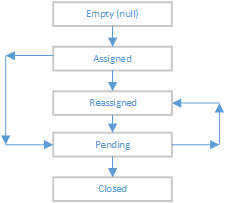
The User has the ability to Edit the Workflow Queue items. Editing allows the user to Close the task, reassign the task to other Users, unassign the task, provide an "in progress" status (Pending) and add comments. Workflow History will capture the updates made to the task. The typical status progression is:
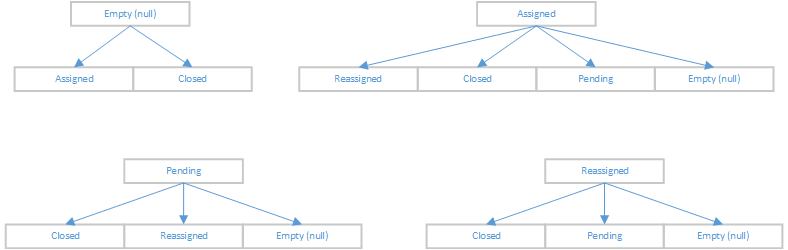
Potential alternative status progressions are:
To edit the Workflow Queue, go to the General Workflow or business-specific queues' rows, click the ellipse icon and select the Edit Workflow option.
The Edit Workflow page appears. It allows the user to close, reassign, unassign, update in progress status (Pending) and add/update comments in the task.
