Adding to the JBoss Server – Linux
The procedure is similar in Linux. Open the file and right click to Edit. Scroll towards the end of the file and insert the system properties using the folder locations defined earlier.
- If the server is running, it must be stopped. Changes to a server that is running will not be dynamically loaded.
- Locate the “standalone.sh” file. In many instances, the file will be located in: ../home/JBoss/jboss-eap-7.4/bin.
- In the “bin” folder locate the “standalone.sh” file. Make a backup copy for safety. If the file you are editing gets corrupted, you can restore the original file.
- Open the standalone.sh file and right click to Edit. Scroll towards the end of the file.
- Locate the command set JAVA_OPTS=%JAVA_OPTS%
- Insert the following system property declarations:
- -DINSBRIDGE_APP_DIR=“home/Insbridge/config”. If you copy, please verify valid characters have been entered.
In this declaration, add a system property for the application directory location to the Java Virtual Machine using the “-D” parameter, then specify “INSBRIDGE_APP_DIR” as the name of the new variable.
You must also specify the path where the configuration file will be located. i.e. “home/Insbridge/config”. Where home/Insbridge/config is the folder you created earlier.
- -DINSBRIDGE_INSTANCE_APP_DIR=“home/Insbridge/config/instance”. If you copy, please verify valid characters have been entered.
In this declaration, add a system property for the instance application directory to the Java Virtual Machine using the “-D” parameter, then specify “INSBRIDGE_INSTANCE_APP_DIR” as the name of the new variable.
You must also specify the path where the configuration file will be located. i.e. “home/Insbridge/config/instance”. Where home/Insbridge/config/instance is the folder you created earlier.
Note: If JBoss does not enter running mode, please check the start dialogue. If your system property is not recognized, please verify that valid characters have been entered.
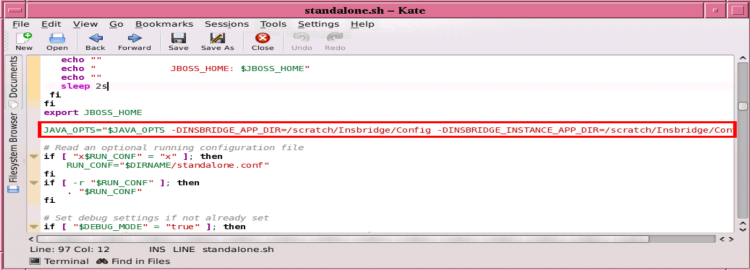
- -DINSBRIDGE_APP_DIR=“home/Insbridge/config”. If you copy, please verify valid characters have been entered.
-
Save your changes.
-
The variables will be added to the Server the next time it is started.
