Scenario User Permissions
This user edits table data and default values. Scenario user permissions allow for only tables to be edited. No other program elements are available. Scenario user permissions are per product and are needed for each product where the user needs to work.
To allow for the complete setup of scenarios, the scenario user needs at least two sets of permissions. A third set may be needed depending on usage.
Scenario user permissions are product wide. Users can work in the product in any scenario.
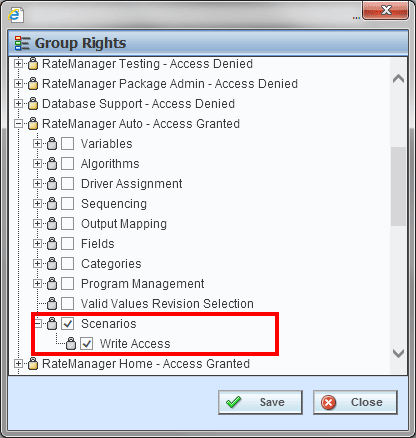
Set 1: Scenario permissions for each of the products with the tables that are to be edited are required. Scenario permissions must be added in each product where the user needs to work.
Set 2: Excel table imports and exports require Table Job Admin – Import/Export permissions.
Set 3: OPTIONAL - Additional permissions may be needed. Permissions are required if universals are to be used. To test updates or delete programs, the user needs Program Management for the product.
Product permissions are required to edit and delete tables.
Admin permissions are required to edit Group Rights.
If scenario permissions are not granted, scenarios will not be presented on the Program Explorer tab. If Table Job permissions are not granted, users will not be able to import or export Excel files.
