Linked Variables
Linked variables are a group of table variables based on the same criteria. For example, if two different base rates were both based off the same table of territory codes, these two variables could be linked. RateManager supports a maximum of 100 variables associated with one single table. This means that a linked variable can have itself and 99 other variables.
Variables can be linked at the time you create them or you can enter new linked variables to an existing variable at a later time on the Edit Table Variable tab. Existing variables cannot be linked together. For example, if you created Table Variable A and then created a separate Table Variable B, you will not be able to link them together.
Creating a Linked Variable
- Select the table variable you want to add a linked variable to. Right click and select Edit. This opens the Edit Table Variable tab. If you are creating a new table variable, you can add a linked variable at any time in the create process.
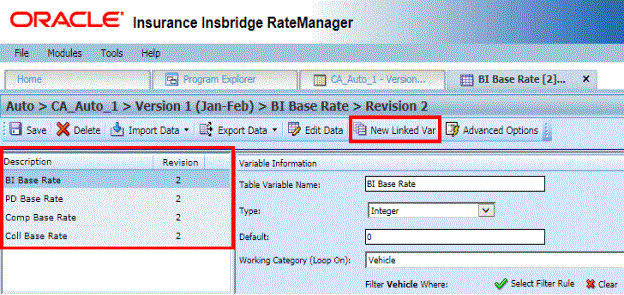
Creating a Linked Table Variable
- Click New Linked Var from the top bar menu. The Variable Information area at the top right side portion of the tab will refresh. Another variable will be added in the Linked Variable Listing at the top left side portion of the tab.
- Enter in a name, select the data type, a default, and the working category.
- Table variables that are linked are listed in the Linked Variables Listing area on the left. You can return to any of the variables listed by clicking it.
- Click Save to save your work.
