Assigning Product UOMs
To assign product UOMs, use the Product Unit of Measure (PROD_UOM) component.
This section discusses how to assign UOMs.
|
Page Name |
Definition Name |
Usage |
|---|---|---|
|
PROD_UOM |
Select the UOMs that apply to the product. Define minimum and maximum order quantities, valid order increments, and minimum selling prices for the product when sold by that UOM. |
Use the Product Unit Of Measure page (PROD_UOM) to select the UOMs that apply to the product.
Define minimum and maximum order quantities, valid order increments, and minimum selling prices for the product when sold by that UOM.
Navigation:
This example illustrates the fields and controls on the Product Unit Of Measure page.
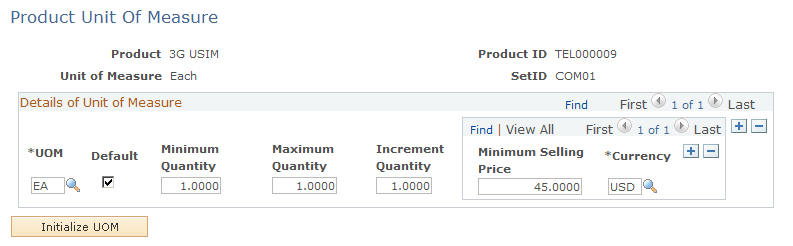
Details of Unit of Measure
Field or Control |
Description |
|---|---|
UOM (unit of measure) |
Enter a UOM that applies to sales order units for the product. |
Minimum Quantity and Maximum Quantity |
Enter minimum and maximum order quantity fields. The order entry and quotation entry systems place the order line on hold if these limits are violated. |
Increment Quantity |
Enter a value if a product can be sold only in specific increments. |