Registering a Model
The machine learning model can be deployed as a REST endpoint after it has been trained and built. Use the Model page to register the REST endpoint. PeopleSoft applications and users use the REST endpoint using the delivered IB_Generic service in Integration Broker.
Access the Model Definition page by navigating to , and select Model (under the Inference folder in the left panel). Alternatively, you can navigate to .
This example illustrates the fields and controls on the Model Definition page. You can find definitions for the fields and controls later on this page.
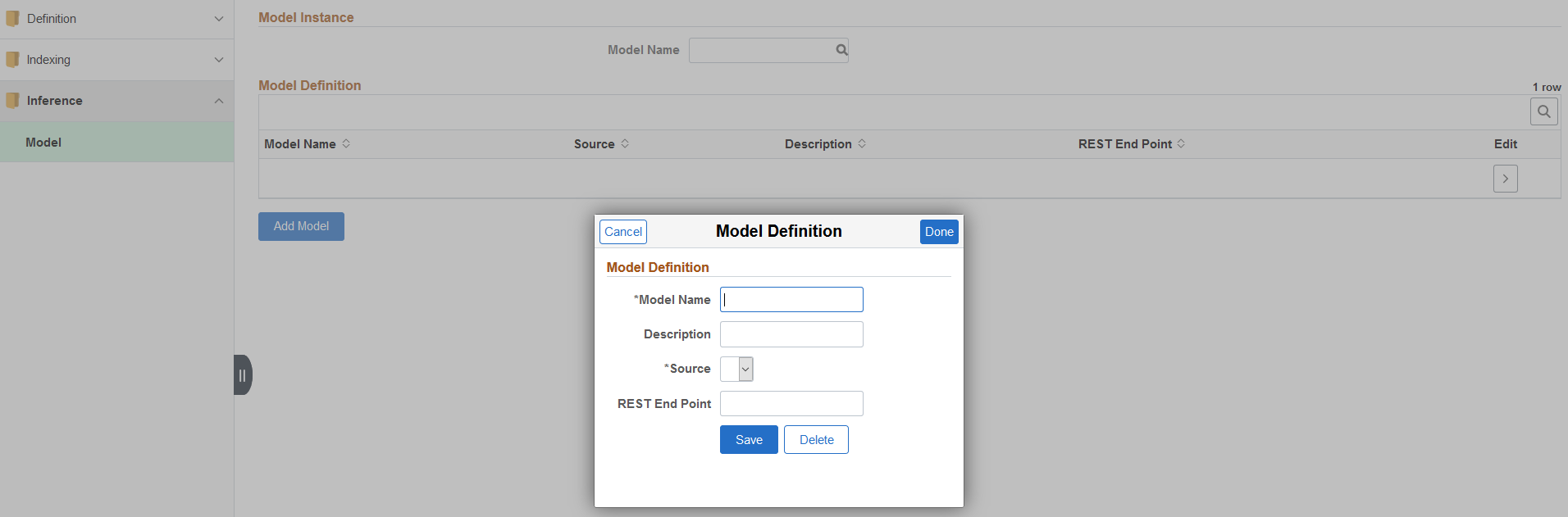
The Model Definition page displays a list of existing model definitions. The Model Name drop-down enables you to identify the model that you require.
To add a new model, select the Add Model button. Use the Model Definition page to specify details of a new model.
Field or Control |
Description |
|---|---|
Model Name |
Enter a name for the model. |
Description |
Enter a description. |
Source |
Select a data source from the list. The data sources are listed here. |
REST End Point |
Enter a value to indicate the model. Note: The system appends the value entered here to the server host to create a fully qualified REST endpoint. |