Track Flexible Service and Tenure
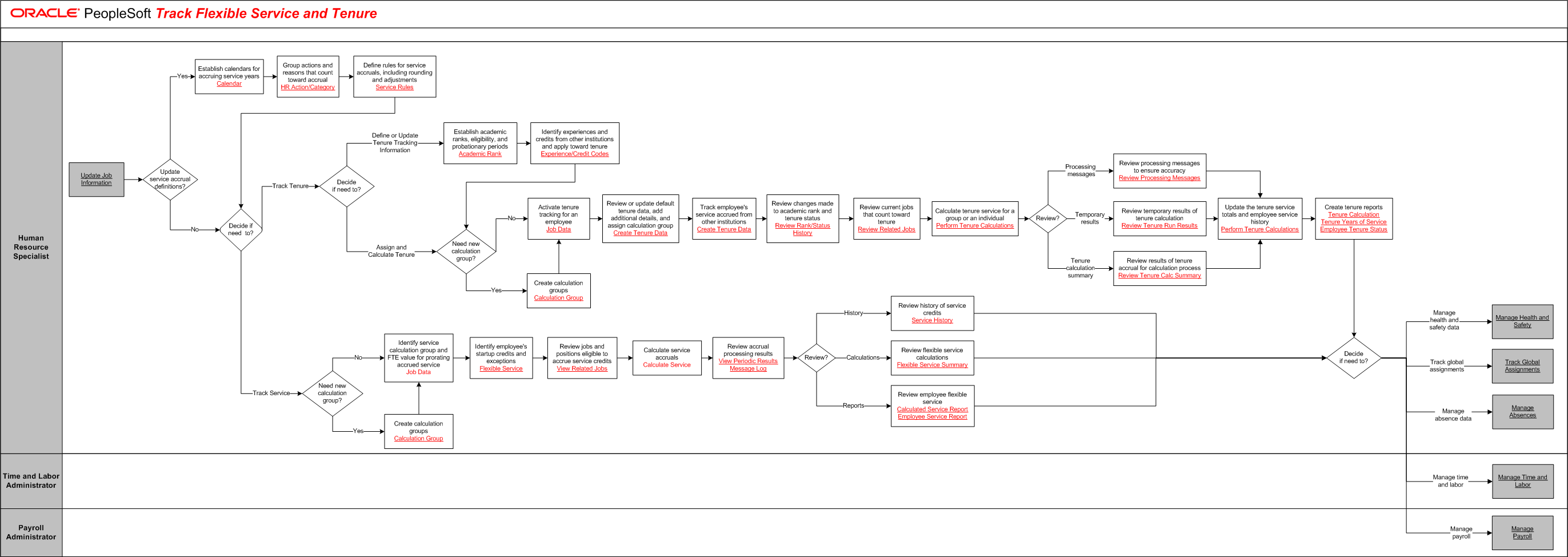
The tables on this page list the tasks for this business process, grouped by role. Some roles may be listed more than once if their tasks are performed at different points in the process. Follow the task numbers in order, unless the Task Description column provides instructions to go to a different task number. Click links in the Task Description column to view detailed diagrams for those tasks or to go to the online help for those pages.
Human Resource Specialist
Task Number | Task Description |
|---|---|
1 | Perform external activity:. Stop and complete Update Job Information. If Update service accrual definitions is Yes, Go to task number 2. If No, Go to task number 5. |
2 | Establish calendars for accruing service years. |
3 | Group actions and reasons that count toward accrual. |
4 | Define rules for service accruals, including rounding and adjustments. |
5 | Determine if Decide if need to. If Decide if need to is Track Tenure, Go to task number 6. If Decide if need to is Track Service, Go to task number 22. |
6 | Determine if Decide if need to. If Decide if need to is Define or Update Tenure Tracking Information, Go to task number 7. If Decide if need to is Assign and Calculate Tenure, Go to task number 9. |
7 | Establish academic ranks, eligibility, and probationary periods. |
8 | Identify experiences and credits from other institutions and apply toward tenure. |
9 | Determine if Need new calculation group. If Need new calculation group is No, Go to task number 11. If Need new calculation group is Yes, Go to task number 10. |
10 | Create calculation groups. |
11 | Activate tenure tracking for an employee. |
12 | Review or update default tenure data, add additional details, and assign calculation group. |
13 | Track employee's service accrued from other institutions. |
14 | Review changes made to academic rank and tenure status. |
15 | Review current jobs that count toward tenure. |
16 | Calculate tenure service for a group or an individual. If Review is Processing messages, Go to task number 17. If Review is Temporary results, Go to task number 18. If Review is Tenure calculation summary, Go to task number 19. |
17 | Review processing messages to ensure accuracy. Go to task number 20. |
18 | Review temporary results of tenure calculation. Go to task number 20. |
19 | Review results of tenure accrual for calculation process. |
20 | Update the tenure service totals and employee service history. |
21 | Create tenure reports. Go to task number 32. |
22 | Determine if Need new calculation group. If Need new calculation group is No, Go to task number 24. If Need new calculation group is Yes, Go to task number 23. |
23 | Create calculation groups. |
24 | Identify service calculation group and FTE value for prorating accrued service. |
Job Data
Task Number | Task Description |
|---|---|
25 | Identify employee's startup credits and exceptions. |
26 | Review jobs and positions eligible to accrue service credits. |
27 | Calculate service accruals. |
Calculate Service
Task Number | Task Description |
|---|---|
28 | Review accrual processing results. If Review is History, Go to task number 29. If Review is Calculations, Go to task number 30. If Review is Reports, Go to task number 31. |
29 | Review history of service credits. Go to task number 32. |
30 | Review flexible service calculations. Go to task number 32. |
31 | Review employee flexible service. |
32 | Determine if Decide if need to. If Decide if need to is Manage health and safety data, Go to task number 33. If Decide if need to is Track global assignments, Go to task number 34. If Decide if need to is Manage absence data, Go to task number 35. If Decide if need to is Manage time and labor, Go to task number 36. If Decide if need to is Manage payroll, Go to task number 37. |
33 | Perform external activity:. Stop and complete Manage Health and Safety. End of activity. |
34 | Perform external activity:. Stop and complete Track Global Assignments. End of activity. |
35 | Perform external activity:. Stop and complete Manage Absences. End of activity. |
Time and Labor Administrator
Task Number | Task Description |
|---|---|
36 | Perform external activity:. Stop and complete Manage Time and Labor. End of activity. |
Payroll Administrator
Task Number | Task Description |
|---|---|
37 | Perform external activity:. Stop and complete Manage Payroll. End of activity. |