Change or Enroll Employees in Benefits
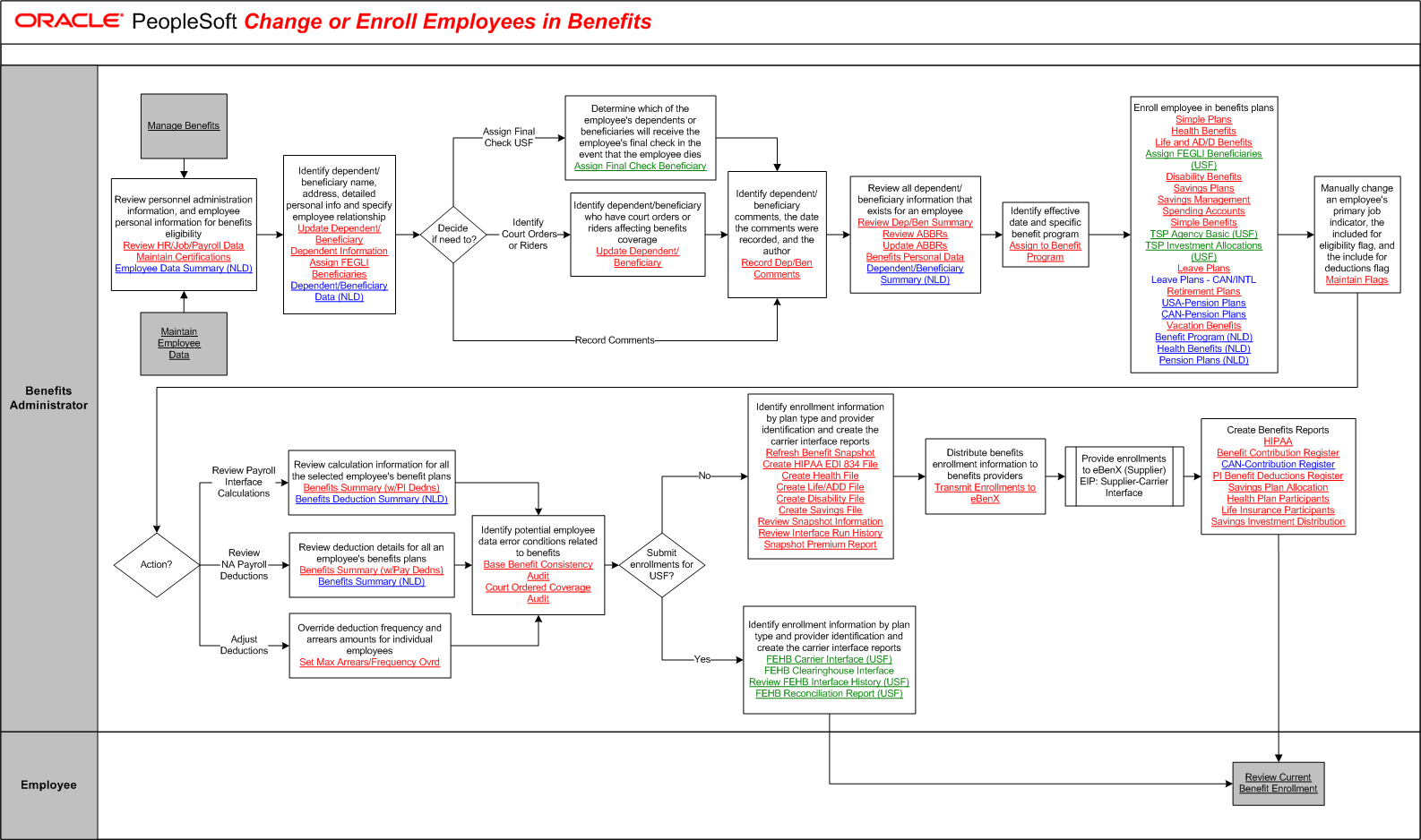
The tables on this page list the tasks for this business process, grouped by role. Some roles may be listed more than once if their tasks are performed at different points in the process. Follow the task numbers in order, unless the Task Description column provides instructions to go to a different task number. Click links in the Task Description column to view detailed diagrams for those tasks or to go to the online help for those pages.
Benefits Administrator
Task Number | Task Description |
|---|---|
1 | Perform external activity:. Stop and complete Manage Benefits. Go to task number 3. |
2 | Perform external activity:. Stop and complete Maintain Personnel Records. |
3 | Review personnel administration information, and employee personal information for benefits eligibility. |
4 | Identify dependent/beneficiary name, address, detailed personal info and specify employee relationship. |
5 | Decide if need to?. In parallel: Go to task number 6, Go to task number 7, Go to task number 8. |
6 | Determine which of the employee's dependents or beneficiaries will receive the employee's final check in the event that the employee dies. Assign Final Check Beneficiary Go to task number 8. |
7 | Identify dependent/beneficiary who have court orders or riders affecting benefits coverage. |
8 | Identify dependent/beneficiary comments, the date the comments were recorded, and the author. |
9 | Review all dependent/beneficiary information that exists for an employee. |
10 | Identify effective date and specific benefit program. |
11 | Enroll employee in benefits plans. Assign FEGLI Beneficiaries (USF) TSP Investment Allocations (USF) Leave Plans - CAN/INTL |
12 | Manually change an employee's primary job indicator, the included for eligibility flag, and the include for deductions flag. |
13 | Action?. In parallel: Go to task number 14, Go to task number 15, Go to task number 16. |
14 | Review calculation information for all the selected employee's benefit plans. Benefits Deduction Summary (NLD) Go to task number 17. |
15 | Review deduction details for all an employee's benefits plans. Benefits Summary (w/Pay Dedns) Go to task number 17. |
16 | Override deduction frequency and arrears amounts for individual employees. |
17 | Identify potential employee data error conditions related to benefits. |
18 | Submit enrollments for USF?. In parallel: Go to task number 19, Go to task number 23. |
19 | Identify enrollment information by plan type and provider identification and create the carrier interface reports. |
20 | Distribute benefits enrollment information to benefits providers. |
21 | Provide enrollments to eBenX (Supplier) EIP: Supplier-Carrier Interface. |
22 | Create Benefits Reports. PI Benefit Deductions Register Savings Investment Distribution Go to task number 24. |
23 | Identify enrollment information by plan type and provider identification and create the carrier interface reports. FEHB Clearinghouse Interface |
Employee
Task Number | Task Description |
|---|---|
24 | Review Current Benefit Enrollment. End of activity. |