Assigning Zaikei Deductions by Payee
This section discusses element assignment and element details.
|
Page Name |
Definition Name |
Usage |
|---|---|---|
|
GP_ED_PYE |
Assign Zaikei deductions to a payee |
|
|
GP_ED_PYE_DTL_SEC |
Set up calculation and run type information for the assigned deduction. |
Use the Element Assignment By Payee page (GP_ED_PYE) to .
Navigation:
This example illustrates the fields and controls on the Element Assignment By Payee page. You can find definitions for the fields and controls later on this page.
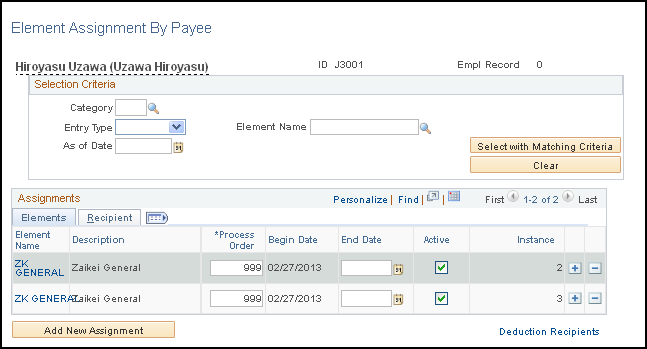
After you set up the Zaikei deductions, assign them to individual payees. Two instances of each Zaikei deduction are assigned, one for the salary run type, and one for the bonus run type.
Use the Element Detail page (GP_ED_PYE_DTL_SEC) to set up calculation and run type information for the assigned deduction.
Navigation:
Click the Element Name link in the Assignments group box.).
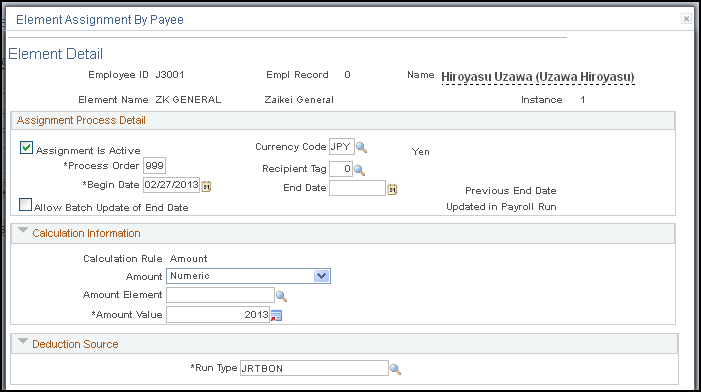
This example illustrates the fields and controls on the Element Detail page. You can find definitions for the fields and controls later on this page.
Field or Control |
Description |
|---|---|
Begin Date |
Enter the date the Zaikei deduction begins. Note: The Zaikei deduction amount is defined as of the period end date rather than payment date. For example, if you are going to begin the Zaikei deduction from the monthly salary with a period begin date of January 1, a period end date of January 31, and a payment date of February 10, enter January 31 in the Begin Date field on this page. |