High-Level Steps for Installing Siebel Monthly Update in a Siebel CRM Environment Deployed using SCM
You can use the procedure in this topic to install latest monthly updates in a Siebel CRM environment deployed using SCM. These steps do not include repository upgrade steps, which are optional and identical to those relevant for on-premises Siebel CRM deployments.
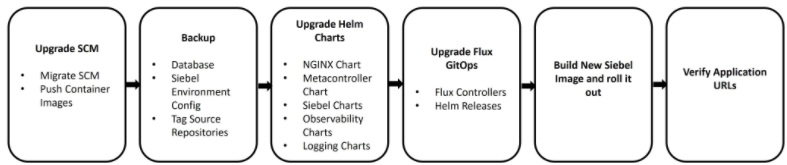
The following are the high-level steps to install a Siebel monthly update in a Siebel CRM environment deployed using SCM:
- Back up the database.
- Upgrade SCM.
- Back up the SCM files for the Siebel environment.
- Tag Git repositories.
- Update SCM container images to the user's container registry.
- Update secrets with the user's container registry details.
- Update Helmchart and Helm release.
You must update the Helm chart repository (
/home/opc/siebel/<ENV_ID>/<env_namespace>-helmcharts/) to the latest version and Helm release (/home/opc/siebel/<ENV_ID>/<env_namespace>-cloud-manager) to point to the user's container registry for the following:- Infrastructure(
ingress-nginx) - Metacontroller (
metacontroller) - SiebelOperator (
siebel-operator) - SiebelGateway (
siebel-gateway) - SiebelConfig (
siebel-config) - Siebel (
siebel) - SiebelArtifacts (
siebel-artifacts) - SiebelObservability (
siebel_observability)
- Infrastructure(
- Build and push the new Siebel CRM custom image for the target version.
- Update the SCM repository files with the newly built target Siebel CRM Image.
- Check the status of the flux components after upgrade.
- Monitor the successful completion of
postinstalldbKubernetes job. - Execute configuration instructions specific to a release.
- Upgrade the repository.
- Troubleshoot any issues.
- Rollback steps for Helm charts.
- Verify the application URLs once the environment comes up.