Installing and Configuring the Coherence Server
The Coherence Server is a standalone Java application. To simplify deployment, management, and configuration, we've integrated it with the Siebel Application Internal. Coherence runs as a container within the Application Internal. As a result, installing Coherence requires installing the Siebel Application Internal. The steps to install Coherence are the same as those for installing the Siebel Application Internal.
Install Coherence on Each Node
- Run the Siebel Installer on the Coherence node.
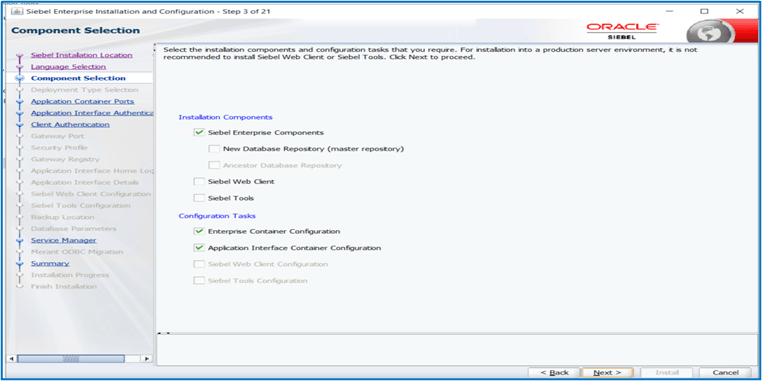
- When the installer gets to the Component Selection screen, choose the following
three components only.
- Installation Components section
- Siebel Enterprise Components
- Configuration Tasks section
- Enterprise Container Configuration
- Application Interface Container Configuration
- Installation Components section
- Click Next and set the Fields as you did in the installer when you installed the Siebel Server. This is the same Siebel installer and will use the same values as your Siebel installation.
- Exit when the installation is complete.
Install SSH on Each Coherence Node
- Once the Coherence installation completes, go to
<Siebel Install
                        Directory>\ses\siebsrvr\BIN
. - Find the SSH software installer OpenSSH-Win64-v9.8.1.0.msi and simply double-click it. There will be no installation screens as this is a silent install.
- The installer will install and start the SSH Server.
- The SSH Server runs as a standard Windows Service.
- To verify, press Win + R, type services.msc, and press Enter to open the Services Management Console.
- Ensure the following services are running:
- OpenSSH SSH Server – the actual SSH server daemon (sshd)
- OpenSSH Authentication Agent – manages SSH private keys
Linux typically has SSH software installed and running by default.
Create the Enterprise Cache Server Profile
You'll create and deploy on each Coherence node an Enterprise Cache Server Profile. The same values must be applied to every Coherence node. When the profiles are deployed, they'e written to Zookeeper and compiled into an XML file so that the Coherence server uses them as input to start the cache service. You'll see different sections, such as Tango Coherence Override and Cache Configuration.
To create and deploy an Enterprise Cache server profile on each Coherence node:
- Sign into the Siebel Management Console (SMC).
- Go to Profiles.
- Create an Enterprise Cache server profile.
- Enter the following values and deploy the Enterprise Cache server
profile.
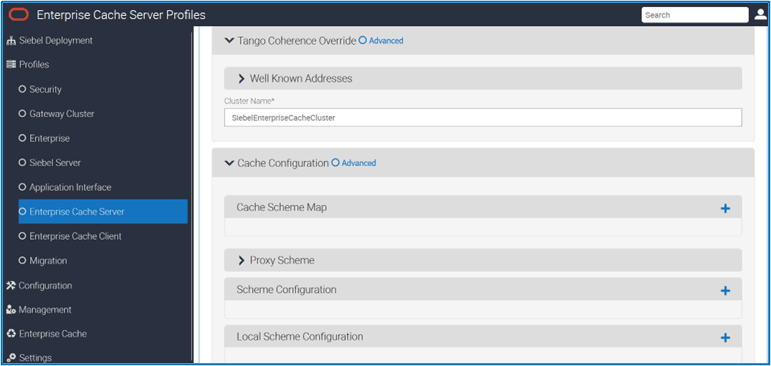
Tango Coherence Override > Well Known Addresses
| Profile Field | Suggested Value | Description |
|---|---|---|
| Server Address |
IP address for the node hosting the Coherence |
The well-known address helps cluster discovery and enables seamless registration of new nodes into the Coherence cluster. |
| Cluster Name |
siebel_cluster |
This can be custom, but it must be consistent across all Coherence Nodes so that they join the same cluster. |
Cache Configuration > Cache Scheme Map
| Profile Field | Suggested Value | Description |
|---|---|---|
| Cache Name |
siebelcache |
The name for your cache. By default, all components use this name, and all profiles must use the same value. Change it only if you've a good reason to do so. |
| Scheme Name |
distributed |
This is the scheme that will define the cache settings. |
Cache Configuration > Proxy Scheme
| Profile Field | Suggested Value | Description |
|---|---|---|
|
Service Name |
ExtendTcpProxyService |
Default: ExtendTcpProxyService – This is the name for the Coherence service that will handle traffic. Don't change this value. The extend proxy service ( |
|
Maximum Thread Count |
75 |
Default: 75 – This is the amount of Maximum threads Proxy will use. Don't change this value. This setting enables thread pooling for handling proxy operations. |
|
Minimum Thread Count |
10 |
Default: 10 – This is the minimum number of threads proxy will use. Don't change this value. This setting enables thread pooling for handling proxy operations. |
|
Cache Server Host |
127.0.0.1 |
This is the local loopback address where the Coherence server is running for this node. Don't change this value. This must be same for every Coherence node. |
|
Port |
7077 |
The port on which Coherence is running and listening for traffic. You can use any available port. |
|
Auto Start Extended Service |
True (checked) |
Default: True (checked) – This allows the Coherence service to automatically start. Don't change this value. |
Cache Configuration > Scheme Configuration
| Profile Field | Suggested Value | Description |
|---|---|---|
|
Distributed Scheme |
distributed |
This value defines how data is stored and retrieved from the Cache. Siebel uses Distributed Cache. This must match the value in the Scheme Name field from the Cache Configuration section. |
|
Type |
Backup Scheme |
Default: Backup Scheme – This is Coherence’s way of making sure the data is available either from a disk or (in our case) in memory. Don't change this value. |
|
Service Name |
DistributedCache |
This is the way Coherence ensures that data will not be blocked from retrieval because of bottlenecks. Don't change this value. |
|
Auto Start Distributed Service |
True(checked) |
Default: True(checked) – This allows the distributed service to start automatically. Don't change this value. |
|
Backup Scheme Configuration |
Local |
The name of the scheme that will be defined in the next section. This specifies the name of another scheme to inherit from. |
Cache Configuration > Local Scheme Configuration
| Profile Field | Suggested Value | Description |
|---|---|---|
|
Local Scheme Name |
Local |
This value defines the scheme for the backup scheme defined earlier. This value must match the one defined earlier. |
|
Eviction Policy |
Hybrid |
Default value: Hybrid – combines both Least Recently Used (LRU) and Least Frequently Used (LFU) principles to find out which cache entries to evict when the cache is full. |
|
Maximum Cache Size (in MB) |
2000 |
Default value: 2000 – The amount of memory the cache will use before starting to evict data. This is per Cache. |
Maximum Cache Size and Guidance on Sizing of Coherence Node Machines
When Application Internal Tomcat is used to deploy the Coherence Server, it is essential to configure both the minimum and maximum heap size settings, as the cache data is stored within the heap space of the Application Internal process.
To determine the appropriate minimum and maximum heap size, first calculate the maximum cache size using the following formula. The parts of this calculation are elaborated on below.
Max Cache Size = Max Number of Entries × (Average Cache Size per Entry + 150 bytes)
Where:
- Max Cache size is the capacity of data held in memory as part of the caching mechanism.
- Number of Entries = Total Metadata + Customized Metadata + (Cache Entries per User Login × Total Users Base)
- Average Cache Size per Entry = Average Cache size of Siebel key-value pairs
- 150 bytes = Additional overhead to account for estimation inaccuracies.
In Siebel, two types of data are cached: metadata and user contexts. These Cache entries are created during components start up, when users log in and when they navigate to views or access business logic for the first time after Coherence Caching is enabled.
Component startup and view navigation create cache entries related to metadata sourced from the S_RR tables. Each record in the S_RR* tables generate one key–value pair in the cache upon access, and each key-value pair represents a single cache entry.
For metadata, the maximum number of cache entries corresponds to the total number of records from all the S_RR tables, along with any additional metadata that may be created in the future—either by modifying existing metadata records or by creating new ones.
For example, suppose a customer is on Version MAIN 20 and upgrades to Build 25.6 or later, with Coherence Caching enabled. When navigating to My Accounts, if there have been no changes on SIS Account List Applet from Main Version 0 through Version 20, the metadata cache entry is created as:
MAIN-WSID | SIS Account List Applet | Applet | 0 | ENU
If a migration occurs and the version increments to MAIN 21, and further customizations are made to My Accounts in that version, a new cache entry is created upon first access. This entry remains active until it is updated again.
MAIN-WSID | SIS Account List Applet | Applet | 21 | ENU
This behavior applies to all metadata components that undergo further changes.
Therefore, when calculating cache sizing, you should account for the probability of additional entries due to customization:
- Highly customized environments: ~50% of total metadata
- Moderately customized environments: ~25% of total metadata
- Lightly customized environments: ~5–10% of total metadata
These percentages can be used as an initial estimate for determining the number of cache entries for sizing calculations.
The following example illustrates how to calculate the number of cache entries. An internal PSR environment is used as a reference. The total metadata entries amount to 1,052,526, calculated by retrieving the record count from all S_RR* tables and summing the results. We used the below provided SQL statement, and you can follow the same approach.
SELECT table_name,
       num_rows AS approx_row_count
FROM   user_tables
WHERE  table_name LIKE 'S\_RR%' ESCAPE '\'

UNION ALL

SELECT 'TOTAL' AS table_name,
       SUM(num_rows) AS approx_row_count
FROM   user_tables
WHERE  table_name LIKE 'S\_RR%' ESCAPE '\'

ORDER BY table_name;
Let's assume a medium customization environment, approximately 25% of 1,052,526, which is 263,131 entries, should be considered as additional metadata. Similarly, during user login, 7 cache entries are generated: 1 for user context, 2 for profiles, 3 for preferences, and 1 for responsibilities. Using these counts, let’s calculate the maximum number of entries that could be created in the cache for a 25k User Base.
- Number of Cache Entries:
Total Cache Entries=Total Metadata + Customized Metadata + (Cache Entries per User Login × Number of Users)
Substituting the values:
=1,052,526+263,131+(7×25,000)= 1,490,657 - Max Cache Size:
Max Cache Size=Total Cache Entries × (Average Entry Size + 150 bytes)
From our analysis, the average cache size per entry is 5021 bytes.
Substituting the values:
Max Cache Size=
1,490,657 × (5021 + 150) bytes=7,708,187,347 bytes ≈
                            7.2GB
Set the calculated Max Cache Size in field.
For a 3-node Coherence setup, backup is enabled by default. Therefore, the total Max Cache Size becomes 14.4 GB (7.2 GB x 2), resulting in approximately 4.8 GB per node for a medium-load environment.
- Heap Size:
Using the Max Cache Size value, the required heap size is calculated as follows:
Approximately 30% of the 1GB JVM’s memory is typically allocated as working heap, with an additional 10% reserved to accommodate potential estimation inaccuracies. Therefore, while calculating the required heap size, you should add an estimated 40% overhead to the maximum Cache Size to ensure stable operation without memory pressure.
Total Heap Size
=7.2 GB + (40% × 7.2
                            GB)=10.08 GB ≈ 10.1 GB
If the Coherence server is running on a single node, set the heap space to 10.1 GB. For a 3-node Coherence cluster, the maximum cache size is doubled due to the default backup configuration. Therefore, the maximum cache size is (7.2 GB x 2) or 14.4 GB. The total heap size is calculated as 40% of 14.4 GB, which is then added to the original 14.4 GB. This value is then divided by the 3 nodes in the cluster.
14.4GB + (40% ×
                            14.4GB)=20.16GB
20.16 GB/3=6.7 GB per nodeSet this value for the Application Internal process. Refer to the Performance Tuning Guide → Tuning Apache Tomcat section for detailed steps to configure the heap space settings.
The above formula applies to a single-language environment. In a multilingual environment, the above calculated heap space will not be sufficient for the same use case because cache entries are generated separately for each language.
Only language-independent entries are shared across all languages, whereas language-dependent metadata and user context entries are generated per language in the Cache.
Therefore, the formula to calculate the total number of cache entries in a multi-lingual environment is discussed in the following sections.
- Total Cache Entries for a Multilingual Siebel Environment
Total Cache Entries
= (LI Metadata + (LD Metadata × No_of_Languages)) +
                            (%Customized_Metadata of Total_Data) + [(LI UserEntries + (LD
                            UserEntries × No_of_Languages)) ×
                        No_of_Users]
Here:
LI=Language Independent
LD=Language Dependent
No_of_Languages = Total Number of Languages
The below example illustrates the Max Cache Size calculation for a 3-language Siebel environment using Oracle’s internal reference implementation. The analysis shows 34,884 Language-Independent (LI) entries and 1,017,642 Language-Dependent (LD) entries. Since the environment supports 3 languages, the LD entries are multiplied by 3 to account for language-specific metadata that get stored in the cache. Additionally, the percentage of customized metadata is assumed to be 25% of the total metadata.
For User Context, there are 3 cache entries per user that are language-dependent. Therefore, the language dependent User Context entries must also be multiplied by the number of supported languages (3). Here, the user base is considered 25K.
Total Cache Entries
= (34884 + (1017642 × 3)) + 263,131) + [(4 + (3 × 3)) ×
                            25000]
=3,350,941+ 325,000= 3,675,941 - Max Cache Size for Multilingual Siebel Dump
Max Cache Size=
3,675,941×5121=18,824,493,861 = 17.5 GBHence Heap Space Required is
17.5 GB + 40% of
                            17.5 GB =24.5 GB
If the Coherence server is running on a single node, set the heap space to 24.5 GB. For a 3-node Coherence cluster, the maximum cache size is doubled due to the default backup configuration. Therefore, the maximum cache size is (17.5 GB x 2) or 35 GB. The total heap size is calculated as 40% of 35 GB, which is then added to the original 35 GB. This value is then divided by the 3 nodes in the cluster:
35 GB+(40%×35 GB)=49 GB49 GB/3=16.3 GB per nodeThe above Max Cache Size and Heap Space calculations are suitable for most customer environments, as they represent an average estimate. In some customer environments, the user base may be smaller with a higher percentage of customization and users navigating through most of the Siebel Views. Conversely, in other environments, the user base may be larger about one hundred thousand with minimal customization, where users primarily access only business-critical views. These factors generally balance each other out.
For an accurate calculation of the maximum cache size, determine the total metadata record count from your Siebel database, estimate the expected percentage of future metadata customizations, and identify the total number of users. Substitute these values into the cache size formula. The average cache size per entry can be set to 5021 bytes.
Advanced Settings
Some customers will have already installed Coherence for other reasons and might've advanced knowledge of the settings they require for their Coherence cache. In these cases, we've provided an Advanced option. When you click this option, you don't have to fill out the individual fields. You might already have a Tango override file to use. In the fields here such as “Tango Configuration XML” and “Cache Configuration XML”, you can simply paste your already created XML. This is a simple way to do this.
Tip: Once you've created and deployed a single Enterprise
Cache Server profile, the SMC application writes the entered settings to XML files.
The Tango Configuration XML is stored in the custom-override.xml
file, and the Cache Configuration XML is stored in
custom-cache-config.xml file. Both files
found at:<SIEBEL Installation
directory>\SES\applicationcontainer_internal\webapps\cgcohconf. You can use the
contents of this file to paste into your next Coherence node’s Advanced option.
Deploy the Enterprise Cache Server Profile to your enterprise
To deploy the Coherence Server, In SMC, select Siebel Deployment, then choose Enterprise Cache Server. Fill in the following fields and submit the form.
| Deployment Field | Suggested Value | Description |
|---|---|---|
|
Host Name: Gateway Port |
CoherenceServerName:Gateway port |
This is the Coherence Server machine name and Gateway port where the Coherence server will be deployed. You can find the gateway port in the
|
|
Profile |
Choose your Profile |
N/A |
|
Action |
Deploy |
Starts the Coherence Server. |
|
Enterprise Cache Server Agent Node Name |
Any Name* |
Any name that's self descriptive. |
|
Enterprise Cache Server Agent Description |
Any Value* |
Any meaningful description. |