3. Generic Wires ISO Maintenance
This section lists the existing maintenances that are re-used while processing the Generic Wires ISO transactions.
3.1.1 Common Core Maintenances
The following are the Common Core maintenances which are referred during the payment processing:
|
Function IDs |
Screen Name |
Screen Usage |
Optional or Mandatory |
|
STDCRACC |
External Customer Account Input |
For validating customer account details for transactions |
Mandatory |
|
PQSREPQU |
Repair Queue |
For the uploaded transaction if the account is invalid then transaction will move to Repair Queue |
Optional |
|
STDCNMNT |
Country Code Maintenance |
For defining Country Codes |
Mandatory |
|
ISDIBNPL |
IBAN Plus Maintenance |
For maintaining IBAN validation |
Optional |
|
ISDESBAN |
IBAN Information |
For maintaining IBAN validation
|
Optional |
3.1.2 Payment Core Maintenances
The following are the Payments Core maintenances which are referred during the payment Processing:
|
Function IDs |
Screen Name |
Screen Usage |
Optional or Mandatory |
|
PMDBKRED |
Bank Redirection |
For maintaining the redirection details for the bank details received in requests or receipts, if applicable |
Optional |
|
PMDACRED |
Account Redirection |
For maintaining the re-direction details for the customer account received in requests or receipts, if applicable |
Optional |
|
PMDDAMNT |
D to A Conversion |
The system converts party details (Name and Address) to BICFI based on the D to A Converter maintenance |
Optional |
|
PMDCTOFF |
Payment Processing Cutoff Maintenance |
For maintaining cutoff time for a Source, Network, Customer service model and customer. |
Optional |
|
PMDNWHOL |
Network Holiday Maintenance |
For defining holidays applicable for Networks |
Mandatory |
|
PMDPSDMT |
PSD Preferences |
For maintaining PSD validation |
Optional |
|
PMDSORCE |
Source Maintenance Detailed |
For maintaining source codes and the related preferences |
Mandatory |
|
PMDCRSTR |
Customer Payment Restrictions |
For restricting the customer/ account for certain Networks |
Optional |
|
PXDSIMNT |
Special Instructions Detailed |
For maintaining special instruction |
Optional |
|
PMDCRSTR |
Customer Payment Restrictions |
For restricting the customer/ account for certain Networks |
Optional |
|
PMDSORNW |
Source Network Preference |
For maintaining the preferences for a combination of Source code, Network Code and Transaction Type |
Mandatory |
|
PMDEURLE |
EU Payer Rule |
For maintaining EU Payer validation. It is applied on the Unstructured Address |
Optional |
|
PMDSORNW |
Source Network Preferences Detailed |
For maintaining the preferences for a combination of Source code, Network Code and Transaction Type |
Mandatory |
|
PMDSCMAP |
Sanctions System Mapping |
For mapping Network to Sanctions systems |
Mandatory |
|
PMDFLPRM |
File Parameter Detailed |
For XSD validation |
Mandatory |
3.1.2.1 File Parameter Preferences
l XSD validation for the incoming/outgoing CBPRPlus/TARGET2 messages is done based on the File Type in the File Parameters Detailed (PMDFLPRM) maintenance.
l See the below table for the File Type and XSD names that are referred to for validation:
|
XSD |
File Type |
|
BankToCustomerDebitCreditNotificationV08.xsd |
CBPR_CAMT054 |
|
ResolutionOfInvestigation.xsd |
CBPR_CAMT029 |
|
BankToCustomerDebitCreditNotificationV08.xsd |
CBPR_CAMT054 |
|
FIToFIPaymentCancellationRequest.xsd |
CBPR_CAMT056 |
|
NotificationToReceiveV06.xsd |
CBPR_CAMT057 |
|
FIToFIPaymentStatusReportV10.xsd |
CBPR_PACS002 |
|
PaymentReturnV09.xsd |
CBPR_PACS004 |
|
FinancialInstitutionToFinancialInstitutionCustomerCreditTransferV08.xsd |
CBPR_PACS008 |
|
FinancialInstitutionCreditTransferV08.xsd |
CBPR_PACS009 |
|
RTGS_ResolutionOfInvestigation.xsd |
CBPR_CAMT029 |
|
FinancialInstitutionToFinancialInstitutionCustomerCreditTransferV08STP.xsd |
CBPR_PACS008 STP |
|
FinancialInstitutionCreditTransferV08COV.xsd |
CBPR_PACS009 COV |
|
FinancialInstitutionCreditTransferV08ADV.xsd |
CBPR_PACS009 ADV |
|
head.001.001.02.xsd |
CBPR HEAD00100102 |
|
XSD |
File Type |
|
RTGS_ReportQueryRequest_2.2.xsd |
TARGET2_ADMI005 |
|
RTGS_GetAccountRequest_2.2.xsd |
TARGET2_CAMT003 |
|
RTGS_LiquidityCreditTransfer_2.2.xsd |
TARGET2_CAMT050 |
|
RTGS_FIToFIPaymentCancellationRequest_2.2.xsd |
TARGET2_CAMT056 |
|
RTGS_PaymentReturn_2.2.xsd |
TARGET2_PACS004 |
|
RTGS_FIToFICustomerCreditTransfer_2.2.xsd |
TARGET2_PACS008 |
|
RTGS_FIToFIFinancialInstitutionCreditTransfer_2.2.xsd |
TARGET2_PACS009 |
|
RTGS_FIToFIFinancialInstitutionCreditTransfer_2.2_Cover.xsd |
TARGET2_PACS009 COV
|
|
RTGS_ResolutionOfInvestigation_2.2.xsd |
TARGET2_CAMT029 |
|
RTGS_Receipt_2.2.xsd |
TARGET2_CAMT025 |
|
RTGS_BankToCustomerDebitCreditNotification_2.2.xsd |
TARGET2_CAMT054 |
|
head.001.001.01.xsd |
TARGET2 HEAD00100101 |
|
RTGS_BroadcastSystemEventNotification_2.2.xsd |
TARGET2_ADMI004 |
|
RTGS_ReceiptAcknowledgement_2.2.xsd |
TARGET2_ADMI007 |
|
RTGS_GetAccount_2.2.xsd |
TARGET2_CAMT004 |
3.1.3 External Systems and Network Mapping Maintenances
The following are the External Systems and Network Mapping maintenances which are referred during the payment processing:
|
Function IDs |
Screen Name |
Screen Usage |
Optional or Mandatory |
|
PMDERMAP |
External Exchange Rate mapping |
For linking the Network to External Exchange Rate System |
Optional |
|
PXDCYCOF |
Outbound BIC Cutoff |
For maintaining the cutoff time |
Mandatory |
|
PQDFUVAQ |
Job Code for Future values transaction |
For maintaining the transaction processing for future valued transactions on the activation date |
Mandatory |
3.1.4 Pricing Related Maintenances
The following are the Pricing Related maintenances which are referred during the payment processing:
|
Function IDs |
Screen Name |
Screen Usage |
Optional or Mandatory |
|
PMDSWPRF |
SWIFT Pricing Preferences Detailed |
For maintaining the transaction pricing code |
Mandatory |
|
PPDVLMNT |
Pricing Value Maintenance |
For maintaining the Price value which is applicable for the Source/customer service level /customer |
Optional |
|
PXD191SR |
Inbound Claim Preferences Detailed |
For maintaining the charges for receiver |
Optional |
3.2 Generic Wires ISO Maintenances
This section details the Generic Wires ISO maintenance screens.
This section details the following sub-sections:
l Section 3.2.1, "Generic Wires ISO Outbound Network Preference Maintenance"
l Section 3.2.2, "Generic Wires ISO Inbound Network Preference Maintenance"
l Section 3.2.3, "Generic RTGS Network Preference Maintenance"
l Section 3.2.4, "Generic RTGS Outbound Network Preference"
l Section 3.2.5, "Generic RTGS Inbound Network Preference"
l Section 3.2.8, "Cross Border Outbound Transaction Status Static Preferences Detailed"
l Section 3.2.9, "Generic Wires ISO Reason Code Mapping"
l Section 3.2.10, "Bilateral Agreement for Cash Messages"
l Section 3.2.11, "Generic Wires ISO Inbound Messages Booking Branch Derivation"
l Section 3.2.12, "Generic Wires ISO Inbound Branch Preference"
3.2.1 Generic Wires ISO Outbound Network Preference Maintenance
You can invoke “Generic Wires ISO Outbound Network Preference Maintenance” screen by typing the function ID ‘PSDOGWNP’ in the field at the top right corner of the Application tool bar and clicking on the adjoining arrow button.
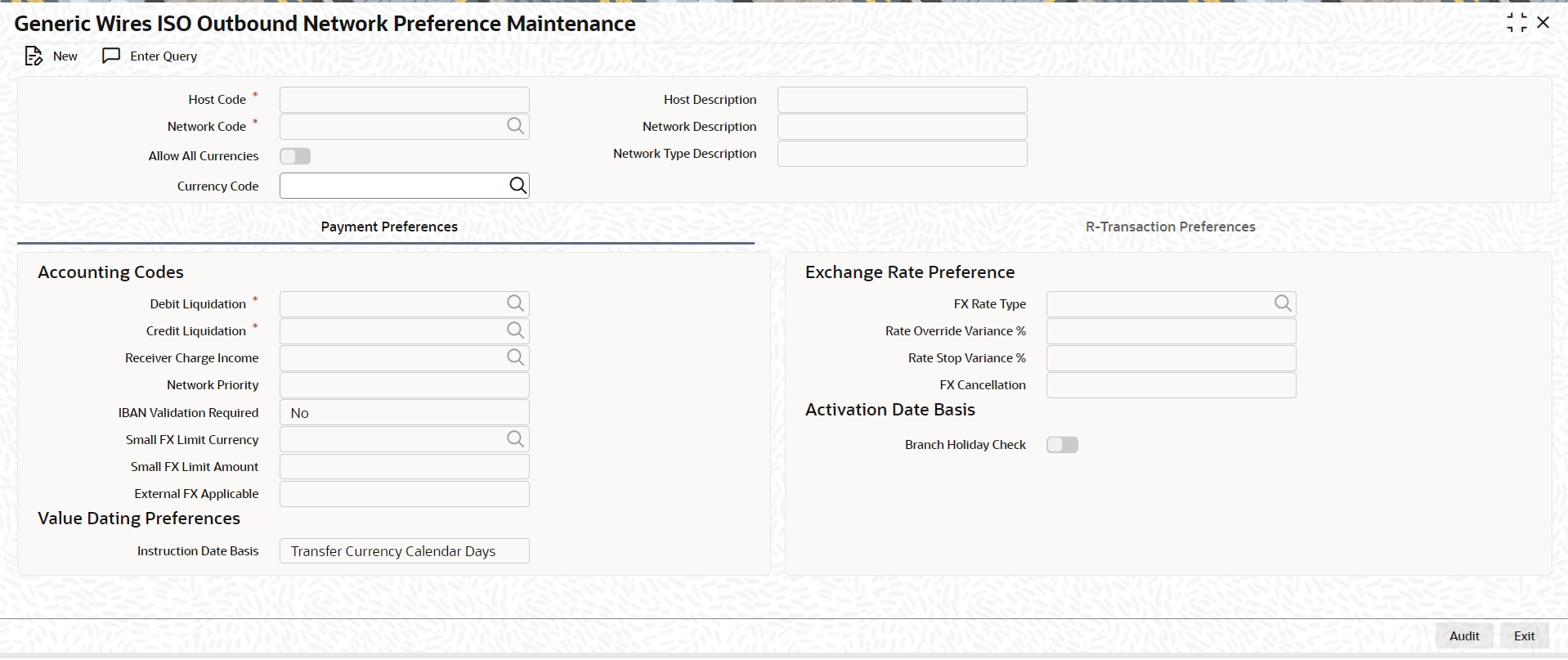
Click ‘New’ button on the Application toolbar.
Specify the following fields:
Host Code
System defaults the Host Code of transaction branch on clicking ‘New’ button.
Host Code Description
System defaults the description of the Host Code displayed.
Network Code
Specify the Network Code from the list of values. The list of values contains all the open/authorized ‘Cross border MX’ and EU-TARGET2 network codes defined in the host.
Network Description
System defaults the description of the selected network code.
Network Type Description
System defaults the network type description of the selected network.
Currency Code
Specify the currency code from the list of values. The list of values contains all the open/authorized currency codes maintained in Currency Definition (CYDCDEFE) screen.
Note
This field is disabled when ‘Allow All Currencies’ check box is selected.
3.2.1.1 Payment Preferences
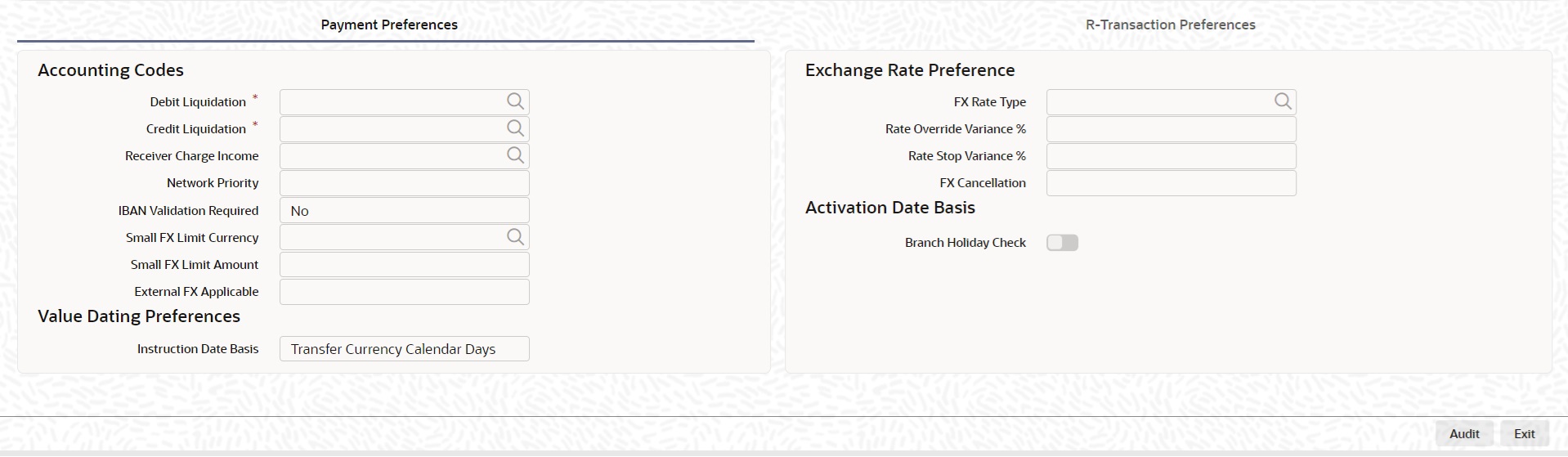
Accounting Codes
Debit Liquidation
Specify the template for Debit Liquidation from the list of available accounting templates. You can select the template from the option list. The list displays all Open/Authorized accounting code defined for the host in the Account Template Maintenance (PMDACCTL) where Main Dr/Cr indicator is 'Debit'.
Credit Liquidation
Specify the template for Credit Liquidation from the list of available accounting templates. You can select the template from the option list. The list displays all Open/Authorized accounting code defined for the host in the Account Template Maintenance (PMDACCTL) where Main Dr/Cr indicator is 'Credit'.
Network Priority
Select the list of values from 0 to 9 to set network priority for processing the requests to external system.
IBAN Validation Required
Select the list of values from available values ‘Yes’ and ‘No’. If you select value as ‘YES’ the IBAN validation is done based on other preferences like Country level ‘IBAN Validation Required’ flag value.
Small FX Limit Currency
Specify the currency code from the list of values. The list of values contains all the open/authorized currency codes maintained in Currency Definition (CYDCDEFE) screen.
Small FX Limit Amount
Specify the small FX limit amount. The system converts the transfer amount in Small FX limit currency and compare with this limit.
External FX Applicable
Select the list of values from available values ‘Yes’ and ‘No’. If you select value as ‘Yes’ Exchange Rate Request is sent to External FX system for obtaining exchange rate.
Exchange Rate Preference
FX Rate Type
Specify the FX Rate Type from the list of values. The list of values contains all the open/authorized currency rate types defined.
Rate Override Variance%
Specify the rate override variance. If you provide an exchange rate manually for a payment transaction and it exceeds the override limit specified, the system displays an overriding message.
Rate Stop Variance%
Specify the rate stop variance. In case the exchange rate specified exceeds the Stop limit specified, the system throws an error.
FX Cancellation
Select the list of values from ‘FX Unwind Queue’ and ‘Auto Interface’. If you select Auto Interface, the FX reversal request is sent to an external system automatically. If you select FX Unwind Queue, the transaction is inserted into FX unwind queue for the operator to manage a manual reversal of the FX contract.
Value Dating Preference
Instruction Date Basis
Select the Instruction Date Basis from the following:
l Transfer Currency Working Days
l Transfer Currency Calendar Days (Default)
Activation Date Basis
Branch Holiday Check
Check Branch Holiday Check, if applicable. Default value is Unchecked.
3.2.1.2 R-transaction Preferences
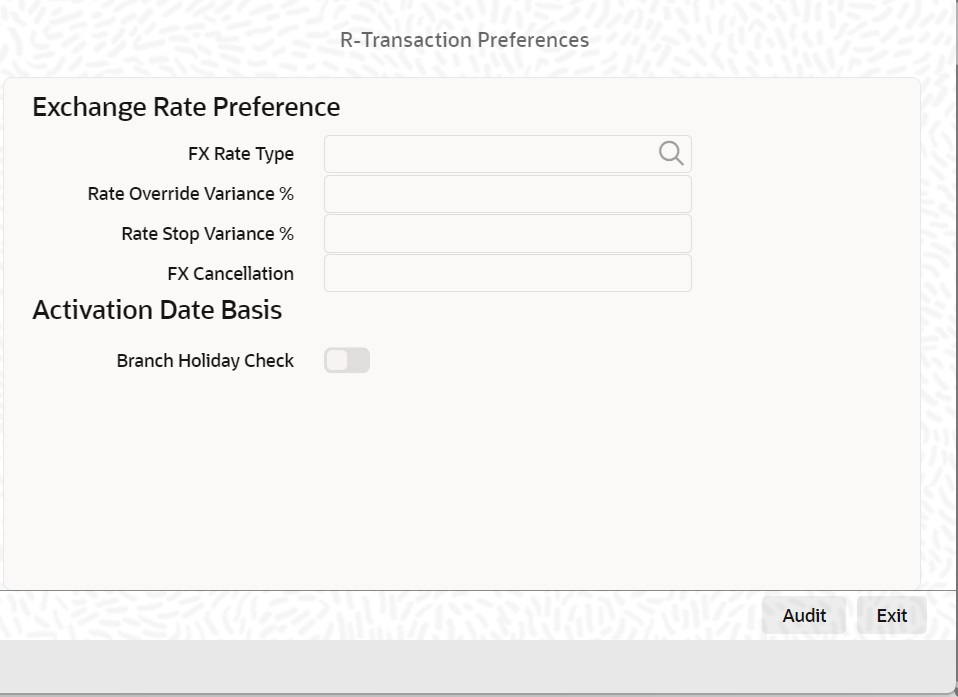
Re-Pickup FX Rate
Select the list of values from available values ‘Yes’ and ‘No’. You can select this value as 'Yes' if the FX rate must be re-picked for R-transactions which has an accounting / FX impact.
Return Days
Specify the return days. If the return days are maintained, the system validates whether the Return is received within the allowed days. If the maintenance is not available for Return days, the system skips the validation.
Return GL
Select the Return GL values from the list of available values. The list displays all Open/Authorized accounts defined for the host.
3.2.1.3 Generic Wires ISO Outbound Network Preference Summary
You can invoke “Generic Wires ISO Outbound Network Preference Summary” screen by typing ‘PSSOGWNP’ in the field at the top right corner of the Application tool bar and clicking on the adjoining arrow button.
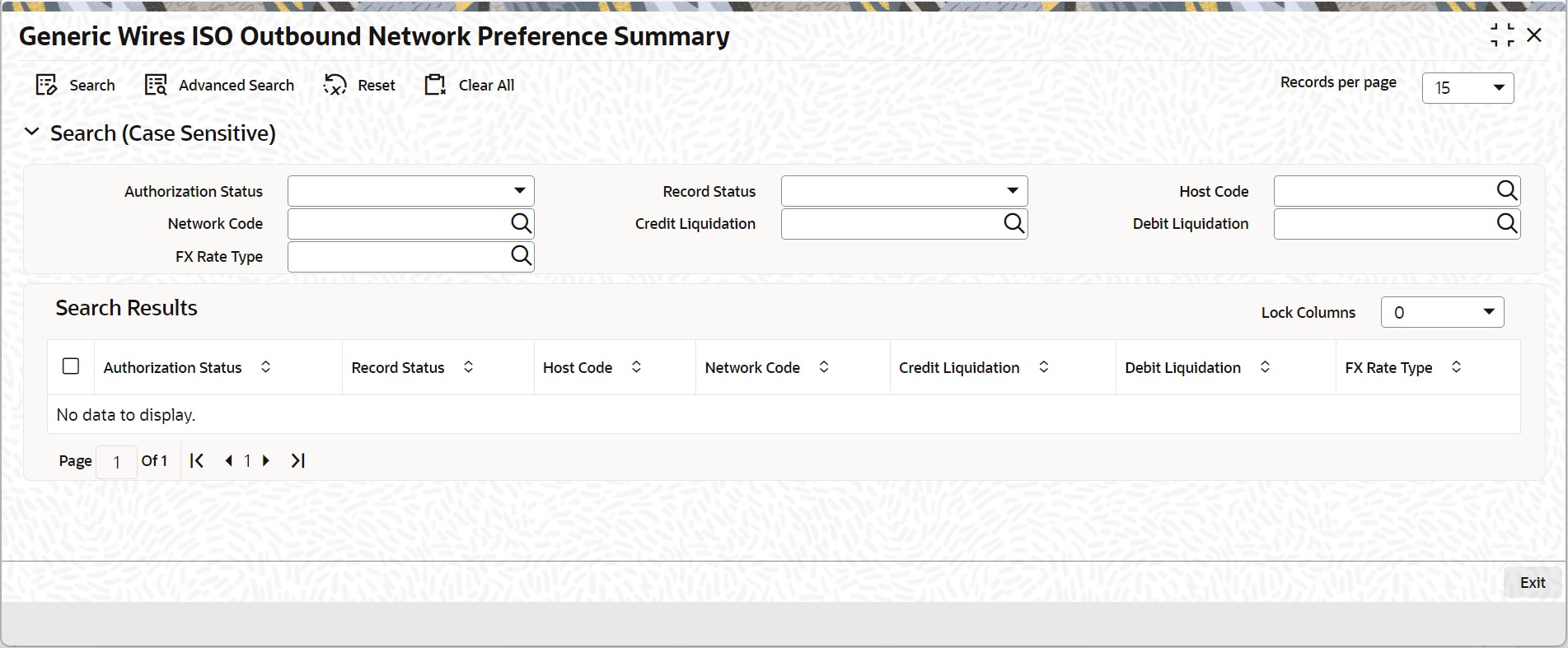
You can search using one or more of the following parameters:
l Authorization Status
l Record Status
l Host Code
l Network Code
l Credit Liquidation
l Debit Liquidation
Once you have specified the search parameters, click ‘Search’ button. The system displays the records that match the search criteria.
Double click a record or click the ‘Details’ button after selecting a record to view the detailed screen.
3.2.2 Generic Wires ISO Inbound Network Preference Maintenance
You can invoke “Generic Wires ISO Inbound Network Preference Maintenance” screen by typing the function ID ‘PSDIGWNP’ in the field at the top right corner of the Application tool bar and clicking on the adjoining arrow button.
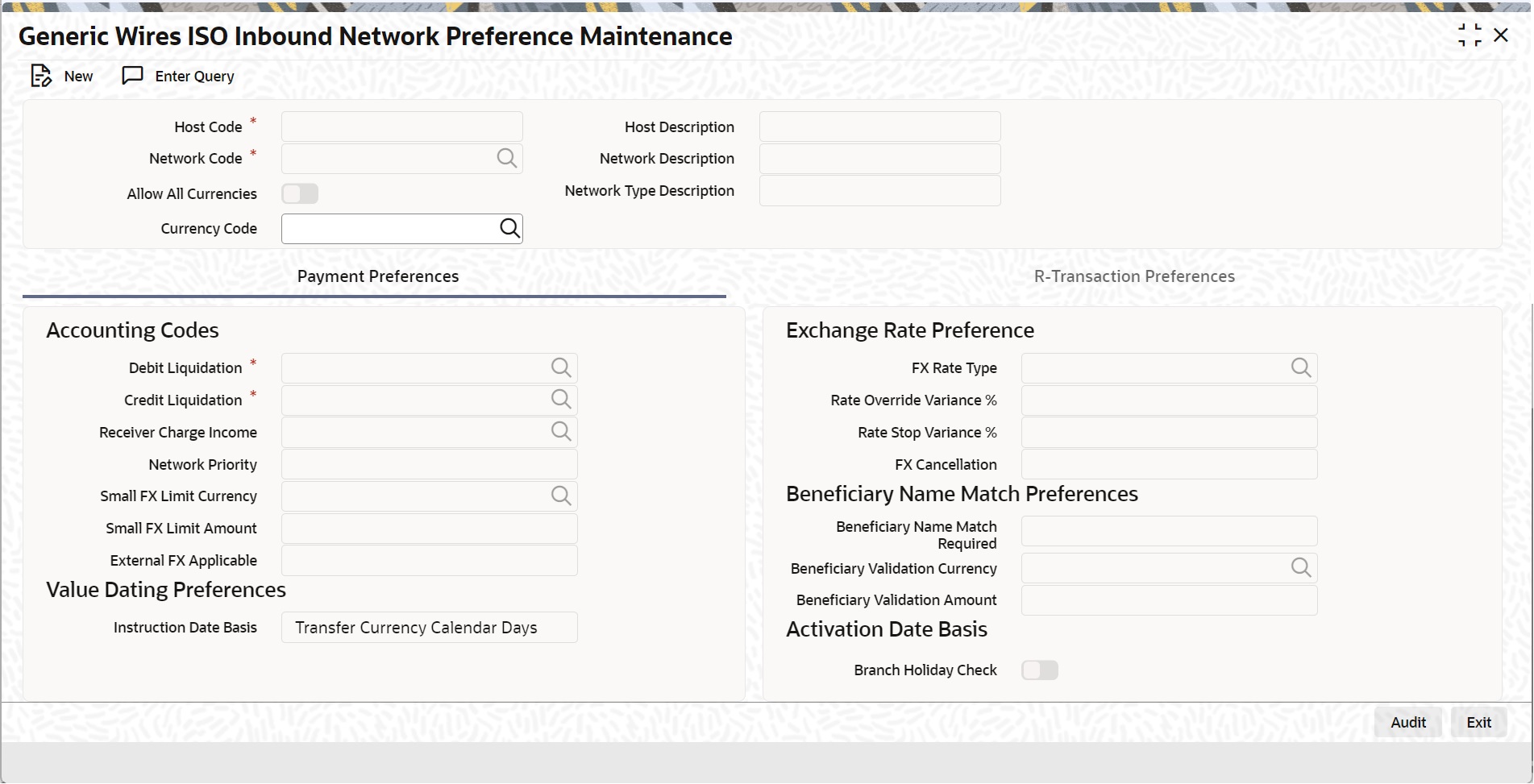
Click ‘New’ button on the Application toolbar.
Specify the following fields:
Host Code
The System defaults the Host Code of transaction branch on clicking ‘New’ button.
Host Code Description
System defaults the description of the Host Code displayed.
Network Code
Specify the Network Code from the list of values. The list of values contains all the open/ authorized 'Cross border MX' and EU-TARGET2 network codes defined in the host.
Network Description
System Defaults the description of the selected network code.
Network Type Description
System Defaults the network type description of the selected network.
Currency Code
Specify the currency code from the list of values. The list of values contains all the currency codes maintained in Currency Definition (CYDCDEFE) screen.
Note
This field is disabled when ‘Allow All Currencies’ check box is selected.
3.2.2.1 Payment Preferences
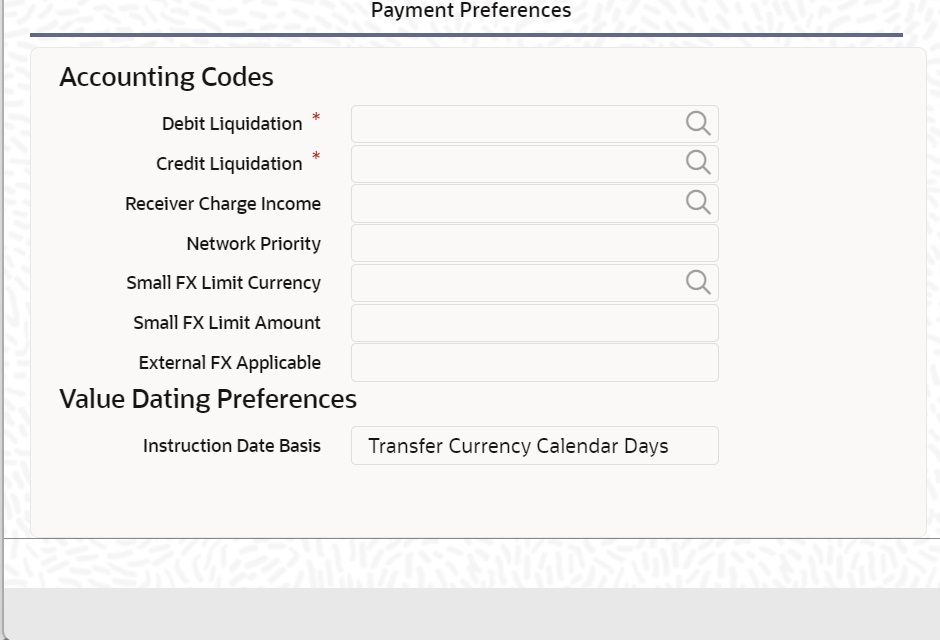
Accounting Codes
Debit Liquidation
Specify the template for Debit Liquidation from the list of available accounting templates. You can select the template from the option list. The list displays all Open/Authorized accounting code defined for the host in the Account Template Maintenance (PMDACCTL) where Main Dr/Cr indicator is 'Debit'.
Credit Liquidation
Specify the template for Credit Liquidation from the list of available accounting templates. You can select the template from the option list. The list displays all Open/Authorized accounting code defined for the host in the Account Template Maintenance (PMDACCTL) where Main Dr/Cr indicator is 'Credit'.
Receiver Charge Income
Select the list of values to display the Accounting Code maintained for Receiver Charge Income.
Network Priority
Select the list of values from 0 to 9 to set network priority for processing the requests to external systems.
Small FX Limit Currency
Select the list of values from all valid currency code.
Small FX Limit Amount
Specify the small FX limit amount. The system converts the transfer amount in Small FX limit currency and compare with this limit.
External FX Applicable
Select the list of values from available values ‘Yes’ and ‘No’. If you select value as ‘Yes’ Exchange Rate Request is sent to External FX system for obtaining exchange rate.
Exchange Rate Preference
FX Rate Type
Specify the FX Rate Type from the list of values. The list of values contains all the open/authorized currency rate types defined.
Rate Override Variance%
Specify the rate override variance. If you provide an exchange rate manually for a payment transaction and it exceeds the override limit specified, the system displays an overriding message.
Rate Stop Variance%
Specify the rate stop variance. In case the exchange rate specified exceeds the Stop limit specified, the system throws an error.
FX Cancellation
Select the list of values from ‘FX Unwind Queue’ and ‘Auto Interface’. If you select Auto Interface, the FX reversal request is sent to an external system automatically. If you select FX Unwind Queue, the transaction is inserted into FX unwind queue for the operator to manage a manual reversal of the FX contract.
Beneficiary Name Match Preferences
Beneficiary Name Match Required
Select the Beneficiary Name Match Preferences between Yes or No.
Beneficiary Validation Currency
Specify the Beneficiary Validation Currency from the list of values. This field lists all the open/authorized currency codes.
Beneficiary Validation Amount
Specify the Beneficiary Validation Amount. Amount must be greater than zero.
3.2.2.2 R-transaction Preferences
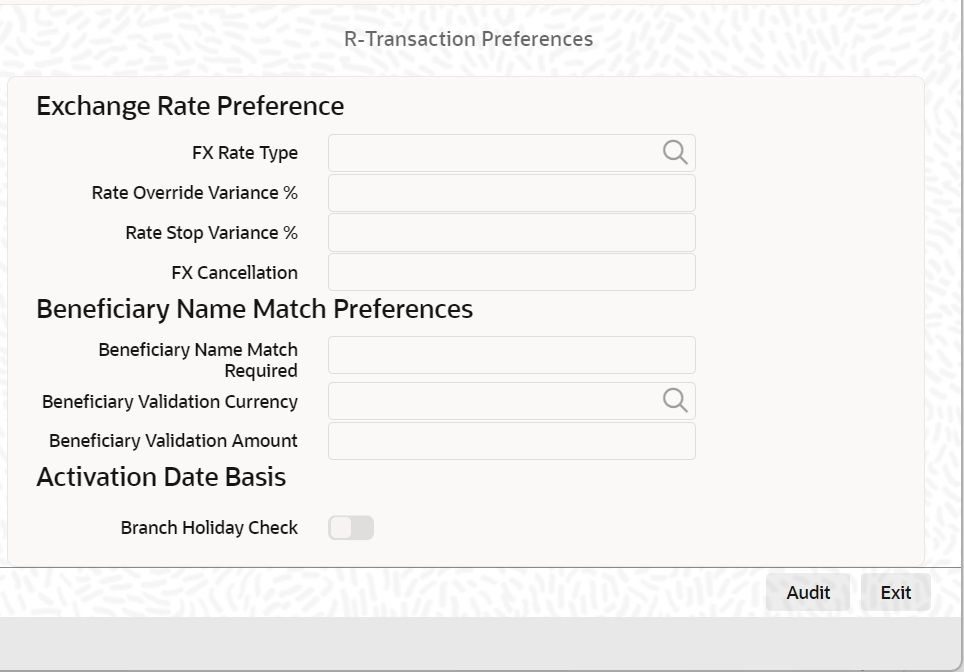
Re-Pickup FX Rate
Select the list of values from available values ‘Yes’ and ‘No’. You can select this value as 'Yes' if the FX rate has to be re-picked for R-transactions which has an accounting / FX impact.
Return Days
Specify the return days. If the return days are maintained, the system validates whether the Return is received within the allowed days. If the maintenance is not available for Return days, the system skips the validation.
Return GL
Select the Return GL values from the list of available values. The list displays all Open/Authorized accounts defined for the host in the External Chart Accounts (STDCRGLM) maintenance.
Recall Response Days
Specify the recall response days. If the recall response days are maintained, the system validates whether the recall response is received within the allowed days. If the maintenance is not available for recall response days, the system skips the validation.
3.2.2.3 Generic Wires ISO Inbound Network Preference Summary
You can invoke “Generic Wires ISO Inbound Network Preference Summary” screen by typing ‘PSSIGWNP’ in the field at the top right corner of the Application tool bar and clicking on the adjoining arrow button.
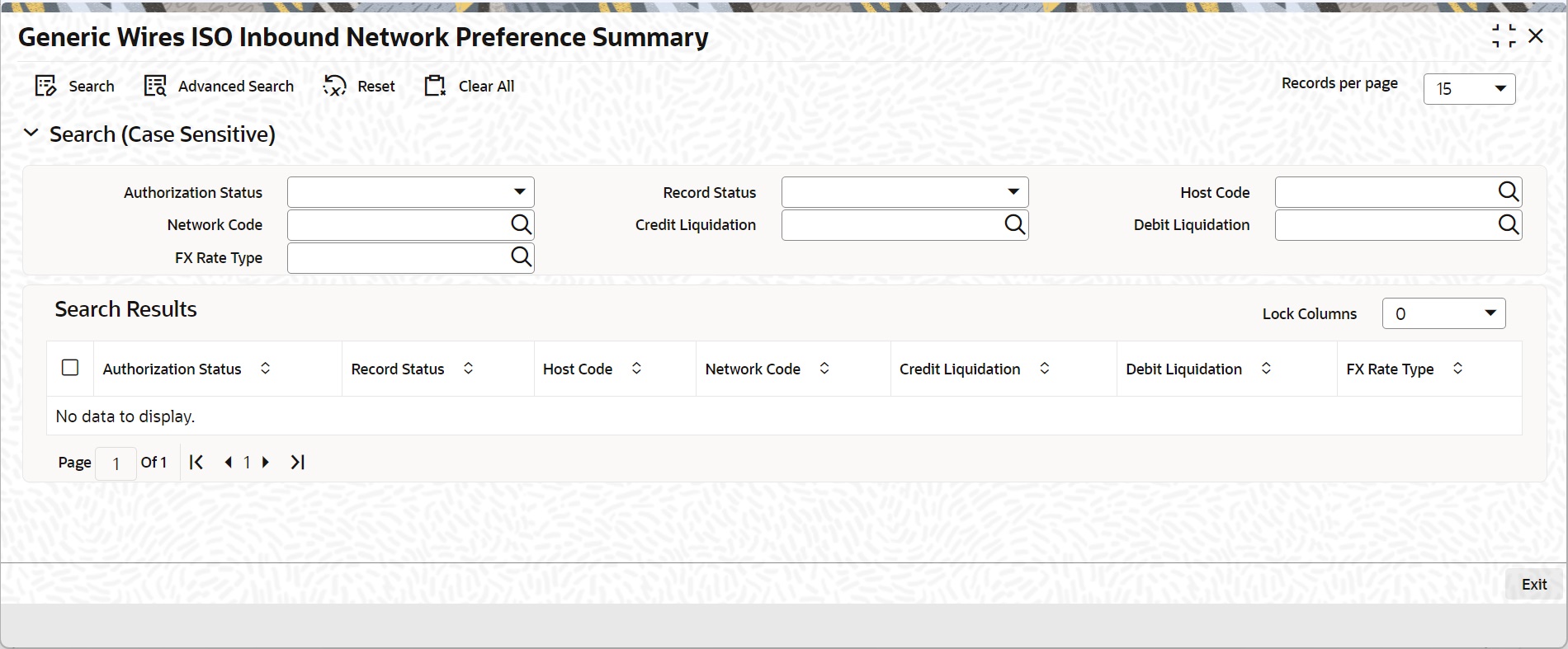
You can search using one or more of the following parameters:
l Authorization Status
l Record Status
l Host Code
l Network Code
l Credit Liquidation
l Debit Liquidation
Once you have specified the search parameters, click ‘Search’ button. The system displays the records that match the search criteria.
Double click a record or click the ‘Details’ button after selecting a record to view the detailed screen.
3.2.3 Generic RTGS Network Preference Maintenance
You can capture the RTGS network specific preferences in this screen.
You can invoke “Generic RTGS Network Preference Maintenance” screen by typing the function ID ‘ PSDGRTNP’ in the field at the top right corner of the Application tool bar and clicking on the adjoining arrow button. Click ‘New’ button on the Application toolbar.
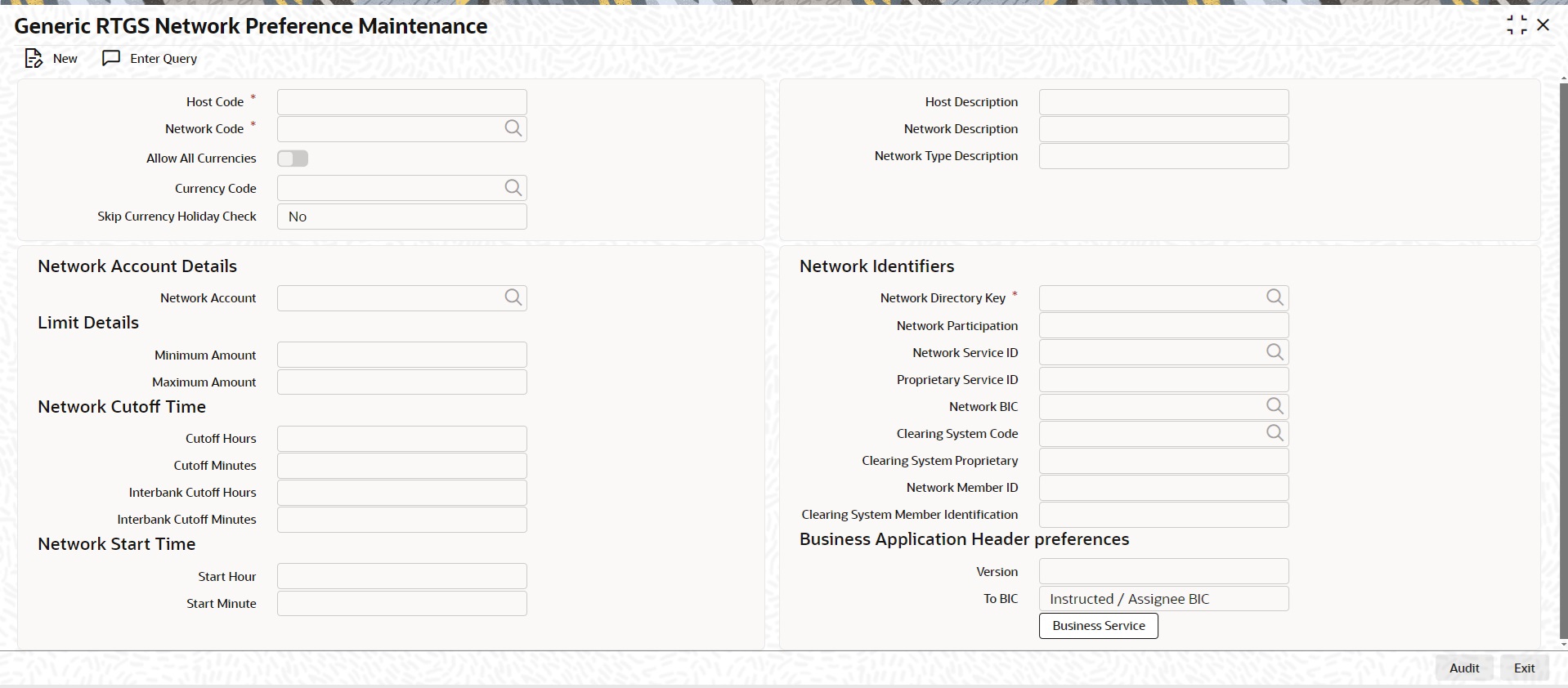
Specify the following fields:
Host Code
System defaults the Host Code of transaction branch on clicking ‘New’ button.
Host Code Description
System defaults the description of the Host Code displayed.
Network Code
Specify the Network Code from the list of values. It lists all open/authorized RTGS networks defined in the host.
Network Description
System defaults the description of the selected network code.
Network Type Description
System defaults the network type description of the selected network.
Currency Code
Specify the currency code from the list of values. The list of values contains all the currency codes maintained in the Generic Wires ISO Outbound Preferences maintenance.
Note
This field is disabled when ‘Allow All Currencies’ check box is selected.
Skip Currency Holiday Check
Select the Skip Currency Holiday Check between Yes or No.
Note
Current Holiday check will be skipped when this field is set as 'Yes' under following conditions:
l Not a cross currency transaction.
l External Exchange Rate is not opted at Network.
l External Exchange Rate is opted at Network. However, transfer amount is less than the Small FX Limit.
Network Account Details
Network Account
Select from the list of values for the network account. This list values contains all open/authorized Nostro accounts.
Limit Details
Minimum Amount
Specify the minimum transaction amount. The system validates the specified minimum transaction amount allowed against the minimum limit maintained.
Maximum Amount
Specify the maximum transaction amount. The system validates the specified maximum transaction amount allowed for transfer against the maximum limit maintained.
Network Cutoff Time
Cutoff Hours
Specify the transaction processing Cutoff Hours for pacs.008 transactions.
Cutoff Minute
Specify the transaction processing Cutoff Minute for pacs.008 transactions.
Interbank Cutoff Hours
Specify the transaction processing Cutoff Hours for pacs.009 transactions.
Interbank Cutoff Minute
Specify the transaction processing Cutoff Minute for pacs.009 transactions.
Network Identifiers
Network Directory Key
Select from the list of values for the Network Directory Key maintenance for a transaction. You can select the list of values from EURO1, TARGET2, or LVTS based on the type of RTGS Network maintained.
Network Participation
Select from the list of values for the Network Participation maintenance for a transaction. You can select the list of values from Direct or Indirect. This indicates whether bank is having a direct or indirect participation in the network
Network Service ID
Select from the list of values for the Network Service ID maintenance for a transaction. This field is not referred for TARGET 2 network.
Proprietary Service ID
Select from the list of values for the Proprietary Service ID maintenance for a transaction. This field is not referred for TARGET 2 network.
Network BIC
Select from the list of values for the Network BIC maintenance for a transaction. This field is not referred for TARGET 2 network.
Clearing System Code
Select from the list of values for the Clearing System Code maintenance for a transaction. This field is not referred for TARGET 2 network.
Clearing System Proprietary
Select from the list of values for the Clearing System Proprietary maintenance for a transaction. This field is not referred for TARGET 2 network.
Network Member ID
Select from the list of values for the Network Member ID maintenance for a transaction. This field is not referred for TARGET 2 network.
Clearing System Member Identification
Specify the value in Clearing System Member Identification. The Member Identification sent over Swift for validating against System User Reference.
Note
The value provided by the user in the Member Identification field is populated in the Member Identification field of the Business Application Header when generating Target2 ISO messages.
Network Start Time
Start Hour
Specify the Start Hour. The possible values are between 0 to 23.
Note
If the value entered in the field Start Hour is greater than 23, the system displays an error message “The Value Entered is Greater Than the Maximum Value 23”.
Start Minute
Specify the Start Minute The possible values are between 0 to 59.
Note
If the value entered in the field Start Minute is greater than 59, the system displays an error message “The Value Entered is Greater Than the Maximum Value 59”.
Business Application Header Preferences
Version
Select the Version from the list of values as follows:
l head.001.001.01
l head.001.001.02
l head.001.001.03
Default value set is head.001.001.01.
To BIC
Select the Version from the list of values as follows:
l Network BIC
l Instructed / Assignee BIC
Default value set is Instructed / Assignee BIC.
Business Service
Click this button to launch screen if Version is selected as 'head.001.001.02'.
3.2.3.1 Generic RTGS Network Preference Summary
You can invoke “Generic RTGS Network Preference Summary” screen by typing ‘PSSGRTNP’ in the field at the top right corner of the Application tool bar and clicking on the adjoining arrow button.
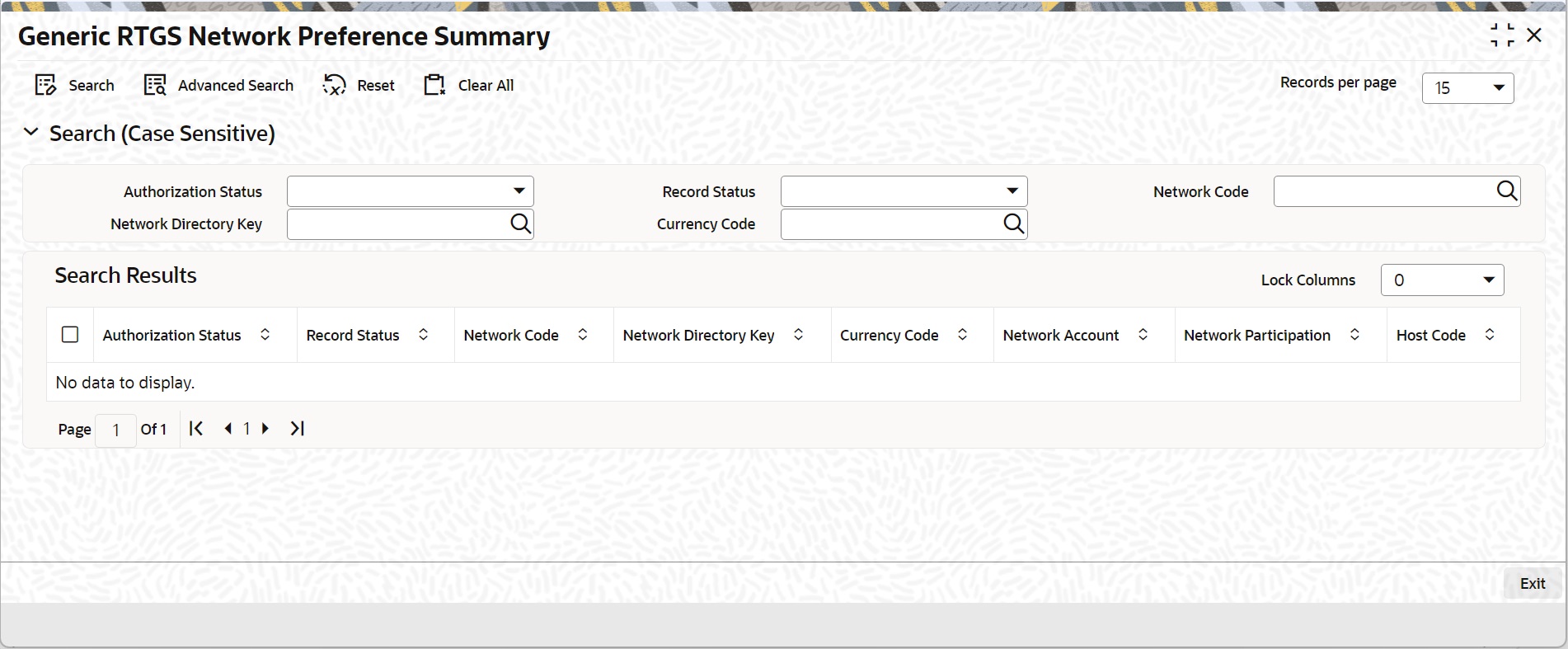
You can search using one or more of the following parameters:
l Authorization Status
l Record Status
l Network Code
l Network Directory Key
l Currency Code
Once you have specified the search parameters, click ‘Search’ button. The system displays the records that match the search criteria.
Double click a record or click the ‘Details’ button after selecting a record to view the detailed screen.
3.2.4 Generic RTGS Outbound Network Preference
You can capture the Pricing Code preferences for the Generic RTGS Outbound transactions.
You can invoke “Generic RTGS Outbound Network Preference” screen by typing the function ID ‘PSDGRTON’ in the field at the top right corner of the Application tool bar and clicking on the adjoining arrow button. Click ‘New’ button on the Application toolbar.
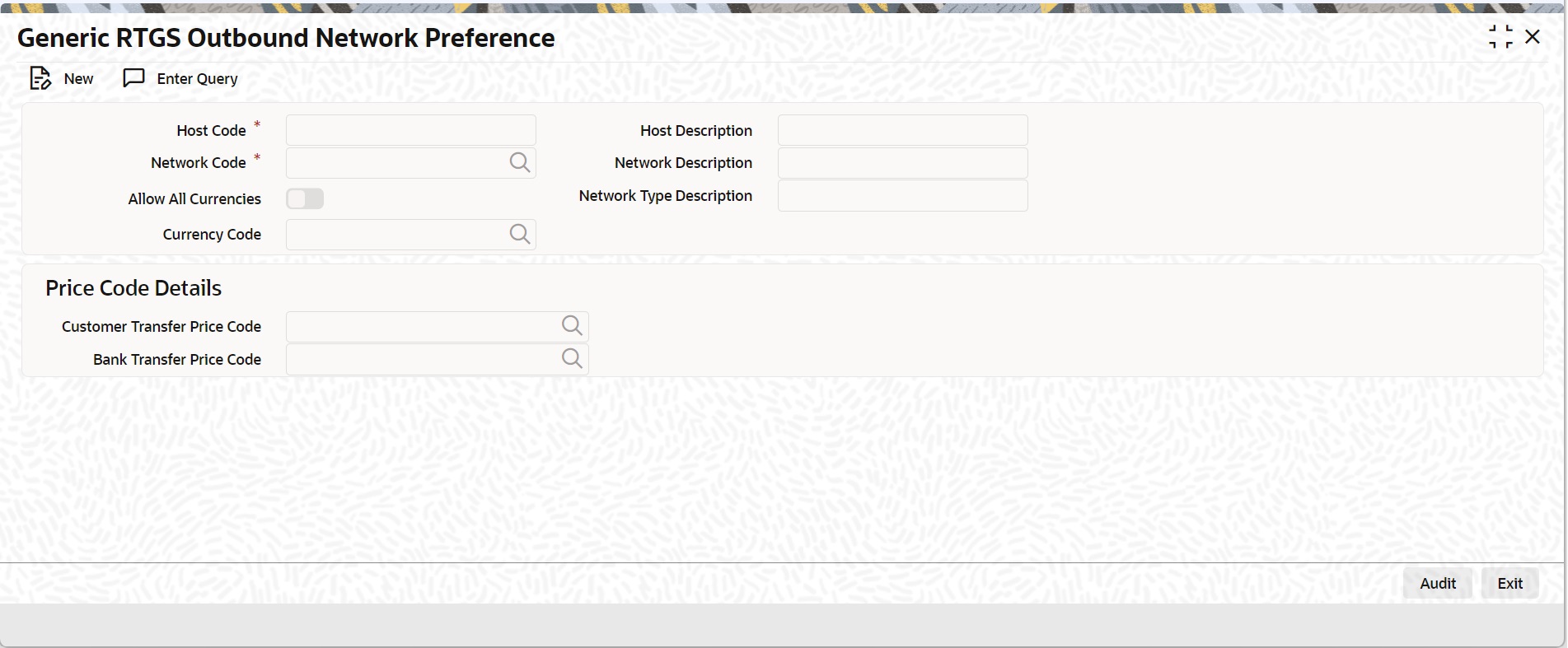
Specify the following fields:
Host Code
System defaults the Host Code of transaction branch on clicking ‘New’ button.
Host Description
System defaults the description of the Host Code displayed.
Network Code
Specify the Network Code from the list of values. It lists all open/authorized TARGET 2 network codes defined in the host.
Network Description
System defaults the description of the selected network code.
Network Type Description
System defaults the network type description of the selected network.
Allow All Currencies
Defaults this value from the Generic RTGS network preference .
Currency Code
Defaults the currency code value from the Generic RTGS network preference
Price Code Details
Customer Transfer Price Code
Specify the Customer Transfer Price Code from the list of values. It lists all the open/authorized pricing codes defined in the host.
Bank Transfer Price Code
Select Bank Transfer Price Code from the list of values. It lists all the valid open/authorized pricing codes defined in the host.
3.2.4.1 Generic RTGS Outbound Network Preference Summary
You can invoke “Generic RTGS Outbound Network Preference Summary” screen by typing ‘PSDGRTON’ in the field at the top right corner of the Application tool bar and clicking on the adjoining arrow button.
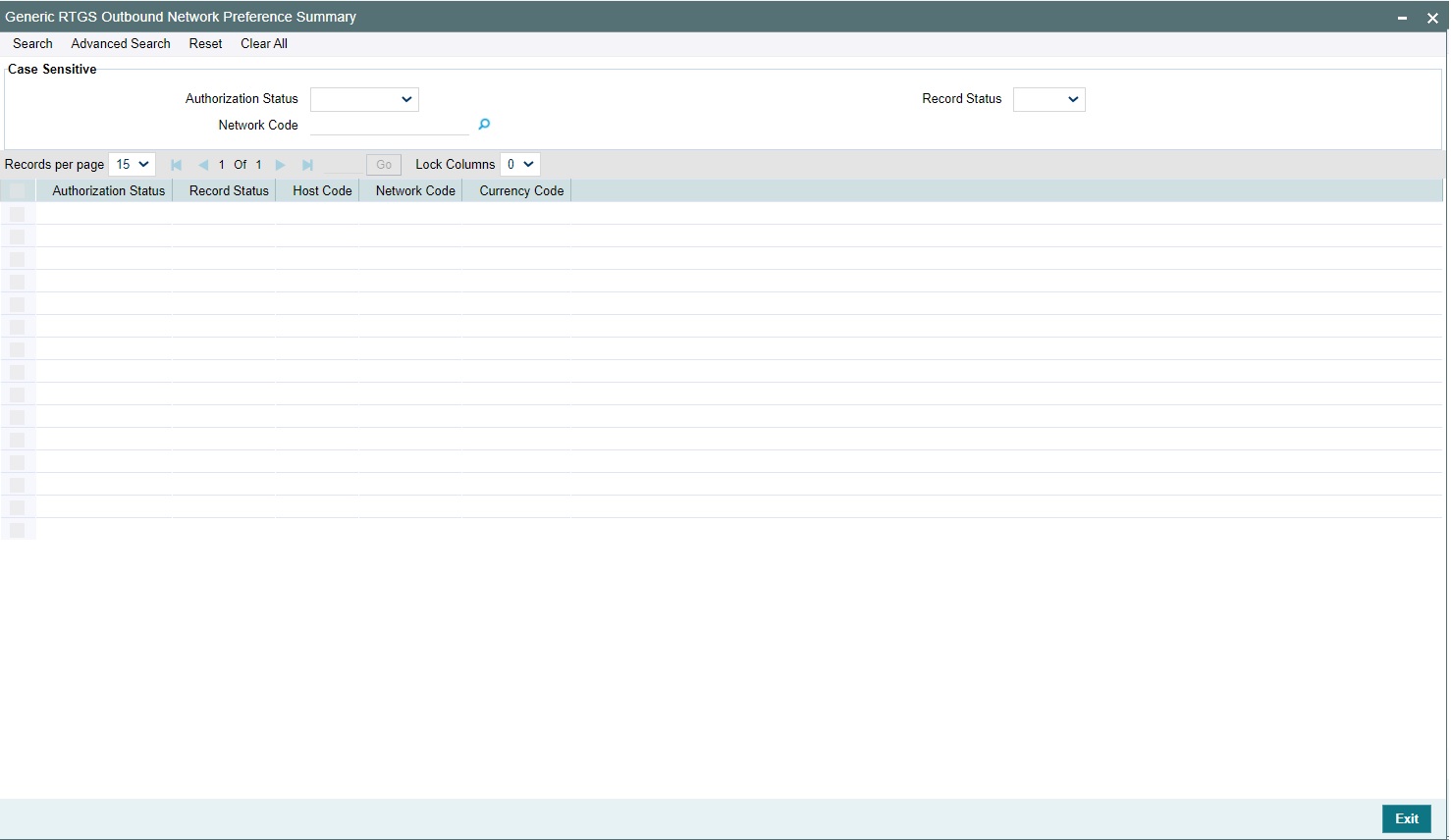
You can search using one or more of the following parameters:
l Authorization Status
l Record Status
l Network Code
Once you have specified the search parameters, click ‘Search’ button. The system displays the records that match the search criteria.
Double click a record or click the ‘Details’ button after selecting a record to view the detailed screen.
3.2.5 Generic RTGS Inbound Network Preference
You can capture the Pricing Code preferences for the Generic RTGS Inbound transactions.
You can invoke “Generic RTGS Inbound Network Preference” screen by typing the function ID ‘PSDGRTIN’ in the field at the top right corner of the Application tool bar and clicking on the adjoining arrow button. Click ‘New’ button on the Application toolbar.
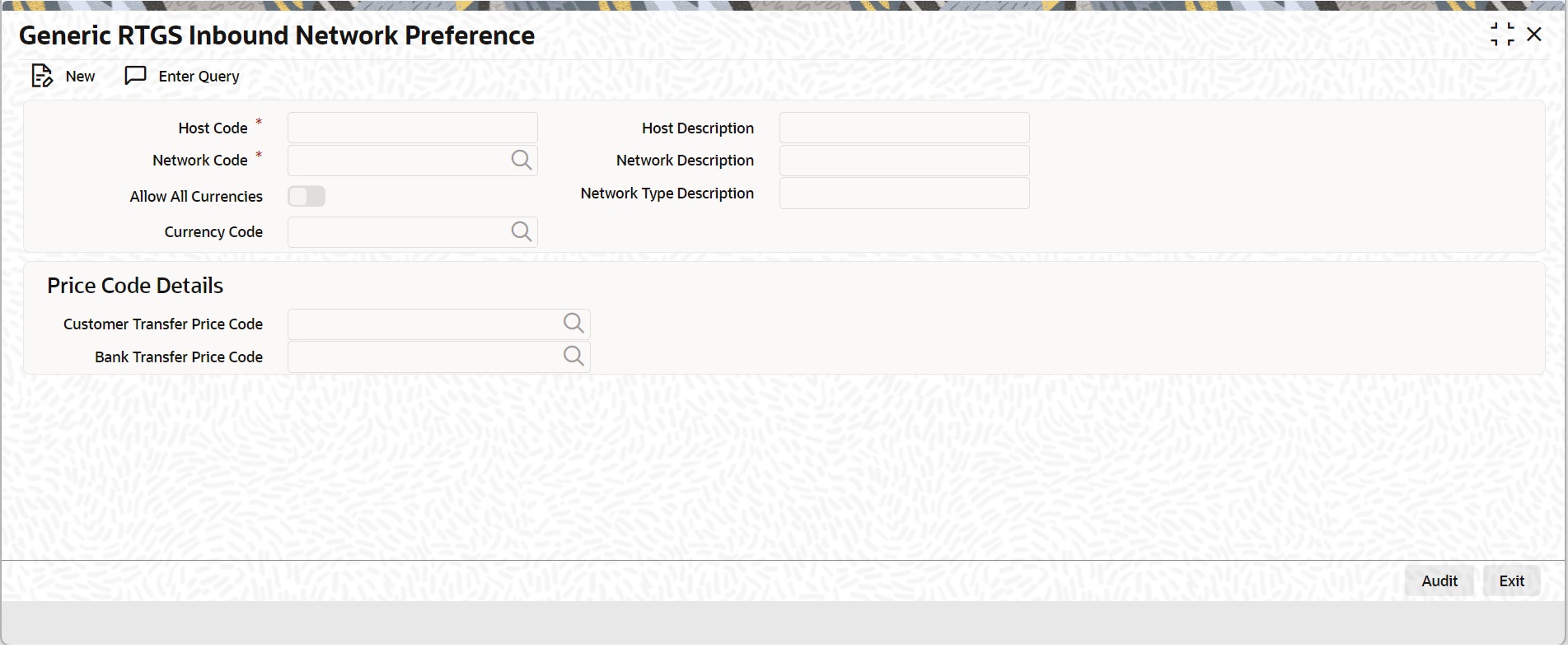
Specify the following fields:
Host Code
System defaults the Host Code of transaction branch on clicking ‘New’ button.
Host Description
System defaults the description of the Host Code displayed.
Network Code
Specify the Network Code from the list of values. It lists all the open/authorized TARGET 2 networks defined in the host.
Network Description
System defaults the description of the selected network code.
Network Type Description
System defaults the network type description of the selected network.
Allow All Currencies
Defaults this value from the Generic RTGS network preference.
Currency Code
Defaults the currency code value from the Generic RTGS network preference
Price Code Details
Customer Transfer Price Code
Specify the Customer Transfer Price Code from the list of values. It lists all the open/authorized pricing codes defined in the host.
Bank Transfer Price Code
Select Bank Transfer Price Code from the list of values. It lists all the open/authorized pricing codes defined in the host.
3.2.5.1 Generic RTGS Inbound Network Preference Summary
You can invoke “Generic RTGS Inbound Network Preference Summary” screen by typing ‘PSDGRTIN’ in the field at the top right corner of the Application tool bar and clicking on the adjoining arrow button.
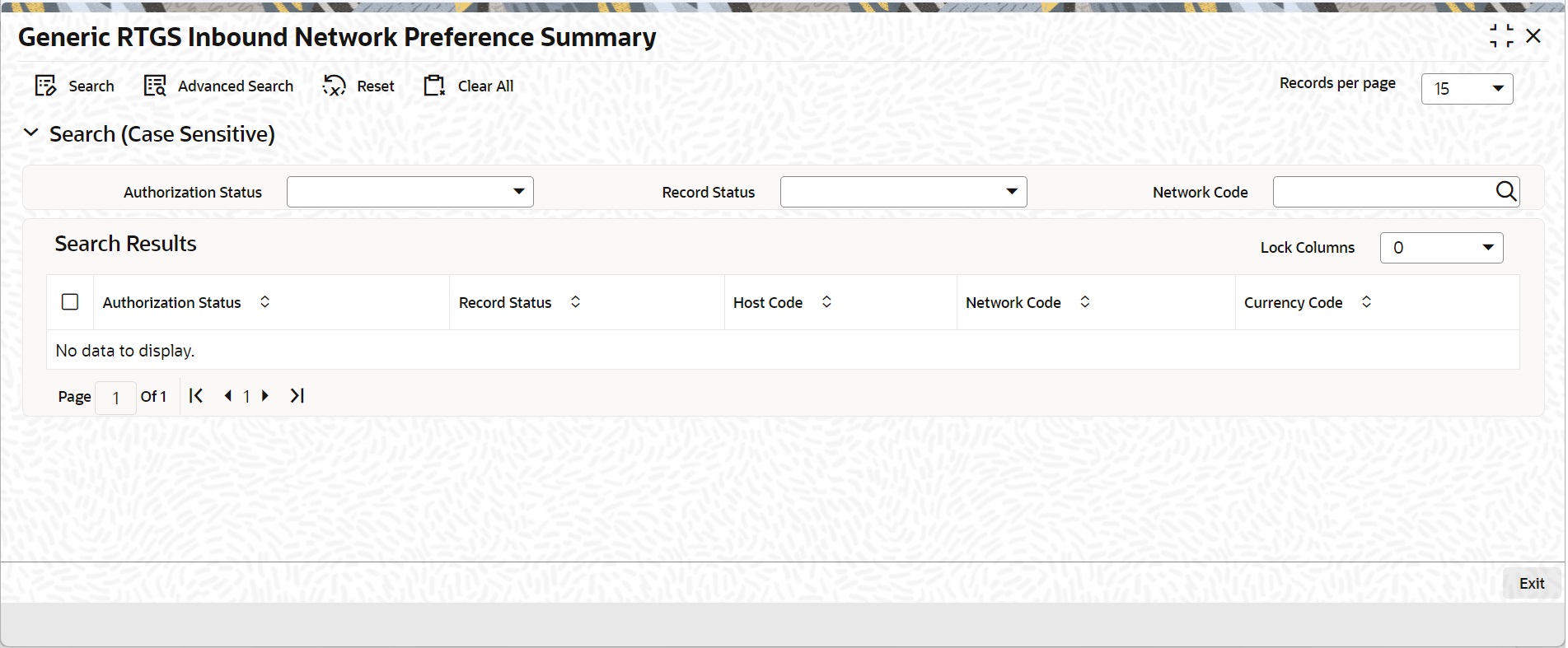
You can search using one or more of the following parameters:
l Authorization Status
l Record Status
l Network Code
Once you have specified the search parameters, click ‘Search’ button. The system displays the records that match the search criteria.
Double click a record or click the ‘Details’ button after selecting a record to view the detailed screen.
3.2.6 Network to Media Control System Maintenance
This maintenance can be used to provide link Media Control system to RTGS MX Networks.
You can invoke ‘Network to Media Control System Maintenance’ screen by typing ‘PMDNWMCS’ in the field at the top right corner of the Application tool bar and clicking on the adjoining arrow button. Click ‘New’ button on the Application toolbar.
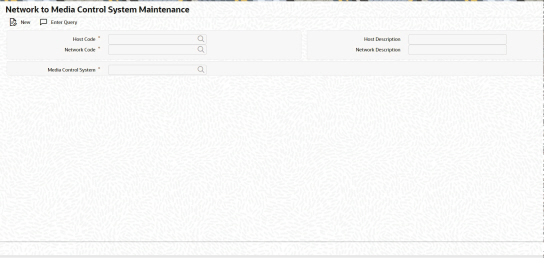
You can specify the following:
Host Code
System defaults the Host Code of transaction branch on clicking ‘New’.
Host Description
This field displays the description of Host Code selected.
Network Code
Specify the Network Code from the list of values. All valid (Open/Authorized) RTGS Network codes - Network Type Code 'EU-TGT' are listed.
Network Description
This field displays the description of Network Code selected.
Media Control System
Specify the Media Control System from the list of values. Valid Media Control systems (Open / Authorized) with media as 'RTGSMX' are listed.
3.2.6.1 Network to Media Control System Maintenance Summary
You can invoke ‘Network to Media Control System Maintenance Summary’ screen by typing ‘PMSNWMCS’ in the field at the top right corner of the Application tool bar and clicking on the adjoining arrow button. Click ‘Search’ button on the Application toolbar.
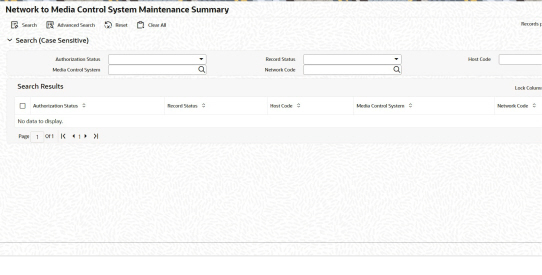
You can search using one or more of the following parameters:
l Authorization Status
l Record Status
l Host Code
l Media Control System
l Network Code
Once you have specified the search parameters, click ‘Search’ button. The system displays the records that match the search criteria.
3.2.7 Generic RTGS XML Schema Preference
This maintenance can be used to provide the schema details for a message type and Media Control system. It is assumed that the schema definition of all messages received in a MCS for a particular message type is same.
You can invoke ‘Generic RTGS XML Schema Preference’ screen by typing ‘PSDGRXSP’ in the field at the top right corner of the Application tool bar and clicking on the adjoining arrow button. Click ‘New’ button on the Application toolbar.
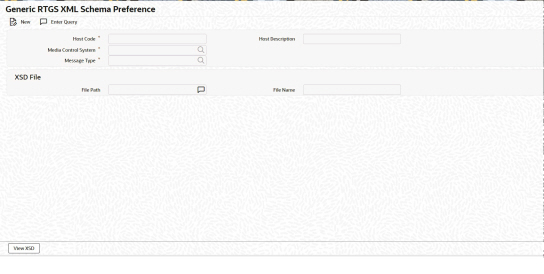
You can specify the following:
Host Code
System defaults the Host Code of transaction branch on clicking ‘New’.
Host Description
This field displays the description of Host Code selected.
Media Control System
Specify the Media Control System from the list of values. Valid Media Control systems (Open / Authorized) with media as 'RTGSMX' are listed.
Message Type
Specify the Message Type from the list of values.
Following is the ISO Message Types applicable for RTGS ISO networks:
l HEAD.001
l PACS.008
l PACS.009
l PACS.009 COVER
l PACS.004
l PACS.002
l CAMT.056
l CAMT.029
l CAMT.050
l CAMT.003
l CAMT.004
l ADMI.002
l ADMI.005
l ADMI.007
XSD File
File Path
Specify the File Path.
File Name
Specify the File Name.
3.2.7.1 View XSD
Click on View XSD button to display “View XSD Details” sub screen.
.
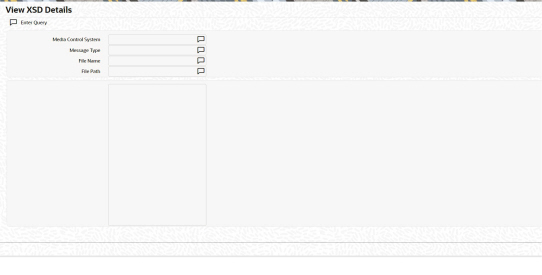
XSD is picked up from this sub screen to validate against the XSD for the incoming RTGS ISO messages.
3.2.7.2 Generic RTGS XML Schema Preference Summary
You can invoke ‘Generic RTGS XML Schema Preference Summary’ screen by typing ‘PSSGRXSP’ in the field at the top right corner of the Application tool bar and clicking on the adjoining arrow button. Click ‘Search’ button on the Application toolbar.
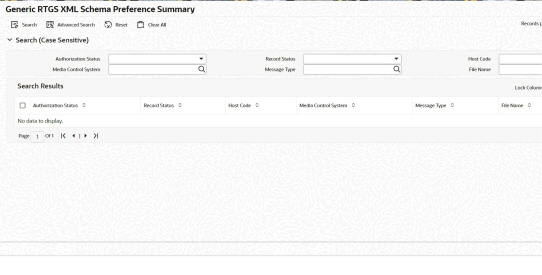
You can search using one or more of the following parameters:
l Authorization Status
l Record Status
l Host Code
l Media Control System
l Message Type
l File Name
Once you have specified the search parameters, click ‘Search’ button. The system displays the records that match the search criteria.
3.2.8 Cross Border Outbound Transaction Status Static Preferences Detailed
You can maintain the Transaction Status Code and Processing status mapping through this screen
You can invoke “Cross Border Outbound Transaction Status Static Preferences Detailed” screen by typing the function ID ‘ PSDRJTST’ in the field at the top right corner of the Application tool bar and clicking on the adjoining arrow button.
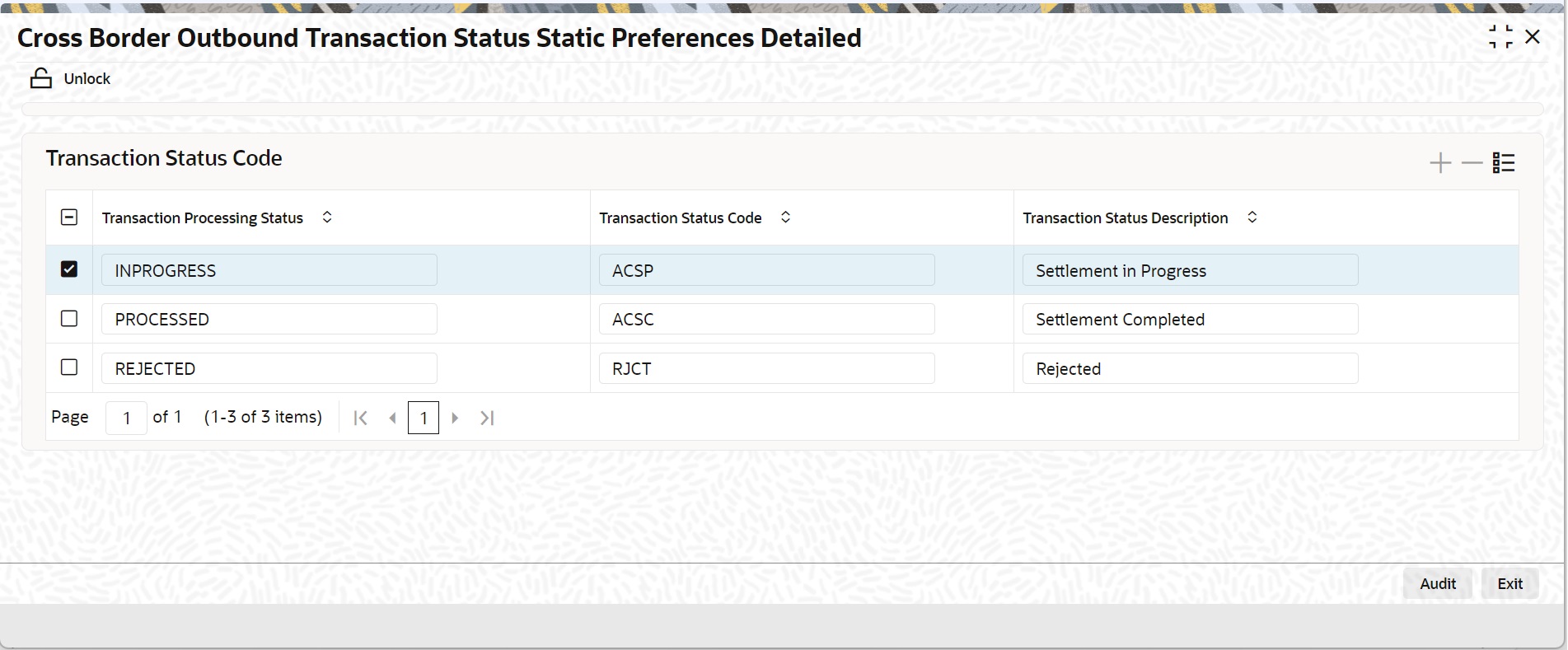
User are allowed to change the value in 'Transaction Status Code' field. The Transaction Status Code table is shown below:
|
Transaction Processing Status |
Transaction Status Code |
Transaction Status Description |
|
INPROGRESS |
ACSP |
Settlement in Progress |
|
PROCESSED |
ACSC |
Settlement Completed |
|
REJECTED |
RJCT |
Rejected |
3.2.9 Generic Wires ISO Reason Code Mapping
You can capture the reject reason code and return code that can be populated in reject/return payments when auto cancellation is triggered due to reject responses from external systems.
You can invoke “Generic Wires ISO Reason Code Mapping” screen by typing the function ID ‘PSDRJTRM’ in the field at the top right corner of the Application tool bar and clicking on the adjoining arrow button. Click ‘New’ button on the Application toolbar.
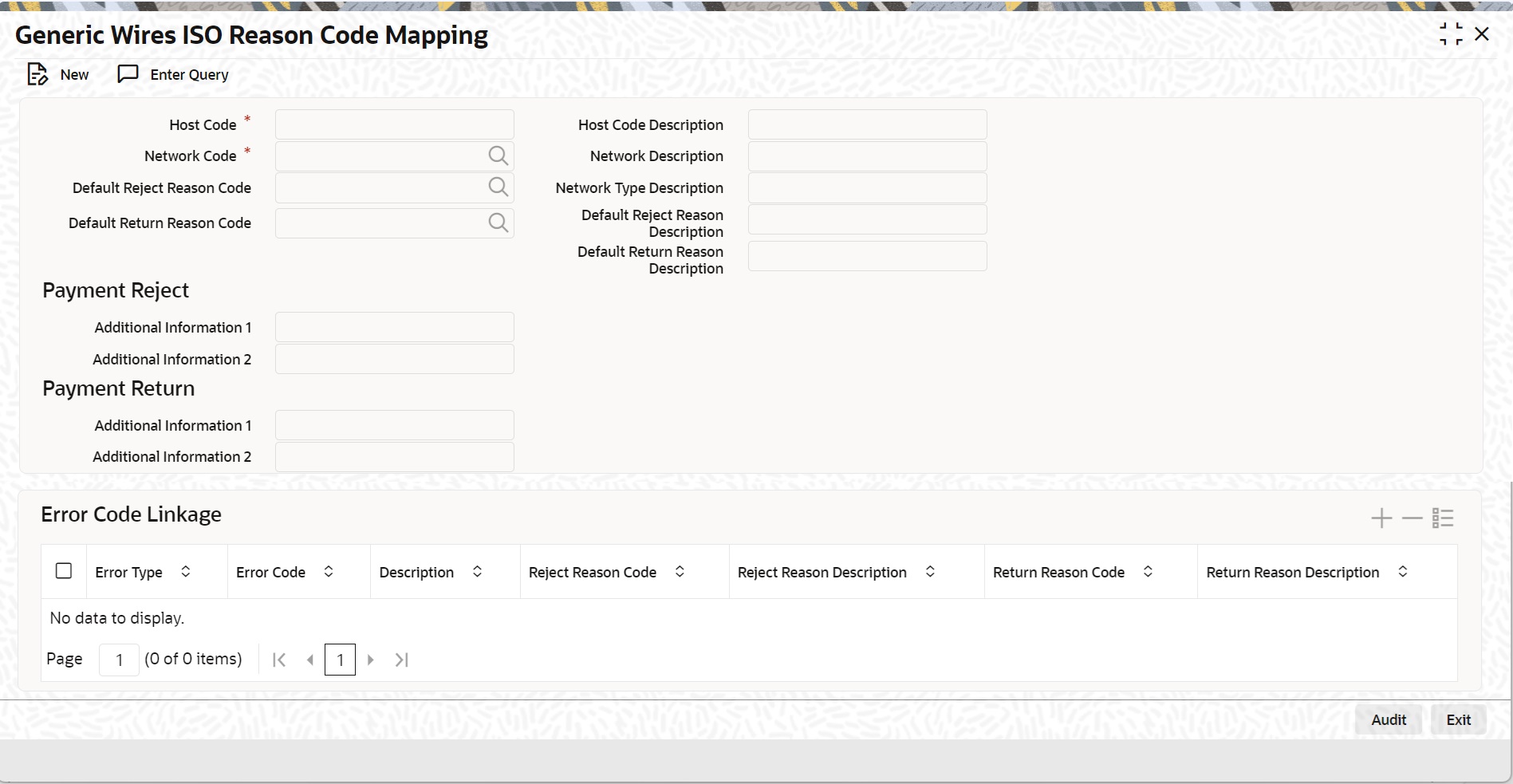
Specify the following fields:
Host Code
System defaults the Host Code of transaction branch on clicking ‘New’.
Host Code Description
System defaults the description of the selected Network.
Network Code
Select from the list of values for Network Code. The list of values contains the Open/Authorized network codes of 'Cross-border MX'.
Network Description
System defaults the Network Description of the selected Network.
Network Type Description
System defaults the Description of the selected Network Type.
Default Reject Reason Code
Select from the list of values the reason for returning of transaction. This field list the Reject Reason Codes applicable for pacs.002 message.
Default Reject Reason Description
System defaults the description of the selected Reject Reason Code.
Default Return Reason Code
Select from the list of values the reason for returning of transaction. This field list the Return Codes applicable for pacs.004 message.
Default Return Reason Description
System defaults the description of the selected Return Reason Code.
Payment Reject
Additional Information 1
Specify the Additional information related to the Return reason.
Additional Information 2
Specify the Additional information related to the Return reason.
Payment Return
Additional Information 1
Specify the Additional information related to the Return reason.
Additional Information 2
Specify the Additional information related to the Return reason.
Error Code Linkage
Error Type
Display the value of External Errors.
Error Code
Select from the list of values for Error Code. It contains the list of all open/authorized Error codes defined in the 'User Defined Error Codes' maintenance (PMDERRCD) for the host code.
Description
Display the Description of the selected Error Code.
Note
The error code value received from the external systems like Sanctions, EAC is maintained in the User Defined Error Codes maintenance (PMDERRCD).
Reject Reason Code
Select from the list of values for Reject Reason Code.
Reject Reason Description
Display the Description of the selected Reject Reason Code.
Return Reason Code
Select from the list of values for Return Reason Code.
Return Reason Description
Display the Description of the selected Return Reason Code.
3.2.10 Bilateral Agreement for Cash Messages
You can capture the message format preference for the debit/credit confirmations.
You can invoke “Bilateral Agreement for Cash Messages” screen by typing the function ID ‘PMDCMAGT’ in the field at the top right corner of the Application tool bar and clicking on the adjoining arrow button.
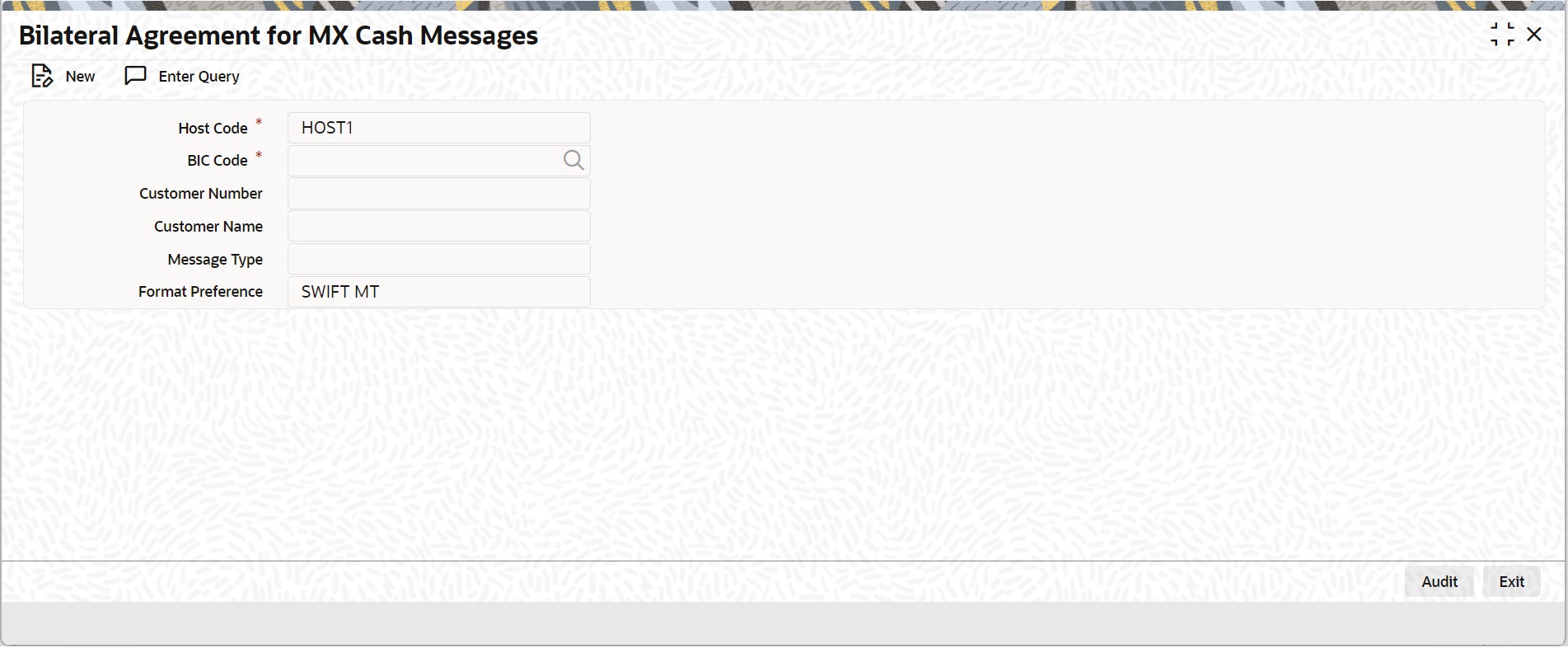
Click ‘New’ button on the Application toolbar.
Specify the following fields:
Host Code
System defaults the Host Code of transaction branch on clicking ‘New’.
BIC Code
Specify the BIC from the list of values. The list of values contains open/authorized BICs defined in the BIC Code Customer (ISDBICPB) maintenance.
Customer Number
System defaults the Customer Number attached to the BIC from BIC Code Customer (ISDBICPB) maintenance.
Customer Name
System defaults the Customer Name attached to the BIC from BIC Code Customer (ISDBICPB) maintenance.
Message Type
Select from the list of values for Message Type. The available values are “Debit Advice” and “Credit Advice”.
Format Preference
Select from the list of values for Format Preference. The available values are “SWIFT MT” and “SWIFT CBPRPlus”.
3.2.11 Generic Wires ISO Inbound Messages Booking Branch Derivation
You can capture the Booking branch preferences for Incoming SWIFT CBPRPlus / RTGS ISO messages in this screen.
You can invoke “Generic Wires ISO Inbound Messages Booking Branch Derivation Detailed” screen by typing the function ID ‘PSDIBRDV’ in the field at the top right corner of the Application tool bar and clicking on the adjoining arrow button.
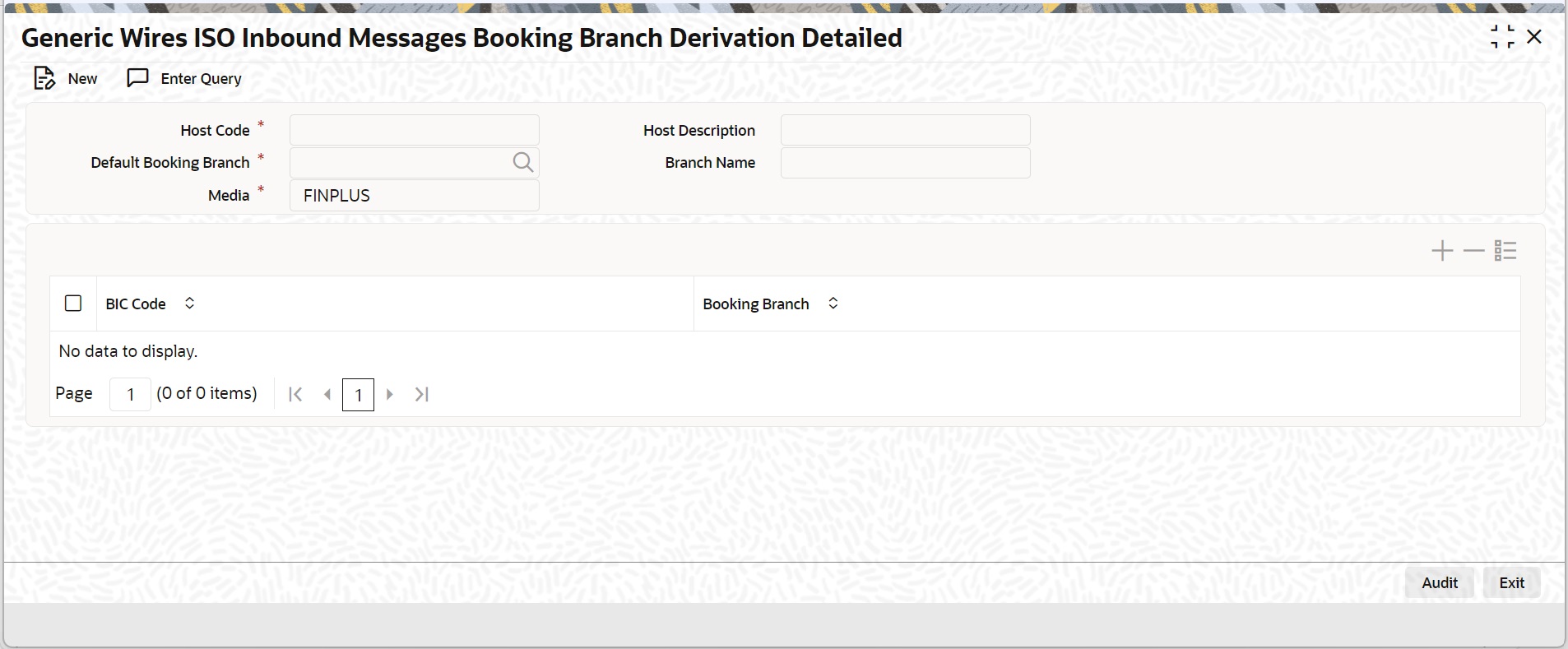
Specify the following fields:
Host Code
System defaults the Host Code of the user’s logged in branch.
Host Description
System defaults the Host Description on Host Code selected.
Default Booking Branch
Specify the Default Booking Branch from the list of values. The list of values contains all the open/authorized branches of the host code.
Branch Name
System defaults the Branch Name of the selected Branch.
Media
Select the Media from the following:
l FINPLUS
l RTGSMX
BIC
Specify the BIC from the list of values. The list of values contains all the BICs code attached to all branches in the host code.
Booking Branch
Specify the Booking Branch from the list of values. The list of values contains all the open/closed branches of the host code.
3.2.11.1 Generic Wires ISO Inbound Messages Booking Branch Derivation Summary
You can invoke “Generic Wires ISO Inbound Messages Booking Branch Derivation Summary” screen by typing ‘PSSIBRDV’ in the field at the top right corner of the Application tool bar and clicking on the adjoining arrow button.
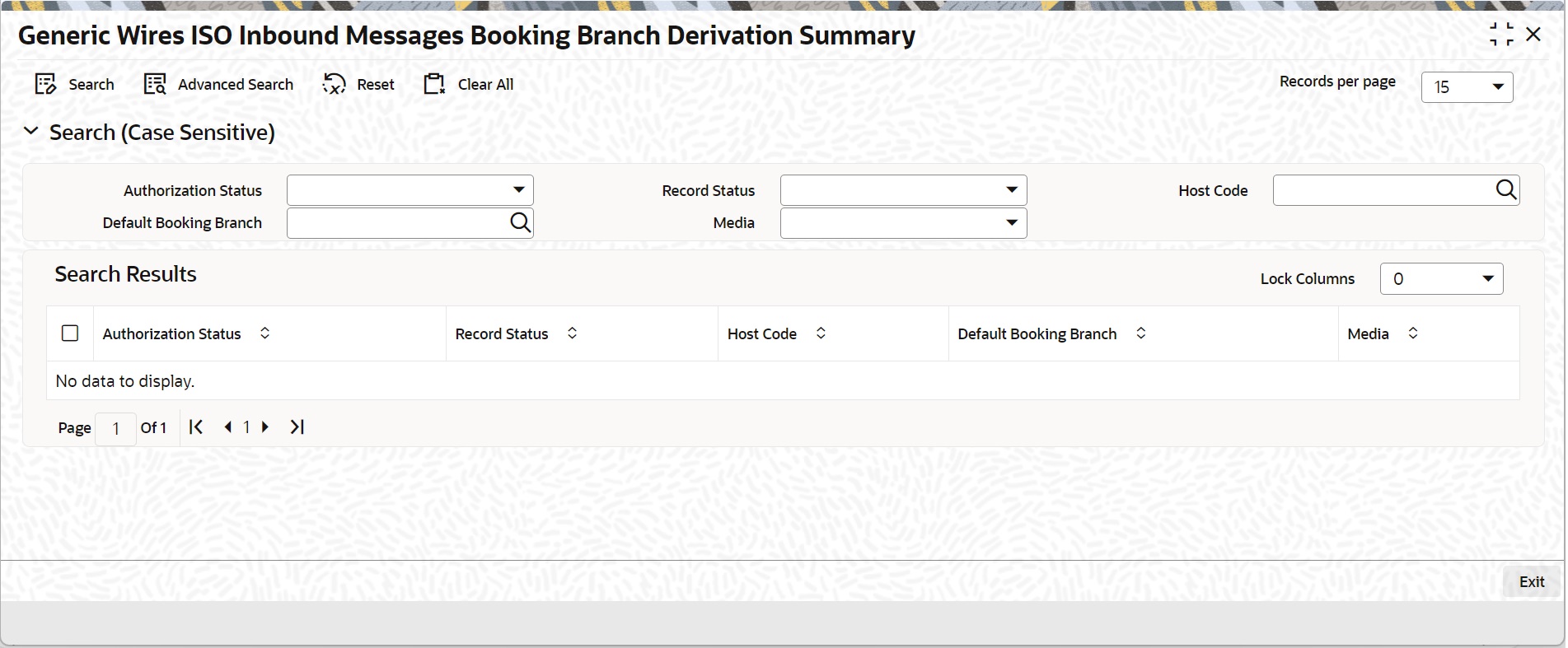
You can search using one or more of the following parameters:
l Authorization Status
l Host Code
l Media
l Record Status
l Default Booking Branch
Once you have specified the search parameters, click ‘Search’ button. The system displays the records that match the search criteria.
Double click a record or click the ‘Details’ button after selecting a record to view the detailed screen.
3.2.12 Generic Wires ISO Inbound Branch Preference
You can define the booking branch preference for incoming messages resulting in Inbound transactions in this screen.
You can invoke “Generic Wires ISO Inbound Branch Preference Detailed” screen by typing the function ID ‘PSDGBPRF’ in the field at the top right corner of the Application tool bar and clicking on the adjoining arrow button.
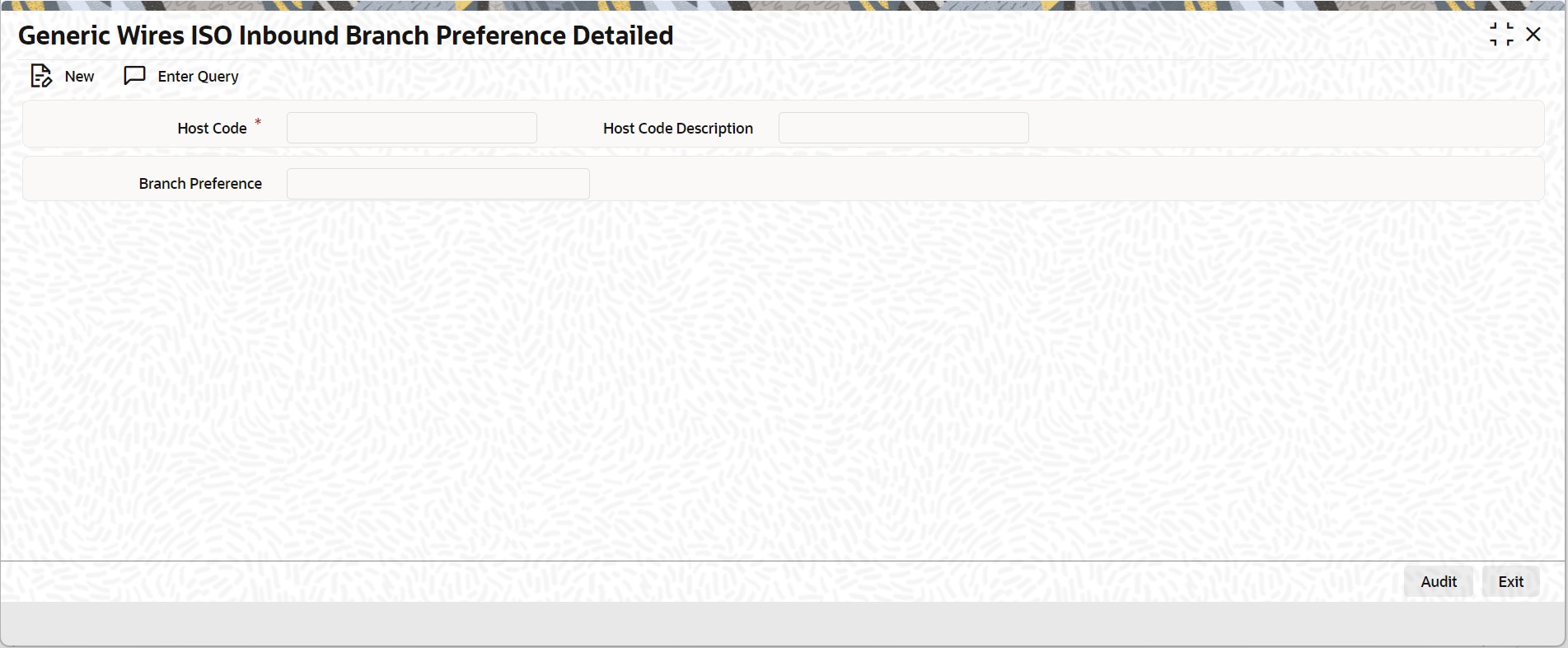
Specify the following fields:
Host Code
System defaults the Host Code of the user’s logged in branch.
Host Code Description
System defaults the Host Code Description on Host Code selected.
Batch Preference
Select the Batch Preference from the following:
l Booking Branch
l Account Branch
3.2.12.1 Generic Wires ISO Inbound Branch Preference Summary
You can invoke “Generic Wires ISO Inbound Branch Preference Summary” screen by typing ‘PSSGBPRF’ in the field at the top right corner of the Application tool bar and clicking on the adjoining arrow button.
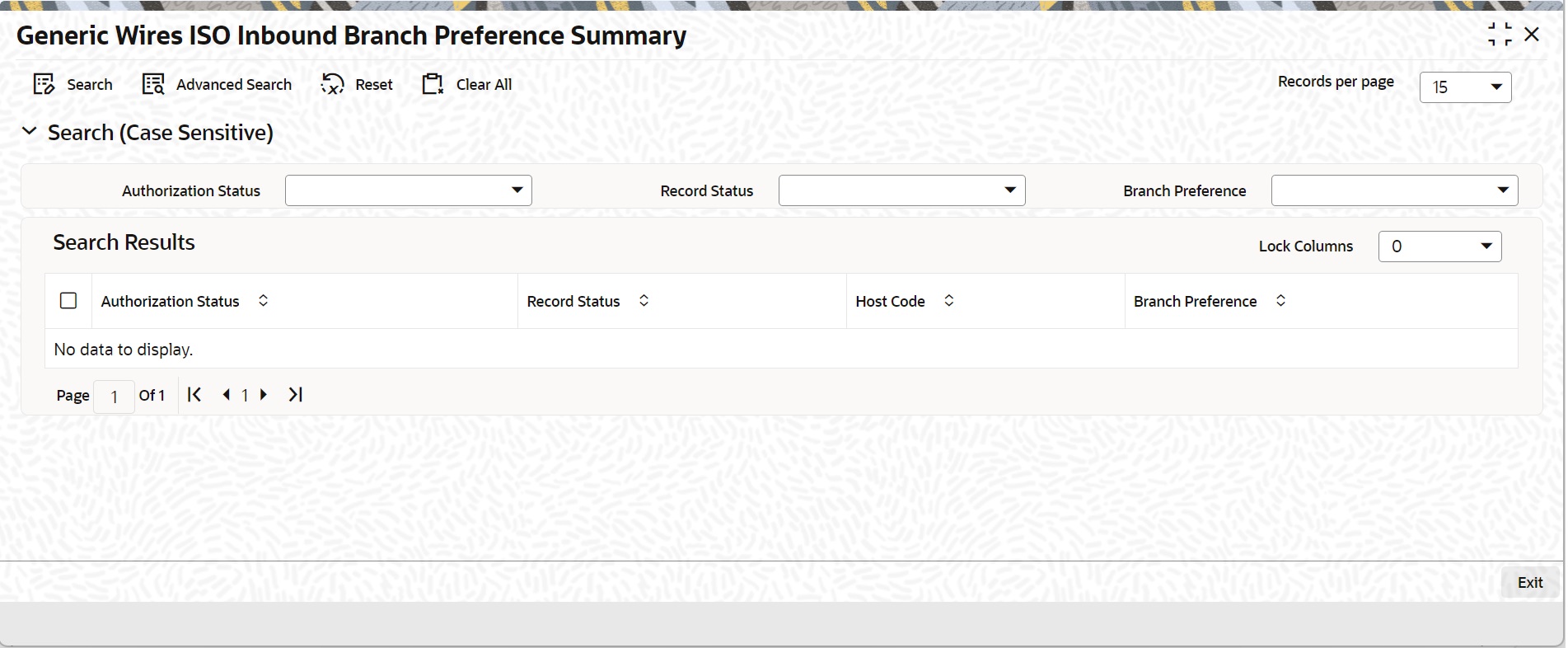
You can search using one or more of the following parameters:
l Authorization Status
l Record Status
l Branch Preference
Once you have specified the search parameters, click ‘Search’ button. The system displays the records that match the search criteria.
Double click a record or click the ‘Details’ button after selecting a record to view the detailed screen.